Roadmap: Support for Docker Desktop on Apple Silicon
Tell us about your request
Provide support for Docker Desktop for Apple computers running on Apple custom silicon.
Which service(s) is this request for?
Docker Desktop for Mac
Tell us about the problem you're trying to solve. What are you trying to do, and why is it hard?
Mac will be moving to a new CPU architecture where Docker Desktop will no longer run, this ticket is to release Docker Desktop on the new architecture
Are you currently working around the issue?
Using a self hosted VMs on new Macs to run Docker
Additional context
https://www.apple.com/uk/newsroom/2020/06/apple-announces-mac-transition-to-apple-silicon/
 nebuk89
All 75 comments
Work on docker-compose can be tracked here: https://github.com/docker/compose/issues/7945
 chris-crone
on 25 Nov 2020
chris-crone
on 25 Nov 2020
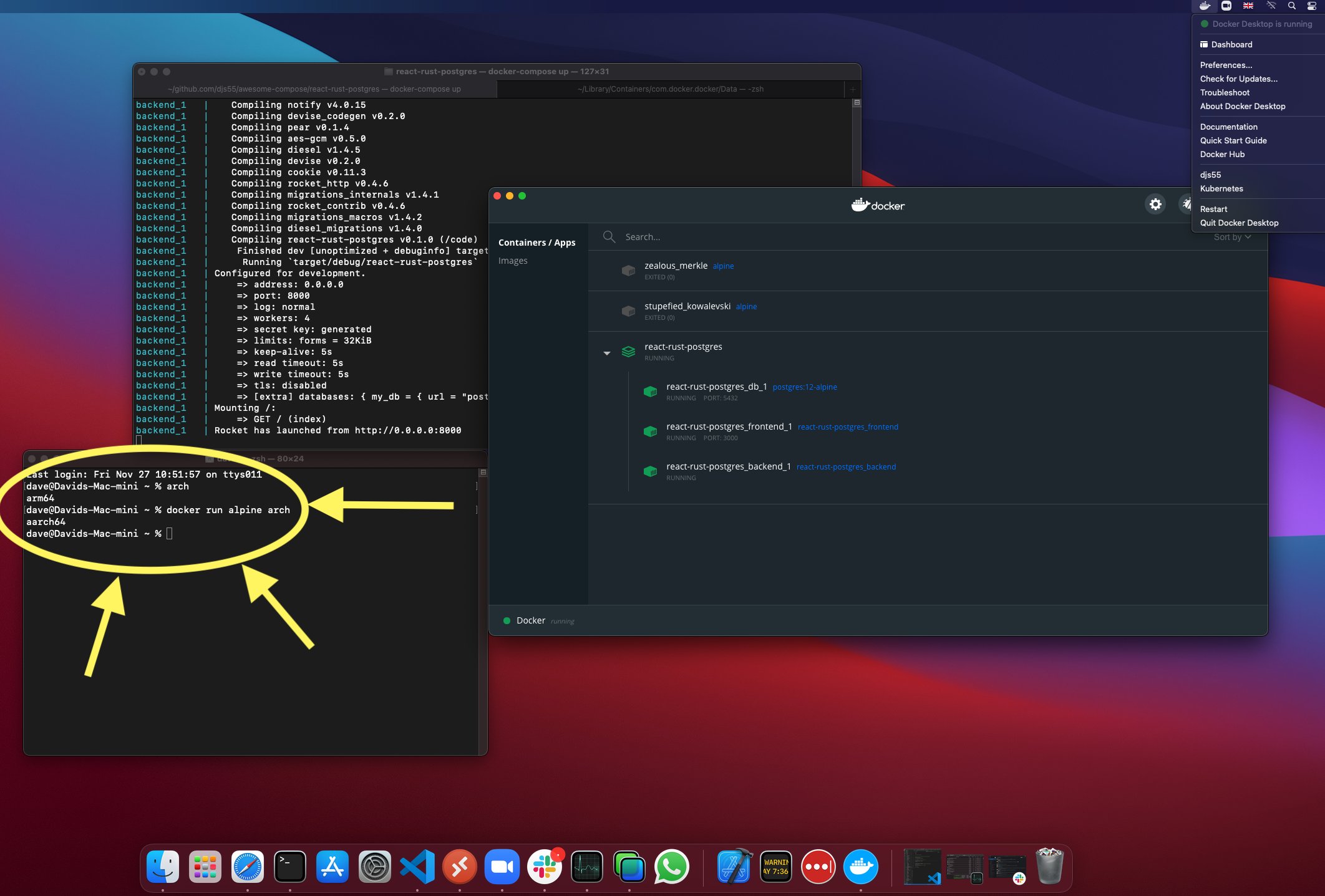
Progress on getting Docker Desktop running on Apple Silicon (M1). Lots (lots!) of duct-tape still, but this screenshot should make many people happy: (I can't take any credits for this, so give Dave's tweet a like ❤️ https://twitter.com/mugofsoup/status/1332382741892124675?s=20)
 thaJeztah
on 27 Nov 2020
thaJeztah
on 27 Nov 2020
@thaJeztah is there a download of that version to download and test?
 rene-mueller
on 27 Nov 2020
rene-mueller
on 27 Nov 2020
@rene-mueller no, much too early for that. This is a local build on a developer's machine. Still needs lots of hand-holding to run it, and we have a very limited number of machines to work with (remote-desktop across continents), waiting for more machines to arrive (also for our release and CI pipelines).
We definitely want to get test builds out as soon as possible, when they're more usable, but that will still take some time.
thaJeztah
on 27 Nov 2020
@thaJeztah what a pity, is there any way to help you and speed up the process?
rene-mueller
on 27 Nov 2020
Not at this moment. Team is working on the low-level stuff to get all components running. Debugging some crashes (which could be bugs in Golang (or the way it's used in our code), and bugs in macOS).
thaJeztah
on 27 Nov 2020
@thaJeztah It certainly looks like you and the team are making good progress. Would it be possible for you to give us a realistic ETA on getting an alpha or beta that runs on the M1 in our hands? I will not hold you to it but it would help with planning. Thanks so much!
 EDemerzel
on 28 Nov 2020
EDemerzel
on 28 Nov 2020
@EDemerzel Not part of the team so I couldn't tell you, but I find your question/demand really super inappropriate. It's done when it's done. If you want to plan (for what?), assume early June and be happily surprised if it's finished early. Otherwise lay off on the pressure and be grateful that you will receive the fruits of their labor for free - whenever that might be. I don't think it's ok to add pressure by asking "when is it done?"
 infostreams
on 28 Nov 2020
infostreams
on 28 Nov 2020
@infostreams Relax, okay? He asked politely and just wanted to know where things are at. He didn't pressure anyone, it was just a question to get a better understanding of what's currently going on. And, believe it or not, some people actually do need to do some planning, especially in an enterprise world. This isn't all fun and games, some people need to work, and some people need docker for this. And yes, docker is free, and he or anyone else using it for free can't demand anything to be done, but it's another thing to just ask a simple question.
 KarimGeiger
on 28 Nov 2020
KarimGeiger
on 28 Nov 2020
@KarimGeiger No. He is putting pressure and he is making demands, however politely phrased, and no - that's not ok. I will stop replying to this thread now, but this needed to be said. I don't mind being the scapegoat for that.
infostreams
on 28 Nov 2020
@KarimGeiger No. He _is_ putting pressure and he _is_ making demands, however politely phrased, and no - that's not ok. I will stop replying to this thread now, but this needed to be said. I don't mind being the scapegoat for that.
Just for the record I wasn't attempting to place pressure or demands. I wasn't even asking about a RC or a Release. On most of my machines I run "edge" and enjoy testing and giving feedback when I can. I'm someone that is excited about the M1 and helping products move from Intel to Apple Silicon. Also, while I do not personally pay for Docker services the people I work for do so I'm not a freeloader. Lastly, I do apologize if my question rubbed you the wrong way.
EDemerzel
on 28 Nov 2020
Please guys, this is an issue related to a bug in the software. Please refrain from leaving a comment unless it contributes to the conversation at hand.
 fieu
on 29 Nov 2020
fieu
on 29 Nov 2020
Assuming we have Docker Desktop for Apple Silicon Macs, how much of a performance hit we’re talking about when running x86 images through Docker QEMU?
 andreiborisov
on 29 Nov 2020
andreiborisov
on 29 Nov 2020
It certainly looks like you and the team are making good progress. Would it be possible for you to give us a realistic ETA on getting an alpha or beta that runs on the M1 in our hands? I will not hold you to it but it would help with planning. Thanks so much!
At this moment, any estimation would be only "guessing" and very likely to be completely off. The honest answer is "we don't know, until we reached that point". To illustrate that; while we did have parts of Desktop running before, the screenshot was posted just minutes after an engineer was able to spin up Desktop (including the UI). There's still many parts that are currently running with duct-tape solutions (e.g. networking with hard-coded IP addresses etc). These builds are also built with unreleased versions of (build-time) dependencies, such as Golang (and I _think_ with some temporary patches on top of that); while that works to get a test-build, that's not something we can use for an actual (regular) release.
This is pretty much "uncharted territory", and given that Docker tends to use parts of operating systems (including macOS) and kernels in very specific ways that other software may not be using, we may be (and often do) running into bugs in macOS that would need to be fixed before we're able to do a somewhat stable release.
I find your question/demand really super inappropriate
..
He asked politely and just wanted to know where things are at.
@infostreams @KarimGeiger thank you for stepping in; no worries: we're good at "reading between the lines", and I assume @EDemerzel's question was all in good faith.
We are all super-excited to see things progress (I for sure am eyeing the new M1 machines to give them a spin), and with engineers in both San Francisco and Europe working on this, we're _literally_ working around the clock to get things working, and try to make that a reality.
And, believe it or not, some people actually do need to do some planning, especially in an enterprise world.
(Personal opinion); while it's definitely good to start testing with these machines in (enterprise) environments, I would not make a major switch to an entirely new hardware for business-critical situations on "day 1". These machines are the first generation of the Apple Silicon platform; while they should be good for may use-cases, there might still be things that need to be addressed. I very much expect that Apple started with the "lower range" models for this reason: allowing them (and users) to "test the waters" before proceeding with the higher-spec models.
Assuming we have Docker Desktop for Apple Silicon Macs, how much of a performance hit we’re talking about when running x86 images through Docker QEMU?
I'm not sure if we have good benchmarks yet. That said; these machines are _FAST_, and even with some overhead, performance may be comparable with native intel. Again; we don't have benchmarks yet (but we'll keep you posted once we have).
With all of the above said, I should add some big warnings :warning: to set expectations right;
- While we _do_ want to get things into your hands as soon as realistically possible, releasing it "to the world" also brings "support" and "bug-reports" with it. With _millions_ of Docker Desktop users, we wouldn't be able to deal with the "firehose" or reports. For that reason, it's possible we will send out test-builds to a limited group of users before making them generally available. (Nothing decided yet on that, and this will depend on how things progress, etc, etc). Also read the related blog-post which has a sign-up link for a Docker ID (and the newsletter).
- As mentioned; currently, we depend on either unreleased, or patched versions of (build-time) dependencies. Those are not suitable for regular releases, so while we may be releasing test-builds at some point (see above), "regular" releases may still be some time out.
- Since we started the work on Apple Silicon, we uncovered some bugs in macOS and the macOS kernel on these machines. Some may have been patched since, but others may either have to be worked around, or we have to wait for those to be fixed by Apple.
- Additional changes may still be needed in other components, which may include changes to "how" architectures are selected from multi-arch images for these systems.
thaJeztah
on 30 Nov 2020
@thaJeztah This is wonderful information and certainly more than I had ever hoped! I really appreciate you taking the time to interact with the community like you do.
EDemerzel
on 30 Nov 2020
Thanks for giving us these informations. I'm part of thoses which received a M1 while having ordered an Intel one in early November, prior M1 unveiling. I hope all bugs will soon be fixed by cupertino.
Does anyone know if we can do something to run Docker on M1 inside some kind of VM ?
 Geekimo
on 30 Nov 2020
Geekimo
on 30 Nov 2020
Thanks for giving us these informations. I'm part of thoses which received a M1 while having ordered an Intel one in early November, prior M1 unveiling.
You ordered a new Intel based Mac in November and instead received an ARM one???
 FernandoMiguel
on 30 Nov 2020
FernandoMiguel
on 30 Nov 2020
Does anyone know if we can do something to run Docker on M1 inside some kind of VM ?
Yes: https://finestructure.co/blog/2020/11/27/running-docker-on-apple-silicon-m1
 finestructure
on 30 Nov 2020
finestructure
on 30 Nov 2020
Thanks for giving us these informations. I'm part of thoses which received a M1 while having ordered an Intel one in early November, prior M1 unveiling.
You ordered a new Intel based Mac in November and instead received an ARM one???
Yes, we (the company I work for) ordered a MBP 13" in November 4th, and the day after M1 reveal the ordered model was switched from Intel to M1.
@finestructure Thanks, I was reading it when your message came up, nice work. 😉 I'll get a VM from Scaleway to host my developments during the meantime of the M1-compatibility development.
Geekimo
on 30 Nov 2020
Love you all for working so hard on this. Thank you!
 aiur100
on 30 Nov 2020
aiur100
on 30 Nov 2020
Amazing work being done here! 👏🏻 👏🏻 👏🏻
 Kyngo
on 3 Dec 2020
Kyngo
on 3 Dec 2020
Yet another comment to notify every subscriber. Thank you!
 musikov
on 3 Dec 2020
musikov
on 3 Dec 2020
It might be a good idea to lock this discussion and allow only comments from the team. Otherwise, the topic's subscription does not make any sense.
/cc @nebuk89
 smt116
on 3 Dec 2020
smt116
on 3 Dec 2020
Apple M1 Chip – EC2 Mac instances with the Apple M1 chip are already in the works, and planned for 2021
New – Use Amazon EC2 Mac Instances to Build & Test macOS, iOS, iPadOS, tvOS, and watchOS Apps
hope this brings god speed to development !!!
 vynu
on 8 Dec 2020
vynu
on 8 Dec 2020
Hi Everyone!
I promised to keep you up to date on progress; If you were at today's community all-hands you may already know (for those that weren't; here's the recording: https://goto.docker.com/on-demand-event-community-all-hands-201210.html)
❗Spoiler alert ❗
Good news! The team has made significant progress, and we will be sending out preview builds of Docker Desktop for Apple Silicon very soon 🎉. We will be using the Developer Preview Program to send out preview builds. If you are interested in giving these builds a spin, you can learn more about the Developer Preview Program (and find a link to register) in this blog post: https://www.docker.com/blog/expanding-dockers-developer-preview-program/
Take in mind; these are still preview builds (some parts are not yet working, and we're working with 🍎 to get some bugs fixed (we discovered some bugs resulting in a kernel panic), or (to quote my college Dave); _"Expect it to be a bit rough around the edges, after all it’s a dev preview!"_
(more details about what works, doesn't work, and "rough edges" will be provided when we send out the previews 😅 )
thaJeztah
on 10 Dec 2020
Hi Everyone!
I promised to keep you up to date on progress; If you were at today's community all-hands you may already know (for those that weren't; here's the recording: https://goto.docker.com/on-demand-event-community-all-hands-201210.html)
❗Spoiler alert ❗
Good news! The team has made significant progress, and we will be sending out preview builds of Docker Desktop for Apple Silicon _very soon_ 🎉. We will be using the Developer Preview Program to send out preview builds. If you are interested in giving these builds a spin, you can learn more about the Developer Preview Program (and find a link to register) in this blog post: https://www.docker.com/blog/expanding-dockers-developer-preview-program/
Take in mind; these are still preview builds (some parts are not yet working, and we're working with 🍎 to get some bugs fixed (we discovered some bugs resulting in a kernel panic), os (to quote my college Dave); _"Expect it to be a bit rough around the edges, after all it’s a dev preview!"_
(more details about what works, doesn't work, and "rough edges" will be provided when we send out the previews 😅 )
Hi, @thaJeztah does this version supports x86 image build? (in Rosseta2?) 🥺 It's really important for me to build x86 image. I had tried using qemu + arm processor(buildx) to build x86 image but not worked for me.
Thanks in advance!
 michael34435
on 11 Dec 2020
michael34435
on 11 Dec 2020
@michael34435 Yes, you can build x86 images using qemu in this release.
 stephen-turner
on 11 Dec 2020
stephen-turner
on 11 Dec 2020
The Docker Desktop Preview5 runs perfect on my Apple Mac Mini M1!
It runs just fine with both x86 images (tried php-apache)

as well arm64v8 images (used mariadb)

Got error with MySql but that is because they don't have published arm64/v8 image.
So well done team!
 gpetrov
on 11 Dec 2020
gpetrov
on 11 Dec 2020
Seems the docker.for.mac.host.internal is not working, cannot connect to the MySQL on the host machine.
 nauxliu
on 18 Dec 2020
nauxliu
on 18 Dec 2020
The preview build doesn't yet have complete functionality. Release notes with known issues for the current build are at https://docs.docker.com/docker-for-mac/apple-m1/
stephen-turner
on 18 Dec 2020
thank you for this build, mac on m1. Php and Nginx containers working as well, thanks, guys!
 narozhniyy
on 19 Dec 2020
narozhniyy
on 19 Dec 2020
hi @stephen-turner
if we try with the build in above link , would we need to re-install manually on next release or it will give an option for update.?
Thanks
 sharadjain21
on 19 Dec 2020
sharadjain21
on 19 Dec 2020
@sharadjain21 ,
The tech preview build does not update automatically. You must manually install any future versions of Docker Desktop. For more detail please read at https://docs.docker.com/docker-for-mac/apple-m1/#known-issues
 ayarhlaine
on 20 Dec 2020
ayarhlaine
on 20 Dec 2020
Are there any plans to release the Tech Preview on Intel as well? It would be useful to be able to test a version of Docker that uses the new Virtualization.framework on Intel architecture as well if the change to the new framework will eventually make it into all Big Sur builds?
I'm noticing changes in functionality when testing on M1. Specifically, https://github.com/docker/for-mac/issues/155 is no longer an issue because now we do have a bridge interface, so tuntap now works. I'd be interested in testing this on Intel as well.
 jasmas
on 12 Jan 2021
jasmas
on 12 Jan 2021
Yes, we will do a preview on Intel, probably in a couple of weeks.
stephen-turner
on 12 Jan 2021
Now that Docker Desktop is using Virtualization.framework, can we expect Docker to continue to contribute to HyperKit?
 RyanMorash
on 17 Jan 2021
RyanMorash
on 17 Jan 2021
thank you for this build, mac on m1. Php and Nginx containers working as well, thanks, guys!
Do you know if it is working PHP8 and Nginx in Alpine images? I wanna know this so I can buy a m1 mac.
 lucashenriquesd
on 17 Jan 2021
lucashenriquesd
on 17 Jan 2021
Docker on M1 can run any linux/arm64 image out of the box, and any Intel image with emulation if you add --platform linux/amd64 to the command line.
EDIT: if someone can tell me how to specify that flag from a docker-compose.yml file, I'd be very grateful.
infostreams
on 17 Jan 2021
Docker on M1 can run any linux/arm64 image out of the box, and any Intel image with emulation if you add --platform linux/amd64 to the command line.
EDIT: if someone can tell me how to specify that flag from a
docker-compose.ymlfile, I'd be very grateful.
Build the Docker image manually yourself from the command line:
docker build --platform linux/amd64 -t name-of-image .
If you're dependent on another image in the docker-compose file like mysql just swap it out with mariadb:latest the binaries should be the same and there's no need to reconfigure your settings.py. The build runs pretty slow, but that's to be expected when building and running through an emulator. At least it's working
 dgonzo27
on 19 Jan 2021
dgonzo27
on 19 Jan 2021
If you use the version 2 compose file format, there is a per-service platform flag you can use https://docs.docker.com/compose/compose-file/compose-file-v2/#platform.
That doesn't seem to be the case for compose file version 3 though.
Another option is to set DOCKER_DEFAULT_PLATFORM as an environment variable in the respective directory https://docs.docker.com/engine/reference/commandline/cli/#environment-variables
 johanneswuerbach
on 19 Jan 2021
johanneswuerbach
on 19 Jan 2021
Circling back after using --platform linux/amd64 tag for a couple of weeks...
The builds are almost unbearably slow, even slower than the early days of using Docker with WSL 😞
dgonzo27
on 28 Jan 2021
@dgonzo27 Are essentially computational tasks (number crunching) slow?
 lemire
on 28 Jan 2021
lemire
on 28 Jan 2021
@lemire It seems to hang on one line in my Dockerfiles in particular, webpack configs. NPM install commands and multi-stage builds run pretty smoothly, but as soon as I hit my webpack line, the whole thing seems to pause for 10 minutes
dgonzo27
on 28 Jan 2021
@dgonzo27 Multiplatform builds are absolutely, unbearably slow. It's because the non-native architecture is having to be emulated. There is a way to offload to a Docker server of the native architecture, but I haven't experimented with it yet. This is not a problem with the M1, so should be spun off. This is a problem with multi-arch builds on one architecture.
 rfay
on 28 Jan 2021
rfay
on 28 Jan 2021
Circling back after using
--platform linux/amd64tag for a couple of weeks...The builds are almost unbearably slow, even slower than the early days of using Docker with WSL 😞
This is probably because Docker is defaulting to 4 CPU cores.
Virtualization.framework seems to be dropping interrupts not directed at VCPU0. Not sure if this is by design, but definitely appears to be the way it is for now.
Looking at my machine currently with the resources defaulted to 4 cores, It appears that my Docker VM has an SMP affinity list set to 0-3. This will result in dropped interrupts.
Try running this from within the Docker VM:
for f in /proc/irq/*/smp_affinity_list;do echo 0 > $f;done
See if you get significant speedup.
Alternately, just change the CPU core resources in settings to use only 1 CPU core and see if you get significant speedup. In my testing, the IRQ drops had a far greater negative impact on performance than any gain from multiple CPU cores.
Unless Apple has indicated they will change this behavior, the Docker team should look at ensuring irqbalanced (or equivalent) is not installed in the VM or possibly starting the VM with the kernel parameter:
irqaffinity=0
jasmas
on 3 Feb 2021
Virtualization.framework seems to be dropping interrupts not directed at VCPU0. Not sure if this is by design, but definitely appears to be the way it is for now.
Sent this as feedback to Apple (via the Feedback Assistant). Feedback ID: FB8989471
 gibfahn
on 3 Feb 2021
gibfahn
on 3 Feb 2021
We've also reported the IRQ thing to Apple, by the way.
stephen-turner
on 4 Feb 2021
Docker on M1 can run any linux/arm64 image out of the box, and any Intel image with emulation if you add --platform linux/amd64 to the command line.
EDIT: if someone can tell me how to specify that flag from a
docker-compose.ymlfile, I'd be very grateful.
putting platform: linux/x86_64 in the docker-compose.yml did the trick for me.
 xd4rker
on 8 Feb 2021
xd4rker
on 8 Feb 2021
Docker on M1 can run any linux/arm64 image out of the box, and any Intel image with emulation if you add --platform linux/amd64 to the command line.
EDIT: if someone can tell me how to specify that flag from adocker-compose.ymlfile, I'd be very grateful.putting
platform: linux/x86_64in the docker-compose.yml did the trick for me.
Maybe a stupid question but does this work on docker-compose v3.7 as well?☺️
 SebDanielsson
on 8 Feb 2021
SebDanielsson
on 8 Feb 2021
@SebDanielsson It depends on your compose config. I can run the docker build command with the platform flag to first build my web app image under the spec that it should be linux/amd64, and then when I run docker-compose build it will inherit that same flag and build the web app 'service' with the same virtualization. The only thing that differs are the other services you're composing together. In my instance, I had to switch my db service in the docker-compose to use postgresql or mariadb because there isn't an ARM based image for mysql.
dgonzo27
on 8 Feb 2021
Docker on M1 can run any linux/arm64 image out of the box, and any Intel image with emulation if you add --platform linux/amd64 to the command line.
EDIT: if someone can tell me how to specify that flag from adocker-compose.ymlfile, I'd be very grateful.putting
platform: linux/x86_64in the docker-compose.yml did the trick for me.Maybe a stupid question but does this work on docker-compose v3.7 as well?☺️
Yup, should work.. https://docs.docker.com/compose/compose-file/compose-versioning/#version-24
xd4rker
on 8 Feb 2021
Hey Apple M1 users,
we have a new preview ready for you. You can read more about it in our docs at https://docs.docker.com/docker-for-mac/apple-m1/
- Kubernetes now works (although you might need to reset the cluster in our Troubleshoot menu one time to regenerate the certificates).
- osxfs file sharing works.
- The
host.docker.internalandvm.docker.internalDNS entries now resolve. - Removed hard-coded IP addresses: Docker Desktop now dynamically discovers the IP allocated by macOS.
- The updated version includes a change that should improve disk performance.
- The Restart option in the Docker menu works.
- We no longer call it preview 7, ... because now these builds are created by our CI pipeline and we're much closer to our Intel code base now.
- The new preview has the version 3.1.0 (60984) that also can be found in the about window. This helps us to reference which version you're using when you report or discuss a problem.
- Come and grab the new preview build, the download link is also in that docs page. :tada:
 StefanScherer
on 11 Feb 2021
StefanScherer
on 11 Feb 2021
Hey Apple M1 users,
we have a new preview ready for you.
Thanks for the update! As the preview builds don't auto-update, can we rely on comments here when new releases are available?
- The updated version includes a change that should improve disk performance.
The biggest problem I've had with preview 7 was the disk performance was poor, especially for MariaDB, which caused tests for my codebase to take three times as long as with a non-ARM64 Mac. With preview 7, I resorted to storing the database files on a tmpfs volume which helped massively. I hoped this update would help with this, but I do not see any noticeable difference with version 3.1.0 (60984).
To quantify this better, I tried to run some benchmarking with fio using the configuration from this Percona blog post since that seemed relevant for MySQL/MariaDB. The tests were run with size=100m to keep the time necessary to do this down. All tests were run inside an ubuntu:latest container with fio installed via apt-get.
Test scenario | ibd_sync_read | ibd_async_write | ib_log_sync_write
------------- | ------------- | --------------- | -----------------
No volume | 90 IOPS / 1.41MiB/s | 90 IOPS / 1.41MiB/s | 178 IOPS / 1.39MiB/s
Volume | 87 IOPS / 1.41MiB/s | 84 IOPS / 1.33MiB/s | 167 IOPS / 1.31MiB/s
Bind mount | 1188 IOPS / 18.6MiB/s | 1778 IOPS / 27.8MiB/s | 1947 IOPS / 15.2MiB/s
The bind mount testing was done using gRPC FUSE. I tried with osxfs, which showed roughly double the throughput for the ib_log_sync_write test, while the other tests failed with osxfs.
I also tried to use the :delegated option, but it didn't make any noticeable difference.
Running the tests directly in macOS and on a tmpfs volume were both much, much quicker but I left them out since it's not too relevant here.
I was surprised to see the bind mount's performance being so much better than the other options, as I expected that to be slowest.
Do you have any indication for where the bottleneck would be for disk IO? It would be interesting to try and run similar tests inside the VM that Docker daemon is running on to see if the problem is with Hypervisor.framework or higher up the stack.
 Tenzer
on 12 Feb 2021
Tenzer
on 12 Feb 2021
@Tenzer I do agree with you, in fact, its much faster but i think that was also expected but since Hypervisor framework got some adjustments for ARM now it will probably slow docker team due to the fact they have to support also this new arch
 underfisk
on 12 Feb 2021
underfisk
on 12 Feb 2021
We have seen some situations in which disk performance is worse on the virtualization framework than on the old hypervisor framework, and we are talking to Apple about it.
stephen-turner
on 12 Feb 2021
@StefanScherer That is perfectly normal to happen, they are probably still adapting the kit to most of the apps that were relying on intel based. Is there anything new from Apple regarding hypervisor or it's still under prep talk?
underfisk
on 12 Feb 2021
Nothing concrete yet.
stephen-turner
on 12 Feb 2021
@Tenzer I had the same issue. My container response felt so slow on my M1.
I'll try with tmpfs. Also I'll try the new preview And I'll comment the results here.
 eveevans
on 13 Feb 2021
eveevans
on 13 Feb 2021
Docker on M1 can run any linux/arm64 image out of the box, and any Intel image with emulation if you add --platform linux/amd64 to the command line.
EDIT: if someone can tell me how to specify that flag from adocker-compose.ymlfile, I'd be very grateful.putting
platform: linux/x86_64in the docker-compose.yml did the trick for me.
can you try to start bitnami/apache on apple silicon?
# dont work
version: "3.8"

services:
  apache:
    image: bitnami/apache
    platform: linux/x86_64
I become this error on startup.
apache 09:58:33.42 INFO  ==> ** Starting Apache **
[Wed Feb 24 09:58:33.504807 2021] [core:emerg] [pid 1] (95)Operation not supported: AH00023: Couldn't create the mpm-accept mutex
(95)Operation not supported: could not create accept mutex
AH00015: Unable to open logs
 jan-runkel-zeitgleich
on 24 Feb 2021
jan-runkel-zeitgleich
on 24 Feb 2021
Hi @jan-runkel-zeitgleich ,
thanks for your input, but the platform flag is not in the 3.8 docker compose specification.
This is why we have to pass it through the command line.
Geekimo
on 24 Feb 2021
Hi @jan-runkel-zeitgleich ,
thanks for your input, but the platform flag is not in the 3.8 docker compose specification.
This is why we have to pass it through the command line.
Is this the correct way to start a x86 image on Apple Silicon?
# dont work
docker run --platform linux/x86_64 bitnami/apache:latest
````
or this?
dont work
docker run --platform linux/amd64 bitnami/apache:latest
````
Or is there another Way to start this image?
This two command dont work on my machine.
jan-runkel-zeitgleich
on 24 Feb 2021
try with linux/arm64 as it's the way it works for me
EDIT:
I mean this:
docker run --platform linux/arm64 bitnami/apache:latest
 DavidGarciaCat
on 24 Feb 2021
DavidGarciaCat
on 24 Feb 2021
try with
linux/arm64as it's the way it works for meEDIT:
I mean this:
docker run --platform linux/arm64 bitnami/apache:latest
thanks for the fast response. I think I forgot something
with your docker run command following message pop up:
docker: Error response from daemon: image with reference bitnami/apache:latest was found but does not match the specified platform: wanted linux/arm64, actual: linux/amd64.
I install today the Docker Apple Silicon preview 7
I also install rosetta2.
softwareupdate --install-rosetta
Is there another Step required to use the x86 emulation?
jan-runkel-zeitgleich
on 24 Feb 2021
@jan-runkel-zeitgleich @DavidGarciaCat please don't use this ticket to report bugs or support questions; use https://github.com/docker/for-mac/issues for that (or the "dev-preview-program" slack channel if you're on that list)
thaJeztah
on 24 Feb 2021
You're right.
Unfortunately I don't have access to the Slack channel yet.
This ticket describes that with the flag "platform: linux / x86_64" Intel images should run. But that doesn't seem to work.
jan-runkel-zeitgleich
on 24 Feb 2021
This ticket describes that with the flag "platform: linux / x86_64" Intel images should run. But that doesn't seem to work.
The --platform flag works if the image is a multi-arch image (which is the case for all official images, but may not be the case for other images). The bitnami/apache image is not a multi-arch image, and only supports linux/amd64 (x86); https://hub.docker.com/r/bitnami/apache/tags?page=1&ordering=last_updated

When you specify --platform, docker will _only_ pull the image if it finds a match (which, in this case, it doesn't).
As a workaround you can try pulling it _without_ --platform, which (in case of a non-multi-arch image) will make docker "ignore" the platform, and just pull "whatever it found".
But, it would still be an x86 image that you run on an arm platform, which means it will try to run it using qemu emulation, which should be considered a "best effort" and _may_ work (but no guarantee, as there's still many bugs/known issues in qemu).
We will continue looking to improve the emulation, and are also in talk with 🍏, but it will remain a "best effort", and mostly to help the transition to ARM becoming more mainstream (both on hosting platforms, and in images).
Because of the above, the recommendation is to run images that match the architecture.
I see you opened https://github.com/bitnami/bitnami-docker-apache/issues/104, which is probably best for that
thaJeztah
on 24 Feb 2021
Hello,
Just aiming to report a potential bug:
When I download and install the Docker Preview on my M1, it seems to run. If I open the Docker Desktop Preferences window and set Docker not to start when booting up my laptop, then I am unable to use it again, and I need to remove it and install it again.
The error message I get is that my M1 is not compatible to use Intel software, even when I already used it and Rosetta is installed.
Maybe this is something to be reviewed and addressed in an upcoming update?
Cheers,
DavidGarciaCat
on 27 Feb 2021
hi everybody, anybody has a solution to inotify issue, I have RC3 Docker Desktop but I don't have some fix o a temporary fix, can you help me, anybody?

 jonareyes
on 14 Apr 2021
jonareyes
on 14 Apr 2021
When I download and install the Docker Preview on my M1, it seems to run. If I open the Docker Desktop Preferences window and set Docker not to start when booting up my laptop, then I am unable to use it again, and I need to remove it and install it again.
It does seem that if I shut down Docker Desktop, it won't start again unless I reboot.
lemire
on 14 Apr 2021
I frequently see the same issue, especially after wake from sleep. Going into Activity Monitor and quitting the Docker process(es) lets me restart. Should save you the reboot.
finestructure
on 14 Apr 2021
As this is now shipped 🎉 https://www.docker.com/blog/released-docker-desktop-for-mac-apple-silicon/
I am closing this item. If you have issues please raise them on https://github.com/docker/for-mac/issues
nebuk89
on 22 Apr 2021
@nebuk89 Congratulations on the release! Is there any place where we can track the status of getting rid of the Rosetta dependency? I searched the issue tracker where you linked but couldn't find anything. I've also only ever seen references to "some upstream binaries" that are still x86, but never been able to find any more information on _which_ upstream binaries, or if anyone is actively working on it...
Thanks!
 LinusU
on 23 Apr 2021
LinusU
on 23 Apr 2021
@LinusU I don't think we have a public ticket to track, but it's definitely on our list of internal tracked items.
You can read about changes for every Docker Desktop release in the release notes https://docs.docker.com/docker-for-mac/release-notes/ . When we finally get rid of requiring Rosetta it will be shown there, and also the system requirements in our docs https://docs.docker.com/docker-for-mac/install/#system-requirements will be updated.
So, just keep your Docker Desktop installation up to date and follow announcements.
Technically our list is down to a few components, and we're aware of version bumps in several components we use that now have native Apple silicon support like Kubernetes, Docker Engine, Node.js, ...
And before you ask, I don't have an ETA to share 😅
StefanScherer
on 23 Apr 2021
@StefanScherer thanks for the quick reply, I'll keep watching the release notes then 👍
So, just keep your Docker Desktop installation up to date
(my Docker crashes on startup because of missing Rosetta, so I can't run the updater 😄)
b.t.w. the "Known issues" section doesn't mention that it requires Rosetta anymore (I think it did during the technical preview), which initially led me to believe that the non-preview release didn't require it anymore. I managed to install it, but then Docker crashes on startup.
No big deal though, since I guess that I will just be able to download and run the latest installer as soon as the dependency on Rosetta is dropped 🚀
LinusU
on 26 Apr 2021
b.t.w. the "Known issues" section doesn't mention that it requires Rosetta anymore (I think it did during the technical preview), which initially led me to believe that the non-preview release didn't require it anymore. I managed to install it, but then Docker crashes on startup.
@LinusU https://docs.docker.com/docker-for-mac/apple-silicon/ it is listed as a system requirement in the installation docs.
 tygore587
on 26 Apr 2021
tygore587
on 26 Apr 2021
Related issues
 iben12
·
6Comments
iben12
·
6Comments
 mghazizadeh
·
6Comments
mghazizadeh
·
6Comments
 psychemedia
·
4Comments
psychemedia
·
4Comments
 DavidSche
·
5Comments
DavidSche
·
5Comments
 hairyhenderson
·
5Comments
hairyhenderson
·
5Comments
Most helpful comment
Hi Everyone!
I promised to keep you up to date on progress; If you were at today's community all-hands you may already know (for those that weren't; here's the recording: https://goto.docker.com/on-demand-event-community-all-hands-201210.html)
❗Spoiler alert ❗
Good news! The team has made significant progress, and we will be sending out preview builds of Docker Desktop for Apple Silicon very soon 🎉. We will be using the Developer Preview Program to send out preview builds. If you are interested in giving these builds a spin, you can learn more about the Developer Preview Program (and find a link to register) in this blog post: https://www.docker.com/blog/expanding-dockers-developer-preview-program/
Take in mind; these are still preview builds (some parts are not yet working, and we're working with 🍎 to get some bugs fixed (we discovered some bugs resulting in a kernel panic), or (to quote my college Dave); _"Expect it to be a bit rough around the edges, after all it’s a dev preview!"_
(more details about what works, doesn't work, and "rough edges" will be provided when we send out the previews 😅 )