Roadmap: [Docker Desktop] Improve Mac File system performance
Update: we are now looking at using GRPCFuse rather than mutagen as a simpler path for perf improvement.
Tell us about your request
Integrate the mutagen pluggin within Docker Desktop to provide users with a file caching option to improve performance on modern web frameworks like PHP Symphony
Which service(s) is this request for?
Desktop
Tell us about the problem you're trying to solve. What are you trying to do, and why is it hard?
File system performance is big issue on Mac,our goal improve web page refresh for web languages like PHP from 2.8 seconds to 0.2 seconds
Are you currently working around this issue?
N/A
Additional context
N/A
Attachments
https://github.com/docker/for-mac/issues/77
 nebuk89
All 173 comments
These issue are still happening, so can they be added to this or new cards made to include them?
https://github.com/docker/for-mac/issues/1592
https://github.com/docker/for-mac/issues/1899
https://github.com/docker/for-mac/issues/2417
https://github.com/docker/for-mac/issues/3186
 daveisfera
on 26 Mar 2020
daveisfera
on 26 Mar 2020
I hope leaving a note here is not unwelcome to highlight a particular difficulty in booting Rails applications in Docker on macOS.
Between Rails hot code reloading, which has a semi-hard dependency on working filesystem events (the polling alternative can eat as much as 20% of system CPU) and Bootsnap, which is a caching loader which tries to speed up booting Rails by bypassing the parsing step (and caching compiled btyecode on disk) which means that booting a Rails app with bootsnap loaded writes as many file as it reads (sometimes), but other times (e,g warm start) has a very different read/write ratio.
None of the existing methods account for this very well, even the relatively new mount options to try and performance boost either reads or writes don't particularly help because of the relative symmetry under certain configurations.
Most places I know are still using NFS, with polling, and trying to tune the fsattr cache times to get a reasonable balance of developer experience (speed of code reloading) vs. performance (outright speed), but it's a tightrope.
 leehambley
on 6 Apr 2020
leehambley
on 6 Apr 2020
hey @daveisfera we haven't got this quite out onto edge yet :) once we do we will move this over to developer/preview and update this ticket. Hopefully then people on those tickets should see some movement!
nebuk89
on 6 Apr 2020
@nebuk89 could u clarify caching? Because at the moment the problem is the slow sync from host machine to docker containers
 mbrioski
on 6 Apr 2020
mbrioski
on 6 Apr 2020
@mauri-brioschi With PHP/Symfony apps sometimes the reverse happens: the app itself rewrites a bunch of files in its own var/cache dir, where it dumps a lot of stuff (container definitions, configuration...) and this slows a lot the machine. You could try to ignore that folder from the sync, but you would lose some IDE functionality that relies on that folder.
 Jean85
on 6 Apr 2020
Jean85
on 6 Apr 2020
@Jean85 i know the problem and it happens more with "Frameworks" like Magento where there is "generated" code. Usually i exclude these directories so there's not need for sync.
Caching these directories really solve the problem? At the end if u flush the cache and u are synchronizing your volumes, your folder must be sync again.
mbrioski
on 6 Apr 2020
Artifacts and caching directories like var/cache, generated, node_modules, vendor, etc. should basically persist on the container, however the issue that @Jean85 pointed out that you miss IDE functionality is definitely valid. As a developer you want assets like these to be generally available, and don't want to have to worry about this folder becoming "out of sync" with the host. I wrote a blog post about all of this at https://markshust.com/2018/12/30/docker-mac-filesystem-volume-mount-approach-performance/ which may be useful to others dealing with filesystem performance issues. Magento 2 seems to be an ideal use-case to test the folder sync issues.
Mutagen offers different modes https://mutagen.io/documentation/synchronization and ideally we should have access to all of these modes. I believe the "one way" is more performant than "two way" since it only needs to check the filesystem changes in one direction. We'd also need to control whether the host or container is alpha or beta. Consistency also probably isn't required for these artifacts directories, it just needs to be "generally there". Being able to control volume mounts on these different modes is crucial to achieving maximum performance.
 markshust
on 6 Apr 2020
markshust
on 6 Apr 2020
What's about mounting NFS volumes? It is the only working solution i have found, i.e. for Magento2.
No configuration is required and you can still use delegated, cache ...
mbrioski
on 6 Apr 2020
@mauri-brioschi osxfs is (much) more performant than nfs in my experience. i haven't had any issues with osxfs as long as i am strategic in the volumes i mount.
markshust
on 6 Apr 2020
I'd like to add that in our case it is important to not sync folders like node_modules or Elixirs build and deps folders back to the host especially because of IDE support. Elixirs folders contain architecture-specific compiled files that will break IDE functionality because many plugins need to execute these files. While file system performance is one of our most prominent Docker dev issues, the requirement of being able to exclude folders from syncing is very important too.
The obvious workaround would be to simply mount another volume on top of the shared app volume for node_modules and such, but we encountered strange issues with that too. There are filed issues for those problems, but I can't find them right now. I think the issue was the the volumes for node_modules and so on suddenly didn't mount anymore.
 Strayer
on 6 Apr 2020
Strayer
on 6 Apr 2020
Just a note that all the docker-sync approaches we've tried have failed, and I'd be very suspicious of mutagen. Although the performance was great, the reliability was zero.
 rfay
on 6 Apr 2020
rfay
on 6 Apr 2020
@markshust i'm following this issue https://github.com/docker/for-mac/issues/1592 since a while, and NFS is definitely not slower than Osxfs... we are using it in all Magento2 projects and performances are not comparable at all. We save minutes with NFS.
mbrioski
on 6 Apr 2020
@mauri-brioschi it depends on what you're using it for. For PHP projects that all have a zillion tiny files that need to be read every time you send a request, osxfs is definitely not as good. IIRC, for small numbers of files, it does pretty well.
 cweagans
on 6 Apr 2020
cweagans
on 6 Apr 2020
We've tried mutagen on macOS and it worked well but we've experienced syncing issues with Windows. Eventually, we chose not to use mutagen in our team since the difference in setups between Windows and macOS slowed us down more (in terms of maintenance) than a less performant "delegated" mode.
Hopefully, a native integration will make this as simple as adding a flag to your volume.
 ifeltsweet
on 7 Apr 2020
ifeltsweet
on 7 Apr 2020
I'm very excited to have a native implementation of Mutagen within Docker Desktop, as my company and I have been using it for over a year!
We are working on both Magento and Symfony, so we are heavily impacted by the famous file system performance issues... We tried several approaches (Docker Machine NFS, docker-sync, exclude cache/vendors from synchronization, etc.), but the most successful by far is Mutagen, at least for us.
Although having to use a third party solution in addition to Docker is still an issue from my point of view.
 ajardin
on 7 Apr 2020
ajardin
on 7 Apr 2020
We've tried mutagen on macOS and it worked well but we've experienced syncing issues with Windows. Eventually, we chose not to use mutagen in our team since the difference in setups between Windows and macOS slowed us down more (in terms of maintenance) than a less performant "delegated" mode.
Hopefully, a native integration will make this as simple as adding a flag to your volume.
This is exactly the experience we want! You should be able to check a volume in the Desktop settings and get it cached :) Initially this will just be released on Mac (as our first preview) due to the point some of you have highlighted that behaviour in Windows differs. Our end goal is to ideally hide this difference so it 'just works with a check box'.
nebuk89
on 8 Apr 2020
This is now out on Docker Desktop Edge, we are after feedback on the UX, the functionality and the performance!
nebuk89
on 27 May 2020
For those of you having permission issues since switching to Edge there's an issue here:
https://github.com/docker/for-mac/issues/4593
 jasonwilliams
on 28 May 2020
jasonwilliams
on 28 May 2020
@jasonwilliams acknowledged, Dave has looked at the issue and we are looking :)
nebuk89
on 29 May 2020
Tested a symfony app
Before Edge:
with no vendor and var overlay volume
~ 2.8s
with overlays:
~ 2.1s
Edge with caching activated for project folder:
with no vendor and var overlay volume
~ 1.8s
with overlays:
~ 1.7s
Good results 👍
 DanielSchwiperich
on 29 May 2020
DanielSchwiperich
on 29 May 2020
I have been monitoring IO performance for some time and for that I have created a simple IO testing project available at my github. It might be useful for you too
 petr-ujezdsky
on 29 May 2020
petr-ujezdsky
on 29 May 2020
@djs55 ☝️
For others: https://docker.events.cube365.net/docker/dockercon/content/Videos/92BAM7vob5uQ2spZf
This is a video of @djs55 giving an. overview of the changes we have made and how the file system also works on Windows :)
nebuk89
on 1 Jun 2020
Here's the same video via YouTube if you prefer to watch without giving your contact information to Docker's commercial team:
leehambley
on 1 Jun 2020
@leehambley nice one, thanks!!
 matei-dragu
on 1 Jun 2020
matei-dragu
on 1 Jun 2020
Please allow me to highlight https://github.com/docker/for-mac/issues/3499 and https://github.com/docker/for-mac/issues/3499#issuecomment-623960890 which suspects a concrete stuck loop in https://github.com/moby/hyperkit/blob/79c6a4d95e3f8a59f774eb66e3ea333a277292c6/src/lib/mirage_block_ocaml.ml#L422. Would this be replaced by mutagen or should we open a new issue here to track progress on this assumption?
Update sorry, think I misread this issue. It is apparently about caching, not about fixing the infamous 100% CPU issue. That is in https://github.com/docker/roadmap/issues/12.
 andig
on 4 Jun 2020
andig
on 4 Jun 2020
@andig closing off this chat on issue #12 this has been acknowledge and started internal discussions in relation to this issue :)
nebuk89
on 9 Jun 2020
For everyone following this ticket, we'd love you to try out our latest Edge release, 2.3.5.0. You can get it at https://desktop.docker.com/mac/edge/47376/Docker.dmg.
The largest change is that (by default) it uses gRPC-FUSE instead of osxfs. This brings a big improvement in file sharing speed (as well as CPU usage). So if you're interested in this issue, we'd love to get your feedback on it.
 stephen-turner
on 21 Aug 2020
stephen-turner
on 21 Aug 2020
@stephen-turner for which volume mounts (delegated, cached, both, or all?) does that filesystem update apply to?
markshust
on 21 Aug 2020
@markshust the new file sharing implementation applies to all volume mounts irrespective of consistency flags. It should be particularly helpful for scenarios where there are lots of files changing on the host (for example uncompressing a large archive or switching git branches).
 djs55
on 21 Aug 2020
djs55
on 21 Aug 2020
@djs55 I'm embarrassed not to know this, but are there any differences between consistent, cached and delegated if you are using gRPC-FUSE?
stephen-turner
on 21 Aug 2020
I updated my Docker for Mac to version 2.3.5.0 on Edge channel, and I notice significant performance impact from Mutagen to FUSE server. This makes my PHP app almost as slow as legacy osxfs file sharing. Anyone know why or probably some workaround to solve this?
 yos1p
on 24 Aug 2020
yos1p
on 24 Aug 2020
@yos1p could you try this and post your results here, just for informations:
without mutagen
docker run -it -v /private/tmp/www:/var/www alpine time dd if=/dev/zero of=/var/www/test.dat bs=1024 count=100000
with mutagen (delegated flag)
docker run -it -v /private/tmp/www:/var/www:delegated alpine time dd if=/dev/zero of=/var/www/test.dat bs=1024 count=100000
I'm still with the v2.3.4.0 and my results are:
# without mutagen
100000+0 records in
100000+0 records out
real    0m 18.51s
user    0m 0.15s
sys 0m 2.42s


# with mutagen
100000+0 records in
100000+0 records out
real    0m 0.35s
user    0m 0.05s
sys 0m 0.29s
 hbouhadji
on 24 Aug 2020
hbouhadji
on 24 Aug 2020
I've enabled gRPC FUSE for file sharing (checkbox selected), and then make sure that /private is available in File Sharing to bind.
docker run -it -v /private/tmp/www:/var/www alpine time dd if=/dev/zero of=/var/www/test.dat bs=1024 count=100000
100000+0 records in
100000+0 records out
real    2m 16.33s
user    0m 0.90s
sys 0m 8.30s
With gRPC FUSE for File Sharing unselected:
100000+0 records in
100000+0 records out
real    0m 46.76s
user    0m 0.48s
sys 0m 2.77s
@stephen-turner @djs55 is the new gRPC FUSE file system something that can be open sourced? There are a lot of talented engineers who use D4M who might be able to help improve its performance if they could build it locally. I think a lot of the frustration with osxfs on the part of the community was from our inability to address its shortcomings/bugs without someone from Docker needing to do all the work.
 itaylor
on 24 Aug 2020
itaylor
on 24 Aug 2020
Here's some results of using various recent versions/configurations of Docker Desktop for Mac Edge. These are run against a real-world large Node.js/webpack project on a real-world usage scenario that developers on the project do somewhat frequently, a "clean build" that removes node_modules, re-installs all dependencies, and rebuilds the codebase from source. These are run on a 2019 Macbook Pro with 12 logical 6 physical CPU cores and 16GB ram. Docker is allocated 8 cores and 12GB ram.
As you can see below, the slowest option is the new gRPC FUSE option from the current edge build. It is ~1.5x slower than osxfs on the same version, and ~15x slower than Native Mac OS. It took 30 minutes to run something that takes 2 minutes on native Mac OS. At first I didn't believe the new gRPC FUSE implementation would be slower than osxfs, so I ran the gRPC FUSE option several times and got similar results each time. It is definitely slower than osxfs on this use case.
The Mutagen option from the previous edge build took half the time of the :cached on the same version of Docker Desktop, and was the best performing docker version, taking 4x longer than native, although when I checked the docker preference pane after the test, it displayed "Error" for that mount, I think indicating that the filesystem was no longer in sync between Mac and Linux, so perhaps it's unfair to count that as having "worked".
I do notice moderately reduced CPU usage when docker is idle with gRPC FUSE vs osxfs. When under load the CPU usage seems roughly similar with either com.docker.osxfs or com.docker.backend showing ~90-150% in Activity Monitor.
Here's the data:
Docker Desktop Mac 2.3.4.0 (46980) OSXFS no cache/no mutagen sync
$ docker run -it -v $(pwd):/src -w /src node:12 /bin/bash -c "time ( rm -rf node_modules && yarn && yarn build)"
real    20m23.226s
user    5m53.208s
sys 5m58.094s
Docker Desktop Mac 2.3.4.0 (46980) OSXFS cached/no mutagen sync
$ docker run -it -v $(pwd):/src:cached -w /src node:12 /bin/bash -c "time( rm -rf node_modules && yarn && yarn build)"
real    19m42.609s
user    7m2.639s
sys 6m26.999s
Docker Desktop Mac 2.3.4.0 (46980) OSXFS delegated/with mutagen sync (note: upon finishing mutagen shows "Error" in File Sharing dashboard, but code built successfully?)
$ docker run -it -v $(pwd):/src:delegated -w /src node:12 /bin/bash -c "time( rm -rf node_modules && yarn && yarn build)"
real    8m41.692s
user    7m29.828s
sys 6m7.284s
Docker Desktop Mac 2.3.5.0 (47376) gRPC FUSE enabled in General preferences
$ docker run -it -v $(pwd):/src:delegated -w /src node:12 /bin/bash -c "time( rm -rf node_modules && yarn && yarn build)"
real    30m1.625s
user    8m33.623s
sys 8m6.792s
Docker Desktop Mac 2.3.5.0 (47376) gRPC FUSE disabled in General preferences, presumably using "cached" semantics because :delegated is not supported by OSXFS
$ docker run -it -v $(pwd):/src:delegated -w /src node:12 /bin/bash -c "time( rm -rf node_modules && yarn && yarn build)"
real    20m40.508s
user    7m41.085s
sys 6m56.079s
Baseline: native Mac OS: Node 12.18.3
$ time (rm -rf node_modules && yarn && yarn build)
real    2m24.297s
user    2m4.654s
sys 2m37.918s
I don't understand why gRPC or FUSE are in the mix at all. Why is the Docker team continuing to invent new solutions to old, mostly solved problems? Plain old NFS with an FS event forwarder + maybe cachefilesd if you want to get fancy outperforms both osxfs and gRPC FUSE as far as I can tell. It worked just fine back in the Vagrant days and is a sane default for the product IMO.
cweagans
on 25 Aug 2020
Our whole team still uses docker-machine and NFS for this reason @cweagans. It just works
 mtibben
on 26 Aug 2020
mtibben
on 26 Aug 2020
It should be pointed out that NFS does not in-fact "just work", unless I'm
missing something you have to configure the host exports manually outside
Docker, and then trade-off the caching, attribute sync, and other
properties to achieve a reasonable performance. Perhaps (as I suspect)
attribute sync disabled, plus an event forwarder is a decent approximation
of a fast, reliable filesystem but it's no silver bullet.
On Wed, 26 Aug 2020 at 07:27, Michael Tibben notifications@github.com
wrote:
Our whole team still uses docker-machine and NFS for this reason @cweagans
https://github.com/cweagans. It just works—
You are receiving this because you were mentioned.
Reply to this email directly, view it on GitHub
https://github.com/docker/roadmap/issues/7#issuecomment-680663908, or
unsubscribe
https://github.com/notifications/unsubscribe-auth/AAAEUCGZT5IUJU35NCSR32DSCSMMXANCNFSM4LC5WHNQ
.
leehambley
on 26 Aug 2020
It should be pointed out that NFS does not in-fact "just work", unless I'm
missing something you have to configure the host exports manually outside
Docker, and then trade-off the caching, attribute sync, and other
properties to achieve a reasonable performance. Perhaps (as I suspect)
attribute sync disabled, plus an event forwarder is a decent approximation
of a fast, reliable filesystem but it's no silver bullet.
@leehambley all I had to do in the past was restart nfs on the host mac and that was it.
Had a custom override docker compose for the binds to be nfs vs local binds on Linux.
Was much faster than anything available at the time, with the benefit no need for initial sync like mutagen does.
Worked mostly problem free for years with 30 devs.
Only one would have occasional issues shifting git branches on the host and blow up the container running
 FernandoMiguel
on 26 Aug 2020
FernandoMiguel
on 26 Aug 2020
So we run a similar setup, we have 20+ devs, and a couple of them use linux
as the host OS. We have to run custom docker-compose.dev.
files which are loaded on top of the docker-compose.dev.yml files, which,
for the mac users redefine the NFS mounts.
In CI, and on platforms with proper sharable filesystems, we don't want to
run NFS, so we need to maintain a dual config. We also run with this config
that one of our cherished elders once devised a lifetime ago, I'm not sure
what all the knobs and dials actually do (I think the last two options are
trying to compensate for lack of filesystem events)
volumes:
nfsmount:
driver: local
driver_opts:
type: nfs
o:
addr=host.docker.internal,rw,nolock,hard,nointr,nfsvers=3,acregmin=1,acdirmin=1
device: ":${PWD}"
On Wed, 26 Aug 2020 at 12:36, Fernando Miguel notifications@github.com
wrote:
It should be pointed out that NFS does not in-fact "just work", unless I'm
missing something you have to configure the host exports manually outside
Docker, and then trade-off the caching, attribute sync, and other
properties to achieve a reasonable performance. Perhaps (as I suspect)
attribute sync disabled, plus an event forwarder is a decent approximation
of a fast, reliable filesystem but it's no silver bullet.On Wed, 26 Aug 2020 at 07:27, Michael Tibben [email protected]
wrote:Our whole team still uses docker-machine and NFS for this reason @cweagans
https://github.com/cweagans
https://github.com/cweagans. It just works—
You are receiving this because you were mentioned.
Reply to this email directly, view it on GitHub7 (comment)
https://github.com/docker/roadmap/issues/7#issuecomment-680663908, or
unsubscribehttps://github.com/notifications/unsubscribe-auth/AAAEUCGZT5IUJU35NCSR32DSCSMMXANCNFSM4LC5WHNQ
.@leehambley https://github.com/leehambley all I had to do in the past
was restart nfs on the host mac and that was it.
Had a custom override docker compose for the binds to be nfs vs local
binds on Linux.
Was much faster than anything available at the time, with the benefit no
need for initial sync like mutagen does.
Worked mostly problem free for years with 30 devs.
Only one would have occasional issues shifting git branches on the host
and blow up the container running—
You are receiving this because you were mentioned.
Reply to this email directly, view it on GitHub
https://github.com/docker/roadmap/issues/7#issuecomment-680800297, or
unsubscribe
https://github.com/notifications/unsubscribe-auth/AAAEUCHI7HLSVSG2AGOXZOLSCTQUJANCNFSM4LC5WHNQ
.
leehambley
on 26 Aug 2020
The disparity in this thread is telling that no one is quite satisfied with any of the current filesystem methods. The open discussion here is great, but building in every option & solution into the Docker UI (aka making everybody happy) is a recipe for disaster. There is nothing preventing anyone from using NFS, FUSE, or Mutagen outside of the built-in GUI, today.
Perhaps D4M can make it easy to add any of these methods (and more, and any new possibile future disk options) into the existing GUI in the form of an add-on or plugin?
If this thread continues going much longer like this (or perhaps it's already there), this open discussion is going to turn anti-productive. The blanket "Improve Mac File system performance" title of this ticket is not well defined, and doesn't/won't lead to any actionable outcome which will make any majority satisfied with any outcome of this ticket.
markshust
on 26 Aug 2020
I agree with @markshust, all of the (current) FS options are non optimal for certain use cases. A plugin based architecture is what's needed, where developers can choose the FS option that fits their use case. Ideally, each File System plugin could be open sourced separately and evolve and improve on its own. We would then be able to have the debate about how to improve each of the file systems within its own repository, where the conversation is productive and focused, instead of having the debate here where it's one FS vs another, with the loser being removed from the product.
itaylor
on 26 Aug 2020
@leehambley I would submit that modifying an existing text file on disk and telling nfsd to restart is a very low lift from an engineering standpoint (especially compared to implementing an entire new filesystem or re-inventing NFS but with gRPC and FUSE). Plain NFS with no tweaking to attribute sync, caching, etc performs better than osxfs at this point. The vast majority of NFS setups on vagrant were _just_ NFS and it made a huge difference compared to vboxfs.
It may not be the _perfect_ solution for every use case, but I would strongly assert at this point that it's a better default for the Docker for Mac product than anything else that has been proposed.
cweagans
on 26 Aug 2020
It should be pointed out that NFS does not in-fact "just work", unless I'm
missing something you have to configure the host exports
Hey @leehambley we use https://github.com/adlogix/docker-machine-nfs which configures NFS seamlessly for us
mtibben
on 27 Aug 2020
@mtibben I just tried the whole NFS thing for Docker for Mac, not docker-machine, and while it was relatively easy to setup (used this guide) it doesn't support fs events out of the box, as @leehambley mentioned.
This is a huge deal for a lot of frameworks that rely on fs change events by default.
Strayer
on 1 Sep 2020
Yeah for sure @Strayer there's a tradeoff. Performance is also a huge deal, and there's no solution that gives you everything at the moment
mtibben
on 2 Sep 2020
mutagen was really great. npm is basically unusable without it.
 GrahamCampbell
on 23 Sep 2020
GrahamCampbell
on 23 Sep 2020
Is it gone from Edge? Docker is back to being unusable slow.
 manuelmeister
on 28 Sep 2020
manuelmeister
on 28 Sep 2020
@manuelmeister I just had that happen to be after updating to Docker Desktop 2.4.0.0, not using Edge. Going into the preferences and disabling gRPC FUSE and going back to osxfs made it usable again for me.
 doublesharp
on 1 Oct 2020
doublesharp
on 1 Oct 2020
I, too, find that the new gRPC FUSE file system is significantly less performant than the osxfs system.
I was so excited to finally have halfway decent performance in the Wagtail admin without template cacheing, but sadly, using gRPC FUSE makes page loads take twice as long compared to osxfs. 6 second load times per request suck, but 12 second load times suck a lot more.
 coredumperror
on 3 Oct 2020
coredumperror
on 3 Oct 2020
I got 300% cpu usage all the time without reason:
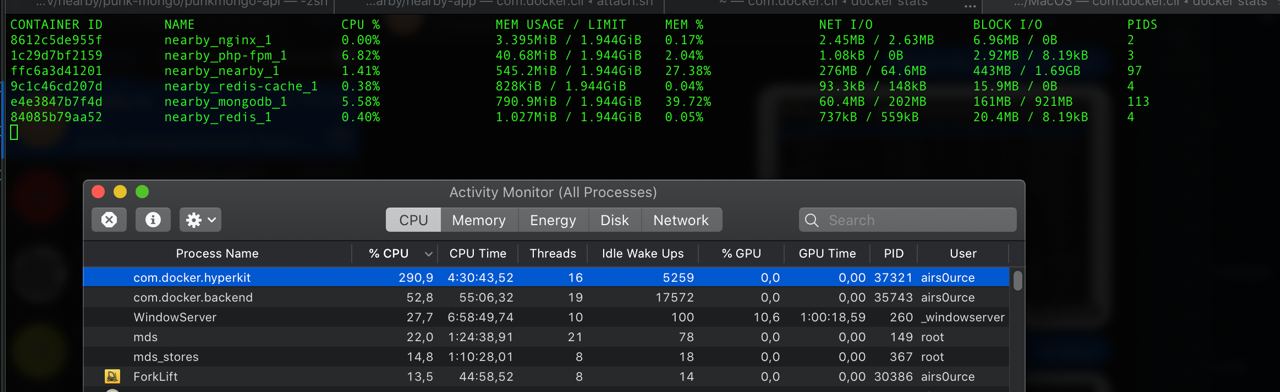
This is v2.4.0.0.
And I don't have idea how to troubleshoot it, as containers don't eat CPU, only docker itself.
MacOS restart and docker's "Clean / Purge Data" don't help. It makes docker not possible to use.
I had to disable grpc-FUSE.
 airs0urce
on 6 Oct 2020
airs0urce
on 6 Oct 2020
Curious why the switch from mutagen to grpc? It sounded like mutagen was a clear winner.
 baohx2000
on 6 Oct 2020
baohx2000
on 6 Oct 2020
First, I've run non-trivial projects on GitHub and I appreciate everyone's time here, thank you. From the v2.3.5.0 notes it states:
Docker Desktop now uses gRPC-FUSE for file sharing by default. This has much faster file sharing and uses much less CPU than osxfs, especially when there are lots of file events on the host.
I did a very basic test and here were my numbers of a very simple Rails application with a very small JavaScript frontend, so it has both vendor and node modules. The timing was to load the rails console and results are in seconds.
| Stable (osxfs) | Edge2.4.1.0 (gRPC-FUSE) | Edge2.3.4.0 (mutagen) |
| --- | --- | --- |
| 125s | 123s | 4s |
So at this time I would like to echo @itaylor and @cweagans comments, I'm not sure why gRPC-FUSE is in the mix here. I mean, who tested the switch and made the statement "much faster file sharing" in the release notes? The consensus seems to be that gRPC-FUSE is either a flop or not implemented correctly.
There are a lot of more technical folks here than myself. But at the end of the day I just want to focus on my work and producing value for the company I work for. To do that I need a fast file system integrated into Docker for Mac or some very basic yaml/config files I can add to my project. Please. Pretty please.
 metaskills
on 8 Oct 2020
metaskills
on 8 Oct 2020
Thank you @metaskills !! By switching to v2.3.4.0, I was able to bring my page request times down from 6+ seconds with osxfs (and 12+ with gRPC) to barely 1s with mutagen.
Why the hell the Docker devs switched to gRPC, when they had a fantastically performant mutagen-based release already, is a real mystery...
coredumperror
on 8 Oct 2020
Apologies, I realise I updated the tickets in the for-mac repo with our reasons for not graduating Mutagen from the Edge channel, but I never put a pointer here. The long explanation is at https://github.com/docker/for-mac/issues/1592#issuecomment-678397258, but in summary: although it improved performance for a lot of people, there were too many cases where it made performance worse, and too many issues we weren't able to solve with the cache not keeping up and leading to bugs in people's scripts. So in the end we we decided we couldn't release it out of experimental. We were not happy to make that decision, but we felt it wasn't of a quality we could stand behind.
gRCP FUSE is not faster in all cases, but it is faster in cases where the file sharing is CPU bound, and it has solved most of the cases where people were seeing 100% CPU. So overall it's a clear improvement over osxfs. We are still committed to improving file sharing speed on Mac, and we are still working on other approaches. But Mutagen, at least in the way we had implemented it, wasn't the answer.
stephen-turner
on 8 Oct 2020
Why not ship all 3 drivers and let people choose?
GrahamCampbell
on 8 Oct 2020
@stephen-turner will the osxfs or gRPC-FUSE drivers be open sourced? There are many talented developers frustrated by this issue and want to help solve it.
mtibben
on 8 Oct 2020
Why not ship all 3 drivers and let people choose?
Strong agree! Mutagen is working well for many people, why take it away? Is there a downside to providing gRPC Fuse by default and Mutagen behind a flag with no stability guarantees?
 pikeas
on 8 Oct 2020
pikeas
on 8 Oct 2020
gRCP FUSE is not faster in all cases, but it is faster in cases where the file sharing is CPU bound
What does that mean? Asked another way, how can I get a basic Rails project integrated into the tests that the Docker for Mac team measures with some... "this is what we see" benchmarks? Maybe I can test against that? Maybe all my Rails v5, v6, simple API projects, etc are all just borked in some way 🤷♂️ and over years Docker for Mac has not been usable for me.. for some reason. I just feel disconnected from the statements above and Mutagen was the only thing that "just worked" for me. It was amazing where nothing was even usable prior and I'm sensing it that is not going to change and I have no way share that information technically.
metaskills
on 9 Oct 2020
@metaskills I felt the same, it was kind of confusing and it sounded to me like the Docker team is putting a higher priority on CPU-bound use cases (Services? ML?), rather than Disk IO (web/app developers). Makes you wonder who they are really targeting with Docker for Mac. I think Docker for Mac should be just targeting developers. For production use cases, no one is even going to be running it on their Macs.
 jaequery
on 9 Oct 2020
jaequery
on 9 Oct 2020
I just hope we can at least have some sort of a build around NFS or perhaps even a comeback of Mutagen in the next couple months. Or like the other poster said, how about just giving us an option to choose a FS method?
jaequery
on 9 Oct 2020
@pikeas to your question:
Strong agree! Mutagen is working well for many people, why take it away?
The answer is simple, it didn't work (in general) correctly, although it was very, very fast for some people. There's extensive info in the other thread, but a common issue is that mutagen itself needs to be "in sync" in order to be fast. That meant that one-shot stuff like docker exec .... <my tests, for example> was slow and often didn't correctly sync the filesystem, as Docker was exiting before Mutagen finished, or some other issue.
To those asking for Docker to ship all the filesystems and let people choose, how do you propose to do that? The Docker-Compose YAML format is shared across a dozen projects who would have to agree on the meaning of any new annotations, plus they'd have to rebuild the UI, and handle then a multiplying mess of configuration options, this isn't as simple as "mutagen fast for Node" or "osxfuse fast for python", the profile of how a certain (configuration of) a driver performns for a workload is really, really complicated.
To those asking about being "CPU bound", I think what they are referring to, is that in the absence of a "real" filesystem with real events (even between Linuxes that isn't an entirely portable concept) you have to come up with something else. MacOS and Linux both have a concept of filesystem events (inotify), but they have different trade-offs, I don't recall which way around, but one implementation has problems to observe files in newly created directories (simple race condition) and struggles with large numbers of watches (I think the limit is something like 10k before you hit warnings/issues).
In lieu of a proper "native" solution, there are a number of stand-in projects which try to emulate fielsystem events by recursively scanning, and hashing files, and emitting faux events when they notice a checksum has changed, that in turn, then is CPU intensive, because hashing thousands of files, plus, that the osxfuse filesystem implementation itself is in Go (not renowned for low latency) could be factors.
I think it's profoundly important for us to understand the three pillars of performance here.
- Whether or not we have filesystem events (and/or how they are emulated)
- The performance cost of any filesystem related syscalls
- The performance of operating on a file (reading, writing) after making the metadata/overhead syscalls (e.g how fast is a read once a file is already open)
Filesystem events are used extensively in development mode code hot reloaders in Node and Ruby, for e.g - I believe because of the typical Python and PHP models, filesystem events are less important, so maybe people from those ecosystems are more willing to compromise those points? I personally consider NFS (the "high performance" configurations most people talk about) to be broken, because you don't get filesystem events. That is, if you touch a file on the host, the container doesn't get notified.
The performance cost of syscalls in general, osxfs is something like 8-10× slower in raw syscalls (stat, open, etc) than a native filesystem. stat is how filesystems let you check if a file exists, or what the permissions are, a call in Ruby to something like File.exists?("some path") is literally a stat syscalls a few lines of code under the hood. Native Linux filesystems answer stat calls in 5-8μsec, osxfs is more like 190-130 μsec with way more deviation than the native one.
I mentioned in the other thread, but in a Rails app (< Rails 6.x) then a single require "something" will make a number of calls to open, approximately one per directory on the LOAD_PATH, which is approximately ~10+<half number of gems in the bundle> (my app has 477 paths on the load path, most open calls finally succeed after an average of ~250 look-ups), for us that means a single require can easily cost 250(directories)×0.000100(seconds), so about 25 milliseconds... for a single require (which Rails handles implicitly when constants are missing, for example). On a native filesystem that would be more like <~ 2ms.
Note, I'm still talking about the cost of opening a file, I haven't even touched on what reading and writing syscalls actually take.
I noticed on a native filesystem that I can read from a file into a buffer in about 8μsec, it doesn't matter that much how much I'm reading, I would imagine that upto a certain page size, it doesn't matter, see:
[pid   138] read(8, "\2\0\0\0P2Qe\322\362\344<q\376\0\0\330\6\0\0\0\0\0\0\274\366\36_\0\0\0\0"..., 64) = 64 <0.000013>
[pid   138] read(8, "YARB\2\0\0\0\3\0\0\0\221+\0\0\0\0\0\0\r\0\0\0+\0\0\0B\0\0\0"..., 11153) = 11153 <0.000012>
[pid   138] read(8, "\2\0\0\0P2Qe\322\362\344<q\376\0\0*\23\0\0\0\0\0\0\274\366\36_\0\0\0\0"..., 64) = 64 <0.000069>
[pid   138] read(8, "YARB\2\0\0\0\3\0\0\0\336t\0\0\0\0\0\0\35\0\0\0N\0\0\0\252\0\0\0"..., 29918) = 29918 <0.000032>
[pid   138] read(8, "\2\0\0\0P2Qe\322\362\344<q\376\0\0f\4\0\0\0\0\0\0\274\366\36_\0\0\0\0"..., 64) = 64 <0.000010>
[pid   138] read(8, "YARB\2\0\0\0\3\0\0\0006$\0\0\0\0\0\0\f\0\0\0\33\0\0\0:\0\0\0"..., 9270) = 9270 <0.000010>
[pid   138] read(8, "\2\0\0\0P2Qe\322\362\344<q\376\0\0\36\3\0\0\0\0\0\0\274\366\36_\0\0\0\0"..., 64) = 64 <0.000012>
[pid   138] read(8, "YARB\2\0\0\0\3\0\0\0z\31\0\0\0\0\0\0\t\0\0\0\23\0\0\0(\0\0\0"..., 6522) = 6522 <0.000010>
(the = 1234 shows how many bytes were read, the 8 in the beginning is the file descriptor ID, in this case those are files from the shared volume between my host (linux) and my machine. (Adding -y to strace will print file names, not FD ids)
All in all, I suspect not many of us have a very similar set-up.
If you run a MySQL instance in a container with the volume shared to your host, I would imagine you get bound on CPU (filesystem events) for things you really, really don't care about.
If your framework/language caches constants, and hot-reload files in development mode (e.g PHP) then probably you don't care about the performance of open and stat that much, just read.
Ruby's constant look-up (especially in Rails, prior to v6) spends 96% of it's time in my app, looking to open files which don't exist, and even natively on Linux<>Linux Docker, it still takes 8 seconds to boot the app.
I'm not sure how well this post contributes to the discussion, on another thread related to this I posted some hints on how people can generate their own strace reports on what their apps/frameworks are doing using the filesystem, with those things in mind, and with an appreciation for how one of the tree pillars (I hope a filesystem/docker expert would agree with me on dividing things that way) affects their experience.
I don't believe there is a good trade-off to be made in general here. NFS is screaming fast for many use-cases because it's in the Kernel, and long-time supported with a local cache (attributes, so that stat/lstat syscalls are fast, mostly), open is also _REALLY_ fast on NFS because you're staying in the kernel. I believe the grpc system probably benefits from the http/2 transport (reuse of connections), I believe osxfs (written in Go) probably suffers from unpredictable latency, plus it's in userspace, which means expensive context switches to the kernel whenever it needs to do any work.
I've not found any info on how mutagen works, but from what little I could glean, it seemed to be more like NFS than the others; though it runs in userspace as a daemon, I believe it essentially manipulates the fielsystem in the container based on the stream of activity it is getting from the host (or alpha/beta, as they call them). So there's no shared filesystem, per-se, but the host and container get the initial state, then changes from outside applied inside. So you get filesystem events for free because _something_ is really editing your files.
But I believe it's illogical to stop the investigation at "
leehambley
on 9 Oct 2020
I think it's profoundly important for us to understand the three pillars of performance here.
I tend to think it is more profoundly important to understand who your users are and the average use case before working on a problem. The fact this issue is on GitHub shows to me that most Mac users downright can not work with Docker at all unless they go to extreme work arounds. I could be wrong on this but I've seen this with my peers at work and on Twitter for many years. My sense is there is a fundamental disconnect when release notes say "... gRPC-FUSE... has much faster file sharing and uses much less CPU than osxfs..." and who that is supposed to help. It certainly did not help me.
The ticket states that "GRPCFuse rather than mutagen" and that was done and it does not work for me. So I want to echo the spirit and desc of this issue has no effect for me and maybe many others. I would also like to know how can I run a benchmark to back up @nebuk89 statement of "like PHP from 2.8 seconds to 0.2 seconds" or how can I add a test case of "like Rails from 120 seconds to something sensible"
metaskills
on 9 Oct 2020
I think I'd like to work with some of you to get profiles of syscalls doing "normal stuff" with Docker, give me a :+1: on this and I'll reach you by your profile information, and see if we can equip the Docker team with arguments about which syscalls/etc we need to perform, and how.
I'd love to find time myself, to implement at _least_ a "no frills" driver based on libfuse, and the same as a kernel module for linux then I can guess with my own cruddy skills at what the lower-bound on performance _could_ be. I guess it's a rocky road to implement those in Docker, in any case. For both those options, there's not actually that many syscalls you have to implement, something like 15, and if you can eliminate a lot of overhead (I'm not sure what the grpc overhead is, but it's not nothing, compared to a raw socket) then I'm sure you can approach the performance of the native filesystem. Translation of fsevents in a way that make sense is also tricky, in general, but a development focused filesystem that maybe forgoes some of the usual guarantees can't be _that_ hard to build.
The reason mutagen is so fast for people is that it's not a shared filesystem, I spent the morning reading into it, and it's basically rsync with significant smarts going on on-top, so the filesystem "shared" using muatgen is entirely local to the Docker4Mac managed VM, and changes to that directory being pushed in over a unix socket to reflect edits outside the VM to the filesystem inside the VM. With that in mind, no wonder it performs so much better, it's basically however fast the IO is on xhyve.
leehambley
on 9 Oct 2020
Just my 1 cent, I'm on version 2.4.0.0 (48506) and gRPC-FUSE is much worse than osxfs... don't know why, but just disabling it I saw a huge improvement, may be my setup, can't check and I doubt it will make any differences 🤣
 0x3333
on 9 Oct 2020
0x3333
on 9 Oct 2020
I'll share a sample on GitHub for a typical Rails on Lambda Docker project later today and some benchmarks. Hopefully that can help too. Thanks y'all.
metaskills
on 9 Oct 2020
OK, I think I have my head around this. Here is what I have and am asking.
Mutagen (Good, Bad, Feature Request)
- Good: Fast for projects!
- Bad: If
docker runwas in a non-project high up directory, like$HOMEit tips over. I suspect this was the sticking point. It made Docker un-usable for some higher tooling/scripts I had. - Request: Can Mutagen come back with some way to enable it for a project directory???
Test Project
https://github.com/customink/docker-rails-lambda
I do some open source work for Rails on AWS Lambda which also uses the lambda container for development. Here is a test project I made from our quickstart guide and the timings.
| Edge2.3.4.0 (mutagen) | Edge2.4.1.0 (gRPC-FUSE) |
| :-------------------: | :---------------------: |
| 3s | 34s |
It would be nice if the Docker team made some headway on those numbers and/or allowed some easy way to opt into a filesystem that meet a lot of other users' expectations.
metaskills
on 9 Oct 2020
@metaskills That was not the only problem with our Mutagen implementation. For one thing, as @leehambley explained (https://github.com/docker/roadmap/issues/7#issuecomment-706032439), it broke docker exec. Also, it caused problems even in large project directories, not just top level directories. Yes, we know it was faster for many people, but it also broke too many use cases. We might return to Mutagen one day, but for now we are concentrating on other approaches.
stephen-turner
on 12 Oct 2020
I spent an hour and a half on the phone last night with the Mutagen author, he's hoping to provide a few easier shortcuts to using Mutagen without needing first-class support from Docker that should be a significant quality of life improvement for many of us.
I'm also looking at writing a benchmarking utility to focus on the overhead of the pure systemcalls themselves (read, and write performance once you have a file open is actually pretty OK), and also whether or not, and with what latency filesystem events actually propagate.
That would give us all more data to work with, whether using a "real" shared fielsystem or something like mutagen which is synching.
leehambley
on 12 Oct 2020
To those asking for Docker to ship all the filesystems and let people choose, how do you propose to do that?
How about they do that in exactly the same way that they do the gRPC-FUSE / osxfs choice? A checkbox/radio button set in the Docker Desktop preferences.
I literally never do docker run, using only docker-compose up -d and docker exec -ti IMAGE_NAME /bin/bash. So mutagen works fantastically for me, as I apparently do not do anything that is has issues with.
Thus, my situation sounds like a perfect use case for a system-level preference.
coredumperror
on 12 Oct 2020
We have no intention to ship several filesystems because we cannot support them: we'd just end up with three buggy ones. The grpcfuse/osxfs checkbox is only an interim measure until we're sure that grpcfuse is working well: we plan to remove osxfs completely after a transition period.
stephen-turner
on 13 Oct 2020
@stephen-turner thanks for the clear statement on that. Can you say much about if/when, or why not the osxfs and/or the GRPC implementations may be open sourced? I'm _sure_ there's enough expertise here in lower level coding that we may be able to do a better job as a community improving these filesystems than Docker can do on it's limited resources?
leehambley
on 13 Oct 2020
That's a business question not a technical one, which I'm less qualified to answer. But my understanding is that we regard Docker Desktop as "value add" on top of the open source engine and CLI, so we don't have any plans to open source it.
stephen-turner
on 13 Oct 2020
@stephen-turner from your docs
We plan to eventually open source all of our shared file system components. At that time, we would be very happy to collaborate with you on improving the implementation of osxfs and related software.
mtibben
on 13 Oct 2020
That was written four years ago and is not the intent now. In fact, that page should be completely removed now we've moved away from osxfs.
stephen-turner
on 13 Oct 2020
That's really disappointing news 😥
What changed @stephen-turner?
mtibben
on 13 Oct 2020
I can't speak to what the plan was at that time as I wasn't in Docker then and the original authors of osxfs left Docker some years ago. But in any case, we are removing osxfs because of its excessive CPU consumption (#12) so it's irrelevant now.
stephen-turner
on 13 Oct 2020
Mutagen author here. I fully support Docker's decision and direction here, but I also appreciate the near-term pain that some developers are facing during this transition. To help out, I'd like to offer a workaround to (a) allow developers continue to use Mutagen with Docker for Mac and (b) allow this thread to focus on discussion of gRPC-FUSE development.
I've created a discussion on the Mutagen issue tracker that details how to use Mutagen manually to replicate the previous Docker for Mac caching functionality. This isn't quite as elegant as Docker's UI, but it will give power users more granular control over file synchronization and allow for continued discussion/experimentation.
In any case, I'd like to emphasize that any discussion on this workaround should take place on the Mutagen issue tracker—this isn't Docker's burden (though I'm happy if Docker developers want to join that discussion!).
I'm hoping this helps all parties involved.
 xenoscopic
on 13 Oct 2020
xenoscopic
on 13 Oct 2020
Only supporting gRPC fuse is a bit concerning for me as it currently makes
docker unusable on my machine which is less than a year old - I had to go
back to oxsfs, again. Are there at least plans to make sure it's usable
before switching over entirely? It's not just slower, my containers won't
even start with gRPC at the moment. The number of new issues in github and
comments here make me think it's not an insignificant number of people who
are having a worse experience.
TBH at the end of the day I don't care which filesystem is used, I just
want it to work.
On Tue, Oct 13, 2020, 1:15 AM Stephen Turner notifications@github.com
wrote:
That's a business question not a technical one, which I'm less qualified
to answer. But my understanding is that we regard Docker Desktop as "value
add" on top of the open source engine and CLI, so we don't have any plans
to open source it.—
You are receiving this because you commented.
Reply to this email directly, view it on GitHub
https://github.com/docker/roadmap/issues/7#issuecomment-707573845, or
unsubscribe
https://github.com/notifications/unsubscribe-auth/AAELQUHWFDO7RYIIYVBZGJ3SKQEBNANCNFSM4LC5WHNQ
.
doublesharp
on 13 Oct 2020
Thank you, @havoc-io, we appreciate that.
stephen-turner
on 13 Oct 2020
@doublesharp We know there are some bugs with gRPC FUSE in a few cases. We believe they're rare based on the number of reports we've had, and also because the same gRPC FUSE code has been in the Windows version of Docker Desktop for nine months now, but of course that doesn't help you if you're encountering one of them. We will not remove osxfs until we've fixed them: correctness is even more important than performance.
stephen-turner
on 13 Oct 2020
@stephen-turner I'd like to again reiterate that Docker's insistence on rolling a custom filesystem is really problematic here. Neither of the options that you've included in the product have been unreliable, but both osxfs and grpc-fuse/nfs have been horrendously slow.
Plain NFS (which is _built in_ to mac os, battle tested in probably millions of configurations, and is widely understood from a performance/troubleshooting/configuration standpoint) would be a great option here. The engineering effort would be minimal (seeing as how the problems to solve are 1. updating /etc/exports to match the docker config, 2. forwarding FS events, and 3. deciding on a default behavior for the attributes) and it would be a marked improvement over the non-mutagen solutions that have already been tried. Can you please help me understand why this is not an option? Both of the built-in solutions that have come to the stable channel have been weird, proprietary things that nobody can troubleshoot or improve and many people cannot use them in a realistic day-to-day work environment (_every_ team that I've worked on or with has had some kind of file-related workaround for Docker for Mac users. I checked in with people that are still on each of those teams and every one of them ended up using NFS or Mutagen. n=12 so take that as you will).
I was among the earliest adopters of Docker for Mac when it first came out, but it still doesn't even _approach_ the level of performance that I could get out docker-machine with https://github.com/machine-drivers/docker-machine-driver-xhyve and https://github.com/adlogix/docker-machine-nfs back in 2016 on an even older machine (it worked great on a 2013 MBP to my recollection).
Can we please -- _pretty please_ -- not commit Docker for Mac to another opaque, proprietary solution for another 4 years?
cweagans
on 13 Oct 2020
Plain NFS (which is built in to mac os, battle tested in probably millions of configurations, and is widely understood from a performance/troubleshooting/configuration standpoint) would be a great option here.
Except it doesn't support filesystem events, so languages such as Ruby which relies on filesystem events and prompt sync of filesystem attributes does not work correctly, as the development mode doesn't reload code properly. For languages such as PHP and maybe even JavaScript (if not using a bundler, which watches the filesystem) maybe this is fine, but it's distinctly not fine for Ruby users, and therefore cannot be the default.
You touched on "forwarding fs events", but I've never seen a working solution, can you recommend anything where I can start researching? Half my team (of Rubyists) is severely affected by this performance, and we maintain two parallel development environments (everything in Docker, and just _some_ things in Docker) and expect people to pick and choose whichever works best for them.
leehambley
on 14 Oct 2020
@leehambley NFS doesn't support it natively, but that doesn't mean that FS events _cannot_ work. Forward the FS events and decide how/if you're going to sync attributes and you're good to go. It worked just fine in docker-machine for the same kind of use case (FS watching). The teams I've worked with have primarily been PHP/JS teams with a couple of exceptions, and webpack in particular has been a pain point until we started doing FS event forwarding.
There are various solutions out there for forwarding FS events (https://github.com/mhallin/notify-forwarder, https://github.com/codekitchen/dinghy has it built in somewhere), but the premise is usually to have something watching for FS events on the host, and then mimic the corresponding event inside of the VM/container/whatever (notify-forwarder works in multiple configurations) by manually emitting events. Even if notify-forwarder wouldn't work OOTB for the docker team, the lift for building some reliable FS event forwarding system is _way_ less than building an entire filesystem.
I'd be curious if https://github.com/codekitchen/dinghy works for you, since that's essentially the setup that I'm suggesting here: NFS with FS event forwarding. Could you give it a try and let us know if it works for your Ruby projects?
cweagans
on 14 Oct 2020
some insight on that. dinghy worked fine for me up until after i tried out Docker for Mac back a few months ago. now i try to go back and install Dinghy, it's not working for some reason. during creation of xhyve, i get an error about obtaining ip from docker machine. when i have time, i'll try out on my other macbook.
but when it did work, i would like to elaborate and say that i had zero problems with hot-reloads for development purposes, it would pick up changes immediately. btw, i am a Ruby developer (although been moving to Node lately)
jaequery
on 14 Oct 2020
I can speak only for my team, but our docs, guidelines, shell aliases and 3 years of muscle memory have us assuming to type $ docker-compsoe ... so anything that is not that, is going to be a non-starter for our team.
When I chatted to @havoc-io I suggested an easier way to integrate Mutagen would be actually just a shell alias that checks mutagen, and then starts docker-compose.
leehambley
on 14 Oct 2020
@leehambley I'm not suggesting that you do anything different. Dinghy is just a different way to run a VM where Docker lives. It sets up all the shell variables and such so that docker-compose just works. I'm also not suggesting you roll it out to your team -- I'm suggesting that _you_ try it out to see if it works for your Ruby app (as a way to validate the idea of using plain NFS with an event forwarder). Sounds like @jaequery had it working at one point, so I imagine it'll work for your app too (assuming ruby apps don't vary too much from one another).
There would be nothing stopping you from using Mutagen in lieu of NFS -- it's significantly faster by almost every measure, but the sync delay doesn't work too well for some use cases. You'd just _not_ mount files into the directory (and use https://mutagen.io/documentation/orchestration/compose instead, presumably).
cweagans
on 14 Oct 2020
@leehambley i'd say, at least for me, dinghy was as close to providing a
native docker experience. there was no need for adding anything on top like
adding, :delegated or :cached, and the GUI stuff as you see with mutagen.
you'd just docker-compose up, like you normally do on native docker.
similar to you, I also dislike adding anything on top of the traditional
docker-compose workflow, that is why docker-sync (or some other rsync
solutions) was never an option for me. mutagen was close to being a deal
breaker as well due to having to add :delegated, etc, which cluttered up
the docker-compose.yml files, but just learned to live with it.
my only issue with dinghy is that it creates its own separate network
space, so instead of localhost, you get a separate network. I recall they
were going to investigate forwarding to localhost, but that was a long time
ago and they never got around it. it shouldn't be a problem for most, but
it could be a problem for those who just explicitly need their containers
to be on localhost for some reason. shouldn't be an issue for most and with
dinghy due to their built-in proxy+dnsmasq, you can just set your project
to utilize a virtual host (some-project.docker instead of ip) by setting
VIRTUAL_HOST=some-project.docker in the environments. that latter is the
biggest selling point of Dinghy for me, since i hate having to deal with
ports all the time when you have many different projects running and you
have to manage port conflicts.
i've tried all kinds of solutions priort and everything pales in compare to
ease of setup dinghy had. but looks like the maintainer of the project ran
out of steam, i think he was under the assumption that Docker for Mac will
eventually provide equal to or better than NFS performance, judging from
looking up the past Github issues.
On Wed, Oct 14, 2020 at 11:11 AM Cameron Eagans notifications@github.com
wrote:
@leehambley https://github.com/leehambley I'm not suggesting that you
do anything different. Dinghy is just a different way to run a VM where
Docker lives. It sets up all the shell variables and such so that
docker-compose just works. I'm also not suggesting you roll it out to your
team -- I'm suggesting that you try it out to see if it works for your
Ruby app (as a way to validate the idea of using plain NFS with an event
forwarder). Sounds like @jaequery https://github.com/jaequery had it
working at one point, so I imagine it'll work for your app too (assuming
ruby apps don't vary too much from one another).There would be nothing stopping you from using Mutagen in lieu of NFS --
it's significantly faster by almost every measure, but the sync delay
doesn't work too well for some use cases. You'd just not mount files
into the directory (and use
https://mutagen.io/documentation/orchestration/compose instead,
presumably).—
You are receiving this because you were mentioned.
Reply to this email directly, view it on GitHub
https://github.com/docker/roadmap/issues/7#issuecomment-708572924, or
unsubscribe
https://github.com/notifications/unsubscribe-auth/AAGB7C67Q5Q26QTPVQXP4MDSKXSV3ANCNFSM4LC5WHNQ
.
--
Kind Regards,
Jae
jaequery
on 14 Oct 2020
@jaequery thanks for taking the time to change my view, when I was being outright dismissive of a technology I hadn't properly understood. That shouldn't have been your responsibility, but i'm thankful for the time you took.
I think for me, as a Linux user, my main contribution can be writing this benchmarking tool, and helping us understand the trade-offs. For Ruby particularly (on the _shared_ filesystems) there might be a 3× speed-up on the table by changing Ruby itself to use stat or access to check for a file, rather than open, which is something like a 5 line change that I can even put behind a Ruby compile-time feature flag.
I've not found any time this week to begin to work on any kind of benchmark that we could then run on the 4/5 common configurations, but I don't expect it to be that much work, I just need to break some ground, and dust off my C skills.
leehambley
on 15 Oct 2020
I'd like to report that gRPC FUSE is completely unusable for me too. I have a project that runs 5 containers, 3 of them have mounted volumes. It's all in TypeScript and using filesystem events (CRA, Gatsby, ts-node-dev).
When using gRPC FUSE performance is noticeably slower when restarting any of the servers but most importantly file syncing and filesystem events randomly stop working. Very often it happens after modifying one file just a few times.
My apps either stop picking up file changes or crash because somehow they get incomplete content for that modified file (and compilation fails). The only remedy seems to be restarting the container (docker-compose down && docker-compose up). Sometimes even that doesn't help and I have to restart the Docker daemon.
Let me know if I can help debug this somehow. Please don't remove osxfs until this is resolved.
I'm using maOS Catalina 10.15.7 and Docker Desktop 2.4.0.0.
 jgonera
on 16 Oct 2020
jgonera
on 16 Oct 2020
@jgonera Functional bugs are off topic for this roadmap item. Please file a bug report at docker/for-mac, including a diagnostics id. Thanks.
stephen-turner
on 16 Oct 2020
Given the 20.10.0 beta1 release notes today, should we assume that gRPC FUSE is the direction forward?
metaskills
on 19 Oct 2020
Yeah... So if that's the case, my team is going to be stuck on 2.3.4.0 for the rest of time. Or until someone comes up with a Mac Docker solution that doesn't have horrible file sharing performance. gRPC FUSE is twice as slow as osxfs for us, and osxfs was already pretty freaking bad.
coredumperror
on 19 Oct 2020
Checking in to say I have made a few hours today to begin work on a filesystem benchmarking tool as promised a couple of weeks ago. I've got nothing worth sharing yet, but I have a client (in alpine Docker) and server, both parts are written in C and the server is creating about 10,000 files across something like 3..15 levels of nesting in the hierarchy. Both parts are communicating over a socket and the _client_ is receiving file system events using fanotify.
All this means now I have all the groundwork laid, and need only to come up with a sensible way to report the results. Bootstrapping this test is done in about 1.5 seconds, and will need some rewriting of the server part for mac. (I'm on Linux, and just doing what works for me, my C is _rusty_, so I'll need to me on my macOS machine to write the macOS port of that, many of the GNU/BSD file-system functions are quite different).
My plan is to "race' the host and the client against each-other, by having one thread do _some action_ on a file, and both the host (and the client via the socket to the host) will capture the file-system event they have seen, and compare timestamps to check the relative latency.
- Server sets up 10,000 files
- Server waits for client
- Client connects, listening to filesystem events and forwarding to server on a socket
- Server starts listening to filesystem events, sending to its own socket
- Server starts modifying files, and waiting for the responses from self and client.
Both sides are listening for filesystem events, and will timestamp the stuff they send to the socket, so we can see the relative time differences. I'm currently just researching how to do high precision clocks/etc across macOS and Linux, it's a bit of a topic, given how many microseconds a filesystem operation usually takes.
Along side this latency check for filesystem events (a check I expect NFS in the "fast" configuration to fail...) which should help people at least choose between Unison and Mutagen, I plan to also do a general exercise of the filesystem, and produce a comparison report (relative hardware, after all) of the performance of the operations on both sides.
I plan to reuse some of the fsevent archietcure for this, since the client knows what the did on the filesystem, I can repeat the same operation on the client and time it, here dealing with timers is easy, as it's not about absolute wall time comparison, but the number of cycles it takes to run a block of code.
This is all pretty experimental for me so far, but I think the overall design makes sense. I hope to post back later this week with a build I could invite people to run to get some relative results.
leehambley
on 19 Oct 2020
I have updated my docker for last edge version (2.4.2) and it automatically activated gRPC FUSE option. It have fully degraded a PHP project (using laradock as base), running on macOS Catalina 10.15.7 with 4 CPUs, 6GB for memory and 120GB for disk dedicated to Docker Machine. It can't process parallel requests and the time of each request as multiplied by 3x or 4x. Deactivating gRPC FUSE option everything backs to work.
 renanwilliam
on 24 Oct 2020
renanwilliam
on 24 Oct 2020
Same experience here, my PHP (Laravel) projects are noticeably slower with gRPC FUSE. Please don't make this the only option and allow your users to switch back to osxfs
 osteel
on 24 Oct 2020
osteel
on 24 Oct 2020
@renanwilliam @osteel I was also having issues with 2.4.2 but seem to be having more luck with the 2.4.3 installer that was posted here https://desktop-stage.docker.com/mac/edge/49130/Docker.dmg (from https://github.com/docker/for-mac/issues/4953).
doublesharp
on 24 Oct 2020
Saw that Edge v2.5.1.0 was released a few days ago and decided to benchmark my basic Rails app (https://github.com/customink/docker-rails-lambda#benchmark) and things are getting worse again.
Edge Eeleases:
| Edge2.3.4.0 (mutagen) | Edge2.4.1.0 (gRPC-FUSE) | Edge2.5.1.0 (gRPC-FUSE) |
| :-------------------: | :---------------------: | :---------------------: |
| 3s | 34s | 52s |
So the fastest file system for Rails Projects on Mac seems to be stable release with osxfs. What's happening y'all?
metaskills
on 22 Nov 2020
@metaskills can you benchmark it in the new MacBook Air/MacBook Pro??
 Saphyel
on 22 Nov 2020
Saphyel
on 22 Nov 2020
Uh no, I do not have one. Is that play? Everyone has to buy a M1 chip to work with Docker because they won't implement an additional filesystem that is better than osxfs? Or are you just curious?
metaskills
on 22 Nov 2020
Docker does not support M1 yet!
 AlexandreGarino
on 22 Nov 2020
AlexandreGarino
on 22 Nov 2020
So gRPC-FUSE is on by default for all Docker stable/edge releases now! When I disable "the experimental feature" other tooling breaks! https://github.com/EugenMayer/docker-sync/issues/755#issuecomment-732215229
metaskills
on 23 Nov 2020
Everyone has to buy a M1 chip to work with Docker because they won't implement an additional filesystem that is better than osxfs?
@metaskills like how we did with fuse, instead of just fixing the existing one, we will likely solve with another rust based microservice(using cap'n proto instead of gRPC) soon and it will be so fast that it will easily work with the Apple M2 chip /s
to answer your question, My beefed up 2020 i9 Pro with 32 gigs of RAM has trouble with gRPC-fuse(2.5.3) with an added bonus of 150% CPU usage under no load, so it is very unlikely that Apple M1 will help.
 avierr
on 30 Nov 2020
avierr
on 30 Nov 2020
@stephen What were your findings with the NFS solution? Could you provide
us with any update on that?
On Mon, Nov 30, 2020 at 9:04 AM avierr notifications@github.com wrote:
Everyone has to buy a M1 chip to work with Docker because they won't
implement an additional filesystem that is better than osxfs?@metaskills https://github.com/metaskills like how we did with fuse,
instead of just fixing the existing one, we will likely solve with another
rust based microservice(using cap'n proto instead of gRPC) soon and it will
be so fast that it will easily work with the Apple M2 chip /sto answer your question, My beefed up 2020 i9 Pro with 32 gigs of RAM has
trouble with gRPC-fuse(2.5.3) with an added bonus of 150% CPU usage under
no load, so it is very unlikely that Apple M1 will help.—
You are receiving this because you were mentioned.
Reply to this email directly, view it on GitHub
https://github.com/docker/roadmap/issues/7#issuecomment-735914947, or
unsubscribe
https://github.com/notifications/unsubscribe-auth/AAGB7C3R436O6YZ6YH5ANA3SSPGA7ANCNFSM4LC5WHNQ
.
--
Kind Regards,
Jae
jaequery
on 30 Nov 2020
@jaequery Yes, but I'm afraid it's not very good news: we found that NFS with inotify is slightly _slower_ than osxfs, for both read-heavy and write-heavy workloads. That was with a userspace NFS daemon: with the kernel NFS it was slightly faster, but not significantly, and we are worried about the security implications of exposing your files that way.
@djs55 Can you supply the actual graphs?
stephen-turner
on 1 Dec 2020
Nothing says #wontfix like a shinny 3.0.0 release with a slower gRPC-FUSE enabled. https://github.com/customink/docker-rails-lambda#stable
metaskills
on 11 Dec 2020
@stephen-turner can you describe what kind of tests your team were doing? hearing that NFS was slower than OSXFS doesn't seem to reflect what we been seeing with our real-world use cases. in most cases, i believe it should be at least 5x-10x faster for general use, unless there are some outlier cases.
jaequery
on 14 Dec 2020
@jaequery We were comparing with osxfs in :delegated mode, which speeds up osxfs. Also, you have to enable an inotify forwarder with NFS for a fair comparison.
stephen-turner
on 14 Dec 2020
The read heavy benchmark was docker run -v <path>:/volume djs55/npm-react-start. The write heavy benchmark was docker run -v <path>:/volume djs55/write-small-files.
stephen-turner
on 14 Dec 2020
hey guys, so i had some time to play around again and this time decided to jump the gun and upgrade to Big Sur because Docker for Mac was not supported on High Sierra.
and i was pleasantly surprised. I'm not sure if anything changed on D4M w/ the Big Sur update, but after I upgraded to it and installed the latest stable Docker for Mac, it actually was fast enough to run a Rail project, without any mutagen, nfs, docker-sync, etc!
i'm really curious, was it the Big Sur update that addressed it or something else?
and whatever the case, i think we finally have a workable Docker solution on Mac!
anyone else tried it out and can report similar results?
jaequery
on 22 Dec 2020
I have a benchmark with some common use-cases our devs have that I just ran. Still 3x slower using gRPC compared to NFS.
mtibben
on 22 Dec 2020
Same, still not seeing anything change. Data here (https://github.com/customink/docker-rails-lambda#stable), basically nothing has really changed AFAICT using Big Sir and my crude Rails boot benchmarks. Ideally these should be close to 2 seconds.
| 3.0.3 (osxfs) | 3.0.3 (gRPC-FUSE) |
| :-----------: | :---------------: |
| 19s | 36s |
metaskills
on 22 Dec 2020
Since yesterday I'm trying to get better performances on our docker stack.
My "benchmark" is based on yarn install, each time removing node_modules directory, clearing yarn cache and restarting docker.
Here is the results:
| native | mutagen | osxfs |gRPC-FUSE |
|:------:|:---------:|:------:|:------------:|
| ~31s | ~37s | ~110s | ~160s |
Does someone can explain to me what's the point to implement gRPC-FUSE if it performs worst than osxfs? I don't get it.
 ByScripts
on 24 Dec 2020
ByScripts
on 24 Dec 2020
I was hoping there were some improvements made on the Big Sur. I am not sure why I am able to run adequately now on my own Ruby/Node projects all of a sudden after I upgraded to Big Sur and re-installed D4M on it. I'd have to test it out again on my other mac that is still on Catalina to see if there are any difference.
And I did try running @metaskills and it took me about a minute for the console to boot up. So I take it, it is still quite slow on it. I'd like to try it on NFS and see how faster it is when I get around to it.
jaequery
on 27 Dec 2020
@jaequery Can you double check if there isn't anything else mingling with your stuff after the upgrade? I.e virus scanners or other network drivers that was just in the way, and got disabled after the upgrade giving you a false sense of a speedup?
 emilebosch
on 31 Dec 2020
emilebosch
on 31 Dec 2020
I noticed this on twitter, and was wondering how they achieved the filesystem integration.
Turns out they're using virtio-fs, "a shared file system ... designed to offer local file system semantics and performance... specifically designed to take advantage of the locality of virtual machines and the hypervisor ... especially useful for lightweight VMs and container workloads"
Could there be some learnings for the docker team from libkrun and virtio-fs? See the design document here (and the way they map memory between the VM and host). In this case I'm guessing virtio-fs is on linux (and mounted in macos with FUSE?), but perhaps it's even possible to use virtio-fs directly in macOS - or at least apply a similar approach?
What are your thoughts @stephen-turner ?
Again I would make the point it could be beneficial to leverage prior work in this space - plus there are many motivated engineers who would try and improve this situation if they had the chance. Docker has had two stabs - osxfs and grpc-fuse - but as yet has not reached a useable solution for many, who still continue to use docker-machine and NFS. Is the current proprietary approach working?
mtibben
on 5 Jan 2021
Interestingly, it appears macOS already has support for virtio-9p (an earlier iteration of FS sharing across VMs) - and I suspect this is what Docker for Mac may already be utilising
$ cat /System/Library/Extensions/AppleVirtIO.kext/Contents/Info.plist | grep 9P
        <key>AppleVirtIO9P</key>
            <string>AppleVirtIO9P</string>
I'm not slightly familiar with virtio-9p, but from skimming through a couple of sites, it looks like a great feature. Is there a way to check if Docker for Mac is using it?
 raisen
on 9 Jan 2021
raisen
on 9 Jan 2021
Here's a simplistic benchmark illustrating where docker for mac struggles
docker run --rm -it -v $(pwd):$(pwd):delegated -w $(pwd) alpine time dd if=/dev/zero of=speedtest bs=1024 count=100000
Native: 0.506s
Docker Machine with NFS: 0.85s
Docker Desktop for Mac 3.0.4 osxfs: 26.18s
Docker Desktop for Mac 3.0.4 gRPC FUSE: 54.01s
mtibben
on 11 Jan 2021
I ought to drive-by to reiterate that these kinds of benchmarks with dd are often times _not_ representative of performance for development environments and coding. the dd benchmark makes one call to open (2), and then probably many hundreds/thousands of calls to write (2) and one final call to close (2).
When working on a Rails, Node, or any other app _most_ of the time is spent in calls to open checking for the existence of, or opening files. Because open is expensive (130µ/call) (it has to _really_ set-up the machinery to open a file) compared to stat or lstat which could significantly cheaper (8-10µ/call)
I wasn't suggesting that anyone thought these _were_ good benchmarks, but for any guests in the thread who are looking for insights, just know that in Ruby land, at least, we could get 80% speed-up with a 5 line patch to Ruby - I just don't have the will to push that through the process of getting code into the language, when most of us aren't on bleeding-edge versions anyway so the utility is limited.
leehambley
on 11 Jan 2021
but for any guests in the thread who are looking for insights
Thanks! If anyone is curious I have a simple Rails project/benchmark repo here. https://github.com/customink/docker-rails-lambda
we could get 80% speed-up with a 5 line patch to Ruby - I just don't have the will to push that through the process of getting code into the language
Can you share that? I might be able to help put that in front of some people that could help.
metaskills
on 11 Jan 2021
Can you share that? I might be able to help put that in front of some people that could help.
I'm not willing to share it just yet (if I share it now, I'm afraid I'll make more work for myself), but the long story short is that on Ruby (2.x and 3.x, so far as I can tell), with Rails (the thing I guess we mostly care about most of the time) prior to 6.0 about 96% or more % of syscalls (it will depend how many gems you have in the load path) are spent doing open trying to turn SomeConst into a some_const.rb at one of the n hundred paths on $:.
Replacing calls to open (2) with a call to stat (2), which in the 4% of successful cases would have to be followed with a call to open (2) anyway, would be a fair trade-off. My 80% figure was shot from the hip, but here's the headlines:
- with about 500 directories on the load path (with about 400 gems on the Gemfile)
- you can expect to find what you are looking for in ~250 syscalls
- my app makes some millions (can't remember if 2, or 6.. it was a couple of months ago) of calls to
open (2), 96% of which fail withENOENT(file not found) - this accounted for 96% of all syscalls made. - Time to run an
open (2)(success or failure) was ~130µ, time to run astat(which Ruby/Rails can do withFile.exists?but this isn't used when doing arequire) was consistently under 10µ, usually pretty flat around 8µ.
Note this would change with Rails >= 6.0 which switched to the Zeitwerk gem loader, which doesn't explore ~50% of all the load paths looking for every constant/file, but I'm _sure_ something like this is pervasive in node/php too, but whilst I do occasionally touch node, I work full time on a linux machine, and my exploration in Ruby is only for the benefit of my colleagues, who are predominantly macOS users, and this community at large, who have suffered a long time with shit tooling.
I hope to share something this week, and try and get it upstreamed into Ruby.
leehambley
on 11 Jan 2021
Thanks. Moving back to what Docker can do. Is there anyone here than can talk about NFS, virtio-fs, or anything to help? Can anyone communicate what may be happening on how Docker is going to address this? Patches to Ruby feels a little far off or is that the play by the Docker for Mac team? Not being snarky, I really would like to know.
metaskills
on 12 Jan 2021
We have ideas to improve write speed specifically, which seems to be the use case where grpcfuse is worse than osxfs. We haven't had time to implement them yet because we are currently focused on making Docker work on the new M1 chips.
We have experimented with NFS and found it no faster, as I said above. On virtio-fs, our understanding was that you have to be running Linux on the host side, which is obviously not applicable.
stephen-turner
on 12 Jan 2021
On virtio-fs, our understanding was that you have to be running Linux on the host side, which is obviously not applicable.
Please correct me if I’m wrong but I don’t think that’s true. It requires a guest kernel with virtiofs support which >= linux 5.4 supports. On the host you basically need a virtiofs daemon (virtiofsd) and a vmm which supports the vhost-user protocol.
 cynecx
on 13 Jan 2021
cynecx
on 13 Jan 2021
We have experimented with NFS and found it no faster
This perplexes me. Using a userspace daemon and inotify forwarding will not optimise for performance, which is what we're wanting to do. There are some tradeoffs here absolutely, but we would prefer the performance over the features
mtibben
on 13 Jan 2021
@mtibben We do not intend to produce a solution without inotify, because of the large number of users who regard the lack of inotify as a bug. To put it another way, we are trying to find a general solution that balances several competing dimensions of functionality and performance for different types of workload with different characteristics. That's not to say we're happy with where we are: in particular the write speed performance is problematic at the moment. But it does mean that if you want to absolutely optimise a single type of workload in a single dimension, you can probably get better numbers with your own custom-built solution than with our general solution.
stephen-turner
on 13 Jan 2021
@cynecx Thanks, we'll look at it again, but not until the M1 work is done.
stephen-turner
on 13 Jan 2021
Replacing calls to open (2) with a call to stat (2), which in the 4% of successful cases would have to be followed with a call to open (2) anyway, would be a fair trade-off. My 80% figure was shot from the hip, but here's the headlines:
I reached out to someone who does core ruby patches all the time and his reply was.
I've heard of this issue, but from what I understand it's a problem with Docker's FS performance. Ruby's IO functions are not too complex wrappers around regular C IO functions. IOW one could probably write a C program that has similar IO problems on Docker
metaskills
on 16 Jan 2021
Not sure if this might help: https://www.paragon-software.com/home/extfs-mac/
 electraform
on 13 Feb 2021
electraform
on 13 Feb 2021
@electraform nope, you can't really mount a single volume for reading & writing from two different places. Every FS driver has to hold an exclusive lock over the underlying block device, otherwise the potential for data corruption is boundless. Even if you designed a new, hypothetical FS around some lock-free data structures, you'd still have two threads that don't communicate, competing for writes, and likely resulting in really poor write performance. The moment you're introducing IPC so the two drivers can talk, you're back to square one - you could've just used a networked file system and saved yourself a ton of trouble.
 rollcat
on 13 Feb 2021
rollcat
on 13 Feb 2021
FWIW, I would pay $$$ if Docker fixed this.

metaskills
on 18 Feb 2021
What does the paid team plan's M1 Support mean?
Doesn't Docker for Mac free version already support M1?
On Thu, Feb 18, 2021 at 12:17 PM Ken Collins notifications@github.com
wrote:
FWIW, I would pay $$$ if Docker fixed this.
[image: Screen Shot 2021-02-18 at 3 14 00 PM]
https://user-images.githubusercontent.com/2381/108416136-4a77e200-71fc-11eb-91dd-7a6c16ee73b0.png—
You are receiving this because you were mentioned.
Reply to this email directly, view it on GitHub
https://github.com/docker/roadmap/issues/7#issuecomment-781608791, or
unsubscribe
https://github.com/notifications/unsubscribe-auth/AAGB7C3DLVDUALLU6B3E4FLS7VYUDANCNFSM4LC5WHNQ
.
--
Kind Regards,
Jae
jaequery
on 19 Feb 2021
Doesn't Docker for Mac free version already support M1?
Yes and no. It is still in beta. I guess they have decided to make the stable version a paid-for only thing...
GrahamCampbell
on 19 Feb 2021
I agree that Mac users should have a premium version only
Saphyel
on 19 Feb 2021
Seems pretty dumb. People will just move off docker to something else, free and open source. OCI exists for a reason!
GrahamCampbell
on 19 Feb 2021
Thanks,
Scott Whittaker
groundtruth
Formerly PA Handford & Associates Ltd
Ph 04 904 0876 | Mob 021 210 1818
www.groundtruth.co.nz http://www.groundtruth.co.nz/
PO Box 52, Paekakariki, NZ
On 19/02/2021, at 1:51 PM, Graham Campbell notifications@github.com wrote:
Seems pretty dumb. People will just move off docker to something else, free and open source. OCI exists for a reason!
—
You are receiving this because you are subscribed to this thread.
Reply to this email directly, view it on GitHub https://github.com/docker/roadmap/issues/7#issuecomment-781736148, or unsubscribe https://github.com/notifications/unsubscribe-auth/AAJRMBIZXEPUESJUOCGLYX3S7WYY7ANCNFSM4LC5WHNQ.
 whittaker007
on 19 Feb 2021
whittaker007
on 19 Feb 2021
Thanks, Scott Whittaker groundtruth Formerly PA Handford & Associates Ltd Ph 04 904 0876 | Mob 021 210 1818 www.groundtruth.co.nz http://www.groundtruth.co.nz/ PO Box 52, Paekakariki, NZ
You are welcome buddy, given how expensive are the apple devices and the extra time that takes to do things for them make sense we have only premium option to support back the poor company helping us
Saphyel
on 19 Feb 2021
Lol, sorry for the accidental post. In my case I actually just last week bought a NUC PC running Ubuntu Server purely as a docker server and have my IDE sync local files down to it. It's not a perfect solution but the large sites I'm working on which are now all docker based became unfeasible to run on my mac.
That server cost me $1k, I'd happily pay to get acceptable performance running on a M1 mac if it can get anywhere close to native linux. I hope Apple is sponsoring development as well as providing reference hardware and tech support.
whittaker007
on 19 Feb 2021
I'd rather pay $1k to have an open source implementation funded.
GrahamCampbell
on 19 Feb 2021
I hope they change their mind and make M1 accessible to all.
Let us pay for features, not some platform support.
On Thu, Feb 18, 2021 at 5:19 PM Graham Campbell notifications@github.com
wrote:
I'd rather pay $1k to have an open source implementation funded.
—
You are receiving this because you were mentioned.
Reply to this email directly, view it on GitHub
https://github.com/docker/roadmap/issues/7#issuecomment-781747070, or
unsubscribe
https://github.com/notifications/unsubscribe-auth/AAGB7CZJ5SZW4U6ADT4NWILS7W4DXANCNFSM4LC5WHNQ
.
--
Kind Regards,
Jae
jaequery
on 19 Feb 2021
The email is badly worded. _Technical support_ for Docker Desktop is only available to paying customers. But running on M1 will be included in the community version.
stephen-turner
on 19 Feb 2021
You guys got us worried here for a minute
osteel
on 19 Feb 2021
Thank you! I would like to still pay for Mac file system performance to be in a usable state as well. Literally that important to me.
metaskills
on 19 Feb 2021
For many years I was an OSX users. I switched to Windows WSL2 a year ago because of the file system performance. I just didn't want to waste my time with unstable tools like docker-sync and mutagen.
I can recommend the switch to anyone. The fact, that Microsoft added a native Linux Kernel (which is updated by Windows Update function btw.) is such an awesome step, that most of the people still do not believe, that this option exists.
Having a native kernel on Windows means, that I have native file system performance. All my docker container on windows with mounted files run at native speed. I can access the files via a mount in the Windows Explorer and edit the files from my favourite IDE on Windows. Any operation like git status, composer update or any file access intensive task run inside the container at maximum performance.
If you still have this feeling, that everyday you loose time with waiting for a long running process to be completed on OSX, you should consider switching to Windows WSL 2.
 ayalon
on 15 Mar 2021
ayalon
on 15 Mar 2021
For many years I was an OSX users. I switched to Windows WSL2 a year ago because of the file system performance. I just didn't want to waste my time with unstable tools like docker-sync and mutagen.
I can recommend the switch to anyone. The fact, that Microsoft added a native Linux Kernel (which is updated by Windows Update function btw.) is such an awesome step, that most of the people still do not believe, that this option exists.
Having a native kernel on Windows means, that I have native file system performance. All my docker container on windows with mounted files run at native speed. I can access the files via a mount in the Windows Explorer and edit the files from my favourite IDE on Windows. Any operation like git status, composer update or any file access intensive task run inside the container at maximum performance.
If you still have this feeling, that everyday you loose time with waiting for a long running process to be completed on OSX, you should consider switching to Windows WSL 2.
I'll switch directly to some Linux distro in that situation rather than using Windows with WSL 🙂
 methbkts
on 15 Mar 2021
methbkts
on 15 Mar 2021
I'm not sure about Windows or the performance of this. But all the Macbooks are designed to be used only for playing music and some videos, so use the right tool for the job
Saphyel
on 15 Mar 2021
Working on a Linux Distro will most likely also bring you in a lot of situation where you lose time. Having a 4K Monitor / Fractional Scaling / Driver issues and so on.
Windows 10 is an incredible stable and fast OS with a wide support for all kind of tools and IDEs. I just want a situation where I can work fast and don't lose any time on issues, that take away my productivity.
With the integration of Windows Terminal (yes Open Source https://github.com/microsoft/terminal) all Linux related tasks feel smooth and without hurdles.
I'm not against Linux Distros, I just want to hightlight this option to give it a try.
ayalon
on 15 Mar 2021
Please let's not argue about Mac vs Windows vs Linux on this ticket. Thanks.
stephen-turner
on 15 Mar 2021
Please let's not argue about Mac vs Windows vs Linux on this ticket. Thanks.
Trolling aside, I think this short discussion also illustrates how the performance issue of Docker on macOS impacts the daily life of developers. More and more users consider switching operating systems or abandoning Docker entirely or partially (hybrid solutions) on their local environment.
I have been using Docker since 2014, and I still consider it a great tool. I even educate my students on its use. However, it's still impossible to work with large projects on macOS. Unless you sacrifice response times or your CPU with third-party solutions (like Mutagen), this context becomes a real show-stopper.
ajardin
on 15 Mar 2021
I have to agree with @ajardin here. I'm considering switching to a Linux distro for my next work machine almost entirely because of this. I spent a great deal of time writing about Docker for web development and I can't promote this content without adding a performance-related caveat for macOS. It's very frustrating.
I think Docker is a fantastic tool for development overall but as long as these performance issues aren't solved wider adoption won't happen. It's a real shame because using it locally is a gateway drug to using it in production, in my opinion.
I went too deep into using Docker to give it up now, but a lot of people are just moving on.
osteel
on 15 Mar 2021
I'm probably beating a dead horse but it is sad to see what has become, when I feel the answer was always in front of us. As I mentioned, Docker w/ NFS provides near native level performance on Mac for web development. Honestly I can't speak for other use cases of Docker, but I feel most users of Docker are web developers. And I was very happy using Dinghy but the author discontinued for whatever reason and it's currently at a broken state now.
There are other solution like docker-sync but that adds complexity where you have to modify docker-compose file which I did not like.
So my only option was to bringing it up to the team here. So they have benchmarked it and I don't know how or why but their benchmarking claimed that NFS was just only a tad faster than what they have, which is hard to believe considering in my web projects (ruby, node, php), it's about a 10x speed increase. I think it goes to show you can't always rely on benchmarks alone.
Anyhow, I gave up on this, moved to M1, which is faster but still slower than the NFS solution. M1 also presents challenges that not all libraries support ARM.
I feel their performance problems could've been resolved years ago because we already had a solution that worked for many, they just needed to give us an option or replicate it.
jaequery
on 15 Mar 2021
There are other solution like docker-sync but that adds complexity where you have to modify docker-compose file which I did not like.
FWIW, I did not like that either so I used docker compose's multiple file support to layer docker-sync onto projects for Darwin while still allowing Linux/Windows users to bypass it. Details here if you are curious. https://dev.to/aws-heroes/serverless-docker-patterns-4g1p#mac-os-filesystem-performance
metaskills
on 16 Mar 2021
Fixed link above ☝🏼
metaskills
on 16 Mar 2021
I went a slightly different route for this. Rather than give up more than a decade of investment in Mac software and downgrade to either Windows or Linux but also finding Mac docker performance unsustainable I recently bit the bullet and bought an external docker server.
I went with a little headless NUC box running Lubuntu. A copy of the source files remain on my Mac and I use PHPStorm's Deployment configuration to sync file changes across automatically on file save using SFTP. Stuff that I don't need to edit locally like Composer includes and databases are excluded. The server has a static IP address assigned in my router to make the local hosts file easier to manage (I use the GasMask app for hosts file management).
So my workflow isn't greatly changed after the sync is set up. I edit source files locally and the changes are uploaded automatically and tested in my browser as usual. Git repository operations and Composer updates etc. are all run directly on the server via SSH.
It all runs pretty smoothly. I've lost a bit of portability in that if I have to move to another location for some reason I'll need to take the NUC with me and maybe set up another copy of my hosts file with different IP address mappings. And I haven't got automated backups running on the NUC yet.
But I'm running Docker at native speed with minimal overhead, freed up hundreds of gigabytes of space on my laptop (yes, my main computer is a laptop), and I'll be able to make the move to the M1 architecture when the real pro machines are available with barely a second thought.
I'm still hoping Docker for Mac will one day be feasible (which is why I'm still watching this list), but in the meantime I have a solution that is acceptable to me while I get work done. No shade to the Docker for Mac team who are doing great work which is under appreciated given what they have to work with.
whittaker007
on 16 Mar 2021
@whittaker007 I went a similar route using an Asus PN50 minipc running Lubuntu as well, but as an editor I'm using vscode with the remote ssh extension. It makes working with vscode on a remote environment seamless and works exactly as if it was local without any complicated configuration.
As someone who's tried Windows, Windows with WSL1/2, Ubuntu, MacOS, this is 100% the best dev environment I've ever had.
 rhyek
on 16 Mar 2021
rhyek
on 16 Mar 2021
Just wanted to chime in here, after reading this thread for about a year now:
I've held off the switch to gRPC/Fuse for a couple of months at least, because I was afraid of the performance issues. Two months ago I finally decided to upgrade as I do like to keep my software up to date. At first there were one or two issues with performance, mainly starting containers could sometimes take longer. However I have not experienced these issues lately anymore. Not sure at what point/version they went away, but everything is running at least the same as before.
I'm running multiple Symfony (PHP) web applications on a 2014 intel MacBook Pro by the way. The only issue I still notice is that running Yarn commands (install or upgrade) take a _very_ long time, longer than before. So I work around that for now and do that locally (ci wil detect/fix most of the possible issues here, and we don't do much with JS anyway).
Not to disregard the people that do experience issues here (the goal should be that everyone has acceptable performance), but I thought it couldn't hurt to add a more positive story here. Especially for the Docker devs, who do seem to work very hard on this — and other — Mac issues. Thank you for that.
 pkruithof
on 16 Mar 2021
pkruithof
on 16 Mar 2021
Another different approach:
I put all my node_modules and python libs into the container so I have fast file system performance in the container for fast yarn etc. My var folders with db stuff are also in the container, so no slow db.
Than I have a linux box like others which I use on per project basis. I do a ssh -nNT -L /tmp/var/docker.sock:/var/run/docker.sock user@box to have the socket locally on my Mac and do export DOCKER_HOST=unix:///tmp/var/docker.sock to set it per project basis.
Next piece in the puzzle is vscode where I use open in container from the remote extension. Now I can decide on project basis with setting or not settings DOCKER_HOST to the remote socket if I want to develop on my Mac or my Linux box.
Some projects are currently a bit slow on my m1 Mac, and some older don't work on m1, so I can decide depending on the project. I hope to get I all back to my Mac, but for the for the meantime I have fast and working setup on every project.
see https://github.com/cividi/spatial-data-package-platform for an example vscode setup
 yvess
on 16 Mar 2021
yvess
on 16 Mar 2021
Responding to remind people that there's three factors which determine what is the right thing for you, or not:
- you need filesystem events (code watchers, live-reload, etc) - then NFS is out, because it doesn't support fsevents
- you need fast operations on tens of thousands of small files (js bundlers, npm installers, etc, etc) - then basically everything sucks (except the sync options, which smuggle the waiting time someplace else)
- you need fast sustained read/write operations (working in already-open files) such as rendering templates, and gRPC-FUSE and friends should work well here
It may not be obvious _what_ you are doing, a PHP Symphony app is doing something quite different to a Ruby app, which is doing something quite different to _another_ Ruby app, because maybe those people use Bootsnap or Spring.
leehambley
on 16 Mar 2021
In addition to Lee's comments, it's worth remembering that a solution with direct access to the filesystem (Linux) is always going to be faster than a VM using the VM's filesystem (Mac or Windows using named volumes; also WSL 2 using the WSL filesystem), which in turn is going to be much faster than a VM using the host's filesystem (bind mounts on Mac or Windows Hyper-V; also WSL 2 using the Windows filesystem). While we still plan to make improvements, please don't think that crossing the VM boundary is ever going be as fast as Linux. If you look at the speed of WSL 2 accessing the Windows host filesystem, you will realise that it's not just small companies like Docker that have these constraints. On a practical note, one good solution is to use named volumes instead of bind mounts where possible.
stephen-turner
on 16 Mar 2021
@hambley i mentioned this before but in case it was forgotten or lost, the
Dinghy's implementation of NFS came w/ fsevents implementation so hot/live
reloads were seamless. and the projects i usually work on indeed do have
many many files, these are all large frameworks with thousands of files
being loaded (rails, nest.js, laravel) w/ no perf issues.
i used a regular macbook pro 2014 8gb ram w/ ssd.
i'll be happy to record a video and do a side by side comparison to show
exactly what i mean but ever since Catalina upgrade i couldn't get Dinghy
to work anymore.
On Tue, Mar 16, 2021 at 1:10 AM Lee Hambley @.*>
wrote:
Responding to remind people that there's three factors which determine
what is the right thing for you, or not:
- you need filesystem events (code watchers, live-reload, etc) - then
NFS is out, because it doesn't support fsevents- you need fast operations on tens of thousands of small files (js
bundlers, npm installers, etc, etc) - then basically everything sucks
(except the sync options, which smuggle the waiting time someplace else)- you need fast sustained read/write operations (working in
already-open files) such as rendering templates, and gRPC-FUSE and friends
should work well hereIt may not be obvious what you are doing, a PHP Symphony app is doing
something quite different to a Ruby app, which is doing something quite
different to another Ruby app, because maybe those people use Bootsnap
or Spring.—
You are receiving this because you were mentioned.
Reply to this email directly, view it on GitHub
https://github.com/docker/roadmap/issues/7#issuecomment-800048659, or
unsubscribe
https://github.com/notifications/unsubscribe-auth/AAGB7C6ZACYRELLEV5IHTOTTD4G6FANCNFSM4LC5WHNQ
.
--
Kind Regards,
Jae
jaequery
on 16 Mar 2021
Just a clarification to my last message to avoid any misunderstanding as I'm fully aware of the challenge that this issue represents. 🙂
I think everyone who takes the time to do some research and comes here is aware that there is no magic solution to make bind-mounts 100% transparent on macOS. The question is not to have exactly the same performance as in a native environment. It's rather to obtain an "official workaround" so that you can work in acceptable conditions, without having to maintain different environments depending on the OS or add complexity with third-party solutions.
Still from my point of view, one of the main advantages of Docker is that it improves the developer experience by allowing you to focus on development rather than spending time on installing/configuring a local environment. However, it's sometimes much easier to install your web server on your machine than to use Docker with projects containing a lot of files.
ajardin
on 16 Mar 2021
it's sometimes much easier to install your web server on your machine than to use Docker with projects containing a lot of files.
That's not true if your projects are identical you can copy and paste and do small tweaks of 2 files, barely 2mins. A local setup will always give you the headache of why works on my local? or why doesn't work on my local? and changes in one project may affect to all of them.
@whittaker007 if you are reading the comments in this issue the downgrade experience seems to be obviously macos. Anyway can we focus on improve the horrible performance instead of crying over how bad is macos. Feels offtopic and won't help to fix the problem.
Saphyel
on 16 Mar 2021
That's not true if your projects are identical you can copy and paste and do small tweaks of 2 files, barely 2mins. A local setup will always give you the headache of why works on my local? or why doesn't work on my local? and changes in one project may affect to all of them.
I think you have missed my point.
- If you work on a single project (or multiple projects with the same requirements), it's far easier to install a local web server than using Docker bind-mounts on macOS.
- If you work on multiple projects, it can be indeed tricky to manage different configurations or even different versions of a programming language, but it's possible while the bind-mounts performance will still be awful.
I personally started to work with Docker because I was tired of hearing the famous "it works on my local" or "I need the week to set up my machine". Unfortunately, I now hear far more complaints from my colleagues about performance than about the difficulties of replicating a configuration locally. 😢
ajardin
on 16 Mar 2021
IMO this issue has now been polluted with so very much extraneous material it's hardly useful now. Perhaps we should close it and link to a new one where the OP includes the entire history of what's already been done and what's been explored and what's to come? Nobody is going to be able to grok the current 164 comments, and it seems that people are willing to debate almost anything here. The new issue could warn about off-topic discussion, and it would be OK to delete off-topic stuff I think.
rfay
on 16 Mar 2021
Yeah, it is indeed a really long thread. What is in fact that current best practice / workaround right now? If I understood correctly we should ask team members to install linux so they can use docker?
rhyek
on 16 Mar 2021
I completely agree with the 2 most recent comments. Could we move all useful tips and recommendations to a wiki page, where knowledgeable users (of which there are clearly many here) could submit PRs?
 klokie
on 16 Mar 2021
klokie
on 16 Mar 2021
TLDR: Use a remote server and sync your files. IMO, that's the best alternative right now.
I went a slightly different route for this. Rather than give up more than a decade of investment in Mac software and downgrade to either Windows or Linux but also finding Mac docker performance unsustainable I recently bit the bullet and bought an external docker server. I went with a little headless NUC box running Lubuntu. A copy of the source files remain on my Mac and I use PHPStorm's Deployment configuration to sync file changes across automatically on file save using SFTP. Stuff that I don't need to edit locally like Composer includes and databases are excluded. The server has a static IP address assigned in my router to make the local hosts file easier to manage (I use the GasMask app for hosts file management). So my workflow isn't greatly changed after the sync is set up. I edit source files locally and the changes are uploaded automatically and tested in my browser as usual. Git repository operations and Composer updates etc. are all run directly on the server via SSH.
@whittaker007 has got it right.
I was confronted to an even more blocking problem back in November when I acquired one of the new M1 Macbooks.
Instead of going the "local" way, I simply grabbed a cheap VPS, and set everything up with PHP Storm so files are synced automatically.
Works fantastic so far. Native Linux experience, with the comfort of using my mac. Don't have the portability problem since my files are on a remote server accessible from anywhere.
Sure, it costs $15 per month, but it's nothing compared to the benefits it brought me.
Oh yeah, you also need a good internet connection, but all the places I find myself working have fiber optics so this isn't an issue.
 tobalsan
on 16 Mar 2021
tobalsan
on 16 Mar 2021
I'm facing the issue that I didn't have enough space on my Mac Mini, so I thought I will solve it by buying Samsung X5 HDD, connected via TB3 ... disk speed is pretty nice ... so I moved Docker disk image to the HDD, but honestly starting composition is now multiple times slower than before. Anyone facing similar problem? I would like to get at least same speed as on internal drive.
Figured it out, exFAT was kek, APFS is good!
 ketys-from-meiro
on 24 Mar 2021
ketys-from-meiro
on 24 Mar 2021
@stephen-turner any chance Docker for Mac using darwin kernel native VirtIO 9P? Big Sur already supported that kernel layer.
 zchee
on 28 Apr 2021
zchee
on 28 Apr 2021
One more issue about slow volume performance on macos https://github.com/docker/for-mac/issues/3677
 mahnunchik
on 14 May 2021
mahnunchik
on 14 May 2021
I compared the performance of Docker Mac's two filesystem adapters against those from other virtualization environments on macOS (Multipass, Vagrant, Parallels, and VMware Fusion), and confirmed that the Docker Mac filesystem adapter is the slowest in that set. (Parallels was the fastest.) Details of my benchmarks can be found here.
 sffc
on 17 May 2021
sffc
on 17 May 2021
I compared the performance of Docker Mac's two filesystem adapters against those from other virtualization environments on macOS (Multipass, Vagrant, Parallels, and VMware Fusion), and confirmed that the Docker Mac filesystem adapter is the slowest in that set. (Parallels was the fastest.) Details of my benchmarks can be found here.
For quite a while, I've been using docker-machine-parallels as build time for our C++ project is greatly reduced compared to using Docker Mac . I've not had any issues with out-of-date files in either direction with it. It's a shame as it would be nice to just use Docker but with the current performance levels, it's just not viable.
As you mentioned, hosting the files natively inside the VM gives even greater performance but given the performance of parallels shared file system, I can cope with that for the ease of not having to sync files.
 aabc123
on 17 May 2021
aabc123
on 17 May 2021
Related issues
 abhaykeerthy12
·
5Comments
abhaykeerthy12
·
5Comments
 hairyhenderson
·
5Comments
hairyhenderson
·
5Comments
 pkennedyr
·
4Comments
pkennedyr
·
4Comments
 ProfDrYoMan
·
3Comments
ProfDrYoMan
·
3Comments
 BretFisher
·
3Comments
BretFisher
·
3Comments
Most helpful comment
This is now out on Docker Desktop Edge, we are after feedback on the UX, the functionality and the performance!