Rmwc: Button displayed as "Unknown" in Snapshot Tests
- What RMWC Version are you using [major.minor.patch]: 5.1.8
Name your build system [Webpack, Rollup...]: create-react-app-ts
Describe the bug with as much detail as possible:
Error while executing a test:
    ({"Object.<anonymous>":function(module,exports,require,__dirname,__filename,global,jest){export default () => {
                                                                                             ^^^^^^
    SyntaxError: Unexpected token export
Code:
import * as React from 'react';
import { configure, shallow } from 'enzyme';
import * as ReactSixteenAdapter from 'enzyme-adapter-react-16';
// @ts-ignore -> somehow no typescript typings were found for this
import rmwcTestPolyfill from '@rmwc/base/test-polyfill';
configure( {adapter: new ReactSixteenAdapter()} );

rmwcTestPolyfill();
The test fails on the line configure. If I don't include the call to rmwcTestPolyfill(); though, everything runs through. So I think this issue is with rmwc instead of enzyme.
If I don't include the polyfill I get Unknown objects in the snapshots though. I hoped that the polyfill would fix that as documented in the Getting started guide. Example:
<Unknown
          dense={true}
          onClick={[Function]}
          raised={true}
>
          Text
</Unknown>
- What happened, and what was supposed to happen:
- An error occured while executing my tests.
- The test code should run through.
 panmau
All 23 comments
Thanks for reporting this. A few questions.
There is create-react-app-ts (the fork of 1.x) and CRA2 using typescript. Which one is this?
You definitely need the polyfill in certain situations where you are testing interactions because MDC uses some DOM apis not available in jsdom.
A minimal repro of this would be very helpful. It almost sounds like jest is expecting the polyfill you are importing to be ES5 and you’re getting ES6. I’m not exactly sure which module is being resolved in the example you posted. You might try @rmwc/base/dist/test-polyfill which will be a direct path to the ES5 code.
I personally am not experiencing this issue with CRA2 TS so I’ll be interested to see what the cause is!
 jamesmfriedman
on 2 Mar 2019
jamesmfriedman
on 2 Mar 2019
I'm using create-react-app-ts. Haven't moved over to CRA2 yet because it misses some features so far.
I don't need to test such interactions. The reason why I tried to use the polyfill (didn't use it before the upgrade) is because I saw that in the Snapshots all "Button" Elements were replaced with "Unknown" Elements.
Do you have an idea why this happens?
If not I will try to create a minimal repro.
panmau
on 2 Mar 2019
This could just be an issue with the displayName of the button. I can take a look at that.
Either way the other thing you’re encountering is also an issue, but rheee is no reason the polyfill should impact the display name of a component.
jamesmfriedman
on 2 Mar 2019
Ok thanks for looking into the snapshot naming issue.
For the issue about the polyfill I created a minimal reproduction for this error in this repository: https://github.com/maracuja-juice/rmwc-error-reproduction
I created the component MyButton and the test MyButton.test.
I also tried it out with your suggestion of using a different import. This ends in this error though:
Cannot find module '@rmwc/base/dist/test-polyfill' from 'MyButton.test.tsx'
Also while you're at it: could you look into it why no typings are found for that polyfill?
panmau
on 2 Mar 2019
Were you able to confirm the behaviour?
I just updated the sample test so that if you comment the rmwc polyfill lines and run yarn test, then "Unknown" will be written for the button in the Snapshot.
panmau
on 5 Mar 2019
I'm adding types to the polyfill for the next release, it was just a plain js file. There is nothing interesting about it, but having it as a .TS file will stop your IDE from complaining.
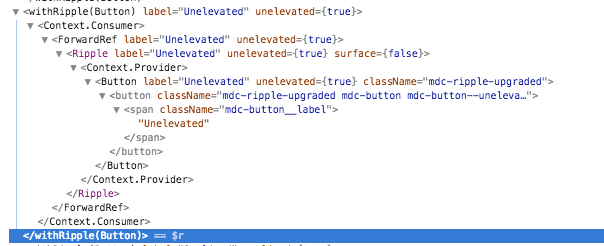
The Unknown component I'm still not sure about. Per the screenshot above, the displayName is being use properly. I still don't think the polyfill update will fix this issue, but you never know.
Release should be up by Monday. This one is taking a bit longer since MDC just converted over to Typescript which has had a major (positive) impact on RMWC.
jamesmfriedman
on 7 Mar 2019
This should be fixed in the 5.2.0-alpha.0. Please verify if you get a chance.
jamesmfriedman
on 8 Mar 2019
By "this" you mean the Unknow button?
I'll try it out.
panmau
on 8 Mar 2019
In the alpha, your non-typed "export" error from the polyfill should be fixed.
I'm still not aware of what would be causing the Unknown Button Issue. If the polyfill fixes it, great. If not we'll have to see how we can get a repro.
jamesmfriedman
on 8 Mar 2019
My repository reproduces this error though. Couldn't you reproduce it?
(Didn't come around trying the new release yet)
panmau
on 8 Mar 2019
No, I cannot reproduce it. Please add a repro case in the code sandbox, or in a publicly accessible repository. At the very least, paste a more comprehensive example.
jamesmfriedman
on 8 Mar 2019
I linked you a publicly accessible repository before. I can link to it again:
https://github.com/maracuja-juice/rmwc-error-reproduction
panmau
on 8 Mar 2019
I missed that before, thanks! Will check it out.
jamesmfriedman
on 8 Mar 2019
Just double checked this against rmwc@next and it is working correctly now
- You have to use
import rmwcTestPolyfill from '@rmwc/base/dist/test-polyfill'; - I updated this in the docs now
- The snapshot test is passing as well
- Cutting an official release shortly
jamesmfriedman
on 11 Mar 2019
What do you mean by passing? Is the Button in your snapshot written as "Button" or "Unknown" ?
panmau
on 11 Mar 2019
- I cloned the repo
- Ran
npm i - Ran
npm i rmwc@next --save - Updated the polyfill import path as mentioned above
- Ran
npm test
Tests pass green. Did I miss something?
jamesmfriedman
on 11 Mar 2019
If the snapshot display issue was fixed, the test should actually go red because in the initially generated snapshot from the thest, the Button is defined as "Unknown". So that means that the updated release didn't solve the issue.
I renamed the issue to reflect better what my actual issue is and suggest to reopen it. (I found the other problem while searching for the solution to the "Unknown" button issue.)
panmau
on 12 Mar 2019
Sorry for all the confusion, and thank you for clarifying. Could you hit me up on discord so we can have a quick back and forth on this?
jamesmfriedman
on 12 Mar 2019
Sure. I have a discord account but not sure how to contact you there. Can't find any references to a discord in the readme.md and contributing.md.
panmau
on 12 Mar 2019
Which is precisely why this now exists :)
jamesmfriedman
on 12 Mar 2019
Dug as deeply as I could into this issue. Seems to be related to issues with Enzyme when using React.Portal not properly using the displayName, or the name of the function as documented in the React Docs. I'm going to leave this open for reference, but I would definitely suggest opening up an issue with the Enzyme team.
jamesmfriedman
on 28 Mar 2019
As an update:
With Jest 24 it is required to use a custom serializer for this Enzyme testing so we switched over to enzyme-to-json which proved to have the following advantages:
1: The Snapshots are a lot clearer!
2: This issue is gone.
panmau
on 18 Apr 2019
Woot woot! Great to hear.
jamesmfriedman
on 18 Apr 2019
Related issues
 alecchisi
·
5Comments
alecchisi
·
5Comments
 UFOMelkor
·
6Comments
UFOMelkor
·
6Comments
 danielmahon
·
3Comments
danielmahon
·
3Comments
 Anwardo
·
6Comments
Anwardo
·
6Comments
 istisiki
·
4Comments
istisiki
·
4Comments