Ripgrep: --color always + -v + pipe don't work as expected
What version of ripgrep are you using?
Replace this text with the output of rg --version.
ripgrep 12.1.1 (rev 7cb211378a)
-SIMD -AVX (compiled)
+SIMD +AVX (runtime)
How did you install ripgrep?
What operating system are you using ripgrep on?
5.7.15-1-MANJARO
Describe your bug.
I got a directory containing files with both SendMessage and SendMessageEx strings.
I need to search the result of only SendMessge, so the SendMessageEx lines won't be printed. (I can use -w for this special case, but this case is just an example for this issue)
I use rg SendMessage . | rg -v SendMessageEx, it works OK, but it contains no color for the result, so I use
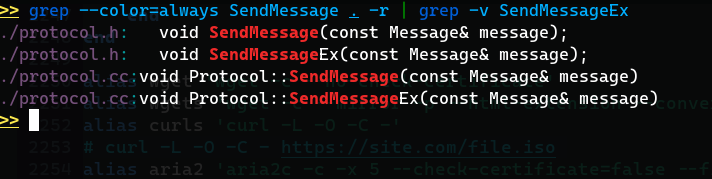
rg --color always SendMessage . | rg -v SendMessageEx, but this doesn't work as expected, the SendMessageEx will still be listed.
What are the steps to reproduce the behavior?
Check #### Describe your bug. part
What is the actual behavior?
Check #### Describe your bug. part
Output with --debug:
~~~
rg --debug --color always SendMessage . | rg -v SendMessageEx
DEBUG|grep_regex::literal|crates/regex/src/literal.rs:58: literal prefixes detected: Literals { lits: [Complete(SendMessage)], limit_size: 250, limit_class: 10 }
DEBUG|globset|crates/globset/src/lib.rs:431: built glob set; 0 literals, 0 basenames, 12 extensions, 0 prefixes, 0 suffixes, 0 required extensions, 0 regexes
DEBUG|globset|crates/globset/src/lib.rs:431: built glob set; 0 literals, 0 basenames, 12 extensions, 0 prefixes, 0 suffixes, 0 required extensions, 0 regexes
DEBUG|globset|crates/globset/src/lib.rs:431: built glob set; 0 literals, 0 basenames, 12 extensions, 0 prefixes, 0 suffixes, 0 required extensions, 0 regexes
DEBUG|globset|crates/globset/src/lib.rs:431: built glob set; 0 literals, 0 basenames, 12 extensions, 0 prefixes, 0 suffixes, 0 required extensions, 0 regexes
DEBUG|globset|crates/globset/src/lib.rs:431: built glob set; 0 literals, 0 basenames, 12 extensions, 0 prefixes, 0 suffixes, 0 required extensions, 0 regexes
DEBUG|globset|crates/globset/src/lib.rs:431: built glob set; 34 literals, 61 basenames, 0 extensions, 0 prefixes, 0 suffixes, 0 required extensions, 0 regexes
./protocol.cc:void Protocol::SendMessage(const Message& message)
./protocol.cc:void Protocol::SendMessageEx(const Message& message)
./protocol.h: void SendMessage(const Message& message);
./protocol.h: void SendMessageEx(const Message& message);
~~~
Image with colors:

I noticed that grep works the way with the same problem, now I'm not sure I used it correctly:
What is the expected behavior?
rg --color always SendMessage . | rg -v SendMessageEx
-v should not print SendMessageEx, --color here works correctly.
 c02y
c02y
All 3 comments
This is expected behavior, both tools print ANSI escape sequences at the match bounds to produce colored output,
like printf '\e[1m\e[31mSendMessage\e[0mEx'
To work around that you can either match the escape sequences in you regex, or maybe just tweak your regex so you won't need to. Try
rg --color always 'SendMessage\w*' . | rg -v SendMessageEx
 krobelus
on 2 Sep 2020
krobelus
on 2 Sep 2020
The traditional solution (with grep) would be to run it a third time to re-add the colours at the end:
rg SendMessage | rg -v SendMessageEx | rg SendMessage
In this example you could also use PCRE's look-around functionality to avoid matching the bad data in the first place:
rg -P 'SendMessage(?!Ex)'
But look-around (especially look-behind) has some limitations that may make it less useful in other cases
And then the other option is to adjust either the first or second pattern to work around the escape sequences, like @krobelus said
 okdana
on 2 Sep 2020
okdana
on 2 Sep 2020
Thanks, as told, it it an expected behavior, I'll just use those workarounds.
c02y
on 2 Sep 2020
Related issues
 Deewiant
·
3Comments
Deewiant
·
3Comments
 andschwa
·
3Comments
andschwa
·
3Comments
 hauleth
·
3Comments
hauleth
·
3Comments
 crumblingstatue
·
3Comments
crumblingstatue
·
3Comments
 Offpics
·
3Comments
Offpics
·
3Comments
Most helpful comment
The traditional solution (with
grep) would be to run it a third time to re-add the colours at the end:In this example you could also use PCRE's look-around functionality to avoid matching the bad data in the first place:
But look-around (especially look-behind) has some limitations that may make it less useful in other cases
And then the other option is to adjust either the first or second pattern to work around the escape sequences, like @krobelus said