Bug Report
Describe the Bug
I've installed the ring plugin and the client api but I don't see any difference in homekit or homebridge.
To Reproduce
Here's my config:
    {
        "refreshToken": "xxxxxxxxxxxx",
        "debug": true,
        "cameraStatusPollingSeconds": 30,
        "cameraDingsPollingSeconds": 5,
        "platform": "Ring"
    }
Expected behavior
I'm hoping to be able to snooze my chime for a duration with this.
Screenshots/Logs
If applicable, add screenshots and log output to help explain your problem.
Additional context
Add any other context about the problem here.
Environment
- OS: [Raspbian]
- Node.js: [e.g. 12.14.1]
- NPM: [12.18.2]
- ring-client-api: [latest, just installed]
 mreassassin
All 12 comments
There isn't currently a _configuration option_ to set how long you want the chime to stay on in the plugin, but this _is_ possible from HomeKit. If you turn on snooze as part of an automation that turns on the snooze switch, you can set the Turn Off option to something like After 30 minutes, which effectively snoozes for 30 minutes. Does that accomplish what you need? If not, could you explain the situation that you are trying to automate that requires different snooze durations?
 dgreif
on 8 Aug 2020
dgreif
on 8 Aug 2020
I’ve got it working with an Alexa routine but was hoping to set the duration in the HomeKit device itself. Is that possible?
Like, instead of an on/off switch (which lasts for 24hrs before turning back off) having a slider to set the duration would be awesome!
Currently I have this set on a schedule that lines up with my daughters nap time. Then it turns off snooze after 2.5 hrs. I’ve also set up another routine that will allow me to manually trigger the snooze for 2.5 hours by saying “Alexa, the baby is taking a nap”.
Would love to hear my options within HomeKit and Siri. I’ve read on here people able to do that.
mreassassin
on 8 Aug 2020
Looks like Scenes don't support the Turn Off After option, only automations do. You could create a dummy switch using https://www.npmjs.com/package/homebridge-dummy which you turn on with siri. Then use that dummy switch turning on to trigger an automation that turns on your snooze switch for 2.5 hours with the Turn Off After feature in HomeKit. Let me know if you need more clarity on that. There is also a PR open that adds a thermostat control for dialing the duration, but it's kind of at a stand still currently - see #399.
dgreif
on 8 Aug 2020
For automations I need home pod, iPad or Apple TV right?
I don’t have those. Or is there another way to setup automations in HomeKit?
mreassassin
on 8 Aug 2020
Ahh, interesting. Didn't think about scenarios where you don't have a home hub. Do you see the Automations tab in HomeKit? You may still be able to use them if it's all triggered from your phone, but this is new territory for me.
@dxdc are you still wanting to move forward with the thermostat or valve approach for snooze duration?
dgreif
on 8 Aug 2020
This is what I see.
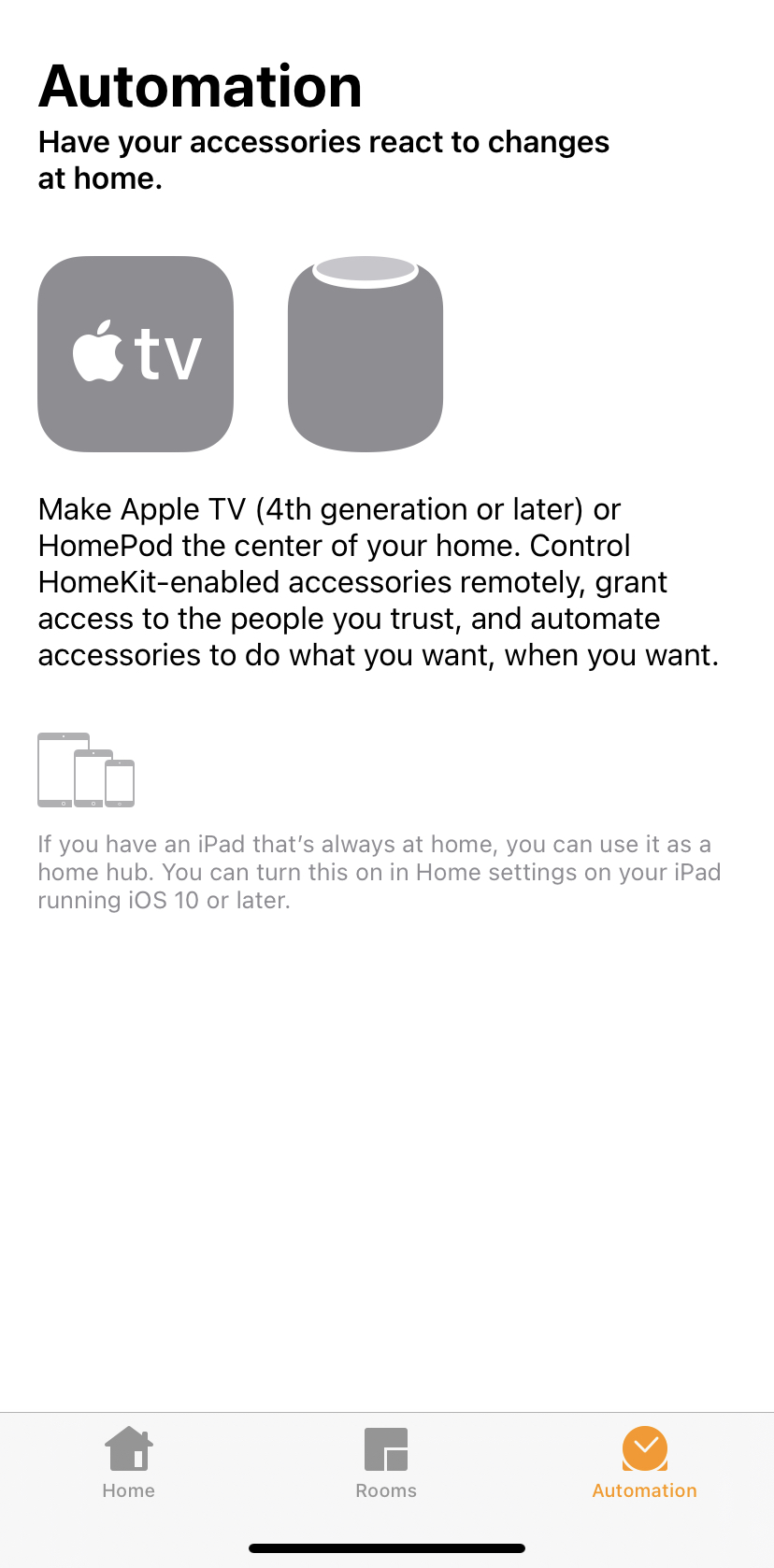
Back when there was stringify i had an automation in there so you’re probably right!
mreassassin
on 8 Aug 2020
Well that's definitely limiting 😄. I think #399 is probably the solution to your issue then. I'll chat with @dxdc and try to get it merged soon.
dgreif
on 9 Aug 2020
Thanks for the ping! Yes I'm still interested. Will try to get it finished this week.
I thought you preferred the valve approach vs. thermostat? I'm fine with it. Mainly, I just need a way to be able to control it externally. I'll redo it to leave the same existing switch alone but add a new "valve" etc. which also reflects the snooze state.
 dxdc
on 10 Aug 2020
dxdc
on 10 Aug 2020
Thanks for looking into it. I can't remember if there were some issues with the cable approach, but I think that would be the best end experience as long as you can specify a duration when creating a scene. In this case, ideally a nap scene could be preset to 2.5 hours.
dgreif
on 10 Aug 2020
Oh, I get it. Well, one problem then. The thermostat will be the only way to go, because you cannot use valves for automated scenes. I just created a valve accessory and tested it.
I'm also not sure we'll be able to set fractional degrees but we can try.
with the cable approach
Did you mean thermostat?
dxdc
on 10 Aug 2020
with the cable approach
Meant the valve approach. I think the lack of ability to set the duration was part of the problem.
I'm wondering if maybe we should try a different approach since the F vs C is still a problem with the termostat, and fractional degrees might be as well. What about a config option that just adds extra switches for specific durations? So in this case it would be something like:
"snoozeDurations": [150] - add an additional switch that turns on snooze for 150 minutes (2.5 hrs).
Seems like most users have a specific scenario in mind, with a specific duration they will always want to use. If we make it an array, then they can cover multiple scenarios. Thoughts on that approach?
dgreif
on 10 Aug 2020
Makes sense. I don't know about creating switches for each snooze duration, seems a bit overkill and may cause issues if users modify their time limits later, which I know was something you wanted to avoid.
(Also, not sure if this is would cause accessory limits for HB if users add a lot of different switches).
The thermostat thing is solvable, although a little clunky -- just requires the user specifying F or C in config. The only bad part about is the rounding since we can't get enough significant digits and HB works in Celsius on the backend. So, it adds a small error for certain time intervals.
I experimented with the brightness control also, in an earlier iteration. We could create a brightness control for minutes and another one for hours? Trying to think of a clever way to implement this that is also suitable for scenes. So, you could set hours to 1% (= 1 hour) and minutes to 30% (=30 min) for example.
One other crazy idea. Have you ever tried to overwrite units (e.g.,
export class Volume extends Characteristic {

  static readonly UUID: string = '00000119-0000-1000-8000-0026BB765291';

  constructor() {
    super('Volume', Volume.UUID);
    this.setProps({
      format: Formats.UINT8,
      unit: Units.PERCENTAGE,
      maxValue: 100,
      minValue: 0,
      minStep: 1,
      perms: [Perms.READ, Perms.WRITE, Perms.NOTIFY]
    });
    this.value = this.getDefaultValue();
  }
}
Could we set maxValue to 1440 and null out percentage?
dxdc
on 10 Aug 2020
Related issues
 LordZork
·
5Comments
LordZork
·
5Comments
 mrtekkid
·
3Comments
mrtekkid
·
3Comments
 divemasterjm
·
7Comments
divemasterjm
·
7Comments
 donavanbecker
·
7Comments
donavanbecker
·
7Comments
 Bullet55NL
·
6Comments
Bullet55NL
·
6Comments