Ring: Ring devices not reappearing in Homebridge
In the last couple days I found that my Ring devices stopped working with Homebridge. When I checked the logs there were a lot of failures connecting with various services. I ended up having to update all the different Homebridge software and plugins. After doing so, the Ring devices still did not work. They appeared, but if I went to arm the alarm it would say it was armed but it wouldn't really be. And if I disarmed the alarm it would say "Disarming" forever and never do anything. So I removed the Ring devices, uninstalled home bridge-ring, rebooted, then reinstalled home bridge-ring. I generated a new token using Homebridge UI X Login, confirmed the config was updated, and then rebooted. Now I can't get any ring devices to appear in Home at all. I tried rebooting Homebridge multiple times, rebooted the Ring base station, and rebooted my Homekit hub (HomePod). Still no luck. This issue begin after a series of power outages and internet service loss over a period of a couple days. I'm also using homebridge-isy-js and all my Insteon devices are working as usual, so I know Homebridge is working. Here is the startup log from Homebridge UI X.
[6/27/2020, 9:45:33 AM] Loaded plugin: [email protected]
[6/27/2020, 9:45:33 AM] Registering platform 'homebridge-config-ui-x.config'
[6/27/2020, 9:45:33 AM] ---
[6/27/2020, 9:45:33 AM] Loaded plugin: [email protected]
[6/27/2020, 9:45:33 AM] Registering accessory 'homebridge-dummy.DummySwitch'
[6/27/2020, 9:45:33 AM] ---
[6/27/2020, 9:45:34 AM] Loaded plugin: [email protected]
[6/27/2020, 9:45:34 AM] Registering platform 'homebridge-isy-js.isy-js'
[6/27/2020, 9:45:34 AM] ---
[6/27/2020, 9:45:38 AM] [Config] Homebridge Config UI X v4.23.1 is listening on :: port 8581
[6/27/2020, 9:45:37 AM] Loaded plugin: [email protected]
[6/27/2020, 9:45:37 AM] Registering platform 'homebridge-ring.Ring'
[6/27/2020, 9:45:37 AM] ---
[6/27/2020, 9:45:37 AM] Loading 3 platforms...
[6/27/2020, 9:45:37 AM] [isy-js] Initializing isy-js platform...
[6/27/2020, 9:45:37 AM] [Ring] Initializing Ring platform...
[6/27/2020, 9:45:37 AM] [Config] Initializing config platform...
[6/27/2020, 9:45:37 AM] [Config] Running in Service Mode
[6/27/2020, 9:45:37 AM] Loading 2 accessories...
[6/27/2020, 9:45:37 AM] [Arrived Home] Initializing DummySwitch accessory...
[6/27/2020, 9:45:37 AM] [Left Home] Initializing DummySwitch accessory...
(node:876) ExperimentalWarning: The dns.promises API is experimental
[6/27/2020, 9:45:40 AM] Initializing platform accessory 'FanLinc-Fan'...
[6/27/2020, 9:45:40 AM] Initializing platform accessory 'Fan Light'...
[6/27/2020, 9:45:40 AM] Initializing platform accessory 'Ceiling Fan'...
Setup Payload:
X-HM://0023NJY59LF5E
Enter this code with your HomeKit app on your iOS device to pair with Homebridge:
┌────────────┐
│ 111-22-333 │
└────────────┘
[6/27/2020, 9:45:41 AM] Homebridge is running on port 51826.
 flmmkr1
All 32 comments
I don’t see anything in the logs that looks out of the ordinary. There should be a line that specified how many locations and devices it is registering. Can you add some more of the logs after it lists you homebridge code?
 dgreif
on 27 Jun 2020
dgreif
on 27 Jun 2020
(node:876) ExperimentalWarning: The dns.promises API is experimental
Maybe a clue here, something regarding the same kind of failure as #382?
@flmmkr1 do you have any ring devices cached in your accessories/cachedAccessories file? If you do, and you install jq, this will help to purge them out.
#!/bin/sh
## NOTE:: STOP HOMEBRIDGE BEFORE RUNNING THESE COMMANDS
cat cachedAccessories | jq 'del(.[] | select (.plugin == "homebridge-ring"))' -c > cachedAccessories.new
mv cachedAccessories cachedAccessories.bak
mv cachedAccessories.new cachedAccessories
 dxdc
on 30 Jun 2020
dxdc
on 30 Jun 2020
I am having the same issue trying to connect my Ring Doorbell to Homebridge. I am using 2FA with Ring and also cleared all devices logged in on Ring.com. I used the Homebridge Plugin installer and authenticated my Ring account and added the token and restarted Homebridge.
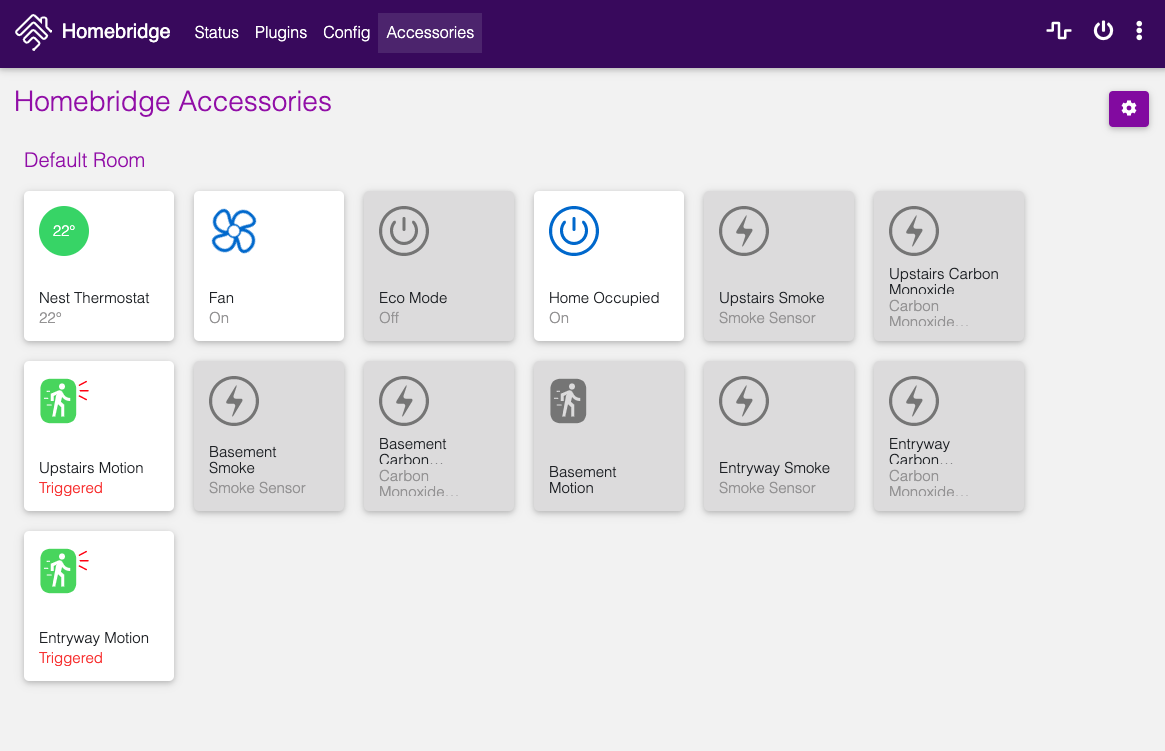
Like @flmmkr1 I got my Nest to add correctly but Ring doesn't add any accessories.
[6/30/2020, 8:39:06 AM] Homebridge is running on port 51932.
[6/30/2020, 8:41:34 AM] [Config] Changes to config.json saved.
[6/30/2020, 8:41:34 AM] [Config] Running Command: npm uninstall homebridge-ring
[6/30/2020, 8:41:49 AM] [Config] Running Command: npm install homebridge-ring@latest
[6/30/2020, 8:42:43 AM] [Config] Changes to config.json saved.
[6/30/2020, 8:42:45 AM] [Config] Changes to config.json saved.
[6/30/2020, 8:42:50 AM] [Config] Homebridge restart request received
[6/30/2020, 8:42:50 AM] [Config] UI / Bridge settings have not changed; only restarting Homebridge process
[6/30/2020, 8:42:50 AM] [HB Supervisor] Sending SIGTERM to Homebridge
[6/30/2020, 8:42:50 AM] Got SIGTERM, shutting down Homebridge...
[6/30/2020, 8:42:55 AM] [HB Supervisor] Homebridge Process Ended. Code: 143, Signal: null
[6/30/2020, 8:43:00 AM] [HB Supervisor] Restarting Homebridge...
[6/30/2020, 8:43:00 AM] [HB Supervisor] Starting Homebridge with extra flags: -I
[6/30/2020, 8:43:00 AM] [HB Supervisor] Started Homebridge v1.1.1 with PID: 75572
[6/30/2020, 8:43:00 AM] Loaded config.json with 0 accessories and 3 platforms.
[6/30/2020, 8:43:00 AM] ---
[6/30/2020, 8:43:01 AM] Loaded plugin: [email protected]
[6/30/2020, 8:43:01 AM] Registering platform 'homebridge-config-ui-x.config'
[6/30/2020, 8:43:01 AM] ---
[6/30/2020, 8:43:01 AM] Loaded plugin: [email protected]
[6/30/2020, 8:43:01 AM] Registering accessory 'homebridge-meross.Meross'
[6/30/2020, 8:43:01 AM] ---
[6/30/2020, 8:43:01 AM] Loaded plugin: [email protected]
[6/30/2020, 8:43:01 AM] Registering platform 'homebridge-nest.Nest'
[6/30/2020, 8:43:01 AM] ---
[6/30/2020, 8:43:02 AM] Loaded plugin: [email protected]
[6/30/2020, 8:43:02 AM] Registering platform 'homebridge-ring.Ring'
[6/30/2020, 8:43:02 AM] ---
[6/30/2020, 8:43:02 AM] Loading 3 platforms...
[6/30/2020, 8:43:02 AM] [Config] Initializing config platform...
[6/30/2020, 8:43:02 AM] [Config] Running in Service Mode
[6/30/2020, 8:43:02 AM] [Nest] Initializing Nest platform...
[6/30/2020, 8:43:02 AM] [Nest] Fetching Nest devices.
[6/30/2020, 8:43:02 AM] [Ring] Initializing Ring platform...
[6/30/2020, 8:43:06 AM] [Nest] initing thermostat "Nest Thermostat": deviceId: 01AA02AB171206S6 structureId: 57326480-ba17-11e1-8fbc-12313926e79a
[6/30/2020, 8:43:06 AM] [Nest] initing home_away_sensor "Home Occupied": deviceId: 57326480-ba17-11e1-8fbc-12313926e79a structureId: 57326480-ba17-11e1-8fbc-12313926e79a
[6/30/2020, 8:43:06 AM] [Nest] initing protect "Upstairs": deviceId: 18B43000002D56C6 structureId: 57326480-ba17-11e1-8fbc-12313926e79a
[6/30/2020, 8:43:06 AM] [Nest] initing protect "Basement": deviceId: 18B43000002D60DC structureId: 57326480-ba17-11e1-8fbc-12313926e79a
[6/30/2020, 8:43:06 AM] [Nest] initing protect "Entryway": deviceId: 18B43000002FBFE9 structureId: 57326480-ba17-11e1-8fbc-12313926e79a
[6/30/2020, 8:43:06 AM] Initializing platform accessory 'Nest Thermostat'...
[6/30/2020, 8:43:06 AM] Initializing platform accessory 'Home Occupied'...
[6/30/2020, 8:43:06 AM] Initializing platform accessory 'Upstairs'...
[6/30/2020, 8:43:06 AM] Initializing platform accessory 'Basement'...
[6/30/2020, 8:43:06 AM] Initializing platform accessory 'Entryway'...
Setup Payload:
X-HM://0024HSREDE20I
Enter this code with your HomeKit app on your iOS device to pair with Homebridge:
┌────────────┐
│ 619-21-973 │
└────────────┘
[6/30/2020, 8:43:06 AM] Homebridge is running on port 51932.
 jyw76
on 30 Jun 2020
jyw76
on 30 Jun 2020
I just checked my log and noticed this
[6/30/2020, 9:10:16 AM] [Ring] Request for machine id timed out. Falling back to random session id
[6/30/2020, 9:26:37 AM] [Ring] Failed to reach Ring server at https://oauth.ring.com/oauth/token. read ECONNRESET. Trying again in 5 seconds...
I unlinked and reconnected with new token
Any other suggestions?
jyw76
on 30 Jun 2020
[6/30/2020, 9:10:16 AM] [Ring] Request for machine id timed out. Falling back to random session id
that is a normal message.
what does ping oauth.ring.com produce for you?
dxdc
on 30 Jun 2020
@flmmkr1 can you try again now that it has been 24 hours? Probably best to try it from ring-auth-cli so that you can see any errors that show up.
@jyw76 I agree with @dxdc, your issue definitely looks network related with that ECONNRESET error in there
dgreif
on 30 Jun 2020
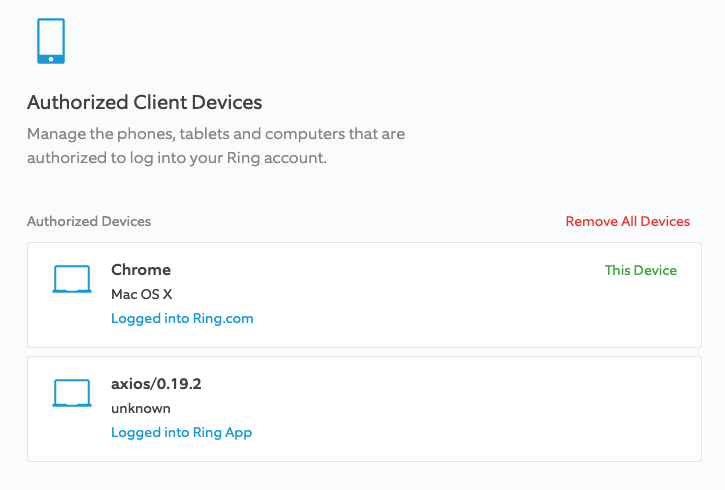
@dxdc & @dgreif I have no issues on my network as I can log into ring.com with no issues and the nest is connecting fine. You can see that the authorized accounts include the Homebridge plugin.
jyw76
on 30 Jun 2020
@dxdc this is what I received back in Terminal when I ping oauth.ring.com
Jasons-Mac-mini:~ jasonwilson$ ping oauth.ring.com
PING oauth.ring.com.cdn.cloudflare.net (104.17.128.1): 56 data bytes
64 bytes from 104.17.128.1: icmp_seq=0 ttl=57 time=15.565 ms
jyw76
on 30 Jun 2020
I am having a similar problem. But I think I got here differently. I removed all cached accessories. and then rest Homebridge and removed it from Homekit. When I try to re-add the Homebridge adds just fine, but none of my Ring devices show back up.
 arejay73
on 30 Jun 2020
arejay73
on 30 Jun 2020
Ok, it finally hit me last night with an issue that someone else opened. Do you have a Ring Alarm or smart lighting hub that is in this location but not currently connected to the internet? The plugin will wait until all Ring hubs are online because it can't query for their devices when they are offline. If this is your situation, either bring the hub back online or remove it from your Ring account
dgreif
on 1 Jul 2020
I have a Ring Alarm system. When I going the ring app I can see the current status of all the ring alarm devices including the ring doorbell. I can view a live video feed as well. But Homekit does not seems to see these devices when I add it to HomeKit.
arejay73
on 1 Jul 2020
@dgreif no all i have is a ring doorbell and chime. 1st gen for both
jyw76
on 2 Jul 2020
Can you check your config and see if you have "locationIds": [] in there? if so, delete it.
dgreif
on 2 Jul 2020
@arejay73 @jyw76 any updates?
dgreif
on 8 Jul 2020
I only have the following in my config for ring platform.
refreshToken
platform
No locationIds
arejay73
on 10 Jul 2020
@arejay73 what is your version of node? (i.e., node -v). Try updating it to v10.X or v12.X.
(node:876) ExperimentalWarning: The dns.promises API is experimental
This line might be a clue. See: #382.
dxdc
on 10 Jul 2020
According to Homebridge
Node.js Version: v12.1.0
Npm Version: v6.14.4
arejay73
on 10 Jul 2020
Try updating to node 12.18.2. The other thing that often causes this scenario is if you have a ring alarm or a ring smart lighting (beams) hub that is part of this location on your Ring account, but isn't currently online. If that's the case, you would see something further down in the logs about it waiting for the hub to come online
dgreif
on 10 Jul 2020
still not working?
I only have a ring doorbell 1st gen.
Nothing too complicated
jyw76
on 10 Jul 2020
Did you update node and npm? what versions are you running
dxdc
on 10 Jul 2020
Node.js Version | v12.18.1
NPM Version | v6.14.5
jyw76
on 10 Jul 2020
did you restart hb after the node update?
dxdc
on 10 Jul 2020
I have and updated it to
Node.js Version | v12.18.2
-- | --
v6.14.5
Still no ring doorbell showing up.
jyw76
on 10 Jul 2020
You may want to try:
- updating ring plugin to latest version (if you haven't already)
- add
debugto ring config - shut down hb
- clear cached accessories for ring devices
- restart and paste ring logs
dxdc
on 10 Jul 2020
[7/10/2020, 2:07:58 PM] Homebridge is running on port 51932.
[7/10/2020, 2:13:24 PM] [Config] Changes to config.json saved.
[7/10/2020, 2:14:07 PM] [Config] Sent request to clear cached accesories to hb-service
[7/10/2020, 2:14:07 PM] [HB Supervisor] Sending SIGTERM to Homebridge
[7/10/2020, 2:14:07 PM] Got SIGTERM, shutting down Homebridge...
[7/10/2020, 2:14:10 PM] [Config] Homebridge restart request received
[7/10/2020, 2:14:10 PM] [Config] UI / Bridge settings have not changed; only restarting Homebridge process
[7/10/2020, 2:14:10 PM] [HB Supervisor] Sending SIGTERM to Homebridge
[7/10/2020, 2:14:12 PM] [HB Supervisor] Homebridge Process Ended. Code: 143, Signal: null
[7/10/2020, 2:14:17 PM] [HB Supervisor] Restarting Homebridge...
[7/10/2020, 2:14:17 PM] [HB Supervisor] Starting Homebridge with extra flags: -I
[7/10/2020, 2:14:17 PM] [HB Supervisor] Started Homebridge v1.1.1 with PID: 98238
[7/10/2020, 2:14:17 PM] [HB Supervisor] Sending SIGKILL to Homebridge
[7/10/2020, 2:14:17 PM] [HB Supervisor] Homebridge Process Ended. Code: null, Signal: SIGKILL
[7/10/2020, 2:14:22 PM] [HB Supervisor] Restarting Homebridge...
[7/10/2020, 2:14:22 PM] [HB Supervisor] Starting Homebridge with extra flags: -I
[7/10/2020, 2:14:22 PM] [HB Supervisor] Started Homebridge v1.1.1 with PID: 98239
[7/10/2020, 2:14:23 PM] Loaded config.json with 0 accessories and 3 platforms.
[7/10/2020, 2:14:23 PM] ---
[7/10/2020, 2:14:23 PM] Loaded plugin: [email protected]
[7/10/2020, 2:14:23 PM] Registering platform 'homebridge-config-ui-x.config'
[7/10/2020, 2:14:23 PM] ---
[7/10/2020, 2:14:23 PM] Loaded plugin: [email protected]
[7/10/2020, 2:14:23 PM] Registering accessory 'homebridge-meross.Meross'
[7/10/2020, 2:14:23 PM] ---
[7/10/2020, 2:14:24 PM] Loaded plugin: [email protected]
[7/10/2020, 2:14:24 PM] Registering platform 'homebridge-nest.Nest'
[7/10/2020, 2:14:24 PM] ---
[7/10/2020, 2:14:24 PM] Loaded plugin: [email protected]
[7/10/2020, 2:14:24 PM] Registering platform 'homebridge-ring.Ring'
[7/10/2020, 2:14:24 PM] ---
[7/10/2020, 2:14:24 PM] Loading 3 platforms...
[7/10/2020, 2:14:24 PM] [Config] Initializing config platform...
[7/10/2020, 2:14:24 PM] [Config] Running in Service Mode
[7/10/2020, 2:14:24 PM] [Nest] Initializing Nest platform...
[7/10/2020, 2:14:24 PM] [Nest] Fetching Nest devices.
[7/10/2020, 2:14:24 PM] [Ring] Initializing Ring platform...
[7/10/2020, 2:14:28 PM] [Nest] initing thermostat "Nest Thermostat": deviceId: 01AA02AB171206S6 structureId: 57326480-ba17-11e1-8fbc-12313926e79a
[7/10/2020, 2:14:28 PM] [Nest] initing home_away_sensor "Home Occupied": deviceId: 57326480-ba17-11e1-8fbc-12313926e79a structureId: 57326480-ba17-11e1-8fbc-12313926e79a
[7/10/2020, 2:14:28 PM] [Nest] initing protect "Upstairs": deviceId: 18B43000002D56C6 structureId: 57326480-ba17-11e1-8fbc-12313926e79a
[7/10/2020, 2:14:28 PM] [Nest] initing protect "Basement": deviceId: 18B43000002D60DC structureId: 57326480-ba17-11e1-8fbc-12313926e79a
[7/10/2020, 2:14:28 PM] [Nest] initing protect "Entryway": deviceId: 18B43000002FBFE9 structureId: 57326480-ba17-11e1-8fbc-12313926e79a
[7/10/2020, 2:14:28 PM] Initializing platform accessory 'Nest Thermostat'...
[7/10/2020, 2:14:28 PM] Initializing platform accessory 'Home Occupied'...
[7/10/2020, 2:14:28 PM] Initializing platform accessory 'Upstairs'...
[7/10/2020, 2:14:28 PM] Initializing platform accessory 'Basement'...
[7/10/2020, 2:14:28 PM] Initializing platform accessory 'Entryway'...
Setup Payload:
X-HM://0024EVPIMOLP7
Enter this code with your HomeKit app on your iOS device to pair with Homebridge:
┌────────────┐
│ 570-20-654 │
└────────────┘
[7/10/2020, 2:14:28 PM] Homebridge is running on port 51932.
jyw76
on 10 Jul 2020
jyw76
on 10 Jul 2020
@jyw76 what does your error log look like? The config-x doesn't show error logs in their default configuration, I don't think.
dxdc
on 10 Jul 2020
@flmmkr1 @jyw76 any updates? There have been a number of error reports from users that were not on the latest version of node 12 or 14. Also seen users struggling if their alarm/beams bridges were offline. Finally, could be "locationIds": [] in your config. Please consider setting "debug": true in your ring platform config as @dxdc suggested, and re-posting your logs. I have nothing to go on at this point.
dgreif
on 13 Jul 2020
@flmmkr1 @jyw76 any updates? I'd like to get this issue closed out
dgreif
on 19 Jul 2020
I gave up. Don’t really need the doorbell on HomeKit
Sent from my iPhone
On Jul 19, 2020, at 12:03 PM, Dusty Greif notifications@github.com wrote:
@flmmkr1 @jyw76 any updates? I'd like to get this issue closed out—
You are receiving this because you were mentioned.
Reply to this email directly, view it on GitHub, or unsubscribe.
jyw76
on 19 Jul 2020
Updated to Homebridge 1.1.1 and it all seems to be working now. But I noticed my system also updated to MacOS 10.15.6. So I am not sure which one fixed the problem.
arejay73
on 23 Jul 2020
This issue seems to be resolved on the plugin side, with some possible user setup as the culprit. Closing so that it doesn't become a catch-all for future similar issues.
dgreif
on 23 Jul 2020
Related issues
 parchmaf
·
3Comments
parchmaf
·
3Comments
 ryanleesmith
·
4Comments
ryanleesmith
·
4Comments
 benfysh
·
6Comments
benfysh
·
6Comments
 mrtekkid
·
3Comments
mrtekkid
·
3Comments
 onefish2
·
5Comments
onefish2
·
5Comments