Rh-che: Unable to start workspace due to untracked deployment
More details in https://github.com/redhat-developer/che-functional-tests/issues/473
A few namespaces on various clusters are affected:
Error: Failed to run the workspace: "Unrecoverable event occurred: 'FailedCreate', 'Error creating: pods "workspaceagjbf0euhcjaz8e3.dockerimage-5dcc95477f-8tp75" is forbidden: exceeded quota: compute-resources, requested: limits.cpu=4,limits.memory=2147483648, used: limits.cpu=4,limits.memory=2147483648, limited: limits.cpu=6,limits.memory=3Gi', 'workspaceagjbf0euhcjaz8e3.dockerimage-5dcc95477f'"

cleaned kkanova-che and osiotest2-che manually and this should unblock testing. Some differences between 2 cases:
kkanova-chehad only pod and deployment whereasosiotest2-chehad all the resources dedicated to namespaces - deployment, pod, route, svckkanova-che
- Start Time: Fri, 05 Apr 2019 15:10:22 +0000
- Restart Count: 0
osiotest2-che
- Running for 10d
- Restart Count: 0
Basically, we can not proceed with any other investigation until kubernetes.labels.app:"rhche" AND kubernetes.namespace_name:"dsaas-production" returns no results on prod cc: @pbergene
 ibuziuk
All 12 comments
@ibuziuk are these for logs coming in via tenant-log-indirector or rhche (master) itself? Guessing the former.
 pbergene
on 16 Apr 2019
pbergene
on 16 Apr 2019
@pbergene correct rhche (master)
ibuziuk
on 16 Apr 2019
Today, another account became broken. The account is for user osiotest1a on 1a cluster. Even it was only two hours old, I could not get any logs from rhche. The only log which is here is:
{"@timestamp":"2019-04-18T12:28:09.440+00:00","@version":1,"message":"Unable to generate signature keypair for ws workspace4cjpqr46i0h5xadk. Cause: Unable to create signature key pair because referenced workspace with id 'workspace4cjpqr46i0h5xadk' doesn't exist","logger_name":"org.eclipse.che.multiuser.machine.authentication.server.signature.SignatureKeyManager","thread_name":"http-nio-8080-exec-22","level":"ERROR","level_value":40000}
{"@timestamp":"2019-04-18T12:28:09.440+00:00","@version":1,"message":"Failed to load signature keys for ws  workspace4cjpqr46i0h5xadk. Cause: Unable to create signature key pair because referenced workspace with id 'workspace4cjpqr46i0h5xadk' doesn't exist","logger_name":"org.eclipse.che.multiuser.machine.authentication.server.signature.SignatureKeyManager","thread_name":"http-nio-8080-exec-22","level":"ERROR","level_value":40000}
The account kkanova-preview has pod workspacejphawp7usecyocvm.dockerimage running for 2 days now. I removed that manually today to have account for manual tests.
 Katka92
on 18 Apr 2019
Katka92
on 18 Apr 2019
I found similar signature keypair logs in testing workspace starts yesterday on 2a; I'm seeing it in roughly 1/10 starts, but in my case it doesn't result in a broken account and the message is slightly different (key-pair already exists vs. workspace does not exist). The stack trace in my case is:
2019-04-18 03:23:45,628[io-8080-exec-10]  [ERROR] [.m.m.a.s.s.SignatureKeyManager 141]  - Unable to generate signature keypair for ws workspacepl33rpdmp2wolmyn. Cause: Signature key pair for workspace 'workspacepl33rpdmp2wolmyn' already exists
2019-04-18 03:23:45,629[io-8080-exec-10]  [ERROR] [.m.m.a.s.s.SignatureKeyManager 105]  - Failed to load signature keys for ws  workspacepl33rpdmp2wolmyn. Cause: Signature key pair for workspace 'workspacepl33rpdmp2wolmyn' already exists
2019-04-18 03:23:45,630[io-8080-exec-10]  [ERROR] [o.e.c.a.w.s.WorkspaceRuntimes 398]   - Failed to generate machine token for user '3f652e0c-1874-4de5-9c62-602634cb5cc2' and workspace 'workspacepl33rpdmp2wolmyn'. Cause: 'Signature key pair for workspace 'workspacepl33rpdmp2wolmyn' already exists'
org.eclipse.che.api.workspace.server.token.MachineTokenException: Failed to generate machine token for user '3f652e0c-1874-4de5-9c62-602634cb5cc2' and workspace 'workspacepl33rpdmp2wolmyn'. Cause: 'Signature key pair for workspace 'workspacepl33rpdmp2wolmyn' already exists'
    at org.eclipse.che.multiuser.machine.authentication.server.MachineTokenRegistry.createToken(MachineTokenRegistry.java:114)
    at org.eclipse.che.multiuser.machine.authentication.server.MachineTokenRegistry.getOrCreateToken(MachineTokenRegistry.java:79)
    at org.eclipse.che.multiuser.machine.authentication.server.MachineTokenProviderImpl.getToken(MachineTokenProviderImpl.java:77)
    at org.eclipse.che.api.workspace.server.spi.provision.env.MachineTokenEnvVarProvider.get(MachineTokenEnvVarProvider.java:42)
    at org.eclipse.che.api.workspace.server.spi.provision.env.EnvVarEnvironmentProvisioner.provision(EnvVarEnvironmentProvisioner.java:46)
    at org.eclipse.che.api.workspace.server.spi.RuntimeInfrastructure.prepare(RuntimeInfrastructure.java:102)
    at org.eclipse.che.api.workspace.server.WorkspaceRuntimes.startAsync(WorkspaceRuntimes.java:369)
    at
[...]
Caused by: org.eclipse.che.multiuser.machine.authentication.server.signature.SignatureKeyManagerException: Signature key pair for workspace 'workspacepl33rpdmp2wolmyn' already exists
    at org.eclipse.che.multiuser.machine.authentication.server.signature.SignatureKeyManager.getOrCreateKeyPair(SignatureKeyManager.java:107)
    at org.eclipse.che.multiuser.machine.authentication.server.MachineTokenRegistry.createToken(MachineTokenRegistry.java:91)
    ... 88 common frames omitted
Caused by: org.eclipse.che.api.core.ConflictException: Signature key pair for workspace 'workspacepl33rpdmp2wolmyn' already exists
    at org.eclipse.che.multiuser.machine.authentication.server.signature.jpa.JpaSignatureKeyDao.create(JpaSignatureKeyDao.java:65)
    at org.eclipse.che.multiuser.machine.authentication.server.signature.SignatureKeyManager.generateKeyPair(SignatureKeyManager.java:139)
    at org.eclipse.che.multiuser.machine.authentication.server.signature.SignatureKeyManager.getOrCreateKeyPair(SignatureKeyManager.java:102)
    ... 89 common frames omitted
 amisevsk
on 18 Apr 2019
amisevsk
on 18 Apr 2019
Today, another account became broken. The account is for user osiotest1a on 1a cluster
cleanup is done. Some details:
workspace4cjpqr46i0h5xadk.dockerimagedeployment has been run for 5 days- che 6 workspace
eclipse/ubuntu_jdk8image @Katka92 are we testing che 6 periodically against the ubuntu stack / image? if this is the case it need to be changed tocentosone - workspace routes, services has been also cleaned
ibuziuk
on 23 Apr 2019
@ibuziuk The image we are using is che/vertx for our specific project. But we use upstream DialogAbout test, which tests really basics (workspace was started, IDE was loaded) and this is the only one using upstream image (the ubuntu one).
If you think that it can be problem using this image, we can simply remove this test from our suite. I don't think it is worth rewriting as this test doesn't have that much value.
Katka92
on 24 Apr 2019
@Katka92 no need to update anything related to Che 6 test suite. Let's leave it as is. please sync with @rhopp regarding Che 7 test strategy for che.openshift.io to be on the same page. Ideally, we should have the possibility to reuse and run any upstream che 7 test in the downstream.
ibuziuk
on 29 Apr 2019
Since kibana is back I started to investigate the issue again and the data regarding untracked deployments is different now. Zabbix provides the following data atm regarding potential problematic workspaces:
1a- no suspicious workspace deployments detected1b- no suspicious workspace deployments detected2- no suspicious workspace deployments detected2a- 3 suspicious workspace deployments detected (04.20 there was a sufficient drop from 10 to 3)
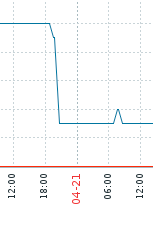
This drop is more or less timely correlated with the 7 beta 3 update @sleshchenko do you happen to know if anything related to improving untracked deployment checker has been added to the upstream betweem beta 2 and beta 3 ?
Basically, atm there are only 3 suspicious deployments on 2a (on other OSIO cluster all workspaces have been idled at some point of time during the last 6 hours)
ibuziuk
on 29 Apr 2019
take a look at workspace pods on 2a:
0/1 Evicted 0 44d
0/1 Evicted 0 12d
1/1 Running 0 11d
0/1 Evicted 0 44d
0/1 Evicted 0 44d
1/1 Running 0 11d
0/1 Terminating 0 2h
1/1 Running 0 11m
0/1 Completed 0 19d
1/1 Running 3 44d
- found no traces about underlying workspaces in kibana
- quite a few of those pods have
Evictedstatus @pbergene @jfchevrette any ideas how workspace pod could end up being in this state for 44 days?
ibuziuk
on 29 Apr 2019
I've encountered the same issue with our osiotest-workspace-2a account running on starter-us-east-2a on production environment.
I have an untracked deployment stuck on my cluster -che namespace:
workspace id: workspaceg2f1712cwtz3ue0i
che-jwtproxy pod docker id: cd94dfedfa536d29e22e3c22bef0d1400edfeadc56c81ca0548dbb4e6ef649b8
ws dev docker id: 4c22c2a248f53b01596dccf303f5c142122c76429dfed1237b43a6807542405a
ws theia docker id: 53b3f6d23c3caf45fb333b4e76193c4c6942537918095671699f17ee0b23da24
The workspace is not visible in the che dashboard and it has been stuck in running status since Sun, 05 May 2019 23:29:59 +0200
I wasn't able to find any information about it in Kibana
This is preventing our test account from starting workspaces described in the HK issue here: https://gitlab.cee.redhat.com/dtsd/housekeeping/issues/2620
 ScrewTSW
on 14 May 2019
ScrewTSW
on 14 May 2019
I took a look into kibana for logs of that workspace (https://logs.dsaas.openshift.com/goto/46a39e0f655490ee9fcf42f40a57bc1e).
From logs it seems, that the workspace never got to "Stopped" state. After log entry "workspace is stopping" follows directly "workspace remove". Usually there is also "workspace is stopped" between them as seen for example on this search: https://logs.dsaas.openshift.com/goto/df07cb54c7166240cc9c6dcf700af990
 rhopp
on 14 May 2019
rhopp
on 14 May 2019
I take a look at zabbix and there are no untracked deployments across 4 clusters anymore. Closing
ibuziuk
on 16 Oct 2019
Related issues
 l0rd
·
4Comments
ibuziuk
·
5Comments
l0rd
·
4Comments
ibuziuk
·
5Comments
 mlabuda
·
10Comments
mlabuda
·
10Comments
 AndrienkoAleksandr
·
8Comments
AndrienkoAleksandr
·
8Comments
 sunix
·
8Comments
sunix
·
8Comments