Rh-che: Investigate image caching on OSIO
From the Che startup timing analysis [1] it seems that sometimes the image pull step takes almost no time (~1 second per image). We need to figure out what causes this to occur and if we can use it to speed up start time for Che workspaces.
With cached images, Che 7 ephemeral workspaces could start in ~15-20 seconds without making additional changes.
[1] https://github.com/redhat-developer/rh-che/issues/1014#issuecomment-437043526
 amisevsk
All 16 comments
There was a suggestion from that we should setup a call with someone from SD team in order to better understand why pulling of images is sometimes fast / slow and triage this issue. It should be possible to do the following tricks:
- force workspace pod to be started always on the same node (cluster admin could tune node selector) and start workspace a few times in order to see if node caching works properly
- get node metrics (CPU & memory consumption) when image pulling / extraction happens. Theoretically, particular node could be under some load which could potentially affect pulling / extraction time.
 ibuziuk
on 13 Nov 2018
ibuziuk
on 13 Nov 2018
@amisevsk could you please provide your findings about correlation between particular node & time required for image pulling in this issue once you finish with this part of investigation?
ibuziuk
on 21 Nov 2018
I've run a start-stop loop for a standard Che 7 workspace over the afternoon today:
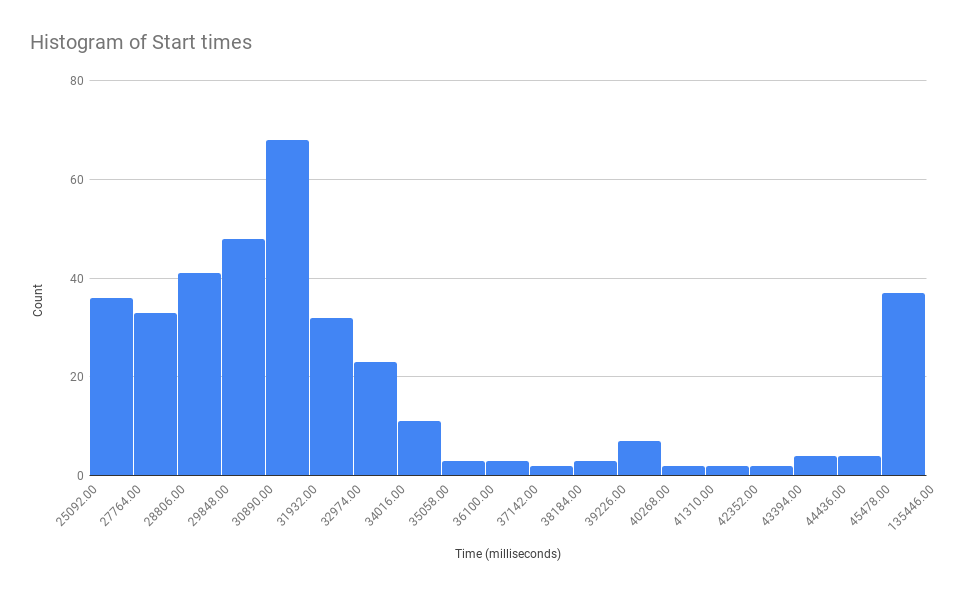
Without more detailed control over node selection / etc, all I can see in the pattern is:
- Workspace start has sped up quite a bit since I started looking at it, perhaps due to caching? 80% of workspace starts take less than 34 seconds.
- Strange thing is that a number of the images used are nightlies, so they should not be cached consistently.
- Out of ~360 workspace starts, only 26 different nodes (as specified by
NodeNamein the pod spec were used. - There are multiple occasions where the first time the workspace starts on a specific node, image pulling takes significantly longer than in subsequent runs (indicating that the image is maybe cached) but there are also occasions where the opposite is true.
- Sometimes things take a lot longer than the average -- maybe due to CPU load at the node level?
- On some occasions, pulling the plugin-broker takes a long time (max: 90 seconds, a few in the 26-40 range). This should not happen, ever, as the plugin broker is a ~10MB image. This may be an issue with my timing, though.
- Long pulls for the
che-theiaimage are quite rare: only 12 out of 360 runs took longer than 5 seconds. This is a quite different situation from when I was looking at https://github.com/redhat-developer/rh-che/issues/1062, where, pulling the theia container first resulting in an almost 20 second pull 12/13 times. I've no idea why this happens, and haven't gotten around to switching the order to check.
Red Hat specific url: https://docs.google.com/spreadsheets/d/1HwZjAAGWz2myFg9HmvXgaMv2W2pLUQqGkKIXO-HeXHM/edit?usp=sharing (Not sure if I can share it more widely)
Some statistics:
| Workspace start | | (Milliseconds) |
| --- | --- | --- |
Min start time | | 25092
Max start time | | 135446
Percentile Start time | 0.1 | 27764
| 0.2 | 28854
| 0.3 | 29815
| 0.4 | 30683
| 0.5 | 31217
| 0.6 | 31732
| 0.7 | 32744
| 0.8 | 34721
| 0.9 | 45373
Average | | 34420
amisevsk
on 22 Nov 2018
for 6. It may be related that theia image is now much smaller
 benoitf
on 22 Nov 2018
benoitf
on 22 Nov 2018
@benoitf I hadn't thought of that, great point!
amisevsk
on 22 Nov 2018
@amisevsk for 1) even if these are nightlies the base layers of the images may be unchanged no and don't need to be re-pulled? for 3) do you mean that you have evidence that pulling an image twice on the same node may take more the second time than the first?
 l0rd
on 4 Dec 2018
l0rd
on 4 Dec 2018
@l0rd Most of the answers are still unclear, and we're still waiting on better access to figure out what's happening in reality.
For 1) You're right, it depends on which layers are the bulk of the size, as 200 MB is 200 MB. My main thing here is that these results are generally a lot faster than when I started looking at it, which is strange -- we had an issue a month ago about each pull taking 20 seconds, consistently. It's hard to know for sure, as there have been cluster upgrades, etc. in the mean time.
For 3), yeah, there are a few instances where a subsequent run on the same node hits a slow pull. It's still unclear what is causing that -- the runs aren't immediately one after another, so it's possible the image is pushed out of the cache by another user. Getting better control over which nodes we use will help in figuring that out.
amisevsk
on 4 Dec 2018
@amisevsk we talked with Mario and it was proposed that we could investigate if 3) is coupled with the image updates. The assumption is the following:
- first workspace startup on the node A - image pulling is fast (image is cached on the node)
- image have been updated
- second workspace startup on the node A - image pulling is slow (pulling of the the latest version of the image slows down the startup)
Do you think it would be possible to check this assumption in the next sprint ? Of course with SD having access to cluster nodes it would be much easier, but looks like currently it is not at all clear when this going to happen.
ibuziuk
on 4 Dec 2018
For 1) Maybe compared to one month ago we now have the base layers cached on almost all nodes. To figure that out you could do some pulling tests outside che. You could try running some pods based on some large images for which you may be quite sure that the base layers are not in the nodes caches.
For 3) As we discussed on mattermost it may be related to the fact that a new version of the image has been released in the meantime. And to figure that out you may use only images that you control (you should be sure that nobody updates them during your tests).
To sum it I think that you should create your image FROM SCRATCH with a simple go application (an hello world or a web server) and a big random file that makes the image large enough (500MB) and use it for your tests instead of using Che itself.
l0rd
on 4 Dec 2018
I did a test using image ksmster/s2i-minimal-notebook (3GB)
#!/bin/bash
set -e

IMAGE=ksmster/s2i-minimal-notebook

while :
do
    time oc run -i -t test2 --image=${IMAGE} -n mloriedo-che --restart=Never --rm=true --command -- wget -qO - https://ifconfig.io/host
    sleep 20
done
At the beginning the start of the container was taking > 1min 70% of the time. After a few hours the start of the container was taking < 10s 90% of the time. Raw output: https://gist.github.com/l0rd/1c388190ae173ca1b9de8ec19890de24
l0rd
on 5 Dec 2018
@l0rd That's great data -- from looking at it, every instance of a long pull (>60 seconds) occurs only the first time that particular node is encountered, with subsequent runs on the same node always being fast. This pretty much makes it clear that caching is at play.
amisevsk
on 5 Dec 2018
We also should explore what are the reasons for an image to be removed from the cache. If another user can easily push out our images from cache we would not have reliable UX
 garagatyi
on 5 Dec 2018
garagatyi
on 5 Dec 2018
@garagatyi We talked about potentially using a daemonset to ensure at least our images are cached. Otherwise UX could be inconsistent every time there's an image update.
I assume images can be pushed out of the cache by being used to run other workspaces. I'm also not clear how this doesn't violate the always pull admission controller, which IIRC is implemented for security reasons.
amisevsk
on 5 Dec 2018
@amisevsk @garagatyi I am not sure images are ever removed from cache. Do you have any evidence of it?
"always pull" of the Admission controller doesn't mean "always download". It should work this way:
- Kubernetes receive a request to run a container based on image I hosted on registry R
- Kubernetes schedule the container to run on node N
- The container runtime on node N sends a request to the registry R to get the image metadata, including the hashes of the layers. If the registry is protected the container runtime needs to provide the credentials in order to get the image metadata.
- Once the container runtime gets the metadata it verifies if it has already pulled some of the image I layers and downloads only those that are not in its local repository yet.
l0rd
on 5 Dec 2018
@l0rd could we close this issue since I think there will be no more investigation related to image caching with SD since it looks like getting node access is still smth. that is not going to happen soon. We are having a separate issue for deamonset PoC already - https://github.com/redhat-developer/rh-che/issues/1152
ibuziuk
on 20 Dec 2018
@ibuziuk ok
l0rd
on 21 Dec 2018
Related issues
 bryantson
·
7Comments
l0rd
·
4Comments
ibuziuk
·
4Comments
bryantson
·
7Comments
l0rd
·
4Comments
ibuziuk
·
4Comments
 mlabuda
·
10Comments
ibuziuk
·
3Comments
mlabuda
·
10Comments
ibuziuk
·
3Comments
Most helpful comment
I did a test using image
ksmster/s2i-minimal-notebook(3GB)At the beginning the start of the container was taking > 1min 70% of the time. After a few hours the start of the container was taking < 10s 90% of the time. Raw output: https://gist.github.com/l0rd/1c388190ae173ca1b9de8ec19890de24