Revolution: Context settings are not appearing in the javascript MODx.config variable in the manager
Bug report
Summary
Context settings are not appearing in the javascript MODx.config variable in the manager
Step to reproduce
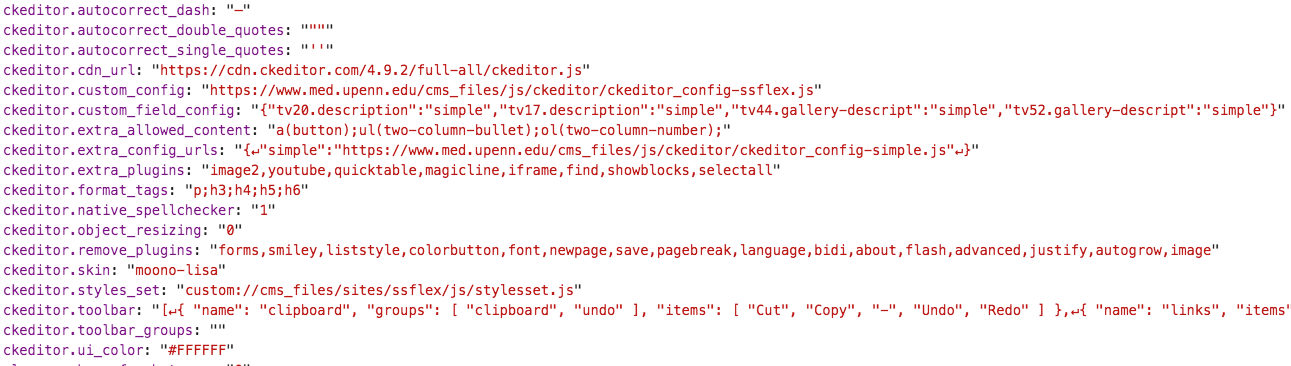
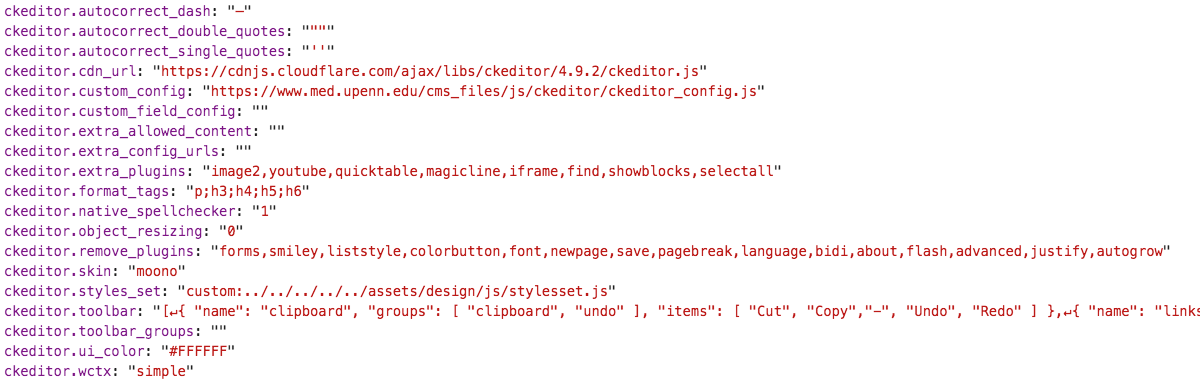
When doing console.log(MODx.config);, the (custom) context setting ckeditor.wctx is not available/listed in MODX 2.7.1, but it available/listed in MODX 2.6.5
Observed behavior
Expected behavior
Environment
MODX 2.7.1
 pmacswebteam
All 11 comments
As far as I know, MODx.config always only included system settings. The manager after all is its own context with its own context settings, and in many views (basically all views but editing a resource) there is no relevant working context to use.
Are you sure this is not a CKEditor feature/bug to dynamically add that?
 Mark-H
on 21 Oct 2019
Mark-H
on 21 Oct 2019
@Mark-H We don't believe it's an issue specific to CKEditor as other context settings are displaying the same behavior. Each setting listed below is a setting that we override per context. In the MODX 2.6.5 examples, the overridden values are displaying properly for each context. For the MODX 2.7.1 examples, the overridden values are being ignored and displaying the system setting values instead:
base_url in MODX 2.6.5 - contains context setting value, which has the name of context "simple"

base_url in MODX 2.7.1 - contains the default system setting value

site_url in MODX 2.6.5 - contains context setting value, which has the name of context "simple"

site_url in MODX 2.7.1 - contains the default system setting value

site_start in MODX 2.6.5 - contains context setting value, which has the correct resource ID

site_start in MODX 2.7.1 - contains the default system setting value

pmacswebteam
on 22 Oct 2019
I'm honestly not sure what's going on there then. If the behavior changed, #14161 could be a reason why, though from what I recall that literally just wrapped it in the class and didn't change any other code. The code does seem to have references to the working context (which suggests I was wrong in thinking context settings were never there).
Another angle to potentially debug this is making sure the config.js.php is being called with the wctx variable..
Mark-H
on 22 Oct 2019
We also notice that when the media browser is opened from CKEditor, in 2.6.5, the correct media source for the context is shown. Now in 2.7.1, the default media source from the system settings is chosen.
To explain that better, in a 2.6.5 site this URL loads up the right media source for our 'sandbox' context:
while in a 2.7.1 site, the same URL loads the media source for the 'web' context.
Is it possible that the changes in #14161 caused this? Would that be another symptom of the working context settings not being available in the manager context?
pmacswebteam
on 1 Nov 2019
Hello! Any updates on this?
pmacswebteam
on 18 Jun 2020
I'm completely confused by this, as the manager should never have shown any "working context" values from the config.js, because the manager is always operating in the mgr context. Working context is sent to requests as applicable to the appropriate processors from the manager when doing something that is context-specific.
 opengeek
on 18 Jun 2020
opengeek
on 18 Jun 2020
Hi @opengeek thanks for your reply.
If we have a site with a context with the context key 'sandbox', and I visit mysiteurl/connectors/modx.config.js.php?action=browser&wctx=sandbox on one of our MODX 2.6.5 sites, I see context settings overriding the system settings where applicable. On a MODX 2.7.1 site that also has a 'sandbox' context, I visit the same URL and only get the system settings.
Any idea what might be going on with that? I think that is the real trouble we are having since I think it causes the media browser not to load the correct default media source.
pmacswebteam
on 20 Jul 2020
If we have a site with a context with the context key 'sandbox', and I visit mysiteurl/connectors/modx.config.js.php?action=browser&wctx=sandbox on one of our MODX 2.6.5 sites, I see context settings overriding the system settings where applicable. On a MODX 2.7.1 site that also has a 'sandbox' context, I visit the same URL and only get the system settings.
I don't understand why or where that URL would have ever been called with a wctx. I believe this was a mistake if it worked.
Any idea what might be going on with that? I think that is the real trouble we are having since I think it causes the media browser not to load the correct default media source.
The media browser is not context-specific. I'm not following the problem.
opengeek
on 20 Jul 2020
Anyway, if it used to work like this for some reason and doesn't now, can someone resolve it by submitting a PR?
opengeek
on 20 Jul 2020
The issue exists, it was caused by just wrapping the code in the class in #14161. $scriptProperties does not exist in the method 'process'. I will create a fix.
 Jako
on 21 Jul 2020
Jako
on 21 Jul 2020
Thank you @Jako and @opengeek!
pmacswebteam
on 22 Jul 2020
Related issues
 sdrenth
·
3Comments
sdrenth
·
3Comments
 pepebe
·
3Comments
pepebe
·
3Comments
 Ruslan-Aleev
·
3Comments
Ruslan-Aleev
·
3Comments
 netProphET
·
3Comments
netProphET
·
3Comments
 muzzwood
·
4Comments
muzzwood
·
4Comments
Most helpful comment
The issue exists, it was caused by just wrapping the code in the class in #14161. $scriptProperties does not exist in the method 'process'. I will create a fix.