Retroarch: (Ozone) selection cursor border glitches with menu scale factors between 0.85x and 1.25x
Description
When the Menu Scale Factor setting is smaller than ~1.25x, the flashing selection cursor border seems to get overlapped on the sides by a semi-transparent background (apparently from the text inside the selection). When the Menu Scale Factor is 1.25x or more it looks normal probably because the margins around the text become small enough to not be noticeable. Pictures below.
When Menu Scale Factor is set to 1.00x and up to around 1.25x, you can see that the sides of the flashing selection cursor border look overlapped by a semi-transparent background:

When Menu Scale Factor is set to 1.25x or more, you can't see the overlap anymore:

It seems that the text background inside the selection is not being scaled correctly to the Menu Scale Factor setting?
EDIT: I also just noticed the glitch doesn't happen when Menu Scale Factor is smaller than 0.85x. This means that the glitch is visible between ~0.85x to ~1.25x
Expected behavior
The flashing selection cursor border should look good no matter the Menu Scale Factor setting.
Actual behavior
The flashing selection cursor border looks glitched when Menu Scale Factor is < 1.25x.
Steps to reproduce the bug
- Go to Settings -> User Interface -> Appeareance
- Change Menu Scale Factor between 1.00x and 1.25x
- Notice how the flashing selection cursor gets glitched on the sides
Version/Commit
You can find this information under Information/System Information
- RetroArch:
v1.8.5(tag)
Environment information
- OS: Windows 7 x64
 hhromic
All 7 comments
This is a really annoying one!
The scaling is in fact correct, and nothing overlaps the cursor. The issue is that this function is little buggy: https://github.com/libretro/RetroArch/blob/f48c6684477c2c926e47ed6ae991c2ae74d180a4/gfx/gfx_display.c#L982-L989
In particular, these sections:
https://github.com/libretro/RetroArch/blob/f48c6684477c2c926e47ed6ae991c2ae74d180a4/gfx/gfx_display.c#L1141-L1161
https://github.com/libretro/RetroArch/blob/f48c6684477c2c926e47ed6ae991c2ae74d180a4/gfx/gfx_display.c#L1185-L1205
...don't render correctly in certain edge cases (seems this happens when the draw height is less than the scaled native height of the source image). This probably also happens for the top + bottom middle sections as well, but since these are always quite long the issue never manifests here.
The thing is, all the parameters seems correct, and I just can't see anything wrong with the code - so this may be an issue deeper down at the driver level. This is difficult to debug... :(
 jdgleaver
on 22 Mar 2020
jdgleaver
on 22 Mar 2020
Thanks for looking into this @jdgleaver !
This probably also happens for the top + bottom middle sections as well, but since these are always quite long the issue never manifests here.
While is not exactly as short as the height, in this example the width is very short and doesn't seem to manifest the problem either:
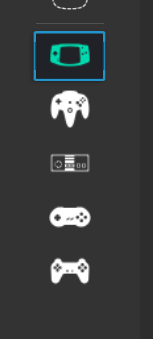
so this may be an issue deeper down at the driver level.
I got curious and tried different video drivers (gl, glcore and d3d11). They still exhibit the problem but I feel with the glcore and d3d11 drivers it is less pronounced:
-- gl driver --
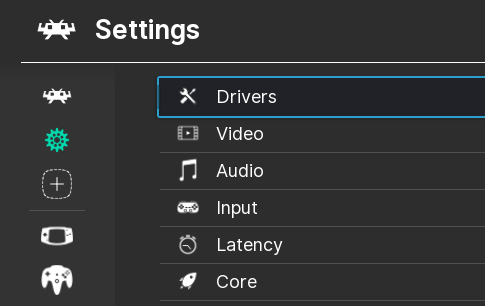
-- glcore driver --
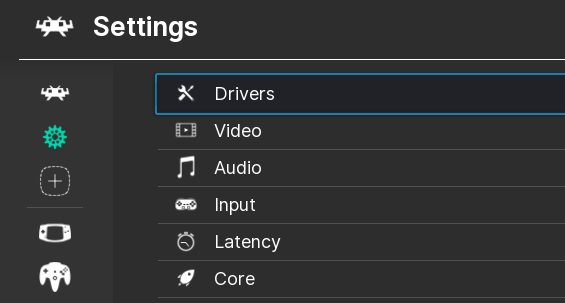
-- d3d11 driver --
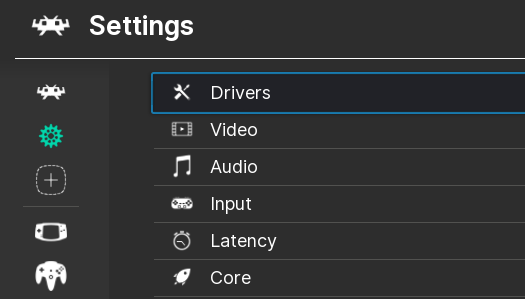
Using fullscreen (real or windowed modes) or windowed doesn't make a difference either.
I hope this shed some light. Let me know how else can I help.
hhromic
on 22 Mar 2020
Ah, forgot to mention that this doesn't happen in v1.8.4
hhromic
on 22 Mar 2020
Thanks for the extra info!
This probably also happens for the top + bottom middle sections as well, but since these are always quite long the issue never manifests here.
While is not exactly as short as the height, in this example the width is very short and doesn't seem to manifest the problem either:
Ah, that's still wide enough that it exceeds the width of the source png image - I'll try to test this by setting a smaller width by hand...
I got curious and tried different video drivers (gl, glcore and d3d11). They still exhibit the problem but I feel with the glcore and d3d11 drivers it is less pronounced:
That is very interesting - it does indeed hint at lower level shenanigans...
Ah, forgot to mention that this doesn't happen in v1.8.4
Yep, before DPI scaling was added, the cursor size was hardcoded such that it always exceeded the source png image dimensions :)
Okay, I'll keep you updated if I make any progress with this...
jdgleaver
on 22 Mar 2020
@hhromic Phew... Well that was a long and tedious issue to debug! But I fixed it :)
It requires the following PRs: https://github.com/libretro/RetroArch/pull/10352, https://github.com/libretro/retroarch-assets/pull/347 - so you'll need to update retroarch and your assets.
jdgleaver
on 26 Mar 2020
@jdgleaver wow amazing debugging work!
I love how you explain your PRs, you are definitively a top-notch engineer. The devil is in the details so I hope you feel very satisfied by finding a fix for this little bug. Your effort is really appreciated!
hhromic
on 26 Mar 2020
Ah, thank you so much for the kind words!
Yes, it is highly satisfying when these tricky issues bug you for ages, and then you finally work it out. And appreciation from fine folk such as yourself is the icing on the cake :)
jdgleaver
on 26 Mar 2020
Related issues
 blackman91
·
3Comments
blackman91
·
3Comments
 Chocobubba
·
3Comments
Chocobubba
·
3Comments
 fr500
·
3Comments
fr500
·
3Comments
 sergiobenrocha2
·
4Comments
sergiobenrocha2
·
4Comments
 alki-apps
·
3Comments
alki-apps
·
3Comments