Retroarch: v1.8.3 crashes when home button is pressed (android)
Description
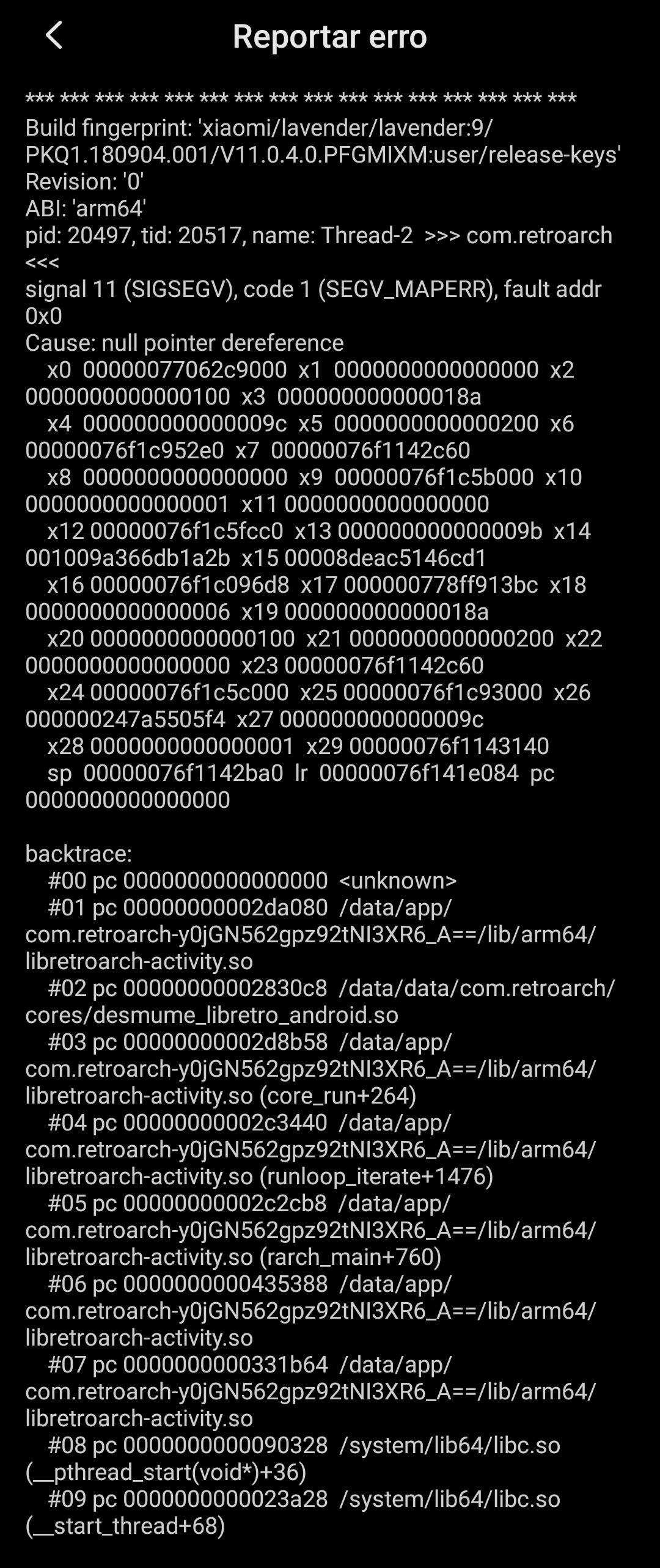
Whenever I press the Home button and minimize the app, or scroll down the notification bar, Retroarch will crash (if a game was previously loaded).
Expected behavior
Game should be paused on background until the app is resumed.
Actual behavior
Retroarch crashes.
Steps to reproduce the bug
- Open Retroarch 1.8.3 for android
- Load a core
- Load a game
- Minimize the app (alternatively, scroll down the notification bar)
- When returning to the app, it crashes
Bisect Results
Started imediately after updating to 1.8.3 on Play Store.
Version/Commit
- RetroArch: 1.8.3
Environment information
- OS: Android 9 (with MIUI 11.0.4 on a Xiaomi Redmi Note 7)
Edit1: spelling
Edit2: attaching Crash Report
 victante
All 15 comments
I've also ran into this problem.
OS: Android 6
 telanus
on 13 Jan 2020
telanus
on 13 Jan 2020
Me too, Android KitKat.
 ghost
on 13 Jan 2020
ghost
on 13 Jan 2020
Happens to me too, my devices are Xiaomi MIPAD 4 (MIUI 10, android 8, snapdragon 660), Huawei Mediapad M5 lite (EMUI 8, android 8, kirin 659), Huawei Honour 5x (custom rom, android 7). Happens both in gl and vulkan.
 demodanza
on 13 Jan 2020
demodanza
on 13 Jan 2020
I believe this should fix it -
https://github.com/libretro/RetroArch/commit/e4ef930b4791ae5289ddc983b4368569b585171f
We will probably push an updated stable version if we get more reports from guys like @jdgleaver confirming that it indeed worked - it worked for me but I always would like to get a secondary confirmation first.
 twinaphex
on 13 Jan 2020
twinaphex
on 13 Jan 2020
I can confirm this error. I'm on a OnePlus T6 Pro; Android Pie with Oxygen OS 9.17. I've screen recorded the error too that if that helps.
 neronomy
on 13 Jan 2020
neronomy
on 13 Jan 2020
I can confirm also on both Note 10+ (Exynos) and Galaxy Tab S6 (S855). I got the same entrypoint in the backtrace at 2da080 / libretroarch-activity.so. @twinaphex if you have a packaged version, I can check if your fix is working.
 komuta
on 13 Jan 2020
komuta
on 13 Jan 2020
Just download the nightlies either later today or tomorrow.
twinaphex
on 13 Jan 2020
Same here galaxy j7 prime ,android oreo 8.1
 Sherazzie
on 14 Jan 2020
Sherazzie
on 14 Jan 2020
Try the latest nightly build on our buildbot - for me it fixes the issue -
twinaphex
on 14 Jan 2020
@twinaphex tested with nightly 2020-01-14, fixes the issue for me. Thanks for the quick fix!
komuta
on 14 Jan 2020
Nightly build fixed it for me too! Should I close the issue or we wait for more confirmations?
victante
on 14 Jan 2020
Just for the record, I also confirm that the issue is fixed :)
 jdgleaver
on 14 Jan 2020
jdgleaver
on 14 Jan 2020
Fixed, thanks!
ghost
on 14 Jan 2020
Fixed on my end, thanks!
El mar., 14 de ene. de 2020 11:56, Major Willy notifications@github.com
escribió:
Fixed, thanks!
—
You are receiving this because you commented.
Reply to this email directly, view it on GitHub
https://github.com/libretro/RetroArch/issues/9991?email_source=notifications&email_token=ALM6VVCAFZRT2NJQM6MCBATQ5XHCXA5CNFSM4KFT7432YY3PNVWWK3TUL52HS4DFVREXG43VMVBW63LNMVXHJKTDN5WW2ZLOORPWSZGOEI44UDI#issuecomment-574212621,
or unsubscribe
https://github.com/notifications/unsubscribe-auth/ALM6VVHJEP53Z4JLSXGS4P3Q5XHCXANCNFSM4KFT743Q
.
demodanza
on 14 Jan 2020
fixed for me toooooo
telanus
on 14 Jan 2020
Related issues
 RobLoach
·
3Comments
RobLoach
·
3Comments
 rrooij
·
3Comments
rrooij
·
3Comments
 orbea
·
3Comments
orbea
·
3Comments
 Chocobubba
·
3Comments
Chocobubba
·
3Comments
 GoronMegaZord
·
3Comments
GoronMegaZord
·
3Comments
Most helpful comment
Try the latest nightly build on our buildbot - for me it fixes the issue -
http://buildbot.libretro.com/nightly/android/RetroArch.apk