Retroarch: Video width and height are switched when a vertically-oriented game is loaded
Description
With vertically oriented games, Retroarch switches the emulator-provided width and height. For example, if the width/height is supposed to be 320x240, RA will switch this to 240x320. This only occurs with vertically oriented games. I tested this in both MAME and FBA using the Windows 64 bit version of RA.
Expected behavior
The game to be displayed using the correct resolution (width/height).
Actual behavior
The height and width is switched when a vertically oriented game is loaded.
Steps to reproduce the bug
- load any vertically oriented game in either FBA or MAME using Windows 64 bit version of RA (example: DonPachi)
- under video settings, enable integer scale.
- set "custom aspect ratio width/height" to 1x.
- look at "custom aspect ratio width/height" to see that it says 240 for width and 320 for height. This is the reverse of what it should be; it should be 240 for height and 320 for width.
Bisect Results
I first noticed this a few days ago.
Version/Commit
You can find this information under Information/System Information
- RetroArch: 1.7.6
Git version: 9750719074
Environment information
- OS: Windows 10
- Compiler: NA


 Patrickdroid
All 82 comments
some arcades have the monitor rotated 90 degrees. The can the emulator can either rotate the image to the displays orientation or display it as intended and you rotated your display 90 degrees
 grant2258
on 7 Apr 2019
grant2258
on 7 Apr 2019
I understand that, but the emulator-provided resolution should not be changed from the correct resolution, regardless of orientation. If the game is 320x240 it should be output as 320x240, not 240x320. The user can flip it or rotate it or resize it or whatever, but the output resolution from the emulator should remain the same (eg, 320x240 should be output as 320x240 before the user does stuff to it). Otherwise you get scaling artifacts unless you just happen to adjust the y axis to a multiple of both 240 and 320 (eg, 960). And if you’re playing a game that uses a weird resolution like 19XX (384x240), then it causes big problems with overscan or underscan when using integer scaling. As of right now, video aspect ratio for vertical games must be configured manually (custom ratio width/height, non-integer) along with custom ratio x/y position, because the resolution/ratio for vertical games isn’t being detected correctly.
Patrickdroid
on 7 Apr 2019
the thing is the topic say the width and height are switched they simply arent it just a rotated monitor. It draws the image on the monitor as 4:3 then you flip the monitor physically this changes it to 3:4 on real hardware as far as the hardware is concerned its a normal 4:3 device but your rendering the image 90 degrees rotated.
In mame2003 or plus just use tate mode this stop the rotation and you need to flip your monitor like a real one. look at sf2 this is on a 4:3 screen look at the resolution of the game it use crt timing when rendering to look the way it does in a crt if you used the literal resolution for sf2 the gfx would be overly stretched.
grant2258
on 7 Apr 2019
it looks like your talking about capcom games watch this to understand whats going on and it is indeed 4:3
https://www.youtube.com/watch?v=LHfPA4n0TRo&feature=youtu.be
grant2258
on 7 Apr 2019
I’m not referring exclusively to capcom games. You can see this behavior in the example screenshots I posted above, which are from Donpachi.
I understand very well that certain games are meant to be displayed vertically. This doesn’t change anything that I’ve said.
With a vertically-oriented 320x240 game, width should say 320 and height should say 240, and the displayed image should be sideways. On a 4:3 CRT monitor the image would be 320x240 and sideways. You then rotate the monitor 90 degrees. This doesn’t change the image to 240x320. It is still 320x240 but now it is rotated 90 degrees so it is no longer sideways.
Altering the internal resolution of the game is incorrect, and will always result in scaling artifacts unless you happen to use a resolution that is a multiple of both 320 and 240.
Patrickdroid
on 7 Apr 2019
If you display the arcade pcb to a CRT monitor in normal orientation it will be a 320x240 image that is sideways. You rotate the CRT 90 degrees. The resolution of the game remains unchanged.
Patrickdroid
on 7 Apr 2019
yes resolution of you display remains unchanged. I dont have a crt to test whats going on there I would assume you should be using core provided information and tate mode on for mame2003 and plus dont know if the others support tate mode
grant2258
on 7 Apr 2019
You just aren’t getting what I’m saying. I’m going to have to post some screenshots later to help illustrate what’s going on currently and what should be going on instead.
Patrickdroid
on 7 Apr 2019
can you make them screenshot in mame2003 and 2003+ with tate mode on so i can see what going on make sure your using core provided for aspect ratio as well in them screenshots will help a lot in seeing whats going on
grant2258
on 7 Apr 2019
First of all, just look at the first two screenshots I posted above. See where it says "custom aspect ratio width" and "custom aspect ratio height" Both of these screenshots were taken with video rotation disabled.
Width/height should be the reverse of what is shown in the above screenshots.
Patrickdroid
on 7 Apr 2019
Here is what it SHOULD look like with video rotation disabled. This is what is NOT happening, currently. I created this in GIMP by manually switching the height/width in GIMP.

Patrickdroid
on 7 Apr 2019
Here is what currently happens. Both of these are incorrect.
video rotation disabled:

video rotation enabled:

Patrickdroid
on 7 Apr 2019
Next, here are some tests conducted by HunterK. See how video height/width are switched from what it is in my screenshots in the very first post? That's what it should be.


Patrickdroid
on 7 Apr 2019
what emulator is this from here is screenshots from with ?
grant2258
on 7 Apr 2019
Next, I made this shot by manually resizing the resolution to 1600x1200, and used a scanlines shader. Notice how the scanlines and mask are perfectly scaled with no scaling artifacts present. This could only be the case if the game's resolution is indeed 320x240. With the currently reported resolution of 240x320, you get scaling artifacts.

Patrickdroid
on 7 Apr 2019
In my initial post, I said that the behavior is present in both MAME and FBA in the Windows 64 bit version of RA. As you can see in the tests conducted by HunterK, this behavior is not present in the Linux version of RA.
Patrickdroid
on 7 Apr 2019
this is mame2003 with tate mode on and off using core provided aspect ratio I cant speak for the other emulators


grant2258
on 7 Apr 2019
have you even tried running mame2003 with these settings it what it shoud do tate mode skips the rotating and renders like its should.
grant2258
on 7 Apr 2019
How are we supposed to know what the core reported width and height are from the screenshots you just posted? Again, the issue is that the emulator reported height and width are not correct.
Patrickdroid
on 7 Apr 2019
Tate mode ON solves the issue in MAME 2003.
Tate mode off:

Tate mode on:

Patrickdroid
on 7 Apr 2019
i think mame current has rotation options in the tab menu dont know if they will work as expected though
grant2258
on 7 Apr 2019
The problem is, tate mode ON in MAME 2003 should be the default for all emulators including FBA. This is what the image looks like when you connect the actual hardware to a CRT that isn't rotated. There shouldn't be any automatic switching for vertical-oriented games. Switching height/width (Tate mode off) should be something that the user has to select because it's altering the original output of the emulated hardware. Anything done to alter the original output of the emulated hardware in this way should be something that the user has to manually select.
Still no idea how HunterK was able to get the image to to display correctly using FBA, and I'm still unable to get the other version of MAME to display the image correctly.
Patrickdroid
on 7 Apr 2019
sure that can be true im sure most people dont have there displays rotated unless they have a barcade of some sort setup for vertical games only.
Its a personal opinion but feel free to post an issue on it is easy enough to change the defaults through issues in the emulators in question. I dont really feel strongly about this its one for the people in charge of the repos it switchable in mame2003 and plus anyway in the options so the default wont really matter it can be changed to suit your display
grant2258
on 7 Apr 2019
I'm not just being pedantic, here. The width/height being switched isn't helpful and causes numerous potential issues. With the current behavior of height/width being automatically switched with vertical games, you still have to rotate the image if you want correct aspect ratio and orientation or to avoid a huge amount of letterboxing, and with height/width being switched like this, it results in scaling artifacts unless you happen to choose a resolution that is a multiple of both 320 and 240.
Furthermore, there is still no way that I know of to get any emulator besides MAME 2003 to work correctly.
The current rationale of "people don't want to rotate their displays" just isn't sufficient to justify this.
Patrickdroid
on 7 Apr 2019
first of all i completely agree with you all options should be clear to change and i feel fba does cover this option well its just you have to restart for it to take effect/
ill need to look into mame current at a later time. I will tell you how to to fix fba got quick menu options turn vertical mode on and restart the emulator it should work as expected.
grant2258
on 7 Apr 2019
In FBA, enabling vertical mode in the quick menu options and restarting the emulator does not fix the problem. I'm still getting this:

Patrickdroid
on 7 Apr 2019
Another problem related to this is the sheer number of knobs and dials related to video rotation. There are options related to video rotation in all of these places:
main menu ->quick menu -> options
settings -> video
settings -> core
If I'm an average user, how am I supposed to know what to do with all of this? Even as an experienced user, this is quite confusing.
Patrickdroid
on 7 Apr 2019
SUCCESS.
Actually, in FBA I have to turn vertical mode OFF under quick menu -> options.

So, yes, there is a lot going on here. Each of the cores seems to be handling this in a different way and there are far too many knobs and dials related to this. Disabling vertical mode makes it work in FBA, while enabling tate mode in MAME 2003 makes it work there... how does that make any sense?! As things currently stand, the options for this are an incoherent mess.
Even you thought that enabling vertical mode would be the same as enabling tate mode, which makes sense, intuitively. There just seems to be no rhyme or reason to the way these settings currently work.
Patrickdroid
on 7 Apr 2019
I'm still getting the same problem in FBA 2012. There is no option in quick menu -> options for vertical mode. Under settings -> core there is an option for "enable rotation." I'm getting the same results with this turned either ON or OFF.
settings -> core -> allow rotation ON:

settings -> core -> allow rotation OFF:

Patrickdroid
on 7 Apr 2019
as far as I can tell, the problem is the frontend based rotation not taking into account the aspect ratio change.
I don't think we need so many knobs in the cores to do this, it should be one option in the frontend and that's all.
I'm not even sure why there is a ROTATION ENV callback in the API
 fr500
on 7 Apr 2019
fr500
on 7 Apr 2019
there is a reason for it to be there clearly this isint a front end issue. It cant guess if you have rotated you monitor 90 degrees physically you need to deal with this as a core option if that is the case.
grant2258
on 7 Apr 2019
Agree w/fr500.
In my opinion, a vertically-oriented game should look like this by default:

The user can then rotate the image using the advanced user option under settings -> video -> rotation
You could also add an option under video settings ("automatically rotate vertical games 90 degrees" or something) to automatically set settings -> video -> rotation -> 90 degrees whenever a vertical oriented game is detected. But, I'm getting ahead of myself. EDIT, okay yeah this wouldn't work. But I still think that the core shouldn't be doing stuff to alter the output resolution (at least not by default) and that the user should do this with the frontend options for rotation and aspect ratio, or by manually selecting a core option to switch width/height for non-rotated displays.
Patrickdroid
on 7 Apr 2019
there is a reason for it to be there clearly this isint a front end issue. It cant guess if you have rotated you monitor 90 degrees physically you need to deal with this as a core option if that is the case.
The resolution/aspect ratio output by the emulator should remain unchanged by the core- see above. A vertical game that is 320x240 should be output as 320x240. The frontend options for video rotation and aspect ratio are more than sufficient and solve the problems related to the way things are currently handled, which are, to wit:
- it's incorrect according to what the original hardware does
- it's counter-intuitive
- it results in scaling artifacts with integer scaling
If people want to play vertical games rotated 90 degrees on their monitors, then they should use the frontend for that. The emulator/core shouldn't alter the actual output.
Patrickdroid
on 7 Apr 2019
and how is the front end supposed to guess that this particular arcade is rotated or not mame2003 covers this i dont see how you can get the front end to be psychic
grant2258
on 7 Apr 2019
I'm saying that the front end options are sufficient and that the cores are currently doing something wrong/there's too much going on with the cores. Just make the cores output the original resolution, unaltered, and let the user use the frontend options for rotation and aspect ratio. That would solve the problem(s).
In standalone FBA, you get this by default, which is as it should be:

With "Video -> rotate vertically aligned games -> enabled" you get this, which is again as it should be:

Patrickdroid
on 7 Apr 2019
ok with you so far you failing to mention the users monitors physical orientation in all this
grant2258
on 7 Apr 2019
I don't see why the monitor orientation is relevant to what resolution the core is outputting. Altering the height/width of the resolution so that the image is correctly oriented on a non-rotated monitor is altering the output resolution, and thus incorrect. Furthermore, in some cases you still have to rotate the image using the frontend options to get a properly oriented image even though the height/width are being switched; automatically switching the height/width doesn't solve the problem that it is intended to solve and is introducing more problems. You can see this in the above example with MAME 2003; TATE mode on or off still results in a sideways image so that the user either has to rotate it using a front end option or physically rotate their display. The core should just output the unaltered resolution. Altering the resolution, aspect ratio or video rotation is all stuff that should happen on the frontend or through a user option that has to be selected.
At the very least, it would be preferable to stop enabling automatic rotation by default and have this be something that the user has to enable through a core option. The default should be the original unaltered image (see the example of standalone FBA, above). The user shouldn't have to dig through multiple menus of confusingly-named settings and apply a lot of trial and error in order to get the emulator to display the original unaltered image.
Patrickdroid
on 7 Apr 2019
Also, as we can see, there's just a lot of weird stuff going on. TATE mode ON in MAME results in the same behavior as vertical mode OFF in FBA, and FBA 2012 won't display a correct image no matter what settings are applied, and I haven't even tested all the emulators yet. I understand the lack of standardization when it comes to core options, but this just seems somewhat ridiculous.
Patrickdroid
on 7 Apr 2019
im trying to understand where you are hitting this from the cores arent scaling the resolution RA scaless the resolution to your display.
grant2258
on 7 Apr 2019
To what are you referring with this statement?
Patrickdroid
on 7 Apr 2019
and how is the front end supposed to guess that this particular arcade is rotated or not mame2003 covers this i dont see how you can get the front end to be psychic
If the front end can't detect whether a game is vertical or not, then it's the cores that are automatically switching the height/width for vertical games.
Patrickdroid
on 8 Apr 2019
yes they do people that dont rotate there monitors dont want to play there vertical games sideways or rotate there monitor by default. Tate mode wont rotated vertical games at all on mame2003 that what you requested. You have t do your part now and rotate your monitor physically to match the arcade.
grant2258
on 8 Apr 2019
This whole discussion is pointless.
and how is the front end supposed to guess that this particular arcade is rotated or not mame2003 covers this i dont see how you can get the front end to be psychic
There is not need to guess anything, this is software development, there is an API, an implementation, and a frontend.
There is an API for this:
https://github.com/libretro/RetroArch/blob/master/libretro-common/include/libretro.h#L486
So the players are:
- core
- api
- frontend
Who knows the content needs rotation? The core does.
The environment callback is a set, which means it's telling the frontend to "do something"
So what should happen could go two ways
a. The core tells the frontend: "hey video is rotated, adjust aspect ratio from what I reported accordingly"
b. The core tells the frontend: "hey this content requires rotation, do whatever you need to do so it works properly"
That's all. This is a frontend problem, but before anything can be do about it what we need is clarification from the API side so we can adjust both the frontend and the cores to do whatever needs to be done.
That's all.
fr500
on 8 Apr 2019
there is no front end issue some arcades have different rotations not just 90 degrees. The core needs to work this out the user will need to be more specific from what he says he wants vertical games to display like this by default which is perfectly valid if you have a rotated monitor.

this is how it displays when you dont have a rotated monitor the user seems to think this is wrong

grant2258
on 8 Apr 2019
Ok, you win, have fun arguing forever instead of proposing a solution.
fr500
on 8 Apr 2019
Ok you have a 4:3 monitor it draws as 4:3 like the fist picture you rotate it the monitor in the arcade 90 degrees what aspect ratio is it now for us to display on out normal monitor sitting on the tv stand? ill leave you two to it.
Despite what the op said before fba mainline are set this way by default i just downloaded it. Its default rotate vertical games mame mainline and all our lr coresdo this by default afaik. However not all lr cores have the option not to rotate.
grant2258
on 8 Apr 2019
This whole discussion is pointless.
and how is the front end supposed to guess that this particular arcade is rotated or not mame2003 covers this i dont see how you can get the front end to be psychic
There is not need to guess anything, this is software development, there is an API, an implementation, and a frontend.
There is an API for this:
https://github.com/libretro/RetroArch/blob/master/libretro-common/include/libretro.h#L486So the players are:
* core

* api

* frontend
Who knows the content needs rotation? The core does.
The environment callback is a set, which means it's telling the frontend to "do something"So what should happen could go two ways
a. The core tells the frontend: "hey video is rotated, adjust aspect ratio from what I reported accordingly"
b. The core tells the frontend: "hey this content requires rotation, do whatever you need to do so it works properly"That's all. This is a frontend problem, but before anything can be do about it what we need is clarification from the API side so we can adjust both the frontend and the cores to do whatever needs to be done.
That's all.
I don't understand all of this, but it sounds very reasonable.
Yes, it does seem grant2258 and I have been going in circles with this. I think I've provided enough info on the problem as it currently stands to work towards a solution, but since I'm not a programmer, I've probably done all I can by this point.
Patrickdroid
on 8 Apr 2019
i agree with that @CharlesBukowski im sure @fr500 has some idea looking forward to seeing what he is going to do since he thinks there is an issue and what exactly is wrong as i cant see any issue at all with mame2003 or fba on libretro it both have the ability rotate or not rotate vertical games. It does it the same way as mainline fba and mame.
So i wll digress im at a bit of a loss what you two seem to think the issue is is you want to maintain a 4:3 ratio you need to rotate the Monitor or physically force the aspect ratio to 4:3 when rotating and put up with the streched gfx
grant2258
on 8 Apr 2019
The issue is that the behavior isn't consistent across cores and it's confusing as hell what is actually going on.
There is the separate issue of what the default behavior should be for vertical games, which you seem to be caught up on. Just having this stuff standardized across cores would be a huge improvement over the current situation, regardless of what the default behavior is set to.
As of right now, MAME and FBA do the exact opposite thing with video_allow_rotate = true/false. And that's just two cores. Who knows what's going on with other cores; I haven't even had a chance to test them yet.
TATE on and video_allow_rotate = true in MAME 2003 produces the same results as vertical mode on and video_allow_rotate = false in FBA. How does this make any sense?
posting this for reference, read from this post down.
https://forums.libretro.com/t/switch-video-width-height-when-video-is-rotated/21674/35?u=nesguy
Patrickdroid
on 8 Apr 2019
i agree with that @CharlesBukowski im sure @fr500 has some idea looking forward to seeing what he is going to do since he thinks there is an issue and what exactly is wrong as i cant see any issue at all with mame2003 or fba on libretro it both have the ability rotate or not rotate vertical games. It does it the same way as mainline fba and mame.
So i wll digress im at a bit of a loss what you two seem to think the issue is is you want to maintain a 4:3 ratio you need to rotate the Monitor or physically force the aspect ratio to 4:3 when rotating and put up with the streched gfx
automatically switching the width/height for vertical oriented games is altering the output resolution, which is incorrect. The emulator should just output the resolution completely unaltered. Altering what is output by the emulator should always be done by the frontend, or through an option that the user has to manually select, but maybe that's just my opinion. The default should just be whatever the emulator spits out before you start doing stuff to it.
rotating the game is something that can be easily handled in the frontend without all of the confusion that currently exists
2 is something that can even be done automatically if desired by the user, through the frontend as explained by fr500.
the current method of automatically switching the height/width with vertical games will always result in scaling artifacts no matter what you set the aspect ratio to (unless it's a multiple of both 240 and 320). How can this be considered correct?
the current method of automatically switching the height/width of vertical games isn't even making things easier for the user in all cases, because video_allow_rotate = true/false isn't doing the same thing in all cores. The current method is just adding more confusion.
My brain is tired. Hopefully the thread I linked to above sheds some additional light on the problem.
Patrickdroid
on 8 Apr 2019
IMO Standalone FBA does things right.
See: https://github.com/libretro/RetroArch/issues/8551#issuecomment-480630788
By default it's sideways and 320x240, and there's a clearly labeled and easily accessed option to rotate video under the video menu.
There should be a way to make RA work the same with all cores using one of the methods @fr500 described (it may need either a or b depending on what the core is doing). You could then add an easily accessed user option to automatically rotate vertical games. (or an option to disable automatic rotation if rotation is the default behavior)
Or we could just endlessly debate what the default behavior should be when launching RA for the first time.
Patrickdroid
on 8 Apr 2019
Ok here is the screenshots with you information the core geometry is reporting the right resolution. I explained before above that the information you need. Fba by default comes with setup like rotated i installed it and checked. It does not display vertical none rotated by default. Just giving you information in one place here not debating at all
rotated
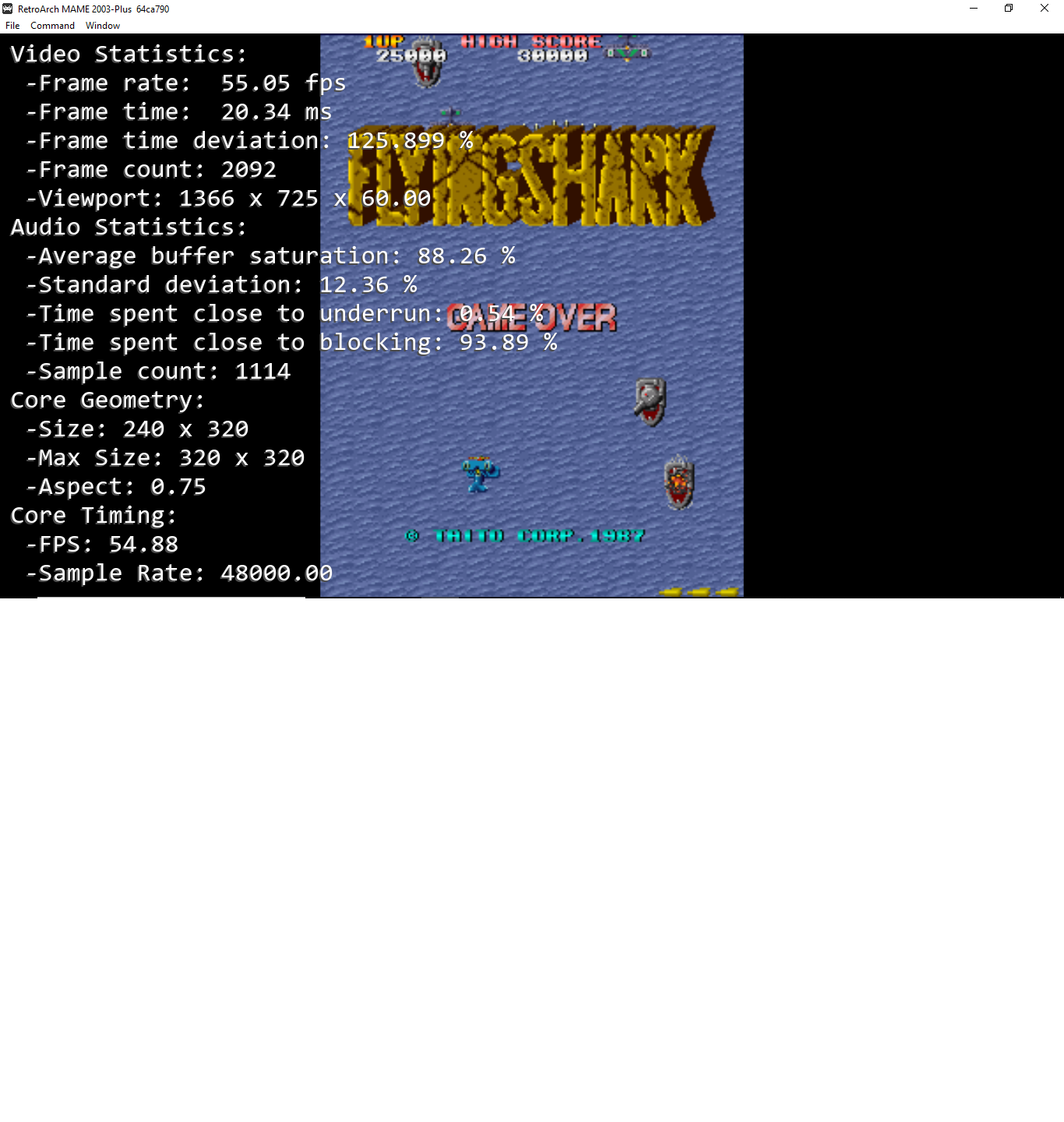
tate mode
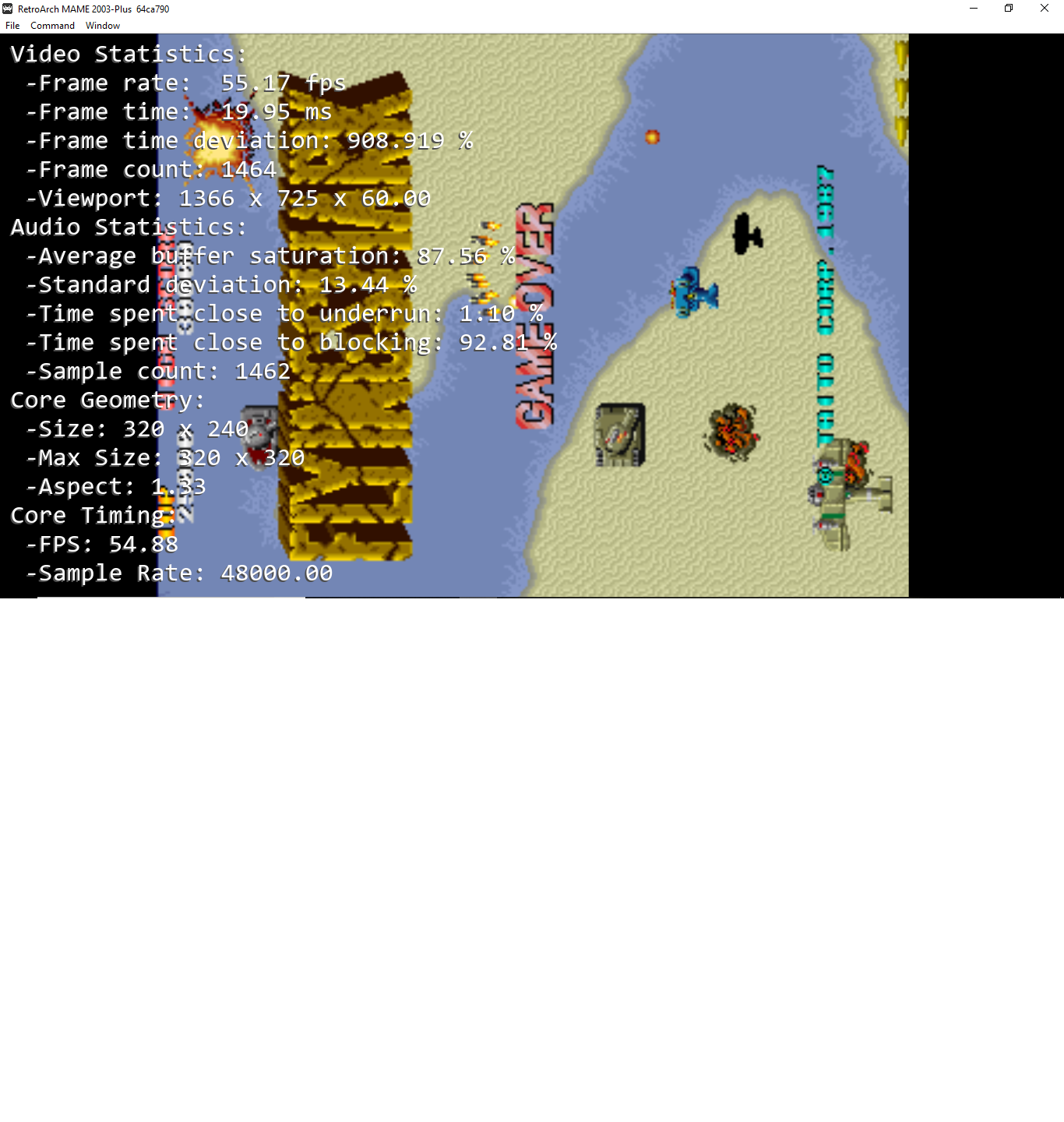
fba default install no setting changed
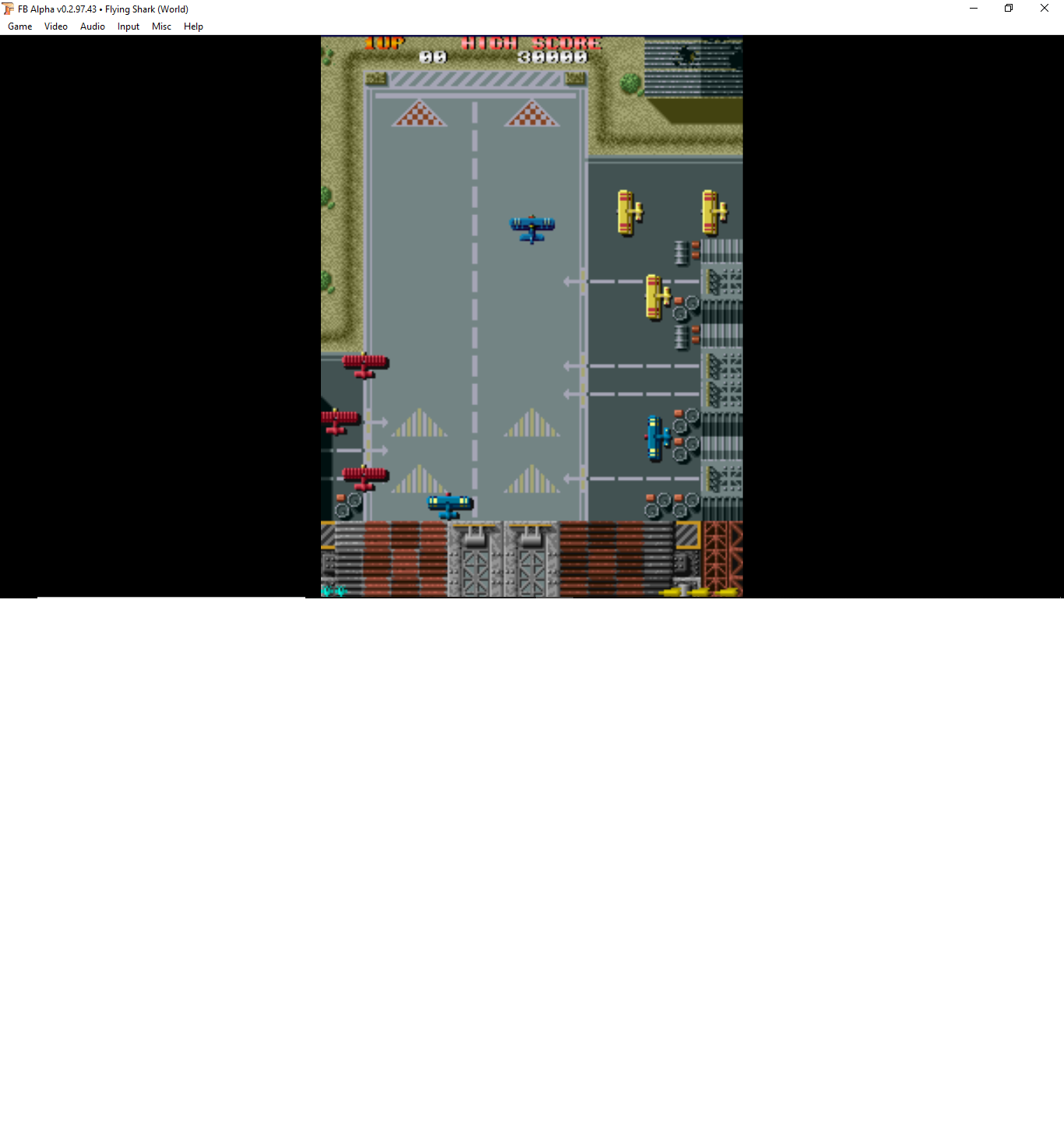
Ill add one more this is screen shot with fba pay attention to the width and height
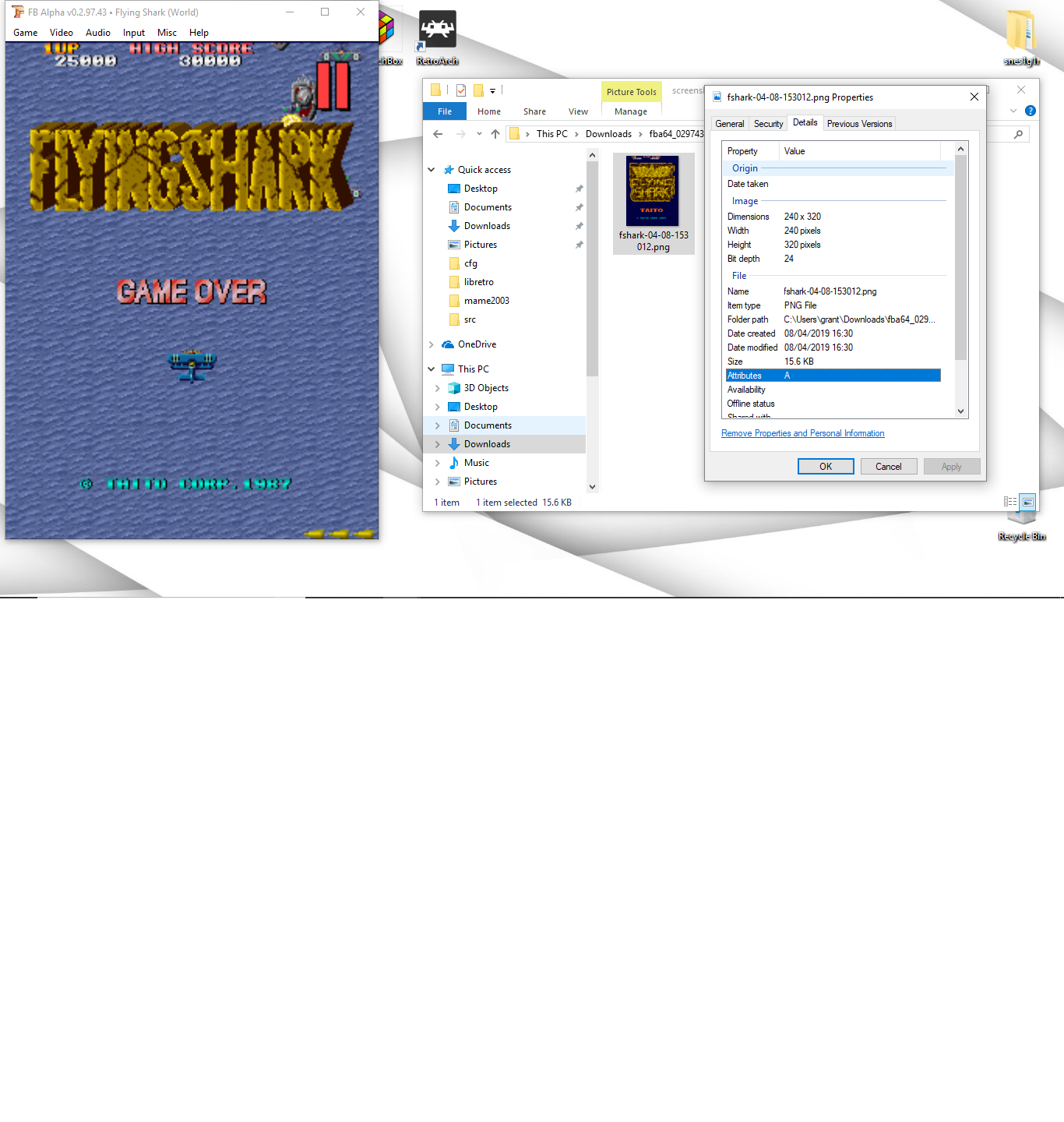
grant2258
on 8 Apr 2019
Ok here is the screenshots with you information the core geometry is reporting the right resolution. I explained before above that the information you need. Fba by default comes with setup like rotated i installed it and checked. It does not display vertical none rotated by default. Just giving you information in one place here not debating at all
I'm trying to figure out the point you're trying to make. If you're still arguing over what the default behavior should be when launching RA for the first time, I'm done with that conversation.
Patrickdroid
on 8 Apr 2019
you rotate 320 x 240 image 90 degrees is becomes 240 x 320 thats as simple as you can describe it
grant2258
on 8 Apr 2019
you rotate 320 x 240 image 90 degrees is becomes 240 x 320 thats as simple as you can describe it
Who is disputing that? What is the point of this?
Patrickdroid
on 8 Apr 2019
With vertically oriented games, Retroarch switches the emulator-provided width and height. For example, if the width/height is supposed to be 320x240, RA will switch this to 240x320. This only occurs with vertically oriented games. I tested this in both MAME and FBA using the Windows 64 bit version of RA.
Yes, and how do you think what you just said contradicts this statement?
I think there is a language barrier here that is preventing meaningful discussion.
Patrickdroid
on 8 Apr 2019
that was you that it in your first post your rotate an images the 90 degrees THE x /y swap
grant2258
on 8 Apr 2019
Furthermore, the conversation has progressed quite a bit beyond the initial post. If you had been keeping up with the conversation you'd realize that the real issue is a lack of consistency between cores when it comes to the options related to video rotation.
I am 100% done debating with you what the default behavior related to video rotation should be.
It doesn't matter what the default behavior is. There are pros and cons to having rotation on or off by default and ultimately it's just an arbitrary decision that has to be made. What matters now is getting consistent behavior across cores and removing unnecessary knobs/dials that just lead to more confusion. @fr500 already outlined the solution and what he needs to implement it.
Patrickdroid
on 8 Apr 2019
that was you that it in your first post your rotate an images the 90 degrees THE x /y swap
I literally can't even tell what you're trying to say, here.
I'm sorry, I really don't want to offend but the language barrier is just too much to deal with. I feel like you just consistently fail to understand the point being made and respond with irrelevant information most of the time and now I'm just wasting a lot of time trying to clarify things to you. I appreciate that you're trying to help, but we haven't been getting anywhere for a while.
Patrickdroid
on 8 Apr 2019
i literally cant even figure your problem out the games will show sideways if they arent rotated. mame fba and lr cores do this. So i guess i leave it at this not wasting more time on you back tracking it not a good default leaving vertical games sideways. Something you claimed fba done
https://github.com/libretro/RetroArch/issues/8551#issuecomment-480630788
grant2258
on 8 Apr 2019
i literally cant even figure your problem out the games will show sideways if they arent rotated. mame fba and lr cores do this.
did you even bother following the steps I listed to reproduce the bug? Or bother looking at the discussion at the libretro forums? There is most definitely something weird currently going on with video rotation and height/width being switched. It's not a problem present in all cores. Rotation behavior is not consistent across cores, for the nth time. That's probably the main problem.
So i guess i leave it at this not wasting more time on you back tracking it not a good default leaving vertical games sideways. Something you claimed fba done
FFS, the screenshots I provided prove it! Facepalm. Here, to make things even clearer:
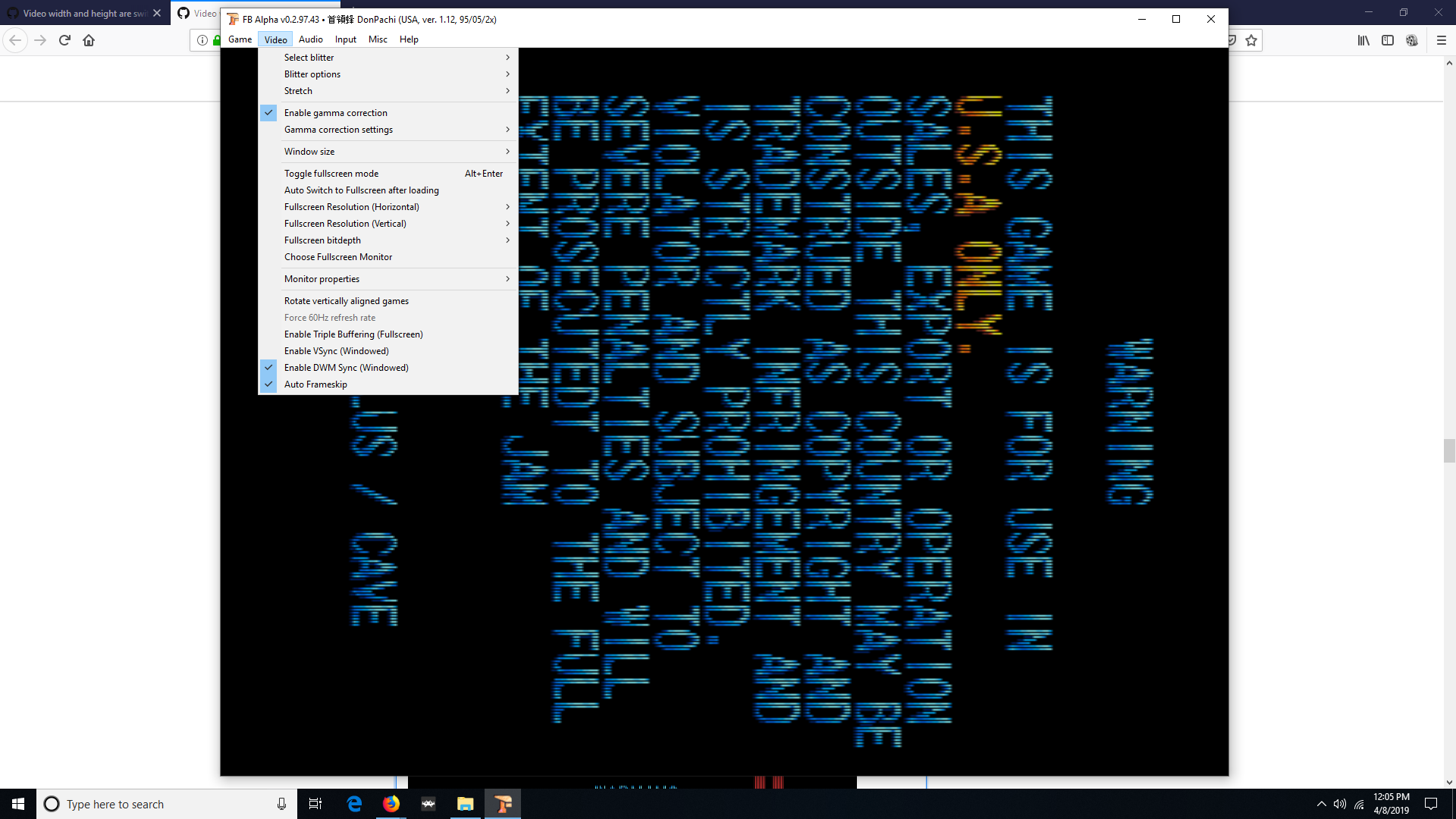

Patrickdroid
on 8 Apr 2019
you rotated the image what do you expect to happen? you screen shots prove nothing accept the video is rotated and not rotated. fba and mame2003 create the same images
grant2258
on 8 Apr 2019
you rotated the image what do you expect to happen? you creen shots prove nothing accept the video is rotated fba and mame2003 create the same images
That's exactly what I expect to happen. Do you see that you're just not following what I'm saying very well?
Patrickdroid
on 8 Apr 2019
you rotated the image what do you expect to happen? you creen shots prove nothing accept the video is rotated fba and mame2003 create the same images
That's exactly what I expect to happen. Do you see that you're just not following what I'm saying very well?
No they don't, and I've provided numerous examples demonstrating this.
Patrickdroid
on 8 Apr 2019
I guess you dont get it when you rotate the video it becomes 3:4 proof is in the screen shot from fba rotated. it 240 x 230 as well not wasting any more time repeating this
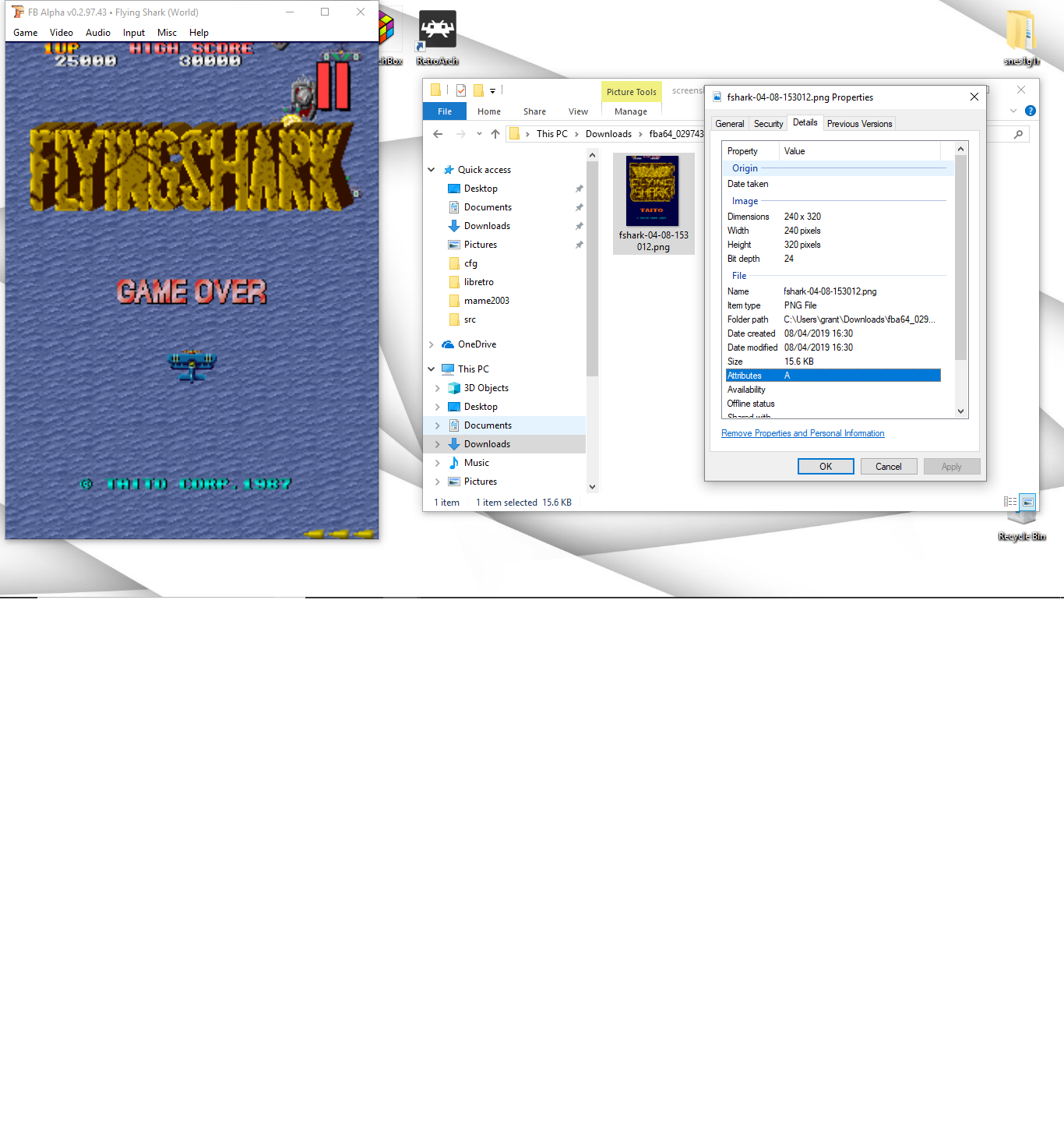
grant2258
on 8 Apr 2019
I guess you dont get it when you rotate the bideo it becomes 4:3 proof is in the screen shot from fba rotated. it 240 x 230 as well not wasting any more time repeating this
Read this thread, from this post down to the end. Others clearly recognize that there is an issue.
https://forums.libretro.com/t/switch-video-width-height-when-video-is-rotated/21674/21?u=nesguy
Please just go away. You aren't getting it and I've reached the limit of my patience with this.
Patrickdroid
on 8 Apr 2019
is fba wrong as well. Ive lost my patience with this as well.
grant2258
on 8 Apr 2019
is fba wrong as well. Ive lost my patience with this as well.
From the thread I just linked to, above:
BarbuDreadMonSenior Member
30m@Nesguy My mistake about width/height being switched for vertical games in fbalpha. While there is no official statement about this, i also think the core should always report resolution before rotation, i changed this behavior in a commit today. Now that it’s settled i would recommend allowing core rotation again and enabling vertical mode, it’s now upscaling properly for me, and there doesn’t seem to be issues with shaders either. One last thing about fbalpha : if you want proper aspect ratio, use core-provided aspect ratio + DAR in core options for fbalpha (actually i’m thinking about removing this core option and always forcing DAR), aspect ratio is per-game and hardcoded in the emulator for each one.
So, yeah. It's not that you're wrong, it's just that you never quite understood what the problem was in the first place. Thankfully, the issue with FBA was recognized and corrected by BarbuDreadMon.
Patrickdroid
on 8 Apr 2019
sending the wrong geometry form the core to fix it i would say thats out of spec and a patch. im sure mark will patch mame2003 and + up to send wrong info so it works in mame2003 and plus. Its trivial to do never the less i wont be changing is as its out of spec to whats really happening.
no matter what your little numbers say the resolution is 240 x 320 when rotated :). I wold suggest you use fba for now because every other core will have it the same way most likely. Ps current mame rotates fine its in the tab menu video options of course its wrong as well cause you said so
grant2258
on 8 Apr 2019
i can explain the reasoning behind TATE mode core option in mame2003:
the emulator sends two bits of information to the retroarch API; the games width and height, and how much it should be rotated:
so, for a typical arcade game, that would be:
width: 320
height: 240
rotation: 0 (none)
now, for a typical arcade vertical game (which were rendered sideways, and then the CRT was rotated when put in the cabinet), that information would be be:
width: 240
height: 320
rotation: 1/3 (90/270 degrees)
the issue is, retroarch uses the sent height and width regardless of whether it has been rotated or not. so, the emulator has to send the width and height of the game on the presumption that the rotation has happened. so, if you set video_allow_rotate = false you will get an unwanted result:
video_allow_rotate = true:
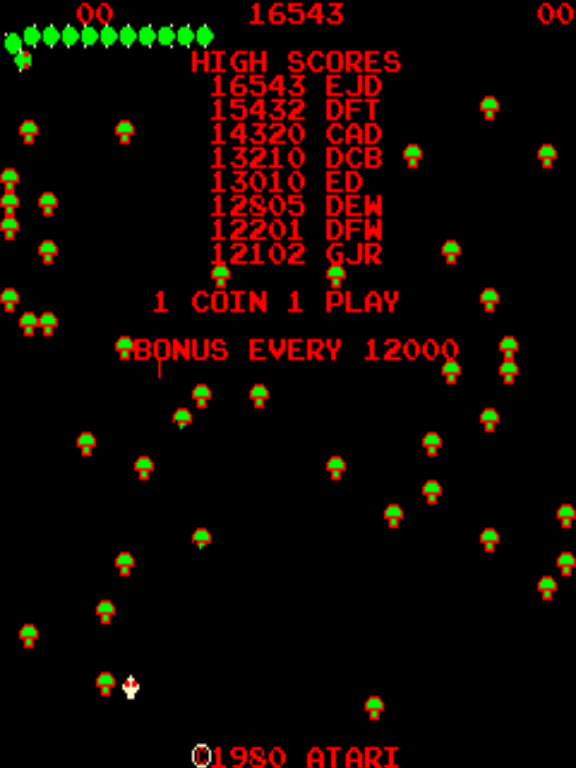
video_allow_rotate = false:
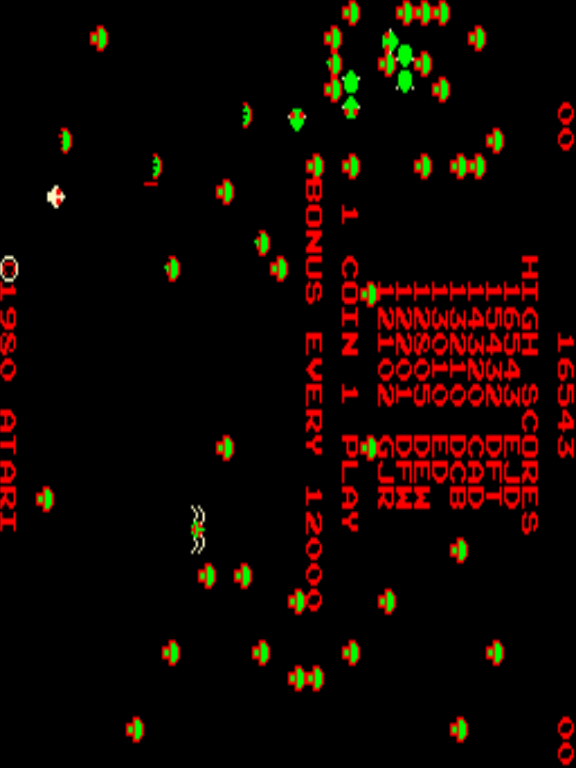
so in this case, mame2003 is sending the core:
width: 240
height: 320
rotation: 1/3 (90/270 degrees)
but video_allow_rotate = false is saying "I don't care about how much the emulator wants to rotate it", so you are ending up with the game not rotated (fine), but the screen dimension are now wrong.
TATE mode was added so that it doesn't presume rotation. Ie, it instead would send:
width: 320
height: 240
rotation: 1/3 (90/270 degrees)
(the rotation is still sent - the presumption is that anyone with a TATE setup would also set video_allow_rotate = false)

(PS, screenshots from behaviour of mame2003 from a year or so ago, and retroarch 1.3.6 - this is what i originally designed TATE mode on - someone else rewrote TATE mode in 2003 so it instead does the rotations within the core itself - personally i think it should all be handled in the front end)
so hopefully that shows the issue that TATE mode was trying to solve. IMO there's some better solutions:
1) the API lets the core find out what video_allow_rotate is set to. that way, it can send the appropriate height/width for the situation.
2) rotation of 1 (90) or 3 (270deg) also flips the height/width. this would be my preference.
i haven't really thought about the ramifications of these! :)
 dankcushions
on 9 Apr 2019
dankcushions
on 9 Apr 2019
there is also some interplay with aspect_ratio that I've forgotten the details about.
EDIT: hmm actually it think TATE mode only changed the core provided aspect ratio. but anyway you can see the problem i had to solve.
dankcushions
on 9 Apr 2019
the front end is still doing the rotating in mame2003 the fix is trivial your just dont swap change the x/y (like you should be doing in the core geometry). rotate anything manually the geometory x/y in the menu doesnt change.
https://github.com/libretro/mame2003-plus-libretro/compare/master...grant2258:out_of_spec?expand=1
grant2258
on 9 Apr 2019
no matter what your little numbers say the resolution is 240 x 320 when rotated :).
No one ever disputed that the correct resolution is 240x320 when rotated. What's being disputed is whether or not all the cores are reporting the correct resolution when the image is rotated. You really are failing to grasp what's going on, here.
Numerous people have since recognized the issue I'm describing and the issue in FBA was both recognized and fixed. The fact that you're holding firm on this even in spite of this indicates either a willful stubbornness on your part to admit that you're wrong, or just a complete misunderstanding on your part.
There are numerous ambiguities and equivocations occurring in this conversation which make it very difficult to have a meaningful discussion with you. In fact, on more than one occasion you seem to think that I'm arguing for the exact opposite of the point I'm trying to make.
The question of what the default rotation behavior should be for vertical games is almost trivial. It literally only matters the first time RA is launched, after which the user can set the behavior in the frontend. The MAIN issue is getting consistent behavior across all cores, regardless of what the default behavior should be.
Now, if we're discussing the SEPARATE issue of what the default behavior should be or what is technically "correct," I've already said what I'm going to say about that. You can either respond directly to the points I've made or continue ignoring them, either one is fine by me. Both standalone FBA and now also the FBA core do exactly what that they should be doing: by enabling rotation in the core options and enabling vertical mode in the quick menu core options, you get the correct image, which looks like this:

Patrickdroid
on 9 Apr 2019
@CharlesBukowski clearly in not debating with you and your screenshots anymore. you clearly dont understand geometry when a rotate happens. Im not wasting more time on it with you. No offence i posted a fix details for mame2003 and plus to send this bad geometry clearly you dont understand this at a level beyond screenshots.
grant2258
on 9 Apr 2019
As for tate mode in mame2003 and plus is a ccw 90 degree rotate (it was renamed to what it is now from that) so if the arcade is 90 or 270 it will rotate the same way if the user has there screen rotated in a barcade/ servo/ stand setup . If you want a no rotate option youll need to post a github issue to get it added.
intended use for this rotation is this https://www.youtube.com/watch?v=dShq_reM-84 if you have the ability to do it. So a no rotate would need to have a good reason
grant2258
on 9 Apr 2019
to sum it up its to do with core rotating an image with ra the cores info updates the rotated geom. RA doesnt like it or update geometry even when you do a manual rotate itself. So you have to return the original orientation even when you rotate through RA with the core.
grant2258
on 10 Apr 2019
all mame cores will need updates or ra should report rotated geometry.
grant2258
on 10 Apr 2019
@grant2258
You are completely hopeless. Several other devs agreed that there’s an issue, FBA dev already agreed that there is an issue and fixed it In FBA. To deny that there is an issue at this point is pretty much insane. I’m done talking to you.
Patrickdroid
on 10 Apr 2019
@fr500, yeah I don’t know why this is even still a discussion. I’m at a loss.
I use custom aspect ratios with RA because I overscan some games that scale to 1120 on the y axis. Switching it to core provided didn’t change what was going on with the reported width/height and rotation, as far as I could tell.
Anyway, the issue in FBA was fixed yesterday so I think this issue can be closed; rotation behavior appears to be consistent, at least from the user’s perspective. The issue of how to best handle rotation is really a separate topic that probably warrants its own issue.
Patrickdroid
on 10 Apr 2019
@CharlesBukowski ive already done the fix for 2003 and plus linked it and described the issue you are either stupid or argumentative or clueless about whats going on i think the latter :)
grant2258
on 10 Apr 2019
@grant2258 Let's please keep this respectful at the very least. That last line was unnecessary and he shouldn't have been insulted like that.
People in this thread recommended that I close this thread so that is what I will do.
 twinaphex
on 10 Apr 2019
twinaphex
on 10 Apr 2019
Related issues
fr500
·
3Comments
fr500
·
4Comments
 blackman91
·
3Comments
blackman91
·
3Comments
 ghost
·
3Comments
ghost
·
3Comments
 Alex793
·
3Comments
Alex793
·
3Comments