Retroarch: [$470 Bounty] Support for MAME backdrop, screen, bezel, and overlay "artwork"
Bounty link - Contribute today!
Context
As I understand it, RetoArch's Overlay system has roots in providing a touch interface rather than reproducing integral game artwork. Even though folks successfully use the existing RA overlay system for applications like displaying arcade game bezels or Vectrex cover overlay sheets, it has limitations that prevent some games with such artwork from being fully emulated.
It is possible to emulate this integral artwork within cores, but doing so requires cores to pre-scale video in order to make use of high-resolution artwork files, negating many of the video-related benefits of libretro-based emulation.
Proposal
Add an artwork system compatible with the MAME artwork format, inspired by but distinct from the existing RetroArch Overlay/Control system.
MAME Layout file documentation: https://docs.mamedev.org/techspecs/layout_files.html
Some, but not all of, the layers in this schema:
- backdrop Intended for use in situations were the screen image is projected over a backdrop using a semi-reflective mirror (Pepper’s ghost). This arrangement is famously used in the Space Invaders deluxe cabinet.
- screen This is the emulated video. It is drawn using additive blending.
- overlay This layer is intended for use translucent overlays used to add colour to games using monochrome monitors like Circus, Gee Bee, and of course Space Invaders. It is drawn using RGB multiplication.
- bezel This layer is for elements that surround and potentially obscure the screen image. It is drawn with standard alpha blending.
By default, layers are drawn in this order (from back to front):
- screen (add)
- overlay (multiply)
- backdrop (add)
- bezel (alpha)
If a view has multiple backdrop elements and no overlay elements, a different order is used (from back to front):
- backdrop (alpha)
- screen (add)
- bezel (alpha)
 markwkidd
All 72 comments
Bounty up to $55 - thanks @Udb23!
markwkidd
on 12 Oct 2018
Bounty up to $150 thanks to Thatman84!
markwkidd
on 13 Oct 2018
Hey! I saw your posts on various forums and though maybe I could help a little.
I tried to convert MAME overlays to Libretro, and failed, but maybe my experience can provide a starting point. Let's take OrionsAngel's 1942 as an example.
OrionsAngel, as he distributes his overlays, provides 2 main files for each game: Artwork1942.zip, containing artworks and overlay layout, and Cfg1942.cfg, containing various position stuff.
Inside the zip file, there are several things:
- a
layfile (usually calleddefault.laybut not always) describing the various possible layout configurations (because a MAME overlay file can have multiple variants inside) and the positioning of elements (screen, overlay, backdrop, bezel) - multiple image files, changing as needed by the
layfile
As far as I can tell, the elements positions in the lay file never match the expected output, at least in OrionsAngel's overlays.
To fix this, I assume one has to look in the cfg file. Unfortunately, this file has a completely different logic, which still evades me.
This cfg file is a simple XML file, but it contains relative coordinates:
<screen index="0" hoffset="-0.004000" hstretch="0.982000" />
These coordinates, applied either to the output resolution, or the coordinates in the lay file, do not result in anything meaningful.
Understanding the relationship between the lay and the cfg files values will be mandatory to apply the overlays.
I have already posted my findings on the Libretro forums: https://forums.libretro.com/t/understanding-mame-overlay-config-to-port-them-to-libretro-config/14539
I also have a conversion script started, but as I said, I didn't find how to position the screen correctly, so after the files have been created, I have to measure everything in Photoshop and report the values in the config files: https://github.com/cosmo0/retropie-overlays-arcade-realistic/blob/master/src/import-mame.js
I hope this helps even a little bit :)
 cosmo0
on 17 Oct 2018
cosmo0
on 17 Oct 2018
Thank you @cosmo0 that seems incredibly useful!
markwkidd
on 17 Oct 2018
I'll also note that the MAME artworks are composed of 4 layers (screen, backdrop, overlay, bezel) so it doesn't match your 3 layers proposal, the system will have to merge at least 2 of them (probably overlay and bezel).
I have never encountered an artwork with "real" backdrop (only black) so I don't know what it's used for.
I will also note that all the arcade overlays I know have to be displayed on top of the emulated video, and not under, as in your proposal. Many arcade overlays mask a part of the screen, for instance:
- avalnche (and many others) reproduces real arcade cabinet that used the cabinet artwork to improve the very basic graphics
- aztarac displays labels in the overlay
- bzone separates screen areas
In addition, OrionsAngel's artwork adds "screen glare and scratches" to provide more "realism" to his overlays, which has to be put on top of the emulated video.
I could not find any documentation about all of this, nor the MAME code which handles it, but I wasn't sure where to look, so maybe it will be obvious to someone more knowledgeable.
cosmo0
on 17 Oct 2018
@cosmo0 "Backdrops" which display behind the video are an important part of the MAME artwork system. Check the OP, I link to a video demonstrating the romset warrior which requires backdrop artwork. I also link to a blog with illustrations of some handheld games with backdrop art.
This proposal is to allow display of backdrops "under" the emulated video, along with all of the other layers "on top" of video.
Based on what you are saying maybe the proposal needs to be amended to have four layers.
@cosmo0 do you know what the screen layer is? I wonder how it is different than MAME's overlay layer
markwkidd
on 17 Oct 2018
@markwkidd ok, all overlays I found simulate the backdrop with a semi-transparent overlay instead, but I understand how it's important.
The screen layer is just the emulated video, and where it's located.
Sample layout file from OrionsAngel's 1942:
<!-- 1942.lay -->
<mamelayout version="2">
  <element name="bezel">
    <image file="1942_bezel.png" />
  </element>
  <element name="bezel_alt1">
    <image file="1942_bezel_alt1.png" />
  </element>
  <element name="bezel_alt2">
    <image file="1942_bezel_alt2.png" />
  </element>
  <element name="screen_bezel">
    <image file="vert_screen_bezel.png" />
  </element>
  <element name="screen_mask">
    <image file="vert_screen_mask.png" />
  </element>
  <view name="Cab Artwork">
    <screen index="0">
      <bounds x="555" y="0" width="810" height="1080" />
    </screen>
    <overlay element="screen_mask">
      <bounds x="554" y="0" width="812" height="1080" />
    </overlay>
    <backdrop element="screen_bezel">
      <bounds x="518" y="0" width="884" height="1080" />
    </backdrop>
    <bezel element="bezel">
      <bounds x="0" y="0" width="1920" height="1080" />
    </bezel>
  </view>
  <view name="Cab Artwork (alt1)">
    <screen index="0">
      <bounds x="555" y="0" width="810" height="1080" />
    </screen>
    <overlay element="screen_mask">
      <bounds x="554" y="0" width="812" height="1080" />
    </overlay>
    <backdrop element="screen_bezel">
      <bounds x="518" y="0" width="884" height="1080" />
    </backdrop>
    <bezel element="bezel_alt1">
      <bounds x="0" y="0" width="1920" height="1080" />
    </bezel>
  </view>
  <view name="Unused (alt2)">
    <screen index="0">
      <bounds x="555" y="0" width="810" height="1080" />
    </screen>
    <overlay element="screen_mask">
      <bounds x="554" y="0" width="812" height="1080" />
    </overlay>
    <backdrop element="screen_bezel">
      <bounds x="518" y="0" width="884" height="1080" />
    </backdrop>
    <bezel element="bezel_alt2">
      <bounds x="0" y="0" width="1920" height="1080" />
    </bezel>
  </view>
</mamelayout>
The element tags declare the various images that can be applied on the final output and give them a name.
Next are the various view, because a MAME artwork can have multiple configurations: for example, you might want to provide various cabinet artwork variations. OrionsAngel often provides multiple views; often it's just a color somewhere that changes, but sometimes it's much more than that.
Inside a view, you use the elements you declared.
Because an arcade cabinet can have multiple screens (like Darius or Punch Out), you have to declare the position of each individual screen (thus the index attribute of the screen node).
Over the screen (or rather, I assume it's over) comes the overlay, using one of the element you previously declared. You next do the same for the backdrop (under the screen) and the bezel (I assume it's sandwiched between the screen and the overlay but I'm not sure).
I'm not sure how bezels and backdrops work with multiple screen; once, I talked about it with OrionsAngel, and he said that MAME didn't handle it well, so he didn't do any multi-screen arcade machine.
cosmo0
on 17 Oct 2018
You are definitely an asset to this thread @cosmo0 !
The first draft of this proposal and bounty were not to implement the MAME format, but because that's the direction it has gone I will update the OP to reflect the need for four layers if we are indeed to have compatibility with that format.
markwkidd
on 17 Oct 2018
This recent discussion has led me to read the MAME artwork documentation, now that we know there is interest in supporting that format specifically. I have updated the OP with some information from their docs.
I'll note that there are two layers, the cpanel (control panel) and marquee that are part of MAME's artwork spec which we have not discussed. I'm not personally as interested in those kinds of artwork so I'm fine with leaving them out of this feature request.
However if someone wants to fully implement the artwork format, details are in the OP's link to the MAME documents.
markwkidd
on 17 Oct 2018
You are definitely an asset to this thread @cosmo0 !
Thanks but I'm not sure I deserve the praise 😄
The first draft of this proposal and bounty were not to implement the MAME format, but because that's the direction it has gone I will update the OP to reflect the need for four layers if we are indeed to have compatibility with that format.
Well, I don't want to steer the direction of the project, but in the forums where you posted, I thought you wanted Retroarch to be compatible with MAME overlays? Did I not understand correctly?
That would help many people I think, to be able to just use existing MAME overlays without any conversion hassle.
You might want to check with the people who have contributed to the bounty? Maybe that's not what they signed/paid for?
Thank you so much for finding the layout documentation! 😍 I'll check it out when I get some time.
cosmo0
on 17 Oct 2018
Thanks again! You are definitely an asset @cosmo0 ! :)
Thank you also for your concern about the bounty staying on target: don't worry, all of the contributions to this bounty have arrived after it was changed to specifically indicate compatibility with the MAME layout format. Your comments and these excerpts from the MAME docs are only helping be more specific about the plan everyone agreed to.
markwkidd
on 17 Oct 2018
Actual Mame artwork supports also lamps or LEDs.
These were used in some arcade classics (e.g. skydiver and Afterburner).
Games that support lamps or LEDs require additional programming in the driver for that game.
They were implemented only after mame .107; so lr-mame 2003 would not benefit from this feature.
I don't think this is necessary for this bounty.
One thing that may be worth underlining is that coding for artwork should consider also lower processing power devices like the Pi to make sure it does not impact actual game performance.
If you got nice artwork and the game is unplayable it makes no sense ;-)
 UDb23
on 18 Oct 2018
UDb23
on 18 Oct 2018
@cosmo0 "ok, all overlays I found simulate the backdrop with a semi-transparent overlay instead, but I understand how it's important."
Having an actual backdrop (as the real arcade games had) below the actual game area ("screen") is totally different from trying to emulate this thru semi transparent areas of the overlay.
Mr do's mame artwork site provides various artwork that include backdrops.
Playing classics like Space Invaders, Omega Race, Battle Zone and Asteroids de Luxe with actual backdrops makes a huge difference :-))
UDb23
on 18 Oct 2018
Mr do's mame artwork site provides various artwork that include backdrops.
I tried to download artwork for Warriors on MrDo's website, but it gave me an error 403 each time...
I assume that when a backdrop is used, MAME only draws where the sprites are, it doesn't "draw" the black area? Like, in Space Invaders, it draws only the ships, barricade, missiles etc, and leaves the empty space alone, like a TV screen would do?
Is Libretro doing the same thing? It would be pretty hard to re-code the video emulation layer just to display a backdrop...
cosmo0
on 18 Oct 2018
@cosmo0 About the 403 error, just edit the download url: it should be _http://_ not _https://_
Yes Mame draws only the sprites afaik. Not sure if libretro cores behave differently. Lr-mame2010 does support new mame artwork (.lay) but, for example, Space Invaders becomes too slow to play with artwork activated on a Pi3 b+.
UDb23
on 19 Oct 2018
@markwkidd Helped you to hype up the issue some more ;) Maybe I'll have a go at it myself, though it won't be till the start of December.
 nayslayer
on 7 Nov 2018
nayslayer
on 7 Nov 2018
Love it! Thanks @nayslayer !
markwkidd
on 7 Nov 2018
Bounty more than doubled to $400 thanks to a donation from @nayslayer, thank you!
markwkidd
on 7 Nov 2018
@nayslayer - That's incredibly kind and generous of you! :)
 Wilstorm
on 7 Nov 2018
Wilstorm
on 7 Nov 2018
bounty up to $405. thanks @188pilas!
markwkidd
on 6 Jan 2019
I would like to start with this issue but I need more info:
A) You want a new artwork-system compatible with mame-layouts? (Coexisting with the previous system.)
B) Or extend the current overlay system to allow backdrops/new blending modes/...? (Also no compatible with mame-layouts but same functions).
Thanks :+1:
 DSkywalk
on 19 Feb 2019
DSkywalk
on 19 Feb 2019
@DSkywalk the consensus when this bounty was vetted by the RA devs is that this should be a new system that is compatible with MAME layouts.
It has been suggested that the existing Overlay code be used as a model, but that this should be a separate feature with its own code.
markwkidd
on 19 Feb 2019
Ok, no problem. I'll do my best :+1:
DSkywalk
on 19 Feb 2019
@DSkywalk Also a goal is getting high res (1080p) artwork resolution, possibly without affecting actual game speed.
The current implementation (old .ART mame artwork system) does not allow for high res output and can be taxing for performance on Raspberry Pi 3B+.
UDb23
on 21 Feb 2019
I second @UDb23, but for a 4:3 high resolutions like 1600x1200 – for users like me who have DIY cabinets with 4:3 monitors. :)
 Taranchul
on 21 Feb 2019
Taranchul
on 21 Feb 2019
If the new Artwork system will be able to output high res (just like RA overlays already do), you can create artwork for both 16:9 and 4:3 at full res.
UDb23
on 21 Feb 2019
Bounty up to $430 - thank you @Taranchul!
markwkidd
on 22 Feb 2019
@UDb23 I will try to affect it as little as possible. But I do not do magic, It is 4 layers with differents blending modes.
I was working on the proposal. But if this is a requirement, I would prefer to do something else. In a few weeks my vacation ends and cap32 need a lot of work :+1:
It's my first bounty, I did not know I could change a proposal...
Thanks
DSkywalk
on 22 Feb 2019
@DSkywalk I agree it wouldn't be fiar to require that 4+ layers performs the same as a single layer. I suggest that the "spec" for this bounty be that each layer of the new artwork implementation performs approximately as well as the existing RetroArch "Overlay" layer that has been suggested as a model for the new feature.
This seems like a reasonable way to discuss how this feature might be able to perform given that it doesn't exist yet. I think that if it's based off the existing Overlay code, that will be a good thing for optimizations in the future since it is already a proven part of the codebase.
With the Overlay code in its DNS, other people can also help if needed once the feature exists and this bounty is finished.
Does this seem like a fair way to talk more about performance @DSkywalk?
markwkidd
on 22 Feb 2019
Bounty up to $460. Thanks @remimcgill!
markwkidd
on 27 Feb 2019
Bounty up to $470 -- thanks @shenglong!
markwkidd
on 7 Mar 2019
Sorry, I start my work in a few days and I have not achieved too much... (cap32 eats most of my available time).
I prefer someone else to try it. So sorry guys :frowning_man:
DSkywalk
on 7 Mar 2019
I'm going to take this on for the bounty.
 huwpascoe
on 8 Mar 2019
huwpascoe
on 8 Mar 2019
Need clarification, does this require multiscreen support?
huwpascoe
on 8 Mar 2019
Are you referring to displaying multiple emulated screens on one physical display, like arcade racing games where two or more players play side by side?
markwkidd
on 8 Mar 2019
Quoting from further up
Because an arcade cabinet can have multiple screens (like Darius or Punch Out), you have to declare the position of each individual screen (thus the index attribute of the screen node).
Over the screen (or rather, I assume it's over) comes the overlay, using one of the element you previously declared. You next do the same for the backdrop (under the screen) and the bezel (I assume it's sandwiched between the screen and the overlay but I'm not sure).
I'm not sure how bezels and backdrops work with multiple screen; once, I talked about it with OrionsAngel, and he said that MAME didn't handle it well, so he didn't do any multi-screen arcade machine.
Would this feature be required regardless of how buggy?
huwpascoe
on 8 Mar 2019
IMHO no need to have artwork on multiple screen games.
UDb23
on 8 Mar 2019
Yes my feeling is also that displaying artwork for emulated multi-screen games could be left as a future enhancement. Multi-screen artwork is not something I have personal experience with and it doesn't really seem that useful.
I also feel comfortable saying that you should not worry about this too much now because I do no think that the existing RetroArch control overlay system supports multiple screen overlays and that is the model that has been suggested for this project.
markwkidd
on 8 Mar 2019
progress report: Basic layout.
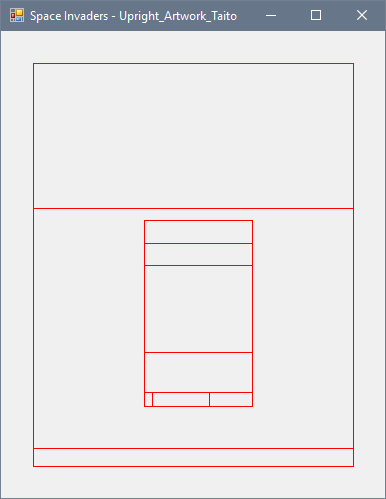
Next is group instantiation and advanced layout, rotation etc.
huwpascoe
on 10 Mar 2019
Very nice!
markwkidd
on 10 Mar 2019
Surprisingly I couldn't find anything online that actually use layout groups, so I'm just going by mangling .lay files and comparing how it looks in mame...
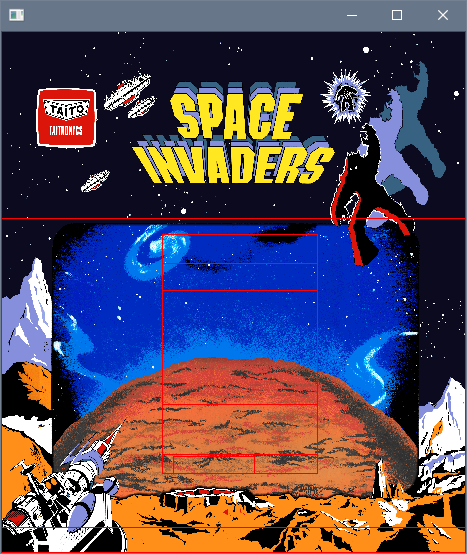
huwpascoe
on 12 Mar 2019
getting there...
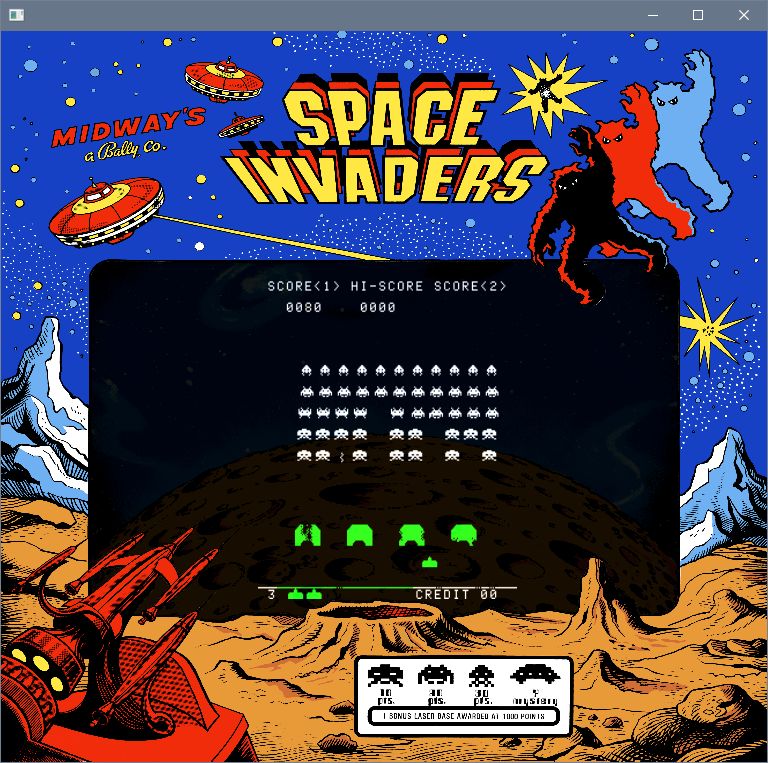
huwpascoe
on 13 Mar 2019
@huwpascoe whoa!! lookin' good!
 hizzlekizzle
on 13 Mar 2019
hizzlekizzle
on 13 Mar 2019
@huwpascoe Nice!
UDb23
on 13 Mar 2019
Awesome.
Have you found the calculation needed to match coordinates in .lay files with actual screen coordinates? I'd be very interested in that.
cosmo0
on 14 Mar 2019
@cosmo0 Each container (element, group, view), has it's own local coordinates for child elements, normalized from the union of all the children. Then you can multiply that to fit whatever container you want.
I made a picture that hopefully explains it better!
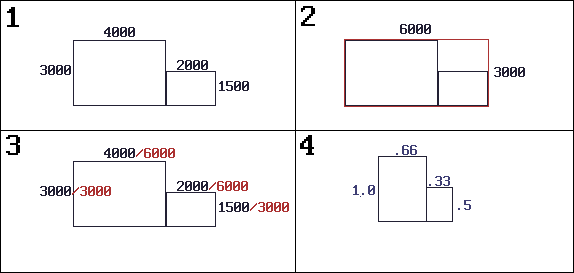
huwpascoe
on 15 Mar 2019
Status: Parameter expansion done. Still waiting on the rxml PR.
huwpascoe
on 20 Mar 2019
Repeating elements done.
(Still waiting on rxml PR to be merged)
huwpascoe
on 22 Mar 2019
OK, the RXML PR has been merged.
 twinaphex
on 23 Mar 2019
twinaphex
on 23 Mar 2019
hi @yesfish ! I wanted to make sure you noticed that there are a few C89-compliance buildfixes that went in earlier today to the RXML code: https://github.com/libretro/RetroArch/commit/cec06a08592c7987be275e18ffb19756f889af19#diff-81b71231d907f8341dcffc8b7082d3c7
markwkidd
on 24 Mar 2019
Hooray
Now we can only blame my glaring C violations for overflows! PR coming soon
huwpascoe
on 26 Mar 2019
About the settings for this, should they share the overlay submenu or get their own layout submenu?
huwpascoe
on 28 Mar 2019
I would suggest that the settings go in Settings -> Onscreen Display.
In that location the new artwork settings (perhaps called "Onscreen Artwork") would be alongside Onscreen Overlay and Onscreen Notifications, but not within the Onscreen Overlays.
markwkidd
on 28 Mar 2019
Progress report:
The menu system is terrible and I hate it very much. This will take longer than I thought.
huwpascoe
on 29 Mar 2019
How to get retroarch file browser to filter custom file extensions.
Or how to filebrowser.filter = "*.etc";
Step 1: Have your menu item set up as in this guide https://docs.libretro.com/development/retroarch/new-menu-options/ and copy paste from other file path properties to get the right setting.
Step 2: Add a new entry in menu_displaylist.h DISPLAYLIST_ETC,
Step 3: Copy paste one of the case DISPLAYLIST_...: that has the line info->exts = strdup("cfg"); to match your label in menu_displaylist.h. That cfg is what specifies the file extension and are separated by the | pipe. e.g. "png|jpeg|jpg". In this case though, just set it to "etc".
Step 4: in menu_cbs_deferred_push.c add a new entry in the generic_deferred_push list(deferred_push_etc, DISPLAYLIST_ETC)
Step 5: scroll down to the switch statement and copy paste one of the items to reference case DISPLAYLIST_ETC: BIND_ACTION_DEFERRED_PUSH(cbs, deferred_push_etc);
Step 6: Start the program with a debugger. Navigate to your menu item.
Step 7: set a breakpoint in menu_cbs_deferred_push.c at function int menu_cbs_init_bind_deferred_push()
Step 8: Select your menu item to trigger the breakpoint.
Step 9: Copy the 8 character hex value in label_hash for the next step and stop debugging.
Step 10: Open msg_hash.h and scroll to the bottom to the #define MENU_LABEL_ 0x.... section to create the new #define with the value you coped while debugging.
If it's worked, you will now only see .etc files when you choose your menu item.
Edit: forgot a step
huwpascoe
on 29 Mar 2019
@yesfish based on the way you wrote that post, are you interested in having
your file extension guide added to the libretro docs?
On Fri, Mar 29, 2019, 4:48 PM yesfish notifications@github.com wrote:
How to get retroarch file browser to filter custom file extensions.
Or how to filebrowser.filter = "*.etc";
Step 1: Have your menu item set up as in this guide
https://docs.libretro.com/development/retroarch/new-menu-options/ and
copy paste from other file path properties to get the right setting.Step 2: Add a new entry in menu_displaylist.h DISPLAYLIST_ETC,
Step 3: Copy paste one of the case DISPLAYLIST_...: that has the line info->exts
= strdup("cfg"); to match your label in menu_displaylist.h. That cfg is
what specifies the file extension and are separated by the | pipe. e.g.
"png|jpeg|jpg". In this case though, just set it to "etc".Step 4: in menu_cbs_deferred_push.c add a new entry in the
generic_deferred_push list(deferred_push_etc, DISPLAYLIST_ETC)Step 5: Start the program with a debugger. Navigate to your menu item.
Step 6: set a breakpoint in menu_cbs_deferred_push.c at function int
menu_cbs_init_bind_deferred_push()Step 7: Select your menu item to trigger the breakpoint.
Step 8: Copy the 8 character hex value in label_hash for the next step
and stop debugging.Step 9: Open msg_hash.h and scroll to the bottom to the #define
MENU_LABEL_ 0x.... section to create the new #define with the value you
coped while debugging.If it's worked, you will now only see .etc files when you choose your menu
item.—
You are receiving this because you commented.
Reply to this email directly, view it on GitHub
https://github.com/libretro/RetroArch/issues/7419#issuecomment-478144753,
or mute the thread
https://github.com/notifications/unsubscribe-auth/ASphdn-nm3ifI_Msu7iEhm-Snw0p-q-tks5vbnwFgaJpZM4XYp9f
.
markwkidd
on 29 Mar 2019
@markwkidd Once all this is done, maybe. At least it's written down somewhere for now.
huwpascoe
on 30 Mar 2019
Config and menu seem to work.
Now for the main task. There are two issues that need addressing:
Mame layouts require control over where screens are positioned. Retroarch's video drivers are inconsistent with their implementation of set_viewport(). Some video drivers don't implement it at all, and others frequently change and reset the viewport multiple times during a frame, sometimes even internally reloading from the global config. As it stands, it's not a reliable interface.
One of the mame layout modes relies on the screen being drawn over the background with additive blending. The space invaders example (that I've been rendering with SDL up to now), will not display correctly without this feature.
The current plan is to implement everything needed in opengl, then contributors can port it to other drivers if they like.
huwpascoe
on 31 Mar 2019
Second issue solved, I've been stupid for not noticing this: The background layer is drawn over black. Don't need to change the viewport rendering at all, can just draw the background over with additive blend.
huwpascoe
on 1 Apr 2019
The current plan is to implement everything needed in opengl, then contributors can port it to other drivers if they like.
Good plan.
hizzlekizzle
on 1 Apr 2019
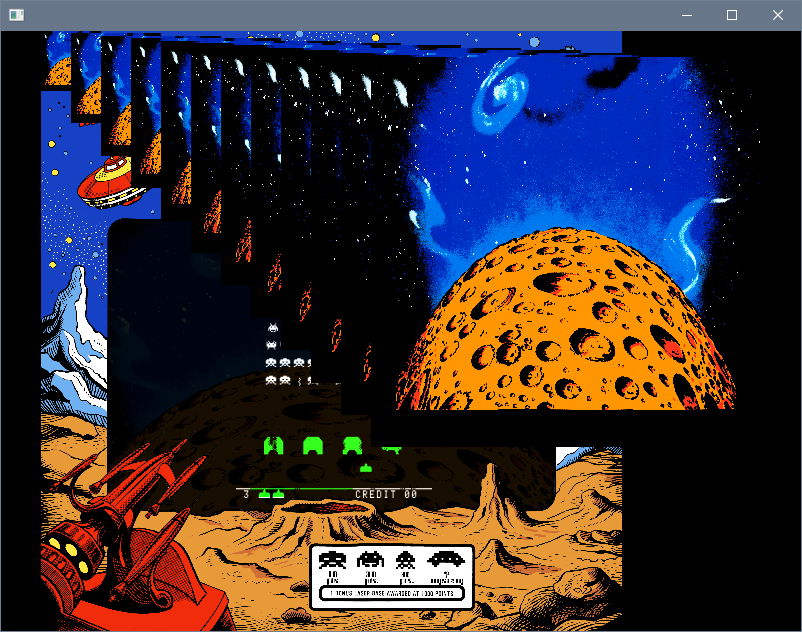
Hacky attempt so not in PR yet, but yay I can get it to show up mostly fine. Actual emulation depicted.

huwpascoe
on 2 Apr 2019
Absolutely gorgeous !! Well done.
UDb23
on 2 Apr 2019
How's game performance ? Do you notice any slowdown?
UDb23
on 2 Apr 2019
Doesn't seem to slow down. Here's my somewhat working PR. Didn't manage to get .zip loading done but you can extract the contents of a layout.zip somewhere and load default.lay directly.
The gl driver is a terrible mess right now, I literally crammed opengl calls wherever until I can figure out what that render chain stuff does. So, maybe read up on restarting your display server if you don't trust your graphics driver!
Going away for a couple weeks. I'll do some updates from remote desktop if I get the time.
huwpascoe
on 3 Apr 2019
Finished. https://github.com/libretro/RetroArch/pull/8529
Notes:
some zip will not load correctly. This is due to a bug in retroarch's file_archive_compressed_read() where it fails to dynamically load files which have used the STORE method. If your layout doesn't load, try extracting it to a sub-directory and load from the default.lay file instead.
I've only implemented the essentials with the gl renderer. It can draw images, rectangles, fit the retoarch frame ("screen" in layout terms) and blend the layers correctly with ALPHA, ADD, MOD.
The layout I/O mechanism is available for future changes if someone wants to add emulation feedback or interface with input overlays.

huwpascoe
on 18 Apr 2019
@markwkidd I believe the bounty is now satisfied, please could you close this issue so I may collect?
I'll continue to rebase the PR until it's merged and provide ongoing layout-related support in my spare time. Thank you.
huwpascoe
on 21 Apr 2019
I have no idea why your getting no response on this. I have tested seems to be working fine for my tests. I dont know who takes care of the bounty's here or the review process. Job well done my good man or woman :)
 grant2258
on 27 Apr 2019
grant2258
on 27 Apr 2019
Normally I am taking an informal role of coordinating communication with
RetroArch developers with these kind of bounties. I apologize the last
couple of weeks I've not been tuned in as much due to my circumstances.
@bparker06 do you have any other requests from a coding standards
perspective?
On Sat, Apr 27, 2019, 1:38 PM grant2258 notifications@github.com wrote:
I have no idea why your getting no response on this. I have tested seems
to be working fine for my tests. I dont know who takes care of the bounty's
here or the review process. Job well done my good man or woman :)—
You are receiving this because you were mentioned.
Reply to this email directly, view it on GitHub
https://github.com/libretro/RetroArch/issues/7419#issuecomment-487313789,
or mute the thread
https://github.com/notifications/unsubscribe-auth/AEVGC5WUYWMOWTA3Z5BMXMDPSSTRPANCNFSM4F3CT5PQ
.
markwkidd
on 27 Apr 2019
huwpascoe
on 13 May 2019
This feature has been merged, and for now it works for people with GL video driver support. I'm closing the issue so that the bounty process can move forward.
markwkidd
on 13 May 2019
@huwpascoe So, we finally got this feature enabled by default and now that folks are testing it we're hitting some bugs I hoped you could help us with:
https://forums.libretro.com/t/470-support-mame-style-backdrop-screen-bezel-overlay-artwork/18537/40
We're getting a black screen with most AMD GPUs, and it seems that it's only showing some of the artwork at a time.
hizzlekizzle
on 26 Oct 2019
Thanks for letting me know
huwpascoe
on 27 Oct 2019
Related issues
 GoronMegaZord
·
3Comments
GoronMegaZord
·
3Comments
 hyarsan
·
4Comments
hyarsan
·
4Comments
hyarsan
·
4Comments
hyarsan
·
4Comments
 orbea
·
3Comments
orbea
·
3Comments
 charlydelta
·
3Comments
charlydelta
·
3Comments
Most helpful comment
Hacky attempt so not in PR yet, but yay I can get it to show up mostly fine. Actual emulation depicted.
