Retroarch: (Menu) Clearer BIOS requirements in Core Information
The BIOS requirements in _Information > Core Information_ could be clearer and more helpful.
Current layout

The exclamation mark in brackets is always there, even when the BIOS is correct - An exclamation mark means 'error' to me. It'd read better if the (!) disappeared once configuration is correct.
The page only shows the MD5 hash that the BIOS is supposed to be for the core to work. It does not show the current BIOS' MD5 hash, or compare the two, or state that there is a mismatch. I had the correct file with an incorrect hash, and no error flashed up. The hashes are also listed separately from the Filenames.
Proposed layout


I don't know if Retroarch currently has the ability to check MD5 hashes, but it would required for this proposal.
The 'Firmware' line could state "place file(s) into System directory" at the end of the line, or in smaller 'help text' when that line is selected. Not sure how that would work with custom directories / on other systems.
(If there was a message saying the BIOS is incorrect on content launch, that'd also help - It took a while to figure out why I was getting nothing but a black screen on executing. Presuming that's a Core issue though, not the frontend.)
 Jaffacakelover
All 8 comments
Five proposals...
- Remove
(!), it's evident with theMissing - Prefix with
-to make the list more apparent - Switch Present/Required position
- Switch string to.....
{title} ({filename}): {required}, {status} - Leverage the Sublabels as proposed in the OP
- PS1 US BIOS (scph5501.bin): Required, Present
    Required MD5: 3243782dfs2
    Detected MD5: 23rjio32fefoi4
- PS1 US BIOS (scph5501.bin): Required, Missing
- PS1 EU BIOS (scph5502.bin): Required, Mismatch
 RobLoach
on 2 Apr 2018
RobLoach
on 2 Apr 2018
It should also allow for marking bios files as optional and provide room for explaining what features they would provide.
 orbea
on 3 Apr 2018
orbea
on 3 Apr 2018
It does, but the pages are basically set up as / treated as Readmes, and different authors have different ideas of what's 'optional'.
See the Higan (Accuracy) core: If you remove all the DSP1 files, Super Mario Kart won't run. Because you can run a SNES without it, but not certain ROMs, they're labelled as "optional". The notes stating which files are for which features are in a big pile at the bottom of the list, nowhere near their cores, with annotations that aren't linked.
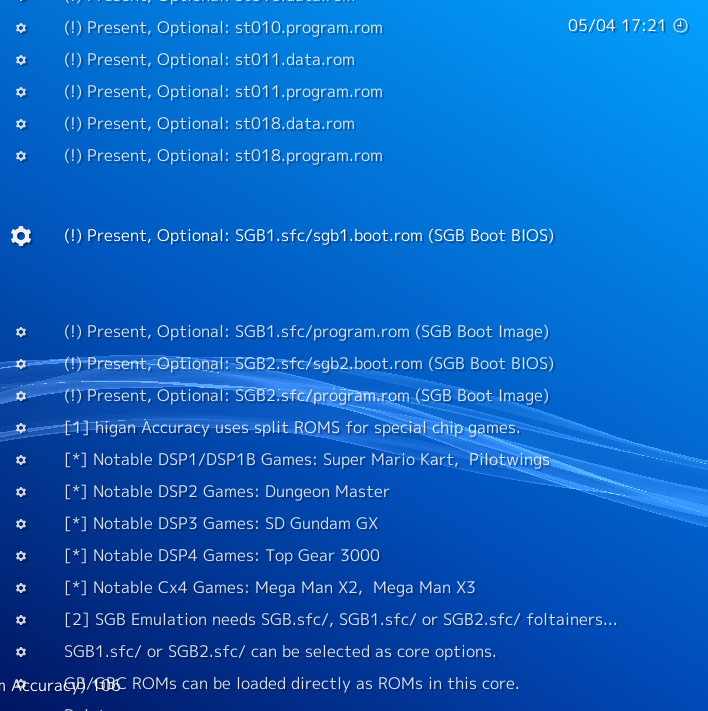
(I'm glad it this core doesn't require MD5 hashes, because there's 21 optional firmwares!)
Conversely, Saturn Beetle lists Firmware that's only used for one game as 'required', because that game won't run without it. Beetle names that game on the same line as the filename, instead of on its own line like Higan.

I bet if I looked into it, every core would have a different way of listing things.
Jaffacakelover
on 5 Apr 2018
I know nestopia lists the bios as required, but its only required for FDS content. The info file should probably be corrected in that one instance. Thanks for the detailed explanation!
orbea
on 5 Apr 2018
Can we use UTF-8 characters in there? Having a ✓ and ✗ in place of Present/Missing would look cool.
Or even ☐ ☑ ☒
RobLoach
on 5 Apr 2018
Can the folders be added here, where Retroarch is looking for these? One of the most confusing things about configuring retroarch is finding out where to put bios files (which folder). I think they all go into "system" but then some emulators (FBA) require them in "roms" or whatever. It is confusing as hell.
 rsn8887
on 5 Apr 2018
rsn8887
on 5 Apr 2018
fbalpha also looks in system, now.
 dankcushions
on 5 Apr 2018
dankcushions
on 5 Apr 2018
It would be great if there would be an additional menu entry in "settings" that shows a unified list of all missing and present bios files of each core. That would help a lot to check what is missing and I would not have to look into each core.
But this issue is a great idea!
 mtoensing
on 27 Jan 2020
mtoensing
on 27 Jan 2020
Related issues
 blackman91
·
3Comments
blackman91
·
3Comments
 charlydelta
·
3Comments
charlydelta
·
3Comments
 hyarsan
·
4Comments
hyarsan
·
4Comments
 GoronMegaZord
·
3Comments
GoronMegaZord
·
3Comments
 rrooij
·
3Comments
rrooij
·
3Comments
Most helpful comment
Five proposals...
(!), it's evident with theMissing-to make the list more apparent{title} ({filename}): {required}, {status}