Retroarch: Add support for "absolute" mouse devices such USB light guns, touchscreens, and some trackpads)
Mouse Devices: Absolute vs. Relative
Mouse devices can be categorized into two categories: absolute coordinates and relative coordinates. This distinction can usually be made based on the type of hardware. Standard mice, trackballs, and gyroscopic airmice provide relative coordinates. Touchscreens, some trackpads, and USB light guns (including the popular AimTrak and Wiimote) use absolute coordinates.
Some standalone emulators support both types of input coordinates, while others support only one. At the moment it is only possible in RetroArch to use 'relative' mouse devices. I believe there is a lot of demand for the ability to use absolute devices, because the only practical way to use anything like a lightgun means dealing with absolute coordinates.
Request
According to @casdevel in a comment on another issue, "Conversion of absolute and relative positions is RetroArch and input driver responsibility, so if you noticed some problems related to this then it's a issue."
I have personally tested this issue and found the problem with Windows 10 RetroArch x86-32 with the latest MAME 2003 core. RetroPie forums user mediamogul has tested it with lr-nestopia, lr-snes9x2010, lr-genesis-plus-gx, MAME 2000, and MAME 2003.
In Windows 10, the MAME 2003 core does not make use of my Dolphinbar->Wiimote position at all using the raw input driver. Using the dinput driver results in erratic positioning of the cursor. I bet there are a few RetroPie users who can provide more detailed accounts of their problems with 'absolute' mice, if that is helpful.
This request is to abstract away the mouse type in RetroArchinput drivers so that both types of mice can be used with any emulation core that provides mouse support in the first place. One method of 'spoofing' these coordinates has been proposed in the past by @dankcushions
 markwkidd
All 48 comments
so one thing to note is that libretro will categorise your connected 'mouse' hardware as one of several different devices: 'RETRO_DEVICE_POINTER' (absolute device like touchpad or touchscreen), and 'RETRO_DEVICE_LIGHTGUN' (i am not sure exactly what this is supposed to be, as OS will just see lightgun as a mouse or pointer).
so, because of this i think it should go like this:
RETRO_DEVICE_MOUSE
always relative coordinates.RETRO_DEVICE_POINTER
always absolute coordsRETRO_DEVICE_LIGHTGUN
i assume absolute, but how would input driver know it was a lightgun?
as far as conversion goes, i guess if there is a DEVICE_MOUSE but no DEVICE_ABSOLUTE connected, then the input driver could convert between the two (and vice versa), so effectively there are two devices connected. this should help cores that have implemented one of the devices but not the other.
 dankcushions
on 28 Jul 2017
dankcushions
on 28 Jul 2017
@markwkidd I created PR #5221 which may help you find out whether your device may be used as a mouse. With this PR winraw log prints mouse index and name for every device that is recognized as mouse. Note that mouse name isn't "friendly", so you may have to extract VID and PID from it, and then compare those with your device VID and PID.
If your device is recognized as a mouse then issue may be solved, otherwise there is nothing that can be done.
 ghost
on 28 Jul 2017
ghost
on 28 Jul 2017
Thanks @casdevel -- absolute mouse devices are indeed recognized according to the new logging.
Here's the relevant excerpt from the log:
[INFO] [WINRAW]: Initializing input driver ...
[INFO] [WINRAW]: Mouse #0 \\?\HID#VID_0079&PID_1802&MI_01&Col01#7&8d02b7&0&0000#{378de44c-56ef-11d1-bc8c-00a0c91405dd}.
[INFO] [WINRAW]: Mouse #1 \\?\ACPI#LEN0006#4&5bd7ca4&0#{378de44c-56ef-11d1-bc8c-00a0c91405dd}.
One of the two devices are my laptop's touchpad, the other is the Wiimote. Note that the Wiimote + Dolphinbar work correctly as a mouse in Windows, it's just in RetroArch that they aren't working correctly.
markwkidd
on 1 Aug 2017
@markwkidd sorry for the delay (I took some time for myself). I also started working on libretro core that may help us here, it's incomplete but should be complete enough for this issue. In the next few days I'll upload source and Windows binaries and we'll take it from there.
ghost
on 24 Aug 2017
@casdevel that sounds great. I do a lot of travel, so it's nothing unusual for me when someone spends some time away from the internet. I'll stay tuned.
markwkidd
on 24 Aug 2017
@markwkidd I uploaded sources and Windows binaries to https://github.com/casdevel/input-debugger-libretro. Note that, currently, only mouse input is supported.
After loading core go to options and select mouse input page and observe input data from driver (if any) .
Also, I suggest that you assign different mouse index for each user to avoid overlapping cross-hairs.
ghost
on 5 Sep 2017
@casdevel I've just done some testing with the Wiimote and Dolphinbar.
Here's my setup:
- Windows 7 Professional x64
- RetroArch 1.6.7 x64
- Version 0.1.1 of your test core (precompiled)
- Input driver set to
raw - Player 1 mouse set to mouse 0, Player 2 to mouse 1, Player 3 to mouse 2
With those settings, the built-in trackpoint is showing up as Player 3 in your test core. The coordinates seemed to be tracking as expected.
I got no response from the Wiimote. It was appearing as a Windows cursor and functioned fine in the OS, but it had no apparent affect on RetroArch / the new test core as the Wiimote cursor moved.
Here are my logs: https://pastebin.com/TbZBvAx1
markwkidd
on 6 Sep 2017
I added debug log with some details about mice data received from OS. This should tell as where is the problem. Code is at https://github.com/casdevel/RetroArch/tree/i5215. If you need binaries let me know.
Start RetroArch, use device (move, press ...) for some time and then exit RetroArch. Log should contain lines "[ERROR] [WINRAW]: Debug report start" and "[ERROR] [WINRAW]: Debug report end". Between them will be few more lines or none on no mice input. Note that messages don't tell much without source code.
ghost
on 6 Sep 2017
Thanks @casdevel -- I compiled your i5215 branch and tried again. Here is the full log: https://pastebin.com/F03fntSf
It seems like these are two new sections of the log with added detail.
Section 1:
[INFO] [WINRAW]: Deinitializing input driver ...
[INFO] [WINRAW]: Input driver deinitialized.
[ERROR] [WINRAW]: Debug report start
[ERROR] [WINRAW]: callback 2.2: 1
[ERROR] [WINRAW]: update_mouse_state 1: 1
[ERROR] [WINRAW]: Debug report end
Section 2:
[INFO] [WINRAW]: Deinitializing input driver ...
[INFO] [WINRAW]: Input driver deinitialized.
[ERROR] [WINRAW]: Debug report start
[ERROR] [WINRAW]: callback 2.0: 429
[ERROR] [WINRAW]: callback 2.2: 544
[ERROR] [WINRAW]: update_mouse_state 0: 429
[ERROR] [WINRAW]: update_mouse_state 1: 538
[ERROR] [WINRAW]: update_mouse_state 2: 6
[ERROR] [WINRAW]: Debug report end
markwkidd
on 7 Sep 2017
@markwkidd changes at https://github.com/casdevel/RetroArch/tree/f5215 should make a difference. I don't have any device that reports absolute coordinates, so I can't test this changes.
ghost
on 8 Sep 2017
@casdevel I didn't see any obvious difference. :(
Here are the logs: https://pastebin.com/WUAhvL0p
markwkidd
on 8 Sep 2017
This log must be from i5215 branch. Branch with fix is f5215, follow the link from my previous post.
ghost
on 8 Sep 2017
You're right @casdevel , I didn't notice the f in the branch name. OK I compiled the correct branch and lots of things were happening!
- The "mouse" screen of the input debugger core only displayed the User 1 input rather than a screen full of users
- The core was seeing coordinates from the Wiimote/Dolphinbar! Woohoo!
- However, the coordinates were very extreme numbers.
I'm attaching a screenshot of how the interface looked, including those X and Y values that seem very high.
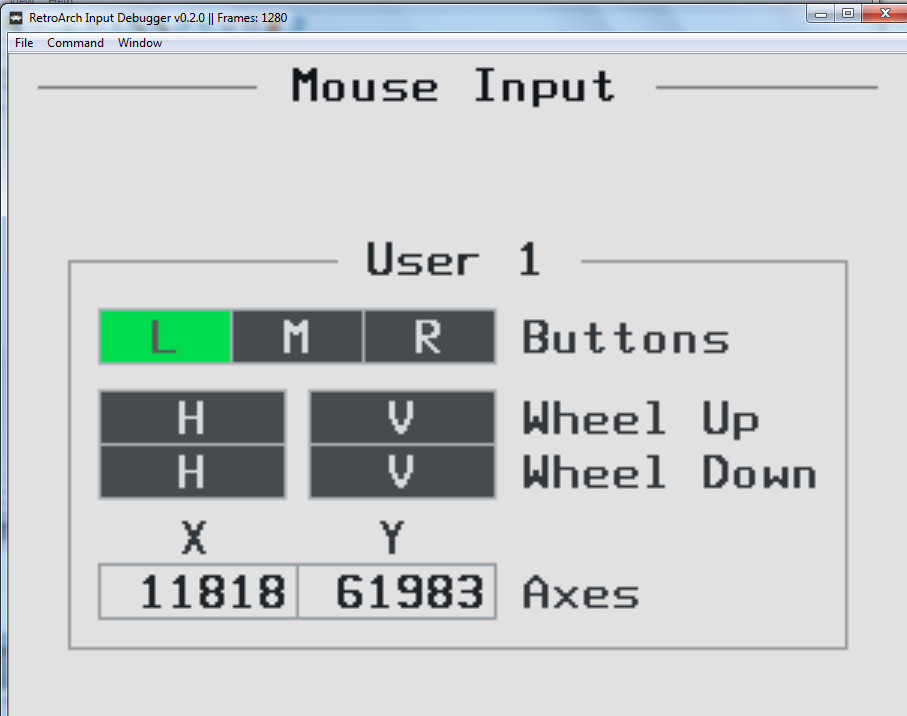
Here is the log from this test: https://pastebin.com/JkWeEtPC
markwkidd
on 8 Sep 2017
I added 'User Count' option, and default value is 1 . This is probably the reason for only one user. You can select up to 16 users.
Axes values represent total movement (since core started). Internally they are not limited but display is limited to range -99999 to 99999. Note that mouse tracking continues, regardless of this display limitation.
Maybe I should change 'Axes' label to 'Movement' or 'Total' or something else?
If cross-hair behaves as expected, then axis values are probably correct. You didn't mention anything about cross-hair?
ghost
on 9 Sep 2017
@casdevel even when I set User Count to 4, I still only have one user info displayed now.
I tested the Wiimote/Dolphinbar again with the same settings and this time I paid closer attention to the crosshair. It jumped wildly across the window, mostly going straight to the four corners, but apparently it would seem to blink into the middle of the window for a moment on its path between corners.
Eventually the X axis stopped displaying numerical values. I'm attaching a screenshot which was typical for what I saw, with the crosshair in the top-right corner.
Note also that this is what is displayed when I have the User Count set to 4 in the Quick Menu options for the input debugger core.
Thanks for sticking with me on this project.

markwkidd
on 9 Sep 2017
@casdevel , I have attached a zip with two video files that demonstrate the difference in how the crosshairs move:
- Trackpoint on my Lenovo Thinkpad: works great
- Wiimote and Dolphinbar: started working because of your improvements, but the crosshair jumps around and the coordinates are more extreme
markwkidd
on 10 Sep 2017
Switch back to i5215 branch at https://github.com/casdevel/RetroArch/tree/i5215.
This time log will contain min/max values of position and movement received from OS. Maybe data needs to be normalized, will see.
I also changed XY input data processing for both absolute and relative movement, so check again cross-hair behavior of all mice and let me know if there are some changes.
Post log again and (hopefully) this debugging will no longer be needed, just fixing.
Note that debug log will contain details for "absolute" device(s) only.
ghost
on 10 Sep 2017
@markwkidd I forgot to ask about user count, do you still can view only one user input?
Also I noticed that cross-hair shows overlapped numbers. This means that more than one cross-hair is there, and that happens when same mouse index is assigned to multiple users. It's better that, during testing, every user has different mouse index assigned, to avoid any confusion.
ghost
on 10 Sep 2017
Hi @casdevel
- When I set the user count to 4, I can still only see user 1 in the input debugging core.
- The trackpoint (relative device) is still working fine.
- When testing the Wiimote/Dolphinbar (Mouse 0) I made sure that it was only configured for User 1. All other users were assigned other Mouse numbers.
Here is the log: https://pastebin.com/gngSyFeP
Here is a video of the test: 2017-09-10 12-38-50 wiimote dolphinbar debugging.zip
markwkidd
on 10 Sep 2017
Debug log didn't worked last time. I fixed that and also I added 1/256 gain to the movement of "absolute" devices (just as experiment).
It looks that received data is OK but with much larger resolution then display. This is based on videos that you posted, and log (with numbers) can confirm this. If this is true than that 1/256 gain will make a difference.
Pull changes from i5215 branch, recompile, try it and post log. One full horizontal and vertical pointer move should be enough data for the log.
Regarding user count option, it seems that core has vertical resolution set to 240, and there is not enough space for more than one user input view. If that is true, increasing vertical resolution should solve the problem. Note that vertical resolution change requires core reload.
ghost
on 11 Sep 2017
@casdevel About the input debbuger user count: Yes, increasing the vertical resolution allowed me to see more than one user in the input debugger. That option was unreadable due to overlapping text at the starting resolution by the way. Now that the resolution is set higher, I can clearly read the resolution setting with no text overlap.
About the Wiimote/Dolphinbar:
That is much improved with the latest update! In fact, now the Wiimote crosshair does not move quite fast enough. You might want to scale it back up a little bit.
Here is the log: https://pastebin.com/M0J3JZKr
markwkidd
on 11 Sep 2017
That device don't report coordinates in screen space. It uses 0..65535 range for XY values. Question is whether is this normal or some OS or device driver bug.
Windows raw input API isn't specific about absolute coordinate space so I assumed that "absolute" device coordinates will be in screen space.
Before changing source, we have to find out is this 0..65535 coordinate space standard or bug. I did a quick search but nothing useful came up. Data from other "absolute" devices, ideally from different manufacturers, would be very helpful.
I'm currently not on my Windows machine, but tomorrow I'll create a new branch and change winraw driver to handle all "absolute" devices in that 0..65535 coordinate space. In the meantime you can experiment with pointer speed yourself, it's just two numbers. Lines are https://github.com/casdevel/RetroArch/blob/i5215/input/drivers/winraw_input.c#L392 and
https://github.com/casdevel/RetroArch/blob/i5215/input/drivers/winraw_input.c#L393. Changing 256 to something smaller will increase speed (128 should double the speed). Also note that XY gains don't have to match.
ghost
on 11 Sep 2017
@casdevel I think that the range of 0-65535 is normal for absolute devices
I found this stackexchange regarding normalizing absolute coordinates: https://stackoverflow.com/questions/21965353/how-to-calculate-coordinates-to-move-the-mouse-cursor-programmatically
That link then led me to a Windows API doc which seems relevant:
"If MOUSEEVENTF_ABSOLUTE value is specified, dx and dy contain normalized absolute coordinates between 0 and 65,535. The event procedure maps these coordinates onto the display surface. Coordinate (0,0) maps onto the upper-left corner of the display surface; coordinate (65535,65535) maps onto the lower-right corner. In a multimonitor system, the coordinates map to the primary monitor." https://msdn.microsoft.com/en-us/library/windows/desktop/ms646273(v=vs.85).aspx
edit: One more relevant stackexchange link: https://stackoverflow.com/questions/12870535/moving-mouse-in-c-sharp-coordinate-units
markwkidd
on 11 Sep 2017
@markwkidd try https://github.com/casdevel/RetroArch/tree/fix5215.
Test it with different resolutions and aspect ratios, just to be sure that mapping works as expected.
ghost
on 12 Sep 2017
@casdevel that seems to be working perfectly! Everything looks right across several resolutions. Is there anything else that I should check?
markwkidd
on 12 Sep 2017
That should be enough. I created a pull request.
ghost
on 12 Sep 2017
Thank you for all your time working on this @casdevel . Do you think your work on the winraw driver would make it easy to add absolute coordinate support to the udev input driver?
markwkidd
on 12 Sep 2017
It should be. Maybe is already implemented, I don't remember.
ghost
on 12 Sep 2017
@casdevel Several RetroPie users have reported that RetroArch is not working with the Wiimote/Dolphinbar and the udev input driver.
I'll try to set up a Linux environment for testing.
markwkidd
on 13 Sep 2017
@casdevel I have set up Ubuntu 17.04 on the same hardware. I have run into an issue almost immediately: neither the laptop trackpoint nor the Wiimote/Dolphinbar are operational in Area 51 via MAME 2003.
I do see in the log that both devices are detected as mice by udev. Here's the log: https://pastebin.com/dish5TUH
markwkidd
on 17 Sep 2017
@markwkidd try https://github.com/casdevel/RetroArch/tree/udev-mouse-abs-move
I suggest that you try this with input debugger core also. If you do so, set 'Max Users' (RetroArch option) and 'User Count' (input debugger option) to value that is no less than number of mice "added" by udev input driver. From log that you posted, 'Max Users' and 'User Count' should be no less than 5. Also don't forget to assign different 'Mouse Index' to all users.
ghost
on 17 Sep 2017
@casdevel that was a big step forward. I compiled your RetroArch branch and the input debugger.
This time both the trackpoint and the Dolphinbar/Wiimote registered input.
The trackpoint seemed to work as expected.
The Dolphinbar Wiimote's measured coordinates were very extreme, and the crosshair moved very quickly across the screen as with the first tests of the Windows raw driver where the coordinates were not yet normalized.
In this case visually, the Wiimote crosshair seemed like it was stuck near the top left of the screen most often, rather than bouncing around to all corners equally. That was just a visual impression however.
Here is the log: https://pastebin.com/8qPb7nHF
markwkidd
on 17 Sep 2017
Pull changes and try again.
Note that this will disable mouse pointer in the RetroArch menu (this is just a quick test).
ghost
on 18 Sep 2017
@casdevel With the new RetroArch compile, the Wiimote crosshair hardly moves at all from the center of the window. When I move the Wiimote wildly, I can get the X value up into the 20s.
markwkidd
on 18 Sep 2017
Can you upload video with one full horizontal and one full vertical move?
You don't have to upload log.
We'll continue tomorrow (it's been a long day).
ghost
on 18 Sep 2017
@casdevel I have attached a video. As you can see it is very hard to tell when I'm moving horizontal and when vertical. My movements were left-right-left, then up-down-up-down.
You'll also notice that the Ubuntu 17.04 system cursor isn't as good at handling this input as Windows is, where the Dolphinbar/Wiimote moved around the interface as expected instead of jerking around.
udev-test-4.mkv.zip
Have a good night!
markwkidd
on 18 Sep 2017
@markwkidd pull changes, compile, start RetroArch and input debugger, do one full horizontal and vertical move, exit RetroArch and upload log.
ghost
on 18 Sep 2017
@casdevel Here is the log: https://pastebin.com/EuBUMxK5
Here is a video of my screen during the test: udev-test-5.mkv.zip
Apologies for waving the Wiimote more than once per axis. For some reason it's easier to tell where the system cursor is when watching the video recording than during the actual test.
markwkidd
on 19 Sep 2017
Latest changes should fix the problem.
Note that this is just a test specific to yours device.
ghost
on 19 Sep 2017
@casdevel your latest change seems to have the crosshairs position moving perfectly.
One thing I just noticed is that the Wiimote "trigger" button isn't mapped, whereas it should be mapped to the left mouse button. Other than that it things are good now.
Is there any other testing I can do for you on this?
markwkidd
on 19 Sep 2017
@markwkidd Mouse move is solved, but mouse click isn't (I will look into that). This means at least one more test. When I find out why mouse click isn't working I will upload changes and let you know.
ghost
on 19 Sep 2017
@markwkidd this will take a few more days...
Code for handling absolute coordinates brakes current functionality of the udev driver. I have to implement pointer support in input debugger core so I can test this as much as it's possible without actual "absolute" device.
ghost
on 20 Sep 2017
No problem, just let me know when you need more tests.
markwkidd
on 20 Sep 2017
@markwkidd try https://github.com/casdevel/RetroArch/tree/udev-mice-abs
If I didn't missed something any mouse-like device may be used as lightgun, mouse or pointer.
Note that all input code, except keyboard, is affected in some way, so regressions are possible.
ghost
on 2 Oct 2017
@casdevel everything looks good here. I tested with two relative mice plus the Dolphinbar/Wiimote. I was able to map each of the mice to various players. The Wiimote worked, including the trigger/left mouse, in your input debugger core and in MAME 2003.
markwkidd
on 2 Oct 2017
@markwkidd I removed some no longer needed code from the driver and did few minor changes. I tested all again and didn't noticed any problems. I also created PR #5512.
If I understood correctly you are involved with input drivers docs. If this is true, is there a place for comments?
ghost
on 5 Oct 2017
Awesome!
@casdevel yes I have been working on docs related to the input drivers. That content can be seen here: https://github.com/libretro/docs/blob/master/docs/guides/input-joypad-drivers.md
I have also started writing a guide for configuring multi-mouse: https://forums.libretro.com/t/configuring-ra-for-multi-mouse-spinners-steering-wheels-lightguns/12619
I would be grateful for any comments or changes you suggest.
markwkidd
on 5 Oct 2017
I think it is time to close this issue, because the API seems to be fully in place. The issues are at the core level now.
markwkidd
on 30 Mar 2018
Related issues
 Alex793
·
3Comments
Alex793
·
3Comments
 danabnormal9000
·
3Comments
danabnormal9000
·
3Comments
 rrooij
·
3Comments
rrooij
·
3Comments
 alki-apps
·
3Comments
alki-apps
·
3Comments
 orbea
·
3Comments
orbea
·
3Comments
Most helpful comment
so one thing to note is that libretro will categorise your connected 'mouse' hardware as one of several different devices: 'RETRO_DEVICE_POINTER' (absolute device like touchpad or touchscreen), and 'RETRO_DEVICE_LIGHTGUN' (i am not sure exactly what this is supposed to be, as OS will just see lightgun as a mouse or pointer).
so, because of this i think it should go like this:
RETRO_DEVICE_MOUSE
always relative coordinates.
RETRO_DEVICE_POINTER
always absolute coords
RETRO_DEVICE_LIGHTGUN
i assume absolute, but how would input driver know it was a lightgun?
as far as conversion goes, i guess if there is a DEVICE_MOUSE but no DEVICE_ABSOLUTE connected, then the input driver could convert between the two (and vice versa), so effectively there are two devices connected. this should help cores that have implemented one of the devices but not the other.