Responsively-app: Add a CSS editor that can used to quickly apply CSS for each device and then copied later to paste it to the codebase
Add a CSS Editor panel(Maybe in the sidebar?) that should allow the user to do quick CSS designing.
Quick pointers:
- If the user has 3 devices in preview, this panel can have 4 tabs/sections:
All,Device1,Device2,Device3. - All CSS in these 3 panels should be combined(using media query conditions) and then apply it to all devices.
- Changes should be applied as and when the user types and stops.
 manojVivek
All 9 comments
@manojVivek I have been thinking a little about this feature. What do you think about a design like this?
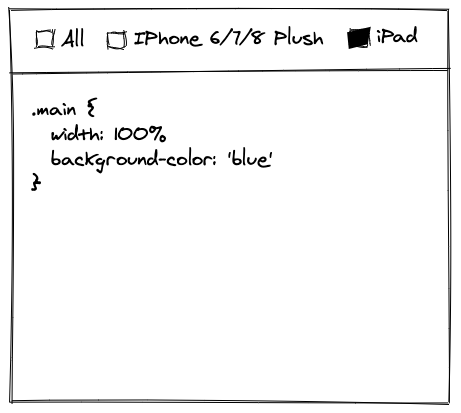
Instead of tab we use checkboxes.
Selecting all selects
all checkbox+ all devices checkboxesUnselecting 1 checkbox, other than all, unselects that checkbox +
all checkbox.Unselecting all, unselects
all checkbox+ all devices checkboxes.The css in the box is applied to all selected devices.
 jzabala
on 25 Aug 2020
jzabala
on 25 Aug 2020
@jzabala I was thinking about something like this, let me know your thoughts:

Here is the Figma link: https://www.figma.com/file/a4DGDidgygGlsrTpC9JGuc/CSS-Editor?node-id=3%3A17
I was planning to start on this after the screenshot improvements, you can take it up if you are interested. Please let me know.
manojVivek
on 25 Aug 2020
@manojVivek I see. That definitely looks better than mine 😂
A user using this tool will probably just copy the whole thing and paste it in the css file. What would you think about only using the big All screens and use Add Screen to add the media query at the end? I know the Copy Styles will probably do that but if I were typing I'll just do Command+A, Command+C and back to my editor.
jzabala
on 25 Aug 2020
Yeah Command+A, Command+C will be a use-case we should definitely cover.
Is it possible to achieve that without making it a full-text field? Something like a content editable div?
Just feel having that separation would make it more intuitive than a single text field with CSS breakpoints.
manojVivek
on 25 Aug 2020
I was planning to start on this after the screenshot improvements, you can take it up if you are interested. Please let me know.
It sounds like an interesting issue but no worries. Go for it 😁
I saw this React editor that we could use. Check the demo, it even has autocomplete.
https://github.com/securingsincity/react-ace
Is it possible to achieve that without making it a full-text field? Something like a content editable div?
Yeah. If we have the separation I suppose a simple Command+C could do the trick only you have something selected. So, on Command+C if the user has a selection only that is selected otherwise everything. What do you think?
Just feel having that separation would make it more intuitive than a single text field with CSS breakpoints.
Makes sense.
jzabala
on 27 Aug 2020
I saw this React editor that we could use. Check the demo, it even has autocomplete.
https://github.com/securingsincity/react-aceCool, will check it out. I was thinking of https://microsoft.github.io/monaco-editor/. Will compare both and select one.
Yeah. If we have the separation I suppose a simple
Command+Ccould do the trick only you have something selected. So, onCommand+Cif the user has a selection only that is selected otherwise everything. What do you think?Can you please explain this a bit? How will we copy everything when there is no selection?
manojVivek
on 27 Aug 2020
I dont know react-ace but monaco-editor has a lot (A LOT) of features
 jjavierdguezas
on 27 Aug 2020
jjavierdguezas
on 27 Aug 2020
@manojVivek
Cool, will check it out. I was thinking of https://microsoft.github.io/monaco-editor/. Will compare both and select one.
Wow monaco-editor looks rad 😍
Can you please explain this a bit? How will we copy everything when there is no selection?
Let's say I am typing in the All box and I click the copy styles button. To me that should copy the styles of all boxes ready to paste in my final file:
.btn {
  ...
}

@media only screen and (max-width: 768px) {
  .btn {
    ...
  }
}
Well, if I were in that box and instead Command+C it should copy the whole thing too. Or maybe we could use another shortcut. I just think it would be cool not to have to move my hands from the keyboard to copy everything.
jzabala
on 27 Aug 2020
Well, if I were in that box and instead
Command+Cit should copy the whole thing too. Or maybe we could use another shortcut. I just think it would be cool not to have to move my hands from the keyboard to copy everything.
Yeah, that makes sense. I'll get the initial setup ready and then let's discuss more over it.
manojVivek
on 27 Aug 2020
Related issues
jjavierdguezas
·
3Comments
manojVivek
·
5Comments
jjavierdguezas
·
5Comments
 JasonLi-9933
·
5Comments
JasonLi-9933
·
5Comments
 johndavemanuel
·
3Comments
johndavemanuel
·
3Comments
Most helpful comment
I dont know
react-acebutmonaco-editorhas a lot (A LOT) of features