Responsively-app: App cannot be installed on Window 10.
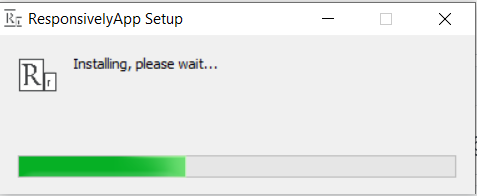
The progress bar seems to stuck here forever. I am not quite sure if there is something wrong with my device. It works fine on my Mac.
 JasonLi-9933
All 5 comments
@JasonLi-9933 I'll try later to reproduce it in a fresh Windows machine with the latest installer, but meanwhile Do yo have any antivirus installed?
 jjavierdguezas
on 25 Jul 2020
jjavierdguezas
on 25 Jul 2020
couldnt reproduce it
tested latest installer from release page in a Windows Sandbox session and in a fresh Azure Windows 10 virtual machine
No antivirus (maybe the Defender, default one)
please provide more info
jjavierdguezas
on 25 Jul 2020
I have an antivirus called McAfee. But it didn't give me any warnings. When I started installing, it was blocked by something called Windows Defender SmartScreen. But I unblock it eventually, and it starts installing and stuck there forever. Not sure if this is the issue. It didn't take up any CPU while installing so I am assuming it just stopped rather than loading slowly.
JasonLi-9933
on 25 Jul 2020
yeah I think this is related to #151
Maybe Defender is analysing some files or deleting them blocking or breaking the install
jjavierdguezas
on 25 Jul 2020
Hello, I would like to ask, why do I turn off the antivirus software and application detection and still fail or still get stuck? Hello, I want to ask, why I turn off the antivirus software and application detection but still does not work or still get stuck?
 Front-end999
on 16 Aug 2020
Front-end999
on 16 Aug 2020
Related issues
 amankkg
·
5Comments
amankkg
·
5Comments
 ahopkins
·
4Comments
ahopkins
·
4Comments
 manojVivek
·
5Comments
manojVivek
·
5Comments
 tochoromero
·
5Comments
tochoromero
·
5Comments
 staabm
·
4Comments
staabm
·
4Comments