Responsively-app: Issues with building app locally via "yarn package-win"
System Windows 10, Version 1909
Machine is blocked by company policy, so I can't install by downloading .exe from releases.
So I tried to build it locally with elevated cmd.exe as local admin:
yarn install
yarn package-win
Stacktrace with error (looks like issue with permissions to AppData folder):
[1] yarn build-renderer exited with code 0
  • electron-builder  version=22.7.0 os=10.0.18363
  • loaded configuration  file=package.json ("build" field)
  • writing effective config  file=release\builder-effective-config.yaml
  • rebuilding native dependencies  [email protected] platform=win32 arch=x64
  • rebuilding native dependency  name=node-sass version=4.14.1
  • packaging       platform=win32 arch=x64 electron=8.3.0 appOutDir=release\win-unpacked
  • building        target=nsis file=release\ResponsivelyApp Setup 0.5.0.exe archs=x64 oneClick=true perMachine=false
  • downloading     url=https://github.com/electron-userland/electron-builder-binaries/releases/download/nsis-3.0.4.1/nsis-3.0.4.1.7z size=1.3 MB parts=1
  • downloaded      url=https://github.com/electron-userland/electron-builder-binaries/releases/download/nsis-3.0.4.1/nsis-3.0.4.1.7z duration=8.792s
  • cannot move downloaded into final location (another process downloaded faster?)  path=C:\Users\xxx\AppData\Local\electron-builder\Cache\nsis\nsis-3.0.4.1
tempFile=C:\Users\xxx\AppData\Local\electron-builder\Cache\nsis\220297347
error=rename C:\Users\xxx\AppData\Local\electron-builder\Cache\nsis\ C:\Users\xxx\AppData\Local\electron-builder\Cache\nsis\nsis-3.0.41: Access is denied.

⨯ ENOENT: no such file or directory, copyfile 'C:\Users\xxx\AppData\Local\electron-builder\Cache\nsis\nsis-3.0.4.1\elevate.exe' -> 'C:\scv\responsively-app\desktop-app\release\win-unpacked\resources\elevate.exe'  stackTrace=

Error: ENOENT: no such file or directory, copyfile 'C:\Users\xxx\AppData\Local\electron-builder\Cache\nsis\nsis-3.0.4.1\elevate.exe' -> 'C:\scv\responsively-app\desktop-app\release\win-unpacked\resources\elevate.exe'
at processImmediate (internal/timers.js:439:21)
From previous event:
at NsisTarget.buildInstaller (C:\scv\responsively-app\desktop-app\node_modules\app-builder-lib\src\targets\nsis\NsisTarget.ts:202:29)
at NsisTarget.finishBuild (C:\scv\responsively-app\desktop-app\node_modules\app-builder-lib\src\targets\nsis\NsisTarget.ts:109:7)
at async Promise.all (index 1)
at AsyncTaskManager.awaitTasks (C:\scv\responsively-app\desktop-app\node_modules\builder-util\src\asyncTaskManager.ts:65:25)
at Packager.doBuild (C:\scv\responsively-app\desktop-app\node_modules\app-builder-lib\src\packager.ts:456:5)
at executeFinally (C:\scv\responsively-app\desktop-app\node_modules\builder-util\src\promise.ts:12:14)
at Packager._build (C:\scv\responsively-app\desktop-app\node_modules\app-builder-lib\src\packager.ts:373:31)
at Packager.build (C:\scv\responsively-app\desktop-app\node_modules\app-builder-lib\src\packager.ts:337:12)
at executeFinally (C:\scv\responsively-app\desktop-app\node_modules\builder-util\src\promise.ts:12:14)
error Command failed with exit code 1.
info Visit https://yarnpkg.com/en/docs/cli/run for documentation about this command.
The other command to run it in dev mode works properly:
yarn dev
 misiekofski
All 6 comments
@jjavierdguezas Any ideas? 🤔
 manojVivek
on 3 Jul 2020
manojVivek
on 3 Jul 2020
I think this is a particular scenario with a computer with an extra layer of protection given by company policies. I use Windows and I tested this in some Windows computers (personal and workplace) and I can't reproduce it.
@misiekofski what antivirus do you have? maybe it is blocking the file while scanning it? ( see https://github.com/electron-userland/electron-builder/issues/3722 )
 jjavierdguezas
on 3 Jul 2020
jjavierdguezas
on 3 Jul 2020
jjavierdguezas
on 3 Jul 2020
jjavierdguezas
on 3 Jul 2020
Thank you @jjavierdguezas
What I did:
- Added to
package.jsoninbuild: {}section:
    "electronDownload": {
      "cache" : "./cache"
    }
- Create env variable:
ELECTRON_BUILDER_CACHEand set it to different directory (C:\scv\cache)
The error now shows almost the same issue (renaming nsis folder failed in different location):
cannot move downloaded into final location (another process downloaded faster?)  path=c:\scv\cache\nsis\nsis-3.0.4.1 tempFile=c:\scv\cache\nsis\982794555 error=rename c:\scv\cache\nsis\982794555 c:\scv\cache\nsis\nsis-3.0.4.1: Access is denied.
  ⨯ ENOENT: no such file or directory, copyfile 'c:\scv\cache\nsis\nsis-3.0.4.1\elevate.exe' -> 'C:\scv\responsively-app\desktop-app\release\win-unpacked\resources\elevate.exe'  stackTrace=Error: ENOENT: no such file or directory, copyfile 'c:\scv\cache\nsis\nsis-3.0.4.1\elevate.exe' -> 'C:\scv\responsively-app\desktop-app\release\win-unpacked\resources\elevate.exe' at processImmediate (internal/timers.js:439:21)
Fortunately I went into folder and changed 982794555 to nsis-3.0.4.1 and ran yarn package-win again
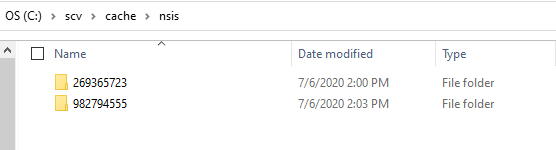
And I got success with this elaborated workaround! ;)
PS. Maybe you guys could provide in releases some kind of portable version of this great app you've created? That would help a lot of less technical people :)
misiekofski
on 6 Jul 2020
@misiekofski I hope you found the solution and we can close this issue.
manojVivek
on 8 Jul 2020
Yes this can be closed, thank you :)
misiekofski
on 8 Jul 2020
Related issues
jjavierdguezas
·
3Comments
manojVivek
·
3Comments
 JasonLi-9933
·
5Comments
JasonLi-9933
·
5Comments
 Kidcredo
·
5Comments
Kidcredo
·
4Comments
Kidcredo
·
5Comments
Kidcredo
·
4Comments
Most helpful comment
Thank you @jjavierdguezas
What I did:
package.jsoninbuild: {}section:ELECTRON_BUILDER_CACHEand set it to different directory (C:\scv\cache)The error now shows almost the same issue (renaming nsis folder failed in different location):
Fortunately I went into folder and changed

982794555tonsis-3.0.4.1and ranyarn package-winagainAnd I got success with this elaborated workaround! ;)
PS. Maybe you guys could provide in releases some kind of portable version of this great app you've created? That would help a lot of less technical people :)