Resharper-unity: Test Runner Hanging when using Continuous Testing
When running tests in Unity using the Continuous Testing, Rider often gets stuck running tests (or waiting for coverage). This is not cancellable (the cancel button does nothing), and I need to restart Rider to start testing again.
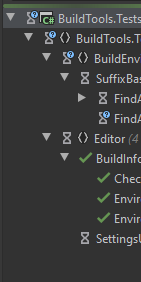
Example Screenshots:
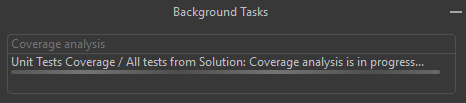
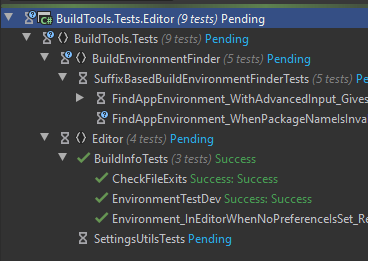
When I try pressing "Stop Execution" nothing happens. In the screenshot the tests have been stuck since before the weekend, so it is not waiting for anything.
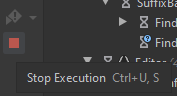
Is this a known issue? Is there anything I can supply to help debugging this issue?
Possible Explanation: It seems to happen more frequently when I change and save any file while the test is running.
Using
- Unity 2019.4.0 with Rider Unity Plugin v2.0.5 and Unity Test Runner v1.1.14.
- Rider 2020.1.3
 Strepto
All 4 comments
Do you mean tests in Unity are finished, but in Rider still waiting?
If they still run in Unity - please try to stop them there by Cancel button in the progress dialog.
 van800
on 15 Jun 2020
van800
on 15 Jun 2020
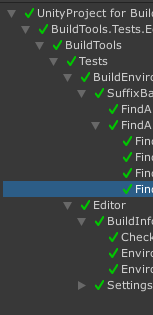
The tests seem to be complete in Unity, but Rider sees them as not complete
Strepto
on 15 Jun 2020
I can reproduce this bug like this:
- Open a small Unity project with some editor tests. Using Unity 2019.4.0f1, and Rider 2020.1.3, and Rider Editor Unity package 1.1.4. Using macOS.
2) Enable "Continous testing" mode "Run all tests"
3) Do a change and save to trigger that the tests run.
4) While the code is compiling, do another small change, but do not save yet.
5) Wait for all tests to show status "pending" and that the Unity editor starts to prepare for running the tests (the "Test runner" window is cleared for a short time). Now hit save.
6) Observe that the Unity editor runs the tests to completion, but the status is never updated in Rider, is is still "Pending" for all tests, and the stop button does nothing.
 eirikwah
on 15 Jun 2020
eirikwah
on 15 Jun 2020
Thank you for the complete repro. I will look into it.
In the meantime, I can only suggest that instead of restart Rider, you can close-open solution, which would be faster.
van800
on 15 Jun 2020
Related issues
 harryr0se
·
5Comments
harryr0se
·
5Comments
 mihakrajnc
·
5Comments
mihakrajnc
·
5Comments
 persn
·
3Comments
persn
·
3Comments
 real-mikhail
·
5Comments
real-mikhail
·
5Comments
 justinlueders
·
3Comments
justinlueders
·
3Comments