Resharper-unity: Project load failed due to Unicode issue
Hi,
I updated to the Rider 2018.2 release yesterday and now it looks like Rider can no longer open my Unity solution's projects.
I get these errors in the log:
`14:48 Project 'Assembly-CSharp' load failed: Die Projektdatei konnte nicht geladen werden. Keine Unicodebyte-Reihenfolgemarkierung. Es kann nicht zu Unicode gewechselt werden. E:\trunk\Assembly-CSharp.csproj at (0:0)
14:48 Project 'Assembly-CSharp-firstpass' load failed: Die Projektdatei konnte nicht geladen werden. Keine Unicodebyte-Reihenfolgemarkierung. Es kann nicht zu Unicode gewechselt werden. E:\trunk\Assembly-CSharp-firstpass.csproj at (0:0)
14:48 Project 'Assembly-CSharp-Editor' load failed: Die Projektdatei konnte nicht geladen werden. Keine Unicodebyte-Reihenfolgemarkierung. Es kann nicht zu Unicode gewechselt werden. E:\trunk\Assembly-CSharp-Editor.csproj at (0:0)
14:48 Project 'Assembly-CSharp-Editor-firstpass' load failed: Die Projektdatei konnte nicht geladen werden. Keine Unicodebyte-Reihenfolgemarkierung. Es kann nicht zu Unicode gewechselt werden. E:\trunk\Assembly-CSharp-Editor-firstpass.csproj at (0:0)
`
(Rough translation: "The project file could not be loaded. No Unicode byteorder mark. Can not switch to Unicode.")
I already tried to invalidate Rider's caches, removed all Rider data from the Unity project (both .idea in the root as well as the plugin in Assets/Plugins/Editor), tried the "Sync C# Project" from Unity and of course restartet both Unity and Rider.
Anything else I could try? I really need to get this working again to properly continue my work :)
Regards,
Chris
 Alloc86
All 37 comments
I have the same issue. It seems csproj files are UTF-8 actually but marked as UTF-16: <?xml version="1.0" encoding="utf-16"?>. I've checked that they have UTF-8 BOM 0xEF 0xBB 0xBF but should be 0xFE 0xFF in a case of UTF-16. So it seems new Rider is more strict then previous version.
As a temporary workaround you are able to replace "utf-16" by "utf-8" in all csproj files but they will be replaced back to "utf-16" anytime you will return back to Unity.
 pnuzhdin
on 24 Aug 2018
pnuzhdin
on 24 Aug 2018
@Alloc86 @pnuzhdin Let us know your OS, Unity version, Language settings. How can I reproduce?
 van800
on 24 Aug 2018
van800
on 24 Aug 2018
You may try to switch used MSBuild version in Rider settings
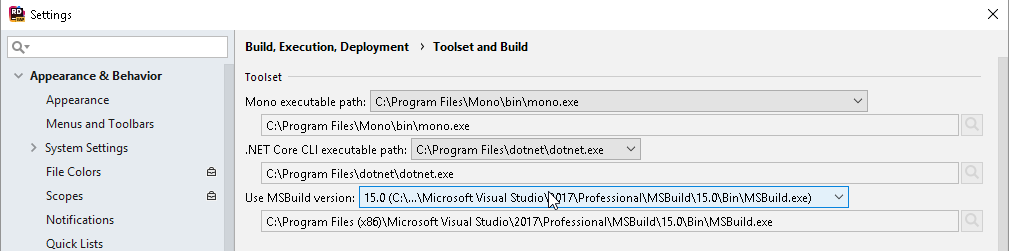
Please let me know if it helps.
van800
on 24 Aug 2018
@van800
MacOS High Sierra 10.13.6
Unity 2018.2.5f1
JetBrains Rider 2018.2 Build #RD-182.4231.193, built on August 21, 2018
JRE: 1.8.0_152-release-1248-b8 x86_64
JVM: OpenJDK 64-Bit Server VM by JetBrains s.r.o
Steps to reproduce:
- Create new project in Unity.
- Set Rider as editor in Unity.
- Create any cs script in Unity.
- Open the script in Unity. Observe that the script has been opened in Rider. Rider installed resharper-unity to the project.
- Close Rider.
- Open the script in Unity again.
Observe that all csproj files unable to be loaded with following messages in Event Log:
Project 'Assembly-CSharp' load failed: The project file could not be loaded. There is no Unicode byte order mark. Cannot switch to Unicode. /Users/pnuzhdin/fat-projects/work/exyte/ver-game1/Assembly-CSharp.csproj at (0:0)
pnuzhdin
on 24 Aug 2018
@van800 No switching MSBuild version didn't help. I only have Mono 12 and 14 builtin in Unity.
pnuzhdin
on 24 Aug 2018
@van800
Windows 10 64 bit, German
Unity 2018.2.4
No Visual Studio (after all that's why I'm using Rider ;) ) so no MSBuild for me if I got that correctly.
Alloc86
on 24 Aug 2018
@Alloc86 Could you please try our MSBuild?
https://download.jetbrains.com/resharper/JetMSBuild.zip
More info available here:
https://blog.jetbrains.com/dotnet/2018/04/13/introducing-jetbrains-redistributable-msbuild/
van800
on 24 Aug 2018
@van800 yes, it works fine with https://download.jetbrains.com/resharper/JetMSBuild.zip for me. Have you plans to fix it for Unity's built-in MSBuild? Or might use JetMSBuild by default for all environments without Visual Studio? It should definitely work out of the box for users without Visual Studio.
pnuzhdin
on 24 Aug 2018
We have such plans https://youtrack.jetbrains.com/issue/RIDER-18214
But they are only for 2018.3
van800
on 24 Aug 2018
For Mac new mono https://www.mono-project.com/download/stable/#download-mac, which comes with msbuild should help.
van800
on 24 Aug 2018
It loads the projects with that MSBuild, but I wouldn't say "it's working". Currently it is at 176k errors in the script files and still counting. It even complains about being unable to resolve "void" or "float".
/EDIT:
As an addition to the stats given above, this is with a Unity project targeting the .NET 3.5 equivalent runtime, Mono backend, .NET 2.0 compatibility level.
/EDIT 2:
And these are the warnings in the event log:
19:39 Project 'Assembly-CSharp' load finished with warnings: Die Verweisassemblys für Framework ".NETFramework,Version=v4.5" wurden nicht gefunden. Installieren Sie zum Beheben dieses Problems das SDK oder das Paket zur Festlegung von Zielversionen für die vorliegende Frameworkversion, oder legen Sie als neues Ziel für die Anwendung eine Version des Frameworks fest, für die Sie das SDK oder Paket zur Festlegung der Zielversionen installiert haben. Assemblys werden im globalen Assemblycache (GAC) aufgelöst und anstelle von Verweisassemblys verwendet. Daher wird die Assembly für das gewünschte Framework unter Umständen nicht ordnungsgemäß als Ziel festgelegt. at (1179:5)
(REPEAT SAME FOR THE OTHER 3 ASSEMBLIES)
19:39 .NET Framework Not Installed: Download and install .NET Framework 4.5 Developer Pack
Not sure if I had these before in Rider 2018.1.2, but this definitely should not be an issue as it worked all fine before this update.
Alloc86
on 24 Aug 2018
@Alloc86 I have seen such error before.
- Do you have dotnet 3.5 targets pack installed in
"C:\Program Files (x86)\Reference Assemblies\Microsoft\Framework\.NETFramework"? - Check that
Assets\Plugins\Editor\JetBrains\JetBrains.Rider.Unity.Editor.Plugin.Repacked.dllis present - If EditorPlugin is present call "Assets->Sync C# Project" in Unity.
- Check that Override TargetFramework is unckecked in Rider tab in Unity Preferences.
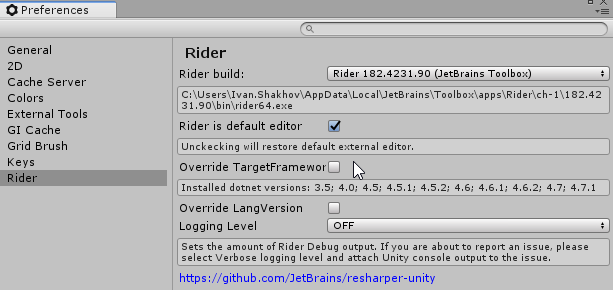
van800
on 24 Aug 2018
@pnuzhdin @Alloc86 Could you please reproduce the Unicode issue and collect Rider logs after that (Help -> Compress log...)? It will help us to locate and fix the issue. Thank you!
 julia-vaseva
on 24 Aug 2018
julia-vaseva
on 24 Aug 2018
@julia-vaseva Just set it back to the autodetected MSBuild and it's giving the errors again. Restarted Rider to get cleaner logs (looks like idea.log never gets reset though):
logs-20180825-132134.zip
@van800 While that might fix the current issue I don't see why it should be necessary to install all this custom stuff if that was never needed before the 2018.2 build. Unity provides the Mono libraries that Rider should use for lookup anyway (and I think it properly did before, at least never had any errors). So this looks like a "simple" regression on Rider's side (or becoming more strict about an issue in Unity but even so that should be fixed on Rider's / Unity's side and not require the end user to fiddle with stuff ;) ).
Anyway, there's both a 3.5 and 3.0 in both x86 and normal Program Files and the plugin is installed fine. The Unity preferences for Rider are the same as in your screenshot (it's not listing any installed .NET versions though in the label). Did the Sync C# Project thing a bunch of times by now but it seems this is a static issue.
Alloc86
on 25 Aug 2018
Same issue for me.
- New Unity project (2018.2.5f1). Up to date Rider version. Windows 10.
- Open Unity's auto-generated .sln in Rider, it loads the first time without issue.
- BUT then after Rider auto-installs the plugin (BAD IDEA!), the first line of the .csproject changes to:
<?xml version="1.0" encoding="utf-16"?>(it was<?xml version="1.0" encoding="utf-8"?>before), thus making Rider unable to load the .csproject.
Hotfix this ASAP.
More info: I'm using a previous Rider version at work without issue (thankfully I ignored the "New version of Rider" popups this week).
 NikiWalkerDeveloper
on 25 Aug 2018
NikiWalkerDeveloper
on 25 Aug 2018
Workaround:
Disable the Rider plugin auto-injection via instructions at bottom of this github's main page: https://github.com/JetBrains/resharper-unity
Delete the rider plugin in Unity, and the .csproj files.
Call Assets->Open C# Project.
NikiWalkerDeveloper
on 25 Aug 2018
@Alloc86 It is not clear if you have v3.5 in "C:\Program Files (x86)\Reference Assemblies\Microsoft\Framework\.NETFramework" or not?
If it the folder exists then maybe this code https://github.com/JetBrains/resharper-unity/blob/182/unity/EditorPlugin/PluginSettings.cs#L37 doesn't work well on your machine? Could you check please?
van800
on 25 Aug 2018
The difference in Rider 2018.2 is that we use new Unity callback, which allows us to modify csproj content without actually saving csproj to file.
The problem must be in this line
https://github.com/JetBrains/resharper-unity/blob/182/unity/EditorPlugin/AssetPostprocessors/CsprojAssetPostprocessor.cs#L43
@citizenmatt ^
van800
on 25 Aug 2018
Having same issue on Win10, Unity 2018.2.3f1.
Can confirm that @NikiWalkerDeveloper's solution works for me.
As well as manually changing first line in .csproj files from UTF-16 to UTF-8.
Unfortunately, it is overriden as soon as .csproj changes.
Not sure what causing the problem, but if the plugin changes the signature of the xml encoding, maybe it should change contents of the file (encoding) as well?
 VergilUa
on 25 Aug 2018
VergilUa
on 25 Aug 2018
@van800 is correct. XDocument will save with utf-16 by default. A custom text writer can be defined to change this behavior. Like this for example:
public class UTF8StringWriter : StringWriter
{
    public override Encoding Encoding
    {
        get { return Encoding.UTF8; }
    }
}

[UsedImplicitly]
public static string OnGeneratedCSProject(string path, string contents)
{
    try
    {
        XDocument doc = XDocument.Parse(contents);
        StringWriter sw = new UTF8StringWriter();
        doc.Save(sw);
        return sw.ToString(); // Instead of doc.ToString()
    }
    catch (Exception e)
    {
        Debug.LogError(e);
        return contents;
    }
}
 jdextraze
on 25 Aug 2018
jdextraze
on 25 Aug 2018
Arrrgh. The old callback would use XDocument.Save, which keeps the same encoding, but the new callback uses XDocument.ToString, which CHANGES THE ENCODING! It does seem to set the BOM correctly, but older versions of msbuild for some reason can't handle different XML encodings. Fixing the encoding should sort things for older versions of msbuild.
 citizenmatt
on 26 Aug 2018
citizenmatt
on 26 Aug 2018
Fix will be included in Rider 2018.2.1.
For a temporary workaround:
- Disable the Rider plugin auto-injection via Rider -> Settings ->Languages and Framework -> Unity Engine -> uncheck "Install or Update Rider plugin automatically".
- Remove existing
Assets\Plugins\Editor\JetBrains\JetBrains.Rider.Unity.Editor.Plugin.Repacked.dll - Unzip attached dll to the same location.
JetBrains.Rider.Unity.Editor.Plugin.Repacked.dll.zip
van800
on 26 Aug 2018
I am leaving the issue opened till public build with a fix.
van800
on 26 Aug 2018
@van800
Fix will be included in Rider 2018.2.1.
Glad to read this, thanks for the quick fix :)
Wondering though, isn't the Unity integration just a Rider plugin? And isn't Rider using some kind of plugin repository? If this is the case, couldn't an update just to this plugin be pushed to the repository so we don't have to use any workarounds until the next Rider release is public?
Alloc86
on 26 Aug 2018
@Alloc86 True, but 2018.2.1 is expected really soon - during the upcoming week.
van800
on 27 Aug 2018
Ah, cool, that sounds reasonable.
Again, thanks for the quick fix!
Alloc86
on 27 Aug 2018
Rider 2018.2.1. is out with fix to this problem.
Be sure to install new Rider, open solution in Rider.
Rider will install new EditorPlugin
Focus Unity and it will reload new EditorPlugin.
van800
on 30 Aug 2018
Thanks Van800!It helps me to solve the damn issue!
 liaoshen2007
on 6 Sep 2018
liaoshen2007
on 6 Sep 2018
Rider 2018.2.1. is out with fix to this problem.
Be sure to install new Rider, open solution in Rider.
Rider will install new EditorPlugin
Focus Unity and it will reload new EditorPlugin.
Had this issue this morning, fixed it by deleting Assets/Plugins/Editor/Jetbrains/JetBrains.Rider.Unity.Editor.Plugin.Repacked.dll and deleting *.csproj, *.sln.
It worked a few moments then boom, my solution is broken once again. This is VERY annoying and kind of a major showstopper.
Using Rider 2018.2.3, build #RD-182.4231.496 on Windows 7 FR, Unity 2018.2.5f1.
 gsylvain2
on 29 Oct 2018
gsylvain2
on 29 Oct 2018
@gsylvain2 Are you sure that you don't have old JetBrains.Rider.Unity.Editor.Plugin.Repacked.dll somewhere in the Assets folder? Please also check what exactly do you have in csproj, is it <?xml version="1.0" encoding="utf-16"?> or something else?
van800
on 29 Oct 2018
Hello, I reproduce on Rider2018.2.3 & Unity2018.2.14f1
JetBrains Rider 2018.2.3
Build #RD-182.4231.496, built on September 13, 2018
JRE: 1.8.0_152-release-1248-b8 amd64
JVM: OpenJDK 64-Bit Server VM by JetBrains s.r.o
Windows 10 10.0
I delete JetBrains.Rider.Unity.Editor.Plugin.Repacked.dll and install the dll. https://github.com/JetBrains/resharper-unity/issues/727#issuecomment-416020746
My csproj has <?xml version="1.0" encoding="utf-16"?>
 kyubuns
on 4 Nov 2018
kyubuns
on 4 Nov 2018
Could you make a bit of debug?
- JetBrains.Rider.Unity.Editor.Plugin.Repacked.dll should be present and loaded in Unity.
1.1. "External source debug" must be enabled in Rider Settings. - Attach debugger
- Press Shift-Shift to call goto everything, type "csprojassetpost"
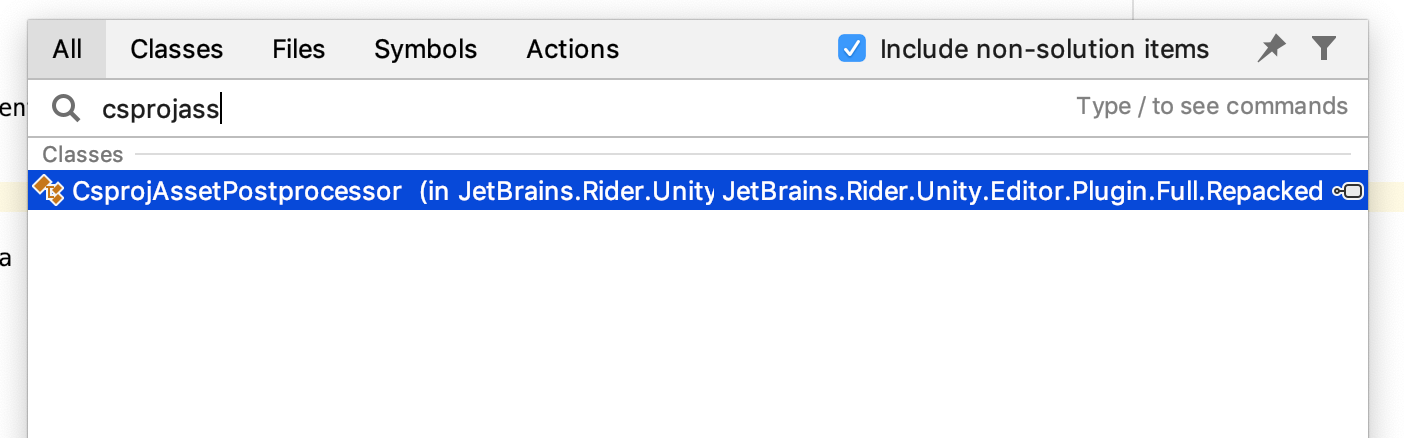
- Put brakepoint

- In Unity call Assets->Sync C# project

- Check the content in Rider debugger

van800
on 4 Nov 2018
@kyubuns @gsylvain2 are you using Unity's Incremental Compiler by a chance? I've been able to trace this bug to it; even when this plugin emits valid utf-8, IC overwrites it with utf-16. After removing IC (0.0.42.preview-24), everything went back to normal.
 FyiurAmron
on 4 Nov 2018
FyiurAmron
on 4 Nov 2018
You may try to debug AssetPostprocessingInternal.CallOnGeneratedCSProjectFiles to see which different methods are called in your case.

Please let me know the results.
van800
on 4 Nov 2018
I got a comment from Unity team saying: fixed in0.0.42-preview.26on staging repository.
van800
on 6 Nov 2018
@van800 This solution worked for me. The precise thing you need to do in your Unity project's Packages/manifest.json is:
{
  "dependencies": {
    ...
    "com.unity.incrementalcompiler": "0.0.42-preview.26",
    ...
  },
  "registry": "https://staging-packages.unity.com"
}
In other words, add the registry line to ensure you have the staging registry.
Tested in 2018.2.16f and Rider 2018.2.3
 doctorpangloss
on 20 Nov 2018
doctorpangloss
on 20 Nov 2018
@doctorpangloss thanks. This works.
 NoxMortem
on 24 Nov 2018
NoxMortem
on 24 Nov 2018
Related issues
 persn
·
3Comments
persn
·
3Comments
 JashanChittesh
·
3Comments
JashanChittesh
·
3Comments
 Strepto
·
4Comments
citizenmatt
·
5Comments
Strepto
·
4Comments
citizenmatt
·
5Comments
 Theby
·
3Comments
Theby
·
3Comments
Most helpful comment
Fix will be included in Rider 2018.2.1.
For a temporary workaround:
Assets\Plugins\Editor\JetBrains\JetBrains.Rider.Unity.Editor.Plugin.Repacked.dllJetBrains.Rider.Unity.Editor.Plugin.Repacked.dll.zip