Resharper-unity: Override TargetFrameworkVersion stopped working in plugin version 2018.2.0.20
Override TargetFrameworkVersion setting in Unity editor no longer works with Rider 2018.2 EAP w/ Unity plugin version 2018.2.0.20
I have the Override enabled, with 3.5 as the value, but the csproj files are generated containing <TargetFrameworkVersion>v4.5</TargetFrameworkVersion>

When I revert back to Rider 2018.1.3 w/ Unity plugin version 2018.1.0.126, the feature works again and the csproj files contain <TargetFrameworkVersion>v3.5</TargetFrameworkVersion> as expected.
Extra details about my EAP install:
JetBrains Rider 2018.2 EAP
Build #RD-182.3894.140, built on July 25, 2018
Rider EAP User
Expiration date: August 24, 2018
JRE: 1.8.0_152-release-1226-b7 x86_64
JVM: OpenJDK 64-Bit Server VM by JetBrains s.r.o
macOS 10.13.6
 Ethan-VisualVocal
All 9 comments
Bitten by Mono. The code to modify the .csproj was changed in Rider 2018.2 to try to minimise unnecessary rewrites (and so also project reloads) of the .csproj files. Unfortunately, the old scripting runtime version of Mono doesn't support XLinq's XObject.Changed event - it just does nothing. So we don't think anything's changed, and so don't save ANY modifications to the .csproj when using the old scripting runtime.
I'll get this fixed ASAP.
 citizenmatt
on 27 Jul 2018
citizenmatt
on 27 Jul 2018
@citizenmatt Thanks so much!
(I'd much rather be running against 4.5 -- but we're about 6 months out from being able to make that move. Hopefully you can keep the code to minimize re-writes for when the newer runtime is being targeted!)
Edit: oh, nevermind, i see you just modified it to do manual change tracking. Nice! 👍
Ethan-VisualVocal
on 27 Jul 2018
Yep, change tracking is done manually now, rather than leaving it to an event in the XML subsystem. Should have the same behaviour, except, you know, it works :)
citizenmatt
on 27 Jul 2018
Awesome, I'll periodically check for a plugin update next week and resume testing the EAP 😄
Ethan-VisualVocal
on 27 Jul 2018
What plugin version should this fix land in? Issue still reproduces w/ plugin 2018.2.0.24
+
JetBrains Rider 2018.2 EAP
Build #RD-182.3944.254, built on August 2, 2018
(I did delete all csproj files and Unity's /Library folder to make it re-create everything)
Ethan-VisualVocal
on 6 Aug 2018
Yes, it's part of .254. I've just tested it with a new project, and it overrides the framework version correctly. Do you have any other plugins that might be overwriting the setting? What version of Unity are you using?
citizenmatt
on 7 Aug 2018
Some versions of Incremental Compiler are known to prevent our override feature.
 van800
on 7 Aug 2018
van800
on 7 Aug 2018
Unity 2017.4.8f1 -- Not using the Incremental Compiler.
Issue still repros after:
Cleaning out all temp/generated files from the Unity folders, Invalidate Cache/Restart on Rider, ensuring the latest resharper-unity plugin dll installed in Unity project, and terminating any running Unity or mono processes.
Here's what the Editor GUI is showing:
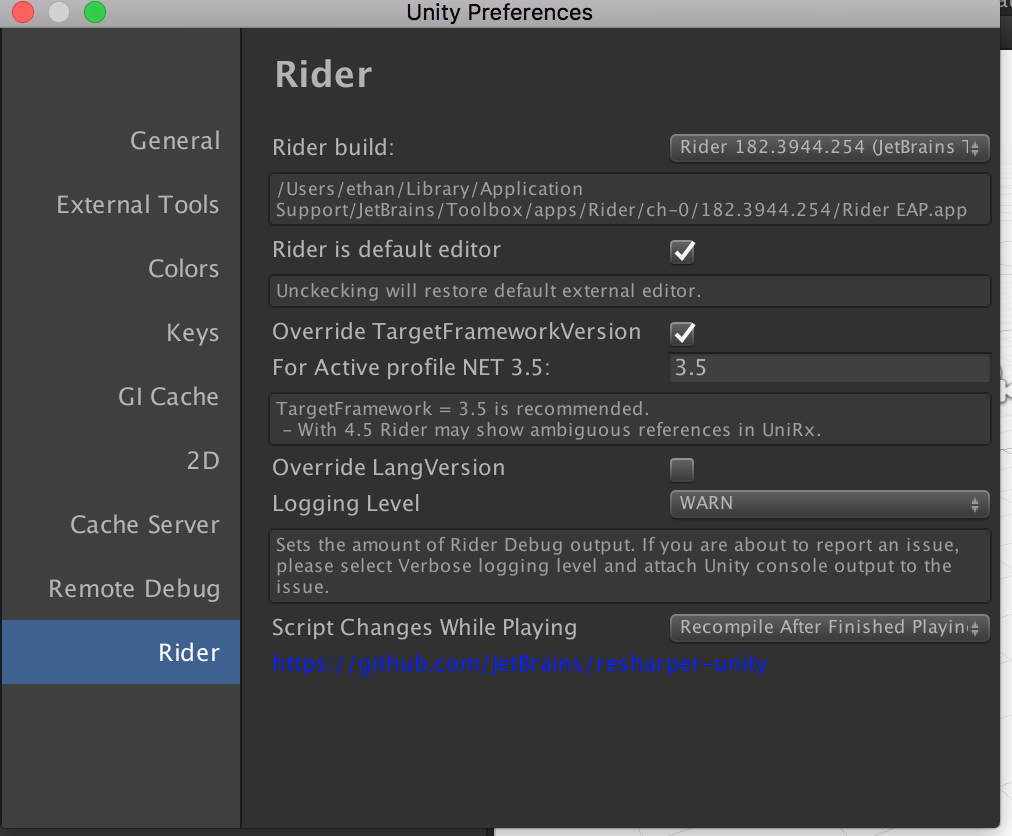
And here's the UnityEditor prefs plist entries for Rider: (confirmed correct file)
Rider_TargetFrameworkVersionOldMono : 3.5
Rider_AssemblyReloadSettings : 1
Rider_OverrideTargetFrameworkVersion : 0
Rider_TargetFrameworkVersion45 : 1
Rider_OverrideLangVersion : 0
Rider_RiderPath : /Users/ethan/Library/Application Support/JetBrains/Toolbox/apps/Rider/ch-0/182.3944.254/Rider EAP.app
Rider_SelectedLoggingLevel : 3
Rider_OverrideTargetFrameworkVersionOldMono : 1
Rider_TargetFrameworkVersion : 4.6
Rider_LangVersion : 7.2
But .csproj files are still being generated with <TargetFrameworkVersion>v4.5</TargetFrameworkVersion> instead of v3.5
Edit: Also, here's project settings:

Any ideas?
Ethan-VisualVocal
on 8 Aug 2018
Reproduced. On it.
van800
on 8 Aug 2018
Related issues
 aaronhoogstraten
·
4Comments
aaronhoogstraten
·
4Comments
 justinlueders
·
3Comments
justinlueders
·
3Comments
 RealMSHB
·
3Comments
RealMSHB
·
3Comments
 mihakrajnc
·
5Comments
mihakrajnc
·
5Comments
 JashanChittesh
·
3Comments
JashanChittesh
·
3Comments
Most helpful comment
Bitten by Mono. The code to modify the .csproj was changed in Rider 2018.2 to try to minimise unnecessary rewrites (and so also project reloads) of the .csproj files. Unfortunately, the old scripting runtime version of Mono doesn't support XLinq's
XObject.Changedevent - it just does nothing. So we don't think anything's changed, and so don't save ANY modifications to the .csproj when using the old scripting runtime.I'll get this fixed ASAP.