Resharper-unity: Sort System.Collections.Generic above Boo.Lang

Generally I'd imagine Generic.List<> should be prioritised, and in this case it's extremely frustrating to always get references to the former.
 vertxxyz
All 19 comments
Oh man, that annoyed me too many times.
I though this integration was removing references to Boo, but just read the code again and it seems it doesn't. Now that Boo and UnityScript are deprecated, it would be nice to strip those references out of the generated projects.
 SugoiDev
on 29 May 2018
SugoiDev
on 29 May 2018
I guess we can't simply strip them, consider if some project has a dll compiled with Boo.Lang reference.
It might be a solution to check dependencies of all referenced assemblies and if none of them requires Boo.Lang, UnityScript, UnityScript.Lang it is safe to strip them. At least references from Assets and Packages should be checked. Does it sound good?
 van800
on 31 May 2018
van800
on 31 May 2018
Any solution ya'll think of that gets rid of this particular instance sounds good to me - stripping would be ideal, but the problem for me at least is purely this UI/UX issue.
vertxxyz
on 31 May 2018
Checking ReferencedAssemblies via reflection takes significant time. Looking into alternatives.
van800
on 31 May 2018
We can just lower the priority of all completion items coming from the Boo namespace. This is an easy fix - they’re still in the list, but less likely to be picked first. I’ll take this.
 citizenmatt
on 31 May 2018
citizenmatt
on 31 May 2018
@vertxxyz what is your Unity version?
van800
on 31 May 2018
@citizenmatt if you are taking it, consider all this 3 assemblies {"UnityScript", "UnityScript.Lang", "Boo.Lang"};
van800
on 31 May 2018
@van800 currently using 2018.2.0b4
(on-and-off with the Incremental Compiler)
vertxxyz
on 1 Jun 2018
Just putting this on hold for a couple of days, until a bug in Rider's own sorting of completion items is fixed.
citizenmatt
on 4 Jun 2018
Any chance this will get prioritized? Since Boo.Lang.List
 Baste-RainGames
on 17 Oct 2018
Baste-RainGames
on 17 Oct 2018
Yeah, happens every time with me too. I had to get used to force a mental delay to actually read the choices and select the second one instead of the first (default) one.
SugoiDev
on 17 Oct 2018
I did not find any solutions to this problem in Rider. There is a fancy script that uses SyntaxTree.VisualStudio.Unity.Bridge but that is only for visual studio I guess.
Please help with that
 CeleriedAway
on 19 Oct 2018
CeleriedAway
on 19 Oct 2018
Considering that Rider sorts using statements with System.* at the top, then other things alphabetically - wouldn't it just make sense to use the same sorting rules for these import suggestions?
 j-h-a
on 9 Nov 2018
j-h-a
on 9 Nov 2018
It probably would fix this particular issue but afaict the autocompletion is at least somewhat dependant on user preference. (What I mean with that is that it adjust based on what you pick.) By always involuntary importing boo one probably pushes boo to the top of the list. It would probably be more helpful to be able to manually influence this dynamic order. Idk e.g alt+arrowkey to move entries up or down in the menu. This could potentially always have side effects on ordering in other queries which would probably make this quite difficult.
 BluBb-mADe
on 30 Nov 2018
BluBb-mADe
on 30 Nov 2018
I've been called out on a few PR's recently because I accidentally used Boo.Lang.List. I'm looking forward to this fix too.
 kmoth
on 6 Jun 2019
kmoth
on 6 Jun 2019
I moved dll from unity fodler and removed references from .csproj files in project root, but getting error
and can not compile code
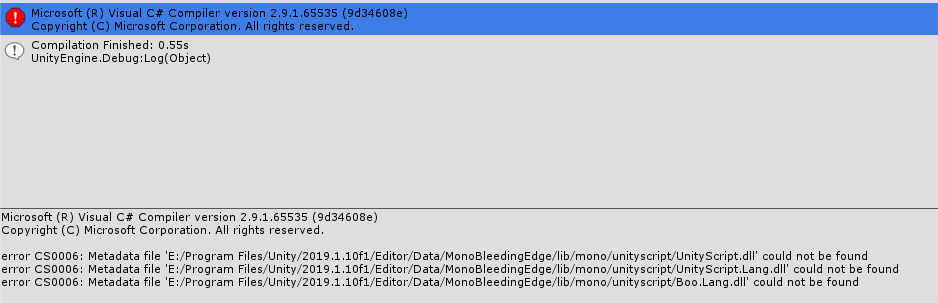
But good news - in rider no Boo and unityscript anymore, and List import without selection
I guess to fix the error - need to make empty dll for instead original
 dimmduh
on 16 Jul 2019
dimmduh
on 16 Jul 2019
It seems find solution, I created fake dll:
replace Boo.Lang.dll in unity folder
"\Unity\2019.1.10f1\Editor\Data\MonoBleedingEdge\lib\mono\unityscript"
with https://mega.nz/#!hY1hEKbR!BxakZKdkz4rMYhuITqEGLLWF3GexMklSowhZKHHL-ls
dimmduh
on 16 Jul 2019
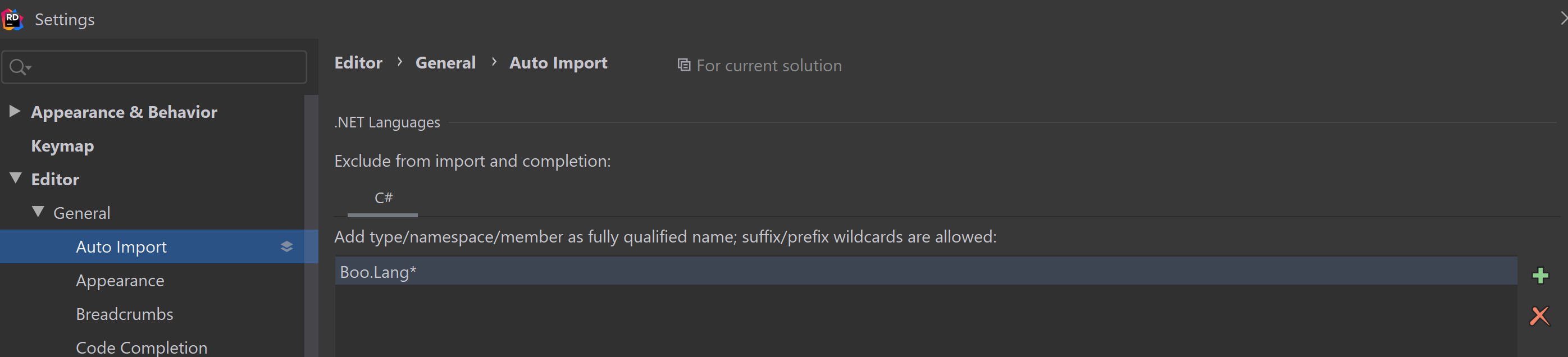
This should probably be solved in a way that is more automated for the end user still, but it can be solved now at least
vertxxyz
on 8 Oct 2019
Yes, see #1252 - you might also want to add UnityScript.*. Unfortunately, Rider 2019.2 doesn't allow _merging_ settings for auto import, so the plugin can't automatically set this. Hopefully this will be addressed in Rider 2019.3
citizenmatt
on 10 Oct 2019
Related issues
 justinlueders
·
5Comments
justinlueders
·
5Comments
 aaronhoogstraten
·
4Comments
aaronhoogstraten
·
4Comments
 oxysoft
·
5Comments
oxysoft
·
5Comments
 real-mikhail
·
5Comments
real-mikhail
·
5Comments
 Strepto
·
4Comments
Strepto
·
4Comments
Most helpful comment
This should probably be solved in a way that is more automated for the end user still, but it can be solved now at least