Resharper-unity: Add Error when using Null Coalescence with classes inheriting from UnityEngine.Object
All 22 comments
The big problem here is all of the other null related features that ReSharper/Rider support. We don't want to get in the situation where we ping-pong between suggesting using null-coalescing, ternary or null conditional operators and showing a warning that this code is invalid.
But this is on the radar as something that would be really useful to fix.
See also #35 and #148
 citizenmatt
on 8 Jan 2018
citizenmatt
on 8 Jan 2018
@citizenmatt any tips on where to begin to suppress the quick fixes?
 Zod-
on 12 Jan 2018
Zod-
on 12 Jan 2018
Sadly no. I haven't looked into it myself yet.
citizenmatt
on 12 Jan 2018
I've spent some time digging through the code to find the relevant classes. What I've found is MergeConditionalExpressionWarning, which contains the highlight and tooltip, ConditionalExpressionToAccessFix provides the quick fix and ConditionalExpressionAccessAnalyzer does the analyzing to create the highlight.
I don't know how to actually replace/extend them yet. The only thing I found on this topic is this outdated snippet in the documentation.
Zod-
on 15 Jan 2018
Ok I managed to override the analyzer and prevent the quick fix from showing up. Looks like all you need to do is inherit the analyzer and define it with the same element and highlight types like so:
    [ElementProblemAnalyzer(typeof(IConditionalTernaryExpression), typeof(MergeConditionalExpressionWarning))]
    public class UnityObjectConditionalExpressionAccessAnalyzer : ConditionalExpressionAccessAnalyzer
    {
        protected override void Run(IConditionalTernaryExpression element, ElementProblemAnalyzerData data, IHighlightingConsumer consumer)
        {
            //base.Run(element, data, consumer);
        }
    }
We then can check our stuff and otherwise run the old analyzer with base.Run
Zod-
on 15 Jan 2018
I'm wondering if this is the right way. There should be a registrar somewhere that contains all the analyzers like for the quickfixes, right? I think it's cleaner to explicitly replace the analyzer than magically override it through interhitance.
Zod-
on 15 Jan 2018
Yeah, it's not a good idea to replace via inheritance. There's always the chance another plugin will want to do the same and that will cause problems. There isn't a registrar for problem analysers, they're collected via attributes.
I think there is a way to suppress known highlights in certain locations, but I don't know how to do it - I'd have to look it up.
citizenmatt
on 15 Jan 2018
Hmm. Actually, this might not be possible out of the box. We can filter out inspections within specific regions, e.g. generated code, or code with special comments, or based on the corresponding compiler warning ID, but it's not an extensible mechanism. We can't add in an arbitrary check for something we don't want.
There might be a way to monitor the highlights added to the document markup model, and manually remove them if they're ones we don't want, but that doesn't feel nice either.
I'll ask around internally.
citizenmatt
on 15 Jan 2018
That would be nice. Meanwhile I'll start preparing a pull request with the analyzer part. I mostly have it finished, I just have to restructure the code a little but otherwise it's running with the tests I created for it.
Zod-
on 15 Jan 2018
Is the analyser working via inheritance? To be honest, and I hate to say it, but I'm very wary about taking a PR that replaces existing ReSharper functionality via inheritance. I'd rather see about getting a proper API to implement this instead.
citizenmatt
on 15 Jan 2018
No, sorry I meant the analyzer that detects the null coalescing with unity objects. It's a regular unity problem analyzer with its own warning/id and so on.
Zod-
on 15 Jan 2018
Ah, very cool. That sounds great! :thumbsup:
citizenmatt
on 15 Jan 2018
One thing that I'd stored away for when I got round to thinking about this was the fact that Object implements implicit operator bool.
I wanted to see if would be an interesting idea to promote that instead of comparing to null. So wherever we saw the myObject == null or myObject != null, instead of prompting for null-coalescing or conditional access, offer a quick fix to convert to myObject == true or if (myObject) or if (!myObject).
Basically, try to deprecate the comparing to null because it's a "gotcha", working differently to most other managed objects, and seeing if we could promote a different pattern.
But I never got round to looking any more at it :)
citizenmatt
on 15 Jan 2018
I've spoken to the dev team about this, and it looks like a change in ReSharper/Rider 2017.3 helps here. They've changed the behaviour of the null coalescing inspections and they should no longer be suggested when there is a class that has a custom equals operator, such as UnityEngine.Object.

I've had a look at some sample code, and I _think_ we no longer give a suggestion to convert to null coalescing or conditional invoke (see screenshot above - no squigglies!). I'd really appreciate it if you could update to ReSharper/Rider 2017.3 and give it a go, please.
If you see it being suggested where it shouldn't, please let me know.
citizenmatt
on 26 Jan 2018
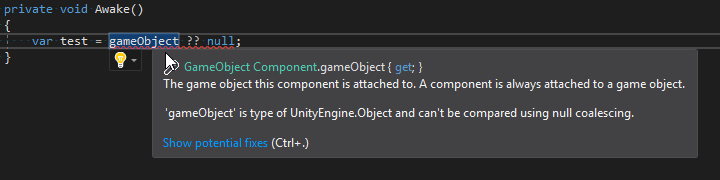
Also, @StephenHodgson, I've only just noticed but that tooltip in your very first screenshot at the top has a warning - "'gameObject' is type of UnityEngine.Object and can't be compared using null coalescing".
That's not us, and I'm pretty sure it's not Visual Studio Tools for Unity, either. Where is that message coming from?
citizenmatt
on 26 Jan 2018
@citizenmatt That's a screenshot of when I was playing around with an analyzer using roslyn.
Zod-
on 26 Jan 2018
Ok I've just updated to 2017.3.1 and it doesn't directly suggest me to turn it into null coalescing with highlights but it kinda looks like it does since there is a Null check can be simplified suggestion which then gives me a bulb for null coalescing.
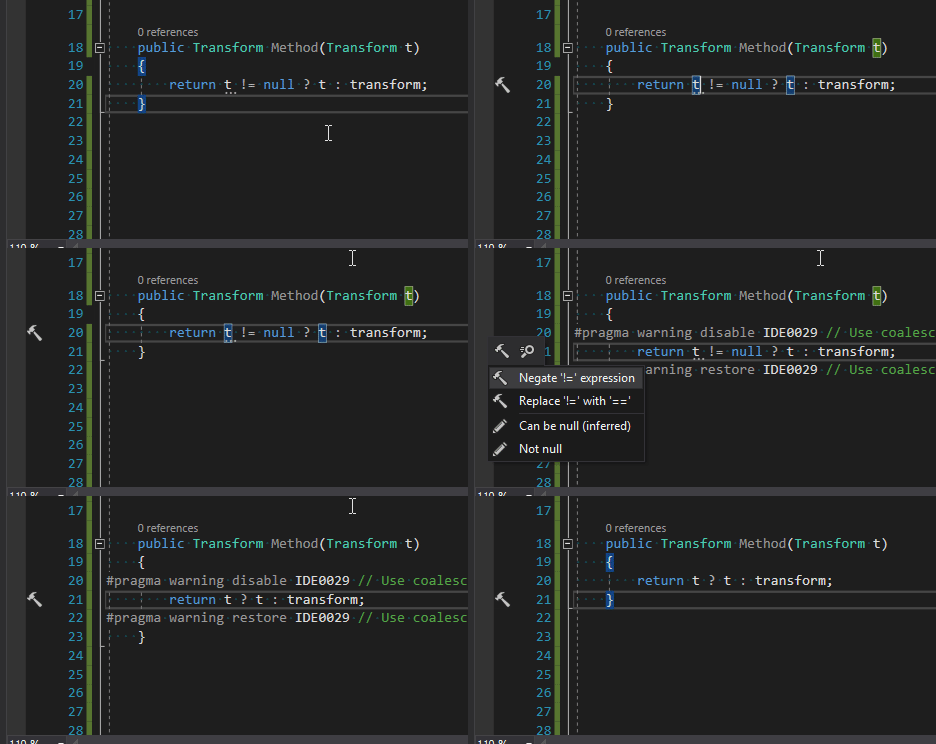
It looks the same with null propagation.
So if we have a quick fix that turns it into obj ? obj : null like you suggested we would be fine.
Zod-
on 26 Jan 2018
Hmm. That's a Visual Studio suggestion (you can tell by the IDE0029 code. ReSharper doesn't have codes)
I think an inspection like you were talking about to identify where it's being used incorrectly, we'd be in a good place. So if we identify null coalescing and conditional invoke on Unity Object classes and give quick fixes to transform to either an explicit null check or an implicit bool conversion, I think we've got this covered.
Did you have a problem analyser in the works?
citizenmatt
on 26 Jan 2018
Zod-
on 26 Jan 2018
I'm struggling with writing the quick fixes currently. The one for null coalescing seems straightforward, however I've looked at the existing one for null propagation and it's quite complex.
Zod-
on 26 Jan 2018
It can be tricky to get them right. I've just created a Gitter room for this project, feel free to drop in and @ me if you have questions. Or start an issue and we can discuss here, too.
And if you'd like to send a PR with just the inspections, we can look at quick fixes for them separately.
citizenmatt
on 26 Jan 2018
Thanks for the updates guys.
 StephenHodgson
on 26 Jan 2018
StephenHodgson
on 26 Jan 2018
Related issues
 justinlueders
·
5Comments
justinlueders
·
5Comments
 aaronhoogstraten
·
4Comments
citizenmatt
·
4Comments
aaronhoogstraten
·
4Comments
citizenmatt
·
4Comments
 persn
·
3Comments
justinlueders
·
3Comments
persn
·
3Comments
justinlueders
·
3Comments
Most helpful comment
@citizenmatt That's a screenshot of when I was playing around with an analyzer using roslyn.