Resharper-unity: Support variable inspection in coroutines
If you place a breakpoint and suspend execution inside a coroutine then you will not be able to inspect variables.
If you try to hover over any variables, fields or parameters you'll see a message that says "Could not evaluate the value". This is until you leave the coroutine.
This makes debugging very difficult in coroutines.
 kwasak
All 33 comments
This also happens in async Task (when using the new C# version in unity)
 RDeluxe
on 30 Oct 2017
RDeluxe
on 30 Oct 2017
I can't recreate this with a simple iterator - the debugger can see the variables inside the method ok. Could you create a simple repro, please? Either issue would be useful, please!
 citizenmatt
on 5 Nov 2017
citizenmatt
on 5 Nov 2017
Absolutely, I'll create a sample project.
kwasak
on 5 Nov 2017
Ok attached is a sample project.
This issue occurs after changing the Scripting Runtime Version in the player settings to .NET 4.6. I couldn't reproduce it with .Net 3.5.
This is similar to VS code issue: https://github.com/Unity-Technologies/vscode-unity-debug/issues/62
Also, if I add "this." before the variable name then I'm able to see the value for members.
You should be able to open the project in Unity 2017.1.2 or higher
CoroutineTest.zip
kwasak
on 5 Nov 2017
That's brilliant, thanks! I got an IndexOutOfRangeException from Rider, that might help diagnose what's going on: DEXP-304672
citizenmatt
on 6 Nov 2017
No problem! Any idea on a possible ETA?
kwasak
on 7 Nov 2017
Hello, any news about this ? This is a big deal
RDeluxe
on 14 Nov 2017
We're investigating. No ETA right now, sorry.
citizenmatt
on 15 Nov 2017
Oh, and I realise we didn't have an actual issue to track this: RIDER-11362
(This needs to be solved in Rider itself, rather than the Unity support in this repo)
citizenmatt
on 15 Nov 2017
Ho, ok my bad, I though your previous link was an opened issue on jetbrains tracker.
RDeluxe
on 15 Nov 2017
No worries. It is, but it's an automatically generated exception issue. Sometimes it's easier to summarise what the issue in a more human readable manner and associate them :)
citizenmatt
on 15 Nov 2017
Fixed in branch an hour ago. The fix will be in Rider 2017.3
 nerzhulart
on 16 Nov 2017
nerzhulart
on 16 Nov 2017
Glad to hear that (and now I'll ask when is 2017.3 due to for release :D )
RDeluxe
on 16 Nov 2017
We're gearing up to open the Early Access Preview, but you can get nightly builds now.
You need to use the Toolbox App, which can manage tool installations for you, and lets you choose which channel to receive updates on. You can also install multiple versions, on different channels, side-by-side. So you can install Rider 2017.2.1 and stick to the "Release" channel, for stable builds. And then you can also install Rider on the "Nightly" channel, and this will give you nightly builds of 2017.3.
But it's not in the nightly builds yet! It's fixed on a branch, so still needs to get merged, and built. So, "soon" (depends on when it's merged).
citizenmatt
on 16 Nov 2017
It was just merged so I hope you'll able to get the nighltly build with the fix tomorrow. @citizenmatt has given a good guide how to get it
nerzhulart
on 16 Nov 2017
Thanks a lot. Sadly I'm using Rider as a portable installation (sitting in my Dropbox, yeah, I know, a bit crazy) and as far as I remember the Toolbox App is not really compatible with that. I'm going to give it a try nonetheless. Thanks again guys !
RDeluxe
on 17 Nov 2017
Just updated to 2017.3 EAP nightly release and the issue is still present. I still get "Could not evaluate the value" in a coroutine.
Rider 2017.3 EAP
Build #RD-173.3717.122, built on November 16, 2017
kwasak
on 17 Nov 2017
Yeah, this is still failing for me too, on latest nightly. @nerzhulart can you confirm, please?
citizenmatt
on 20 Nov 2017
Hm, will take a look on this now
nerzhulart
on 20 Nov 2017
Seems the latest nightly doesn't contain my changes. Investigating it
nerzhulart
on 20 Nov 2017
New nightly build is out.
 van800
on 21 Nov 2017
van800
on 21 Nov 2017
It's still an issue with the new nightly - 3801.86
citizenmatt
on 21 Nov 2017
Bugfix commit got lost somewhere, I've retriggered the merge. I'll update when the Nightly with fix will be available.
 IvanPashchenko
on 21 Nov 2017
IvanPashchenko
on 21 Nov 2017
I've just tested this with the 2017.3 EAP1 release from a couple of days ago and it's working with the sample app linked way up near the start of this. You can get it from the EAP home page or via the Toolbox app.
citizenmatt
on 29 Nov 2017
The values for fields and parameters work, however It still doesn't show values for local variables.
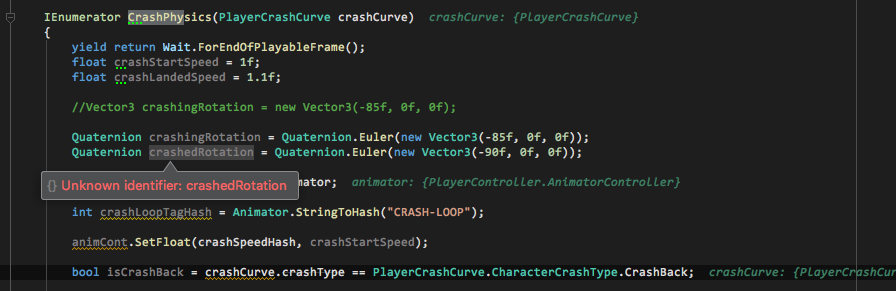
kwasak
on 29 Nov 2017
I can't recreate it with the sample project from earlier in the thread, or by creating extra variables in that test. What version are you using, and what OS?
/cc @nerzhulart
citizenmatt
on 29 Nov 2017
I'm using yesterday nightly build on MacOS 10.13.1
I just created local variables in a coroutine.
Rider 2017.3 EAP
Build #RD-173.3801.573, built on November 28, 2017
kwasak
on 29 Nov 2017
@kwasak Can't reproduce it on the latest nightly. Could you please check it again?

nerzhulart
on 6 Dec 2017
I'm still able to reproduce it on latest nightly on my project. (Build #RD-173.3994.179, built on December 5, 2017)
I haven't tested the example project yet, I'll try that and report back.
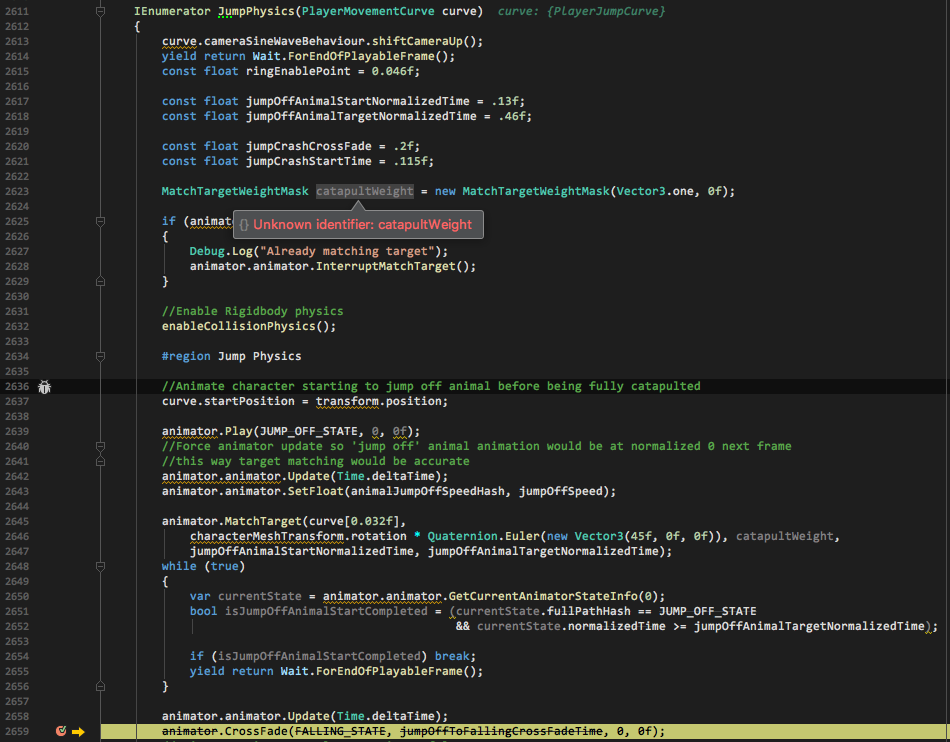
kwasak
on 6 Dec 2017
I was able to reproduce it in the example project.
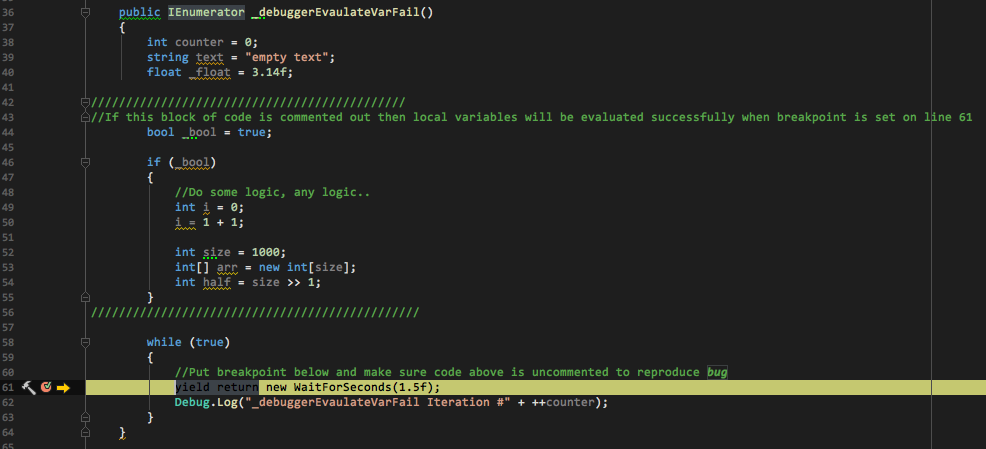
Replace 'CoroutineAwaitTest.cs' in example project with attached. Rename extension from '.txt' to '.cs'.
CoroutineAwaitTest.txt
kwasak
on 6 Dec 2017
@kwasak thanks a lot for the repro! Found the issue: actually Unity uses the old debugger protocol which doesn't provide the information about hoisted scopes. I've made a simple hack to return any variable in case of old protocol, but it still may give improper variable in the case when you have many locals with the same name in yield/async methods, but this case is more rare, so I guess it's better.
nerzhulart
on 7 Dec 2017
Ahh I see, well it's great to hear you have a fix! I'm glad I could help. Looking forward to the fix.
kwasak
on 10 Dec 2017
I'm going to close this issue now. Let me know if there's still an issue.
citizenmatt
on 15 Dec 2017
Related issues
 justinlueders
·
3Comments
citizenmatt
·
5Comments
citizenmatt
·
4Comments
justinlueders
·
3Comments
citizenmatt
·
5Comments
citizenmatt
·
4Comments
 aaronhoogstraten
·
4Comments
aaronhoogstraten
·
4Comments
 Baste-RainGames
·
4Comments
Baste-RainGames
·
4Comments
Most helpful comment
We're gearing up to open the Early Access Preview, but you can get nightly builds now.
You need to use the Toolbox App, which can manage tool installations for you, and lets you choose which channel to receive updates on. You can also install multiple versions, on different channels, side-by-side. So you can install Rider 2017.2.1 and stick to the "Release" channel, for stable builds. And then you can also install Rider on the "Nightly" channel, and this will give you nightly builds of 2017.3.
But it's not in the nightly builds yet! It's fixed on a branch, so still needs to get merged, and built. So, "soon" (depends on when it's merged).