Reportportal: Missing Testcase is displayed in wrong execution build number
Describe the bug
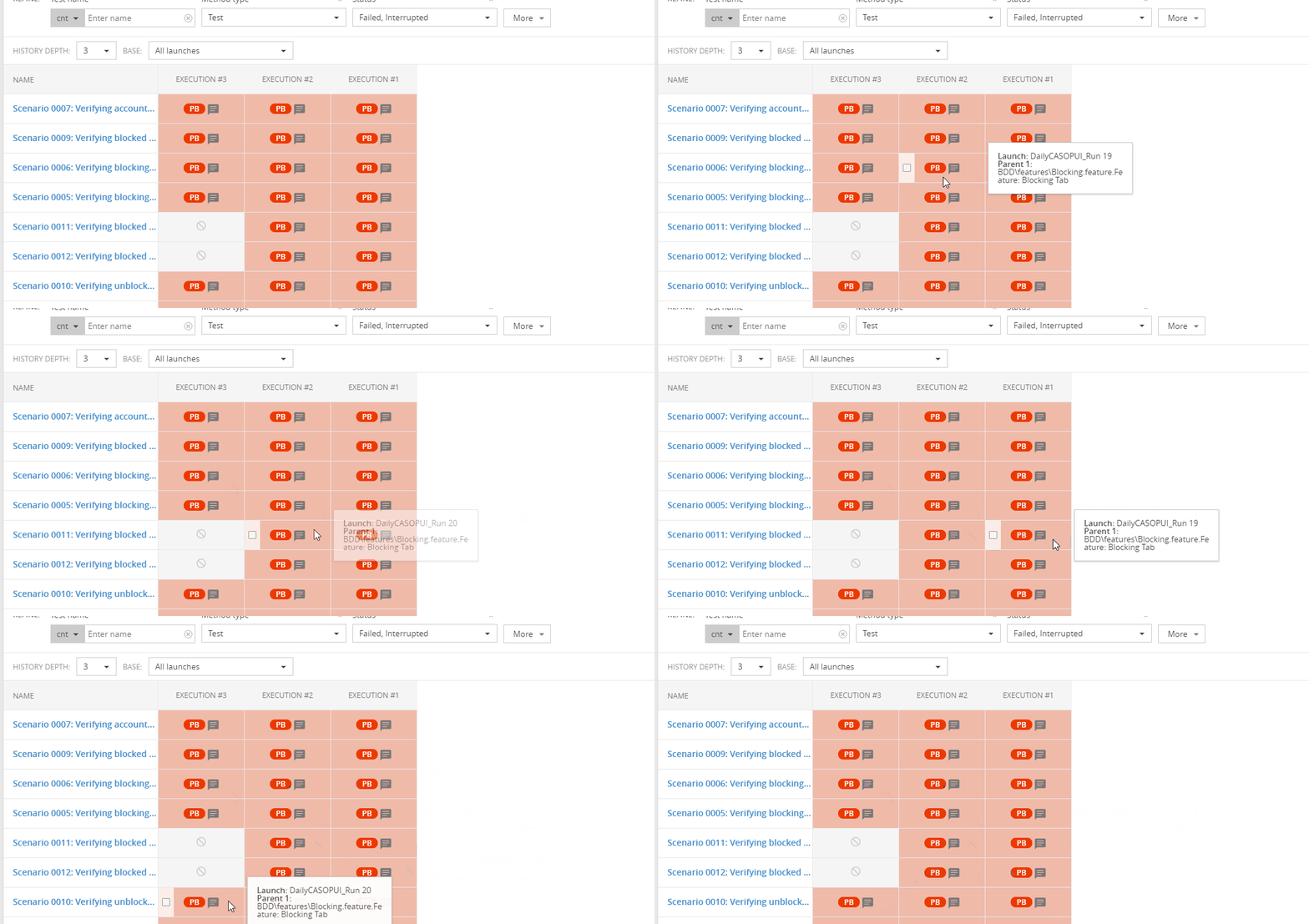
Say my execution 1 had 7 test cases ; Execution 2and 3 each had 9 test cases. Now, since there are 2 new cases added in 2 and 3 execution for execution 1 in History it should be shown as greyed out. But it is shown greyed out in execution 3 -> with details about execution 2 and 3 been shifted to right tiles. Refer video attached for more details. -- Launches numbers are run_18, run_19 and run_20 . 2 of the testcases are not present in launch number 18 , but still the greyed out tile is shown for execution 3 (i.e launch 20) and details for launch 20 are shifted to right tiles of launch 19 and 18. Ideally the grayed out tile should be present on launch 18(execution 1)
Versions:
- Version of RP -- API Service: 5.1.1;Index Service: 5.0.7;Authorization Service: 5.1.0;Service UI: 5.1.0;
PLease check once.
 priyankachaturvedi30
All 4 comments
@priyankachaturvedi30 One row is not equaled to one launch.
It is a number of execution.
History works as expected.
But you are using an old version, in the latest version we have fixed a few bugs
 evjlobanova
on 22 Jul 2020
evjlobanova
on 22 Jul 2020
Sure @evjlobanova . I'll move to the latest version, but I want to double check my understanding.
For above scenario: We have 3 columns namely Execution 3 ; Execution 2 and Execution 1.
According to my usecase following is the data in each of these columns:
Execution 3 for Launch name Run 20
Execution 2 for Launch name Run 19
Execution 1 for Launch name Run 18
Now for Scenario 0011 and Scenario 0012 -> you'll notice that data for Run 20 has been moved in column Execution2 and for Run 19 it has moved to Execution 1. (Where actually grayed box is present for Execution 3 column --> which instead should be present in Execution 1 column as Scenario 0011 and 0012 test case are not present for Run 18. Am I missing something cause that's what I feel should be expected behavior.
priyankachaturvedi30
on 22 Jul 2020
No, we have a little other logic.
The history is based not on the launches, but on the executions.
Here description of this functionality https://reportportal.io/docs/History-of-launches%3Ehistory-table
So you have 3 test cases:
Test A
Test B
Test C
This test cases have been run in different launches:
Launch # 1 total 2 test case (A and B)
Launch # 2 total 3 test cases
Launch # 3 total 3 test cases
On a history I will see:
Execution # 3 Execution # 2 Execution # 1
Test A p f f
Test B p f f
Test C f f
Because Test C has only 2 execution in 3 launches, a table shows it
evjlobanova
on 22 Jul 2020
Oh, I get it now. This is helpful @evjlobanova . Makes Sense 👍
priyankachaturvedi30
on 22 Jul 2020
Related issues
 ivan-sukhomlyn
·
4Comments
ivan-sukhomlyn
·
4Comments
 kmayika
·
3Comments
kmayika
·
3Comments
 arunkumar-muthusamy
·
4Comments
arunkumar-muthusamy
·
4Comments
 ebenahar
·
6Comments
ebenahar
·
6Comments
 movigit
·
4Comments
movigit
·
4Comments