Reportgenerator: Generate Report for nodejs code coverage
Hello,
I am trying to generate report from cobertura coverage for a nodejs app. But, I am getting the following error:
##[error]Unable to locate executable file: 'dotnet'. Please verify either the file path exists or the file can be found within a directory specified by the PATH environment variable. Also check the file mode to verify the file is executable.
This is on Azure DevOps pipeline
Parameters:
Reports: <path/to>/cobertura-coverage.xml
Target Dir: coveragereport
Report types: HtmlInline_AzurePipelines;Cobertura
Any suggestion on how to fix this?
 jjscaria
All 16 comments
You need .NET Core to be available.
Just chose Hosted VS2017 as build agent type
See #204
 danielpalme
on 11 Feb 2019
danielpalme
on 11 Feb 2019
That worked, thanks!
But, now the build is not showing Code Coverage tab.
Parameters for Publish code coverage:
Coverage tool: Cobertura
Summary file: coveragereport/Cobertura.xml
Report Dir: coveragereport
Output:
[command]/usr/bin/dotnet /home/lqscrane/Desktop/vsts-agent-cranetagz/_work/_tasks/reportgenerator_be803a55-9253-4895-a525-be570d86f161/1.0.20/tools/netcoreapp2.0/ReportGenerator.dll -reports:mean/**/**/coverage/cobertura-coverage.xml -targetdir:coveragereport -reporttypes:HtmlInline_AzurePipelines;Cobertura -sourcedirs: -historydir: -plugins: -assemblyfilters:+* -classfilters:+* -filefilters:+* -verbosity:Verbose -tag:54_#54
Loading report '/home/<path/to>/coverage/cobertura-coverage.xml' 1/2
 Preprocessing report
 Initiating parser for Cobertura
Loading report '/home/<path/to>/coverage/cobertura-coverage.xml' 2/2
 Preprocessing report
 Initiating parser for Cobertura
Coverage report parsing took 0.0 seconds
Initializing report builders for report types: HtmlInline_AzurePipelines, Cobertura
Analyzing 0 classes
 Creating summary
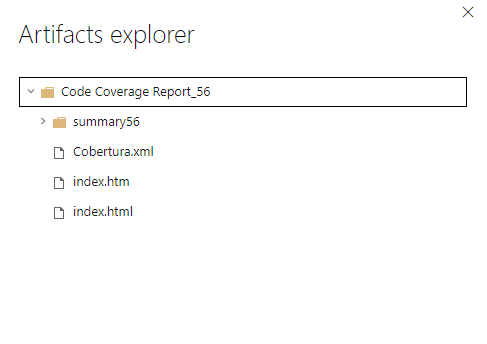
  Writing report file 'coveragereport/Cobertura.xml'
  Writing report file 'coveragereport/index.htm'
Report generation took 0.1 seconds
Looks like it is not reading the coverage files correctly.
Cobertura.xml file contents:
<?xml version="1.0" encoding="utf-8"?>
<!DOCTYPE coverage SYSTEM "http://cobertura.sourceforge.net/xml/coverage-04.dtd">
<coverage line-rate="1" branch-rate="1" lines-covered="0" lines-valid="0" branches-covered="0" branches-valid="0" complexity="NaN" version="0" timestamp="1549905609">
  <sources>
    <source>/home/<path/to>/project-src</source>
    <source>/home/<path/to>/project-src</source>
  </sources>
  <packages />
</coverage>
I tried disabling and enabling boards but that didnt work.
jjscaria
on 12 Feb 2019
There are several issues:
- Your _Cobertura_ file is basically empty and does not contain any coverage information. Therefore the report generated by _ReportGenerator_ does not contain any meaningful results.
- To see the _coverage_ tab, you have to publish the coverage files using the _Publish Code Coverage Results_ task (Edit: You already did this)
- Enabling _boards_ should not be necessary any more, but just try it with _board_ enabled first.
danielpalme
on 12 Feb 2019
- The Cobertura file is supposed to be a combination of multiple xmls from ReportGenerator config. The files that are supposed to be combined has all the data in there. Not sure why they are not being combined.
I also tried to use a single xml to be added to the report, but Cobertura.xml came out just like above with only source dir. Packages block is not getting added to the final xml - Boards was already enabled/in-use. So, I executed the pipeline after disabling and re-enabling.
jjscaria
on 12 Feb 2019
I don't know why the coverage tab is not visible.
But if you like you can share one of your Cobertura files, then I can check why the output of _ReportGenerator_ is empty.
danielpalme
on 12 Feb 2019
Here is one of them
https://gist.github.com/jjscaria/f6809fe26176ee82d26e2d562a2c2d44
jjscaria
on 12 Feb 2019
Which tool do you use to generate the initial _Coberatura_ files?
The file you posted is invalid.
The <packages> element has to contain a <package> element and the package element should contain the class elements.
See DTD: http://cobertura.sourceforge.net/xml/coverage-04.dtd
danielpalme
on 12 Feb 2019
Im using Jest for code coverage.
jjscaria
on 12 Feb 2019
And _Jest_ seems to use _instanbul_.
See also these issues:
https://github.com/danielpalme/ReportGenerator/issues/192
https://github.com/istanbuljs/istanbuljs/issues/14
https://github.com/istanbuljs/nyc/issues/965
danielpalme
on 12 Feb 2019
Oh ok. I guess I will follow those threads.
Thank you so much for taking the time to help with this issue.
jjscaria
on 12 Feb 2019
The coverage tab will probably show up as soon as the _Cobertura_ file is valid.
danielpalme
on 12 Feb 2019
@danielpalme whats the value for Jacoco report type? I dont see it on ReadMe.
jjscaria
on 12 Feb 2019
@jjscaria
I'm not sure if I understand your question correctly.
ReportGenerator also supports the JaCoCo format and it's mentioned in the readme:
https://github.com/danielpalme/ReportGenerator#file-formats
danielpalme
on 13 Feb 2019
The latest release now supports handling those invalid files:
https://www.nuget.org/packages/ReportGenerator/4.0.12
The Azure DevOps extension is also updated. So your build should work now (it may take some time until the new version is used in your build, version number is: 1.0.21)
danielpalme
on 13 Feb 2019
@danielpalme Report works now. Thank you so much for the update!
jjscaria
on 14 Feb 2019
Related issues
 daniel-white
·
3Comments
daniel-white
·
3Comments
 nilfdev
·
5Comments
nilfdev
·
5Comments
 hannahchan
·
3Comments
hannahchan
·
3Comments
 yuichi-github
·
4Comments
yuichi-github
·
4Comments
 wsugarman
·
4Comments
wsugarman
·
4Comments