Refined-github: Question: "new pull request" button
Which option do I need to disable to get the "new pull request" button back on the main repo page? I have to do PRs from the master branch into staging/production branches after merging feature branches into master. With this great extension installed this button is gone.
 jsumners
All 8 comments
I don't have that button with the extension disabled. It doesn't ring a bell as existing to me either. Can you attach a screenshot with the extension on and then disabled? Please disable other extensions as well, as they may be creating/hiding this button.
 busches
on 31 May 2019
busches
on 31 May 2019
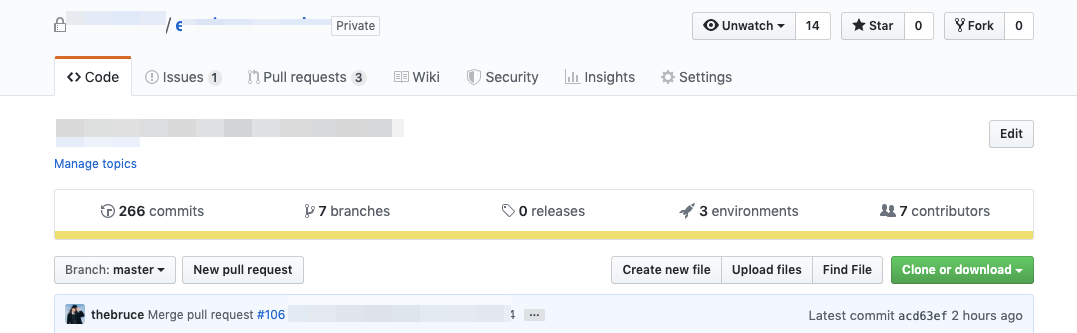
That's with the plugin disabled. With it enabled, the button "New pull request" simply wouldn't exist. Clicking the button takes you to the diff between branches tool so that you can choose which branches to compare and generate the PR from.
I have no other extensions installed that interact with GitHub.
jsumners
on 31 May 2019
 yakov116
on 31 May 2019
yakov116
on 31 May 2019
@yakov116 does that mean there isn't an option in the extension's settings I can toggle to disable that style?
jsumners
on 31 May 2019
Thanks for the screenshot. I always create my PRs from the branch push popup or the PR page and never noticed the button there.
You're correct in that it's not directly tied to a feature to be disabled, but what yakov116 linked shows you the CSS you can override to enable it again.
This is one of many UI cleanups we do and I can't see us adding a feature to disable it in the future, with it being easily overridden via CSS.
busches
on 1 Jun 2019
Well this is an unfortunate outcome.
jsumners
on 3 Jun 2019
@jsumners commented on Jun 3, 2019, 1:50 PM GMT+2:
Well this is an unfortunate outcome.
Why is this unfortunate? Go to GitHub Refined options, and paste the following in the "Custom CSS" textbox:
/* Show new PR button again. See https://github.com/sindresorhus/refined-github/issues/2107#issuecomment-498236040 */
 .file-navigation .new-pull-request-btn {
    display: inline-block;
}
 jerone
on 3 Jun 2019
jerone
on 3 Jun 2019
Hmm, I didn't know(overlooked?) the extension has a user CSS section. I assumed I'd have to setup some other user CSS extension to do the override and just removed Refined GitHub.
jsumners
on 3 Jun 2019
Related issues
 vanniktech
·
3Comments
vanniktech
·
3Comments
 shivapoudel
·
3Comments
yakov116
·
3Comments
shivapoudel
·
3Comments
yakov116
·
3Comments
 sompylasar
·
3Comments
sompylasar
·
3Comments
 juliocanares
·
3Comments
juliocanares
·
3Comments