Refined-github: API calls need Personal Token to support frequent calls and private repos
Refined GitHub needs
- [x] [Personal token](https://github.com/settings/tokens) field in the options
- [x] Automatic token usage by https://github.com/sindresorhus/refined-github/blob/master/source/libs/api.js, if present
 fregante
All 26 comments
Features that can use API:
- Embedded gists (https://developer.github.com/v3/gists/#get-a-single-gist)
- Public gist count
- Searching issues
- CI/CD status links (https://developer.github.com/v3/repos/statuses/#get-the-combined-status-for-a-specific-ref)
- Get users full name (https://developer.github.com/v3/users/#get-a-single-user)
Can also use GraphQL API to request only required data.
 notlmn
on 14 Jun 2018
notlmn
on 14 Jun 2018
Maybe its just me, I feel very unconformable with the token being displayed with one click. In your issue linker its 2 steps (1. click the ext. 2. Click options).
Can we collapse the token area once its filled in (add a + symbol)?
 yakov116
on 17 Jun 2018
yakov116
on 17 Jun 2018
In your issue linker its 2 steps (1. click the ext. 2. Click options).
How is it different here? The token appears in the options
fregante
on 17 Jun 2018
Its 2 steps
1.
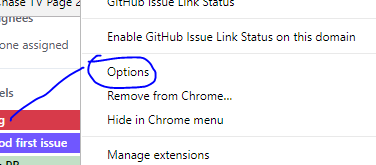
Then Step 2 opens the options
yakov116
on 17 Jun 2018
Right, how is that different from Refined GitHub?
fregante
on 17 Jun 2018
@bfred-it clicking on the ext shows the token.
yakov116
on 17 Jun 2018
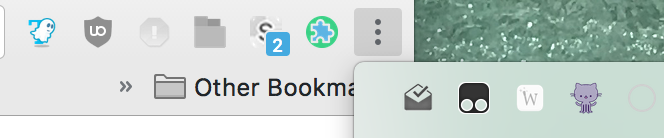
Why is your button not hidden in the overflow? It's pretty much useless
fregante
on 17 Jun 2018
Why is your button not hidden in the overflow? It's pretty much useless
What?

yakov116
on 17 Jun 2018
This overflow:
fregante
on 17 Jun 2018
@bfred-it 👍, ok...
Would rather not do that.
Im not saying that there is no way to get my key, I just feel unconformable the way its setup now.
yakov116
on 17 Jun 2018
@sindresorhus thoughts?
fregante
on 17 Jun 2018
If someone has access/control of your computer, all bets are off anyway, so I don't fully agree with your reasoning. That being said, I don't mind making it a password type input. GitHub hides it too: https://github.com/settings/tokens
 sindresorhus
on 17 Jun 2018
sindresorhus
on 17 Jun 2018
The issue is not the access, it just doesn't feel right to have it displayed in plain text.
@bfred-it had an issue with using password as it gives a false sense of security.
Also I work in an office and a screenshot is taken every min of my screen, so having it in plain text...
yakov116
on 17 Jun 2018
@sindresorhus GitHub doesn't store them on your computer in plain text like Chrome does
Also I work in an office and a screenshot is taken every min of my screen, so having it in plain text...
That's some serious trust issues. We can think of something...
fregante
on 17 Jun 2018
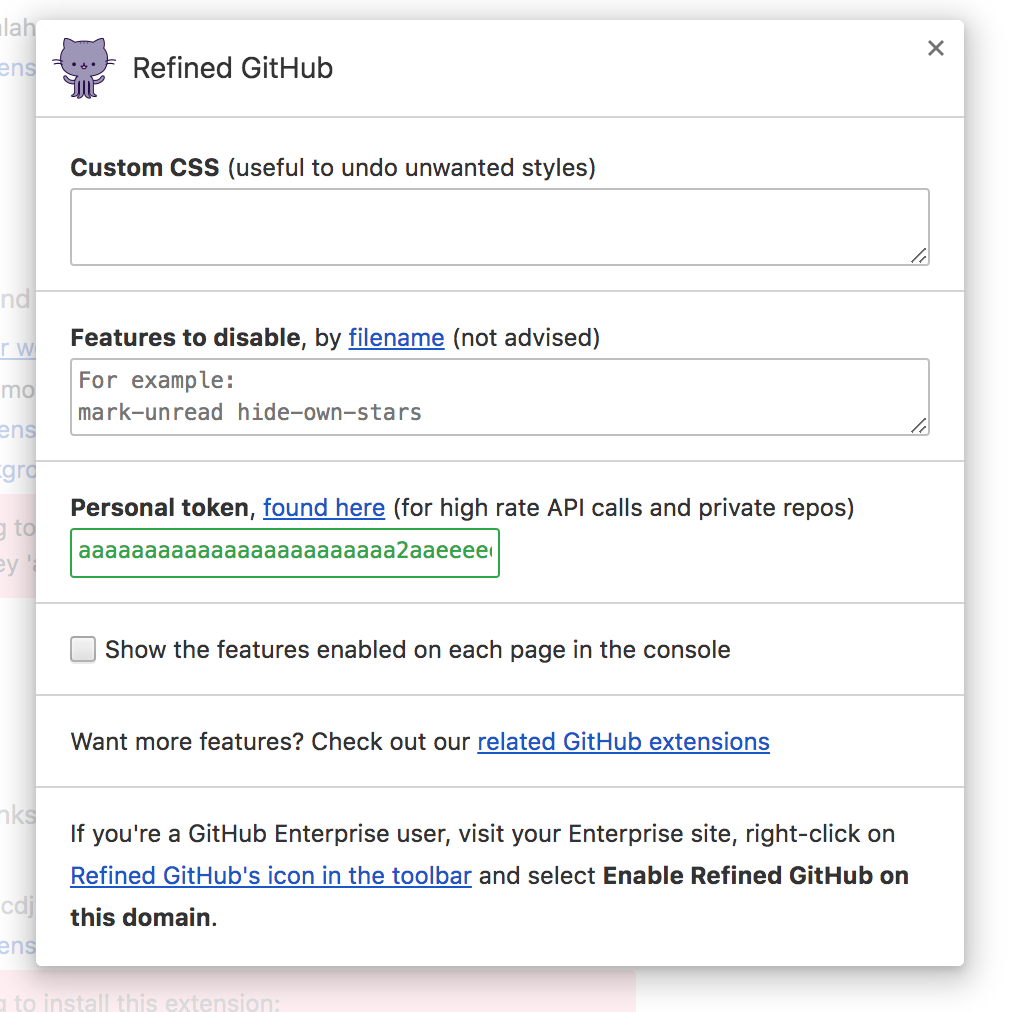
type=password is the last resort, so how about making the field shorter so it won't be displayed in full? Am I thinking too hard?
fregante
on 17 Jun 2018
Also I work in an office and a screenshot is taken every min of my screen, so having it in plain text...
😔
sindresorhus
on 17 Jun 2018
@yakov116 now I wonder how you're going to get that token in the first place without having it on screen since GitHub does this: 😅

fregante
on 17 Jun 2018
@bfred-it lol,
I have my ways :)
Just want to point out its nothing to do with trust. My boss does it so we know that he CAN look back at what we were doing.
But knowing that he can....
yakov116
on 18 Jun 2018
Can we collapse the text area after its full? And only show it with clicking the + symbol?
yakov116
on 18 Jun 2018
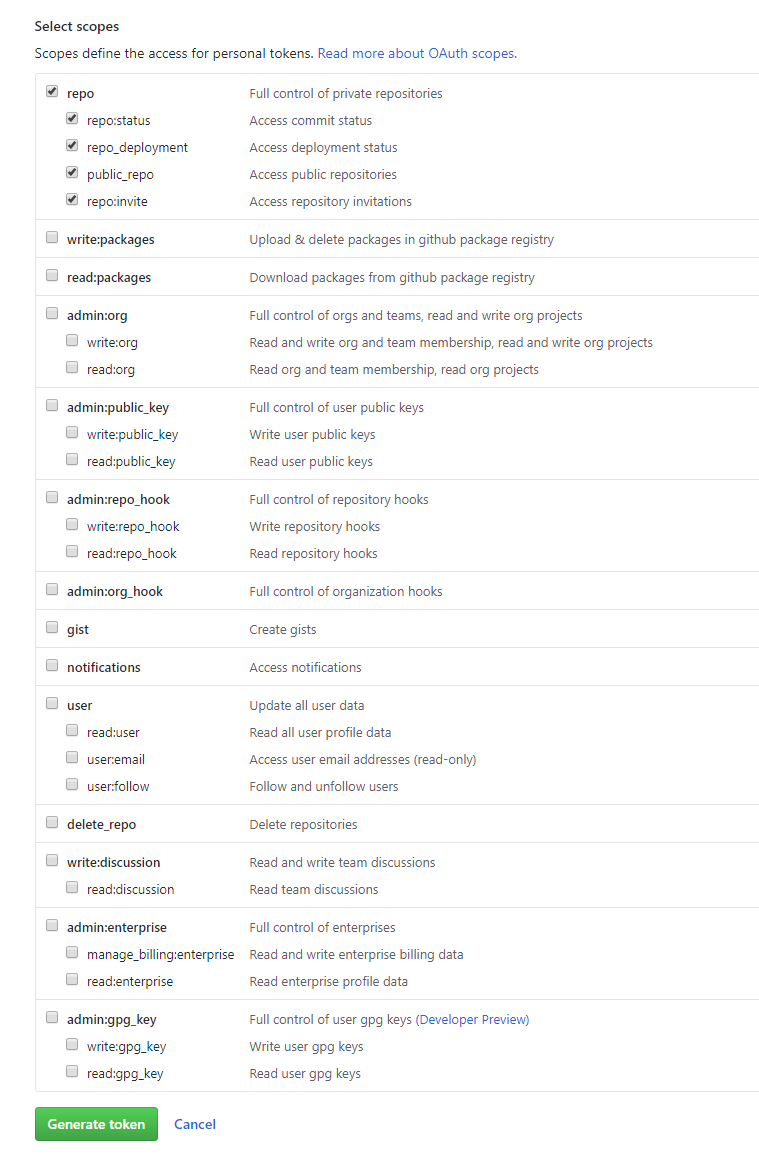
Which scopes should be selected for the token? Just repo or anything else?
 borekb
on 18 Jul 2018
borekb
on 18 Jul 2018
Can you open a new issue for that? We can change the url to include the required scopes
fregante
on 19 Jul 2018
borekb
on 19 Jul 2018
Some instructions on the scopes that should be given to the token would be very welcome. Right now, there are a lot, and I'm not sure which ones RG can utilize.
 archon810
on 25 Aug 2019
archon810
on 25 Aug 2019
@archon810 No need to do anything else. The "Repo" scope is automatically checked.
 jerone
on 25 Aug 2019
jerone
on 25 Aug 2019
Understood, but to the user, it's not obvious. A small clarification that the right set has been pre-selected would go a long way.
archon810
on 25 Aug 2019
@archon810 PRs are welcome to make it more obvious or an issue with mockups of what you would propose to change.
 busches
on 25 Aug 2019
busches
on 25 Aug 2019
Related issues
 mareksuscak
·
3Comments
yakov116
·
3Comments
mareksuscak
·
3Comments
yakov116
·
3Comments
 shivapoudel
·
3Comments
sindresorhus
·
3Comments
shivapoudel
·
3Comments
sindresorhus
·
3Comments
 MilesBHuff
·
3Comments
MilesBHuff
·
3Comments