Refined-github: Merge after CI is green doesn't seem to be working
I just installed the Chrome extension and I see a bunch of things that have changed in the UI but when I click on the Squash & Merge button, I don't see the "Wait for successful checks" like in the gif here: https://user-images.githubusercontent.com/1402241/35192861-3f4a1bf6-fecc-11e7-8b9f-35ee019c6cdf.gif

Am I doing something wrong? Or is it not enabled for Squash & Merge?
Thanks! I've wanted that feature for so long, I'm so glad that you made it happen :)
 vjeux
vjeux
All 11 comments
Looks like it's working for another repo. The only difference that I can see that the one where it's working is public and the one where it isn't is private. Could that be it?
vjeux
on 6 Feb 2018
The checkbox only appears if there's a yellow CI icon next to the commit, like what it's being circled with the cursor in that GIF.
 fregante
on 6 Feb 2018
fregante
on 6 Feb 2018
It's now working on an another PR in that repo. It may not have initialized correctly right after installing or something. I can't repro it not working so I'm going to close it.
vjeux
on 6 Feb 2018
I clicked the green button next to the checkbox and it actually merged it and didn't wait for CI tests to pass. Am I supposed to just wait on that screen and if the checkbox is selected it'll automatically merge? Or did I do the right thing and it was supposed to wait?
vjeux
on 6 Feb 2018
Any errors in the console?
fregante
on 6 Feb 2018
I'm sorry I closed the page :(
vjeux
on 6 Feb 2018
Am I supposed to just wait on that screen and if the checkbox is selected it'll automatically merge?
Yes, it would work if you leave the tab open.
 hkdobrev
on 7 Feb 2018
hkdobrev
on 7 Feb 2018
I'm having the same issue as @vjeux , but my yellow icon DOES show up beside the last commit:
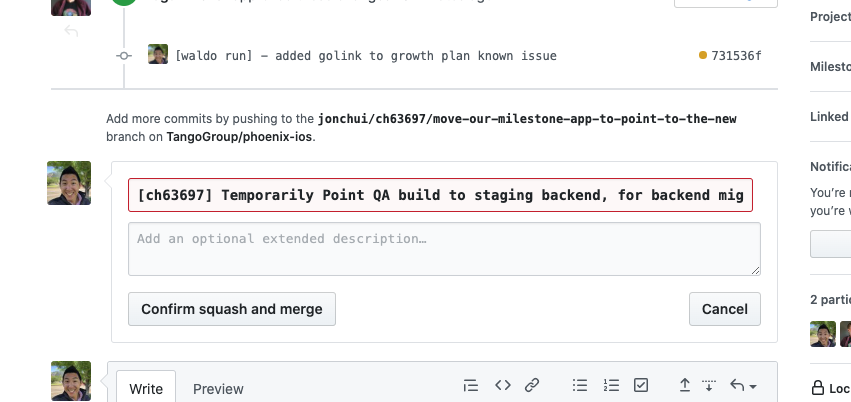
It used to work for me, but i think after switching our repo to squash and rebase it stopped working.
Does anyone know how to debug this ?
 jonchui
on 11 Jun 2020
jonchui
on 11 Jun 2020
I've experienced this before. What may be happening (one of them):
- RGH creates the checkbox, then GitHub regenerates the form, deleting it. We should detect this.
- RGH doesn't detect the yellow dot if it appears a few seconds _after_ the commit.
But I don't know for sure.
fregante
on 11 Jun 2020
https://github.com/sindresorhus/refined-github/issues/3084 could be a good solution to safely keep track of the yellow dot (scrapping most of our pr-ci-status.ts file)
fregante
on 11 Jun 2020
I think at the moment the feature is completely broken since it never appears for me
fregante
on 11 Jun 2020
Related issues
 sindresorhus
·
3Comments
sindresorhus
·
3Comments
 vanniktech
·
3Comments
fregante
·
3Comments
vanniktech
·
3Comments
fregante
·
3Comments
 shivapoudel
·
3Comments
shivapoudel
·
3Comments
 juliocanares
·
3Comments
juliocanares
·
3Comments