Refined-github: Add a button to quickly approve the PR
Looking something like this:

When clicking that button it would mark the PR as approved with/without comment based on the textarea.
 jacehensley-wf
All 12 comments
Would be useful, but the "Comment" button should be to the far right, otherwise I'll press "Approve" accidentally all the time.
 sindresorhus
on 18 Dec 2017
sindresorhus
on 18 Dec 2017
Good point 👍
jacehensley-wf
on 18 Dec 2017
I would have the approve the color Blue (or something like that)
 yakov116
on 18 Dec 2017
yakov116
on 18 Dec 2017
I’m conflicted: approve without looking at the code?
 fregante
on 19 Dec 2017
fregante
on 19 Dec 2017
No its instead of going to the Dropdown and selecting approve
yakov116
on 19 Dec 2017
But the dropdown appears in the files tab. This comment form appears on where there’s no code visible.
fregante
on 19 Dec 2017
@bfred-it I often times go back and forth between the files and conversation view so that I can look at the diffs as well as other people's reviews. In doing so, I find that about half the time, I've ended up at the bottom of the page on the conversation view trying to approve with no way to do so (maybe it's still a force of habit from before reviews were a thing). In that scenario, though, I would find this useful.
 ekweible
on 19 Dec 2017
ekweible
on 19 Dec 2017
One note: this enhancement requires a fetch of the Files tab to get the form with the token.
In alternative or in addition, I'd like to see this:
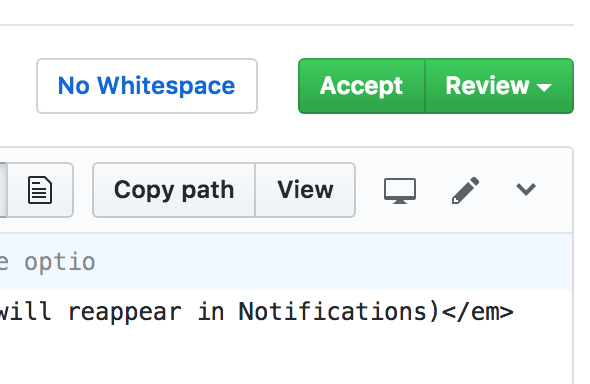 or
or 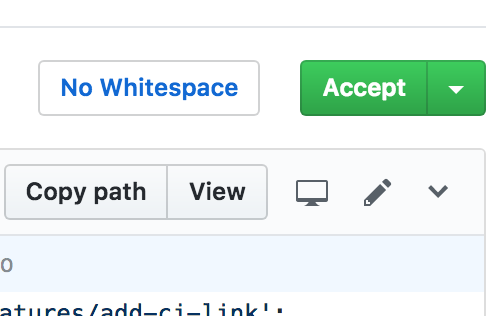
And/or this: (Implemented in #885 🎉 )

And perhaps that whole dialog can be also shown in the Conversation and Commits tabs. However in those tabs, the header bar is not position: fixed like in Files, so you'll have to scroll up.
fregante
on 19 Dec 2017
Anything that can be done here? Or is https://github.com/sindresorhus/refined-github/issues/1069 preferrable?
fregante
on 13 Nov 2018
A shortcut to open the reviews panel from the conversation view would work for me 👍
ekweible
on 13 Nov 2018
The link would be:
https://github.com/user/repo/pull/1/files#submit-review
But where would it make sense to show it?
fregante
on 21 Feb 2019
I'd love this feature. I often review automated PRs for dependency upgrades, and approving them requires three clicks with loading time in between.
Could this button be placed in the top right so one doesn't have to scroll down the thread? E.g. below the notifications buttons, or next to the "edit" button for the title.
 felixfbecker
on 5 Aug 2019
felixfbecker
on 5 Aug 2019
Related issues
 vanniktech
·
3Comments
vanniktech
·
3Comments
 durka
·
3Comments
durka
·
3Comments
 MilesBHuff
·
3Comments
MilesBHuff
·
3Comments
 hkdobrev
·
3Comments
hkdobrev
·
3Comments
 pawelad
·
3Comments
pawelad
·
3Comments
Most helpful comment
@bfred-it I often times go back and forth between the files and conversation view so that I can look at the diffs as well as other people's reviews. In doing so, I find that about half the time, I've ended up at the bottom of the page on the conversation view trying to approve with no way to do so (maybe it's still a force of habit from before reviews were a thing). In that scenario, though, I would find this useful.