Refined-github: Add functionality to expand all outdated comments at once
Hey everyone, first comment in this repo, so wanted to give you a big "Thank You" first for creating this great extension!
What do you think of the following small tweak for pull requests:
- when hovering over the "Show outdated" text, a small popup tells you "Hold shift while clicking to expand all comments"
- when shift-clicking on the "Show outdated" text, all collapsed comments expand

Alternative implementation ideas:
- Have a button/text next to "Show outdated"
- Use a different button combination
Why? My team is currently in the habit of manually going through all outdated comments to make sure they were implemented correctly. Sometimes those comments are outdated because of code formatting or similar. We are currently using JS via a bookmark to achieve that functionality, but it would be really nice to have this in this extension.
Very happy to try implementing this myself, but I wanted to check if this is something you might be interested in.
 sgabler
All 10 comments
I find myself doing this often too. I feel that we should tackle this and other similar toggles via keyboard shortcut, eg cmd+click=toggle all. No UI clutter necessary.
Alternatively it could be alt+click to match macOS’ alternative behavior, and perhaps we could show the alternative actions while alt is held down i.e. all Show outdated become Show all outdated (macOS does the same)
 fregante
on 29 Oct 2017
fregante
on 29 Oct 2017
212 is related. Maybe pressing i also works in the discussione tab? I’m away from keyboard now
fregante
on 29 Oct 2017
I didn't find anything and I think that Github doesn't provide that feature
Here's a screenshot of the shortcuts displayed for the discussion page
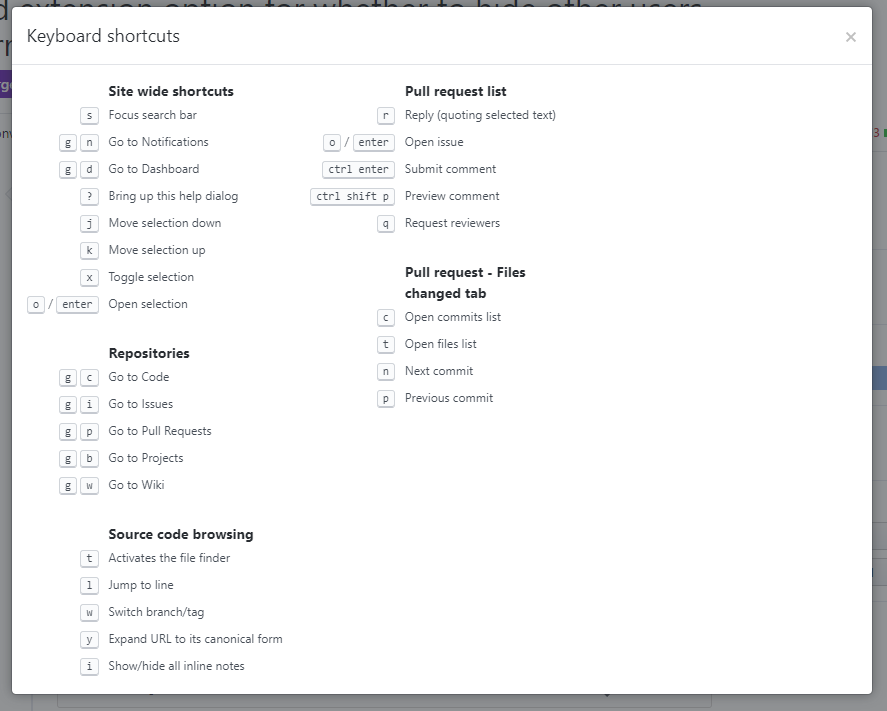
sgabler
on 29 Oct 2017
JS bookmark for recent Github redesign:
javascript:Array.from(document.getElementsByClassName('outdated-comment')).forEach(l => l.setAttribute('open',true));
 laurenbrandstein
on 2 Aug 2018
laurenbrandstein
on 2 Aug 2018
@laurenbrandstein thank you!
 jakesyl
on 22 Aug 2018
jakesyl
on 22 Aug 2018
To add to @laurenbrandstein solution, this worked for me
javascript:Array.from(document.getElementsByClassName('outdated-comment')).forEach(l=>l.setAttribute('class','file js-comment-container has-inline-notes'));
 mgoveas
on 1 Oct 2018
mgoveas
on 1 Oct 2018
@mgoveas I think the entire conversation needs to be unhidden and I have a few PRs where I have to meticulously scroll around to find these "hidden items" and click a few times and it is a pain.
 haridsv
on 30 Sep 2019
haridsv
on 30 Sep 2019
2020 edition.
Open all resolved:
javascript:Array.from(document.getElementsByClassName("js-toggle-outdated-comments")).forEach(l => l.click());
Click all "Load More":
javascript:Array.from(document.getElementsByClassName("ajax-pagination-btn")).forEach(l => l.click());
 voppe
on 8 Jun 2020
voppe
on 8 Jun 2020
thanks @voppe that worked!
 tekumara
on 22 Jun 2020
tekumara
on 22 Jun 2020
The solution for "Load More" is too simplistic that only works for one level (I have PRs that nest at least 10 levels), so here is my better solution: https://stackoverflow.com/a/62711702/95750
There are other solutions that I found later:
haridsv
on 3 Jul 2020
Related issues
 shivapoudel
·
3Comments
shivapoudel
·
3Comments
 sindresorhus
·
3Comments
sindresorhus
·
3Comments
 sompylasar
·
3Comments
sompylasar
·
3Comments
 Arcanemagus
·
3Comments
Arcanemagus
·
3Comments
 olso
·
3Comments
olso
·
3Comments
Most helpful comment
JS bookmark for recent Github redesign:
javascript:Array.from(document.getElementsByClassName('outdated-comment')).forEach(l => l.setAttribute('open',true));