Refined-github: Fix merge conflict with both changes

We can now resolve merge conflicts in the GitHub UI. Often with merge conflicts, I want to include both the conflicts as it's usually just two list items being placed at the end. Would be nice to have a button that just removed the merge conflict markers.

Above, I would have like to preserve both the items. The red characters are the markers I would like removed.
farnabaz earned $60.00 by resolving this issue!
- Checkout the Issuehunt explorer to discover more funded issues.
- Need some help from other developers? Add your repositories on Issuehunt to raise funds.
 sindresorhus
All 14 comments
👍 I would like to have options for choose left, choose right, choose both (left first), choose both (right first) similar to other merge tools. When you click one of these buttons, it would edit appropriately and remove the markers in all cases. What do you think?
P.S. Ideally, we would remember what the initial state was and the buttons would remain active after choosing an action and would allow you to click on the buttons again if you've changed your mind.
 hkdobrev
on 13 Dec 2016
hkdobrev
on 13 Dec 2016
Instead of multiple buttons a drop-down similar to the Watch/Unwatch one could be added.
 jacobbearden
on 13 Dec 2016
jacobbearden
on 13 Dec 2016
👍 to both ideas.
sindresorhus
on 13 Dec 2016
I would like to attempt this. Any tips for getting started?
 jorgegonzalez
on 26 Oct 2017
jorgegonzalez
on 26 Oct 2017
@jorgegonzalez I'd start with installing the extension from source, looking into the code and then discuss the UI and UX here first before development and then start with something small and share a branch/PR here to get feedback.
hkdobrev
on 26 Oct 2017
I was thinking of implementing this the way VSCode does, adding a line above each conflict with the options to keep the current or incoming change, or both.
https://code.visualstudio.com/docs/editor/versioncontrol#_merge-conflicts

jorgegonzalez
on 26 Oct 2017
@jorgegonzalez Yeah, that would be a good way to do it.
sindresorhus
on 26 Oct 2017
@issuehunt has funded $60.00 to this issue.
- Submit pull request via IssueHunt to receive this reward.
- Want to contribute? Chip in to this issue via IssueHunt.
- Checkout the IssueHunt Issue Explorer to see more funded issues.
- Need help from developers? Add your repository on IssueHunt to raise funds.
 IssueHuntBot
on 21 Mar 2019
IssueHuntBot
on 21 Mar 2019
I would like to attempt this.
 farnabaz
on 24 Mar 2019
farnabaz
on 24 Mar 2019
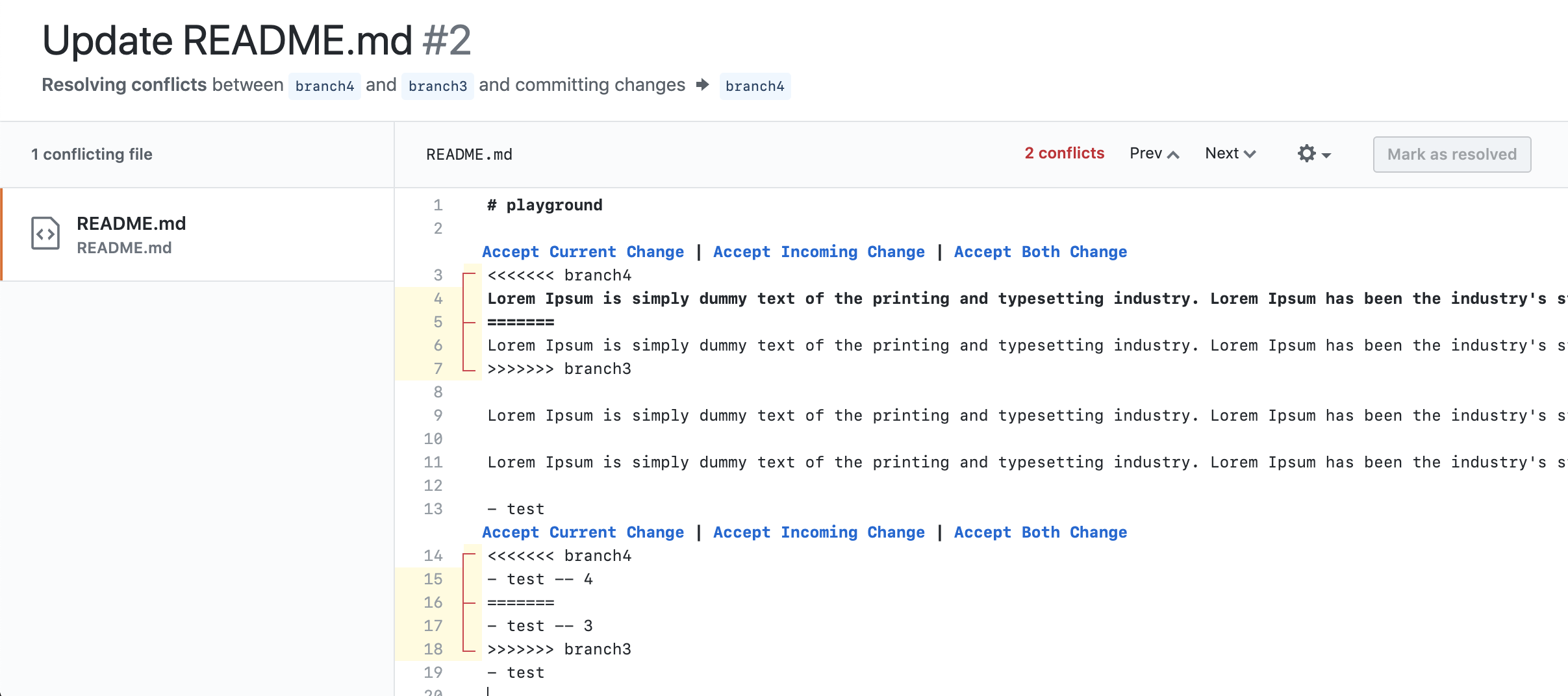
Ok, I found a way to do this, but there are some problems and questions:
- Could I add
CodeMirroras develop dependency? because github useCodeMirrorand features writes in Typescript. - I have to access
CodeMirrorobject insidewindow, is this ok to do this?
// @ts-ignore
const CodeMirror = window.CodeMirror;
- We can't access CodeMirror instance inside extension scope, so I forced to embed code inside the page.
const script = document.createElement("script");
script.text = `(${embeddedInit.toString()})();`;
document.documentElement.appendChild(script);
Because of this issue we can't use select-dom to select elements, I used document.querySelector
- I've create new page detection called
isConflict
export const isConflict = (): boolean => /^pull\/\d+\/conflicts/.test(getRepoPath());
- I can't find any accurate way to listen for editor ready event, for now I've create 2 second timeout for that
function init() {
    setTimeout(() => {
    }, 2000);
}
- I have no idea how to handle multiple files yet, I haven't test this
- Most important, my code is dirty 😅 😅
Here is quick demo
farnabaz
on 24 Mar 2019
Develop dependency is fine, it doesn’t get bundled. Perhaps however there’s a lighter @types/codemirror package we can rely on
Injecting an unsafe script is probably the only way. You can use JSX to generate the script tag.
When I tried to do this, the injected “buttons” were removed by CodeMirror when I made any changes to the content. Does your method preserve them without having to regenerate them?
Thanks for checking in!
 fregante
on 24 Mar 2019
fregante
on 24 Mar 2019
Thank you @bfred-it for the quick response
Could you tell me how to generate script tag with JSX?
When I tried to do this, the injected “buttons” were removed by CodeMirror when I made any changes to the content. Does your method preserve them without having to regenerate them?
I use CodeMirror widgets to generate actions and CodeMirror adds these actions for us.
farnabaz
on 24 Mar 2019
Could you tell me how to generate script tag with JSX?
document.head.append(<script>{`(${embeddedInit.toString()})()`}</script>);
@sindresorhus has rewarded $54.00 to @farnabaz. See it on IssueHunt
- :moneybag: Total deposit: $60.00
- :tada: Repository reward(0%): $0.00
- :wrench: Service fee(10%): $6.00
IssueHuntBot
on 28 Mar 2019
Related issues
 mareksuscak
·
3Comments
mareksuscak
·
3Comments
 vanniktech
·
3Comments
vanniktech
·
3Comments
 supremebeing7
·
3Comments
supremebeing7
·
3Comments
 olso
·
3Comments
olso
·
3Comments
 durka
·
3Comments
durka
·
3Comments
Most helpful comment
Ok, I found a way to do this, but there are some problems and questions:
CodeMirroras develop dependency? because github useCodeMirrorand features writes in Typescript.CodeMirrorobject insidewindow, is this ok to do this?Because of this issue we can't use
select-domto select elements, I useddocument.querySelectorisConflictHere is quick demo