Hello team, I would like to know if there is any command to update my project.
I started it in version 0.10 and I see that 0.11 is already released. Is there a command to update me.
Thank you.
 christianvargasforero
All 5 comments
@christianvargasforero Hey, there is indeed:
yarn rw upgrade
If you're coming from an earlier version, sometimes you can't just use this command, but the release notes for v0.11.0 say that for v0.10.0 --> v0.11.0, yarn rw upgrade is all you need.
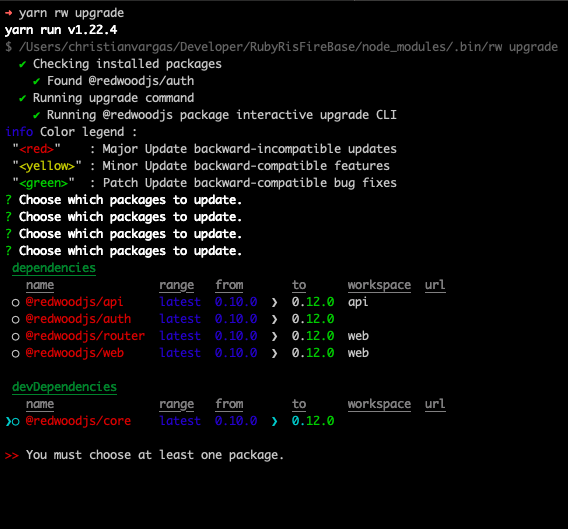
But v0.12.0 is actually out now (here's the release notes). So the upgrade command will probably ask you if you want to upgrade to v0.12.0 instead of v0.11.0. This should still work though, as neither say that upgrading from v0.10.0 will break anything.
 jtoar
on 26 Jun 2020
jtoar
on 26 Jun 2020
@jtoar
There appears to be incompatibility between versions. Although my application is small, I could rebuild it in the new version, but there is a solution to this problem.
christianvargasforero
on 26 Jun 2020
@christianvargasforero I don't think anything will break necessarily, but those are pretty famous last words. :sweat_smile:
Backward-incompatible just means that there's features in v0.12.0 that won't work in earlier versions, not that the earlier stuff will break (we'd specify that in the release notes if we knew in advance).
I'll tag @thedavidprice to get a second opinion though.
jtoar
on 26 Jun 2020
Thanks @jtoar
And hi @christianvargasforero! Excited you're diving into the Redwood waters with us.
That output screen you see is just the standard yarn upgrade output and I believe it's simply based on server. If you haven't already, you should definitely save the current state (e.g. commit) and backup DB if/as needed. Redwood works, but things can break between versions right now.
That said, it's best to keep up when/if possible. Personally, when things are changing quickly, I find it easier to make the minor changes across a few releases versus waiting a long time and try to figure out _all_ the things that changed over the course of a month or more.
In your case, I'd recommend:
- upgrade to v0.12.0
- _thoroughly go through v0.11.0 release notes_
- then _thoroughly go through v0.12.0 release notes_ 😆
Make sense?
 thedavidprice
on 27 Jun 2020
thedavidprice
on 27 Jun 2020
@thedavidprice
Thank you very much for your great work 🍻.
Effectively I worked the update manually, I will try to be more attentive to the update notes.
christianvargasforero
on 27 Jun 2020
Related issues
 balaji-balu
·
3Comments
jtoar
·
4Comments
balaji-balu
·
3Comments
jtoar
·
4Comments
 jeliasson
·
3Comments
jeliasson
·
3Comments
 wispyco
·
3Comments
wispyco
·
3Comments
 Tobbe
·
4Comments
Tobbe
·
4Comments
Most helpful comment
@thedavidprice
Thank you very much for your great work 🍻.
Effectively I worked the update manually, I will try to be more attentive to the update notes.