Redwood: Filename needed in import in tsx
When I import a component in a .js file I only need to specify the directory name, like this
import ProductCell from 'src/components/ProductCell'
If I rename that file to .tsx, I have to change that import to look like this, to include the filename as well
import ProductCell from 'src/components/ProductCell/ProductCell'
I expected the imports to behave the same in .tsx files as in .js files
This issue sounds kind of similar to #804 except that one is only about the api side
 Tobbe
Tobbe
All 4 comments
Hey @Tobbe I can't reproduce this yet. But one error I did come across is if I renamed the file from ProductCell.js to ProductCell.tsx while the dev server was running, I would get an error (no such file or directory...). But it turned out that was because I needed to restart the dev server for the file rename to take effect.
I was just importing ProductCell.tsx in a Page, but were you doing it in a Component, Cell, or Layout?
I think this is the relevant part of our webpack config:
 jtoar
on 13 Jul 2020
jtoar
on 13 Jul 2020
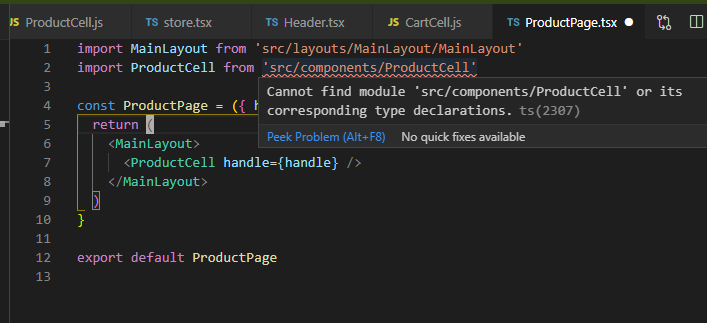
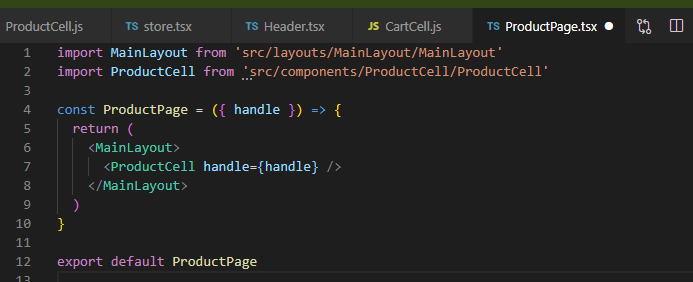
This is in a freshly restarted VS Code session.
Actually building/running the project seems to work just fine, even with the shorter import. So I guess it's a VS Code config issue.
Tobbe
on 13 Jul 2020
Hmm, maybe not just a VS Code issue after all. The autoimports for routes doesn't seem to be working for tsx files, even in the built project
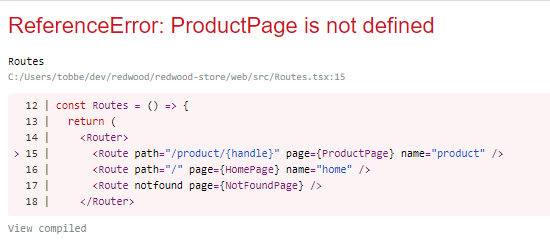
Changing the pages over to .js files and the autoimport works just fine
The project is now on RW 0.13.0, but it wasn't originally. It's an older project that was switched over to TS along the way. Is there a manual step that has been missed somewhere to get the correct tsconfig?
This is what my tsconfig looks like now
{
  "compilerOptions": {
    "baseUrl": ".",
    "declaration": true,
    "esModuleInterop": true,
    "jsx": "preserve",
    "lib": ["dom"] /* <-- required! */,
    "module": "ESNext" /* or at least ES2015 */,
    "moduleResolution": "node" /* <-- required! */,
    "outDir": "dist",
    "resolveJsonModule": true,
    // "strict": true,
    "target": "ES2018" /* or at least ES2015 */,
    "paths": {
      "src/*": ["./src/*"],
    }
  },
  "include": ["src/**/*"]
}
Hi gents. This functionality will come with the conversion to first-class Typescript and was a reason for Peter re-writing the Named Directory macro as a Babel plugin. It was my understanding the Babel plugin was going to apply this convention to TS but apparently there's another step required.
I'll comment now on #804 that TS should also be taken into consideration for both API and Web when implemented.
And, for now, this isn't so much a bug as unanticipated behavior when using TS vs JS -- it would be nice to provide a heads up or document this for TS developers but I'm not sure where that could be stated effectively. Any thoughts?
 thedavidprice
on 14 Jul 2020
thedavidprice
on 14 Jul 2020
Related issues
 Ameobea
·
3Comments
Ameobea
·
3Comments
 tmeasday
·
4Comments
jtoar
·
4Comments
tmeasday
·
4Comments
jtoar
·
4Comments
 josteph
·
3Comments
josteph
·
3Comments
 jeliasson
·
3Comments
jeliasson
·
3Comments
Most helpful comment
Hi gents. This functionality will come with the conversion to first-class Typescript and was a reason for Peter re-writing the Named Directory macro as a Babel plugin. It was my understanding the Babel plugin was going to apply this convention to TS but apparently there's another step required.
I'll comment now on #804 that TS should also be taken into consideration for both API and Web when implemented.
And, for now, this isn't so much a bug as unanticipated behavior when using TS vs JS -- it would be nice to provide a heads up or document this for TS developers but I'm not sure where that could be stated effectively. Any thoughts?