Redwood: Feedback after going through the tutorial
Hi team, I just listened to your podcast episode from js-party and decided to check things out.
The tutorial was great and really well thought out! I have some feedback from my experience and wanted to share it.
- Typescript? I only start new projects using typescript and just giving my
+1for support. - #234 - I adore line ending semi-colons..... It would be great if the CLI ran prettier using my local config as the files were generated so that I did not have to deal with formatting on my own every time? #339
prettier.config.jsfor some reason does not offer code completion (at least not for my config of VSCode).... sort of annoying when I want to make changes. Is there a strong reason to useprettier.config.jsinstead of.prettierrcas part of the CLI generation?- I prefer to have my components nested by domain, so when I generated
yarn rw g scaffold post, I would love an option to have them generate in./web/src/components/post/*/**to keep things organized better as my list of components grows.
- This would need to be supported for multiple fenerate commands (e.x.
yarn rw g cell BlogPostsshould have option for me to specify I want it to end up in a parent folder namedcomponents/blog/BlogPosts) #340
- This would need to be supported for multiple fenerate commands (e.x.
- As I tried to access the CLI docs, it appears there is not detailed help per command, which could be useful if there are/will be command specific flags. (e.x.
yarn rw g scaffold --helpproduces the same help output asyarn rw g --helpinstead of providing me help just for scaffold)
- Note: I am lazy and did not pivot out of the tutorial to attempt to find published docs to see if there are indeed additional CLI flags available.
- Is there a way I configure my IDE (vscode) to correctly auto-import using the correct path aliases?
- Is there a way I can get auto-completion without the actual import for the magical things that redwood tells me not to import (e.x. within routes)? ex. when I start typing and get code completion and press enter, vscode imports the data for me even if it should not be imported.
- If so, this might be something to include in the tutorial
- Docs show code that differs from actual code when generating the sdl for contact -
https://redwoodjs.com/tutorial/saving-data- docs showtype, actual is aninput.
- Note: I was not sure if the docs were wrong, or if I was supposed to update my code to match the code example in the docs. #305
export const schema = gql`
  type Contact {
    id: Int!
    name: String!
    email: String!
    message: String!
    createdAt: DateTime!
  }

  type Query {
    contacts: [Contact]
  }

-  input ContactInput {
+  type ContactInput {
    name: String
    email: String
    message: String
  }
`
 paustint
All 9 comments
I agree with 4. Scaffolding generates quite a mess in the folder structure as it currently stands.
 freddydumont
on 23 Mar 2020
freddydumont
on 23 Mar 2020
An additional comment that I'm not sure has been addressed and I may have just missed it. Lets say I edit a schema file and add new fields to the entity, then run the mutation and save to the database. Is there a way to update all the scaffold code to include these new fields, including the admin pages it generates, or is the only way manually?
 axtscz
on 24 Mar 2020
axtscz
on 24 Mar 2020
Is there a way to update all the scaffold code to include these new fields, including the admin pages it generates, or is the only way manually?
We aren't planning on having that level of intelligence in the scaffold generator any time soon. You can always run the scaffold command again with --force: it will re-introspect the schema file and recreate all of the files (sdl, service, components, etc.) so be careful if you made changes to any of them that you want to keep. At some point we'll have something like a --prompt flag that will ask you for each and every file if you want to overwrite it or skip it, but no promises on a release date for that.
 cannikin
on 24 Mar 2020
cannikin
on 24 Mar 2020
- Docs show code that differs from actual code when generating the sdl for contact - https://redwoodjs.com/tutorial/saving-data - docs show type, actual is an input.
Note: I was not sure if the docs were wrong, or if I was supposed to update my code to match the code example in the docs. #305
This has been updated in the tutorial, thanks!
cannikin
on 24 Mar 2020
- As I tried to access the CLI docs, it appears there is not detailed help per command, which could be useful if there are/will be command specific flags. (e.x. yarn rw g scaffold --help produces the same help output as yarn rw g --help instead of providing me help just for scaffold)
Note: I am lazy and did not pivot out of the tutorial to attempt to find published docs to see if there are indeed additional CLI flags available.
This topic is in progress here #322 (and could use some help!)
 thedavidprice
on 25 Mar 2020
thedavidprice
on 25 Mar 2020
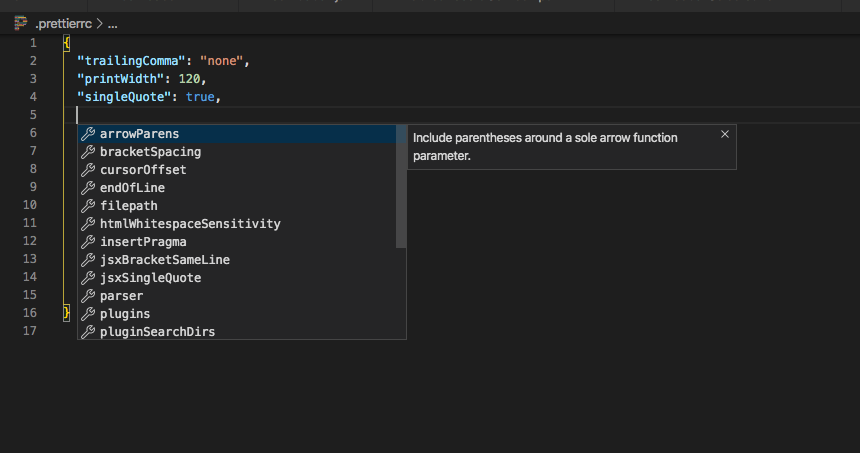
- prettier.config.js for some reason does not offer code completion (at least not for my config of VSCode).... sort of annoying when I want to make changes. Is there a strong reason to use prettier.config.js instead of .prettierrc as part of the CLI generation?
I renamed the file and it still did not auto-complete, I'm not sure what the mechanism would be that offers completion? Is it an vscode-extension?
 peterp
on 26 Mar 2020
peterp
on 26 Mar 2020
@axtscz I've added #341 in response to your suggestion
peterp
on 26 Mar 2020
@peterp - I don't know for certain, but I think the built-in json-schema capability for VSCode may be what provides code completions.
This is the extension that I am using: https://marketplace.visualstudio.com/items?itemName=esbenp.prettier-vscode
This is what the experience is like:
paustint
on 27 Mar 2020
I think we've taken most of the things that we could out of this issue and made them into separate issues.
peterp
on 25 Apr 2020
Related issues
 Tobbe
·
4Comments
peterp
·
4Comments
Tobbe
·
4Comments
peterp
·
4Comments
 jeliasson
·
3Comments
thedavidprice
·
3Comments
jeliasson
·
3Comments
thedavidprice
·
3Comments
 aldonline
·
3Comments
aldonline
·
3Comments
Most helpful comment
I agree with 4. Scaffolding generates quite a mess in the folder structure as it currently stands.