Redwood: Following tutorial, yarn create redwood-app on macOS errors (when using N rather than NVM)
I'm running macOS 10.15.3 (19D76), following the tutorial, when I run
yarn create redwood-app ./redwoodblog
It fails because of node engine incompatibilities (full output below). I tried yarn's --ignore-engines flag but it doesn't seem to work for create.
One thing, I'm using n not nvm to manage my node versions, and tried some other node versions, but they all had issues. So maybe it's n related? Maybe notably I can successfully install the example blog repo by cloning it down and running yarn.
Running with:
▶ node --version
v12.16.1
▶ yarn --version
1.19.2
Full output:
▶ yarn create redwood-app ./redwoodblog
yarn create v1.19.2
[1/4] 🔍  Resolving packages...
[2/4] 🚚  Fetching packages...
info @expo/[email protected]: The platform "darwin" is incompatible with this module.
info "@expo/[email protected]" is an optional dependency and failed compatibility check. Excluding it from installation.
info @expo/[email protected]: The CPU architecture "x64" is incompatible with this module.
info "@expo/[email protected]" is an optional dependency and failed compatibility check. Excluding it from installation.
info @expo/[email protected]: The platform "darwin" is incompatible with this module.
info "@expo/[email protected]" is an optional dependency and failed compatibility check. Excluding it from installation.
info @expo/[email protected]: The CPU architecture "x64" is incompatible with this module.
info @expo/[email protected]: The platform "darwin" is incompatible with this module.
info "@expo/[email protected]" is an optional dependency and failed compatibility check. Excluding it from installation.
info @expo/[email protected]: The platform "darwin" is incompatible with this module.
info "@expo/[email protected]" is an optional dependency and failed compatibility check. Excluding it from installation.
info @expo/[email protected]: The CPU architecture "x64" is incompatible with this module.
info @expo/[email protected]: The platform "darwin" is incompatible with this module.
info "@expo/[email protected]" is an optional dependency and failed compatibility check. Excluding it from installation.
info @expo/[email protected]: The CPU architecture "x64" is incompatible with this module.
info @expo/[email protected]: The platform "darwin" is incompatible with this module.
info "@expo/[email protected]" is an optional dependency and failed compatibility check. Excluding it from installation.
info @expo/[email protected]: The CPU architecture "x64" is incompatible with this module.
info @expo/[email protected]: The platform "darwin" is incompatible with this module.
info "@expo/[email protected]" is an optional dependency and failed compatibility check. Excluding it from installation.
info @expo/[email protected]: The platform "darwin" is incompatible with this module.
info "@expo/[email protected]" is an optional dependency and failed compatibility check. Excluding it from installation.
info @expo/[email protected]: The platform "darwin" is incompatible with this module.
info "@expo/[email protected]" is an optional dependency and failed compatibility check. Excluding it from installation.
info @expo/[email protected]: The CPU architecture "x64" is incompatible with this module.
info @expo/[email protected]: The platform "darwin" is incompatible with this module.
info "@expo/[email protected]" is an optional dependency and failed compatibility check. Excluding it from installation.
error [email protected]: The engine "node" is incompatible with this module. Expected version ">=4 <=9". Got "12.16.1"
error Found incompatible module.
info Visit https://yarnpkg.com/en/docs/cli/create for documentation about this command.
Thanks!
 zischwartz
All 9 comments
Hi @zischwartz This one's a bit strange. Your versions are just fine and, in the case they weren't, you wouldn't see the error until further down the chain of steps when the bootstrap calls 'yarn install'. Here's a screenshot of what you should see on a successful installation:
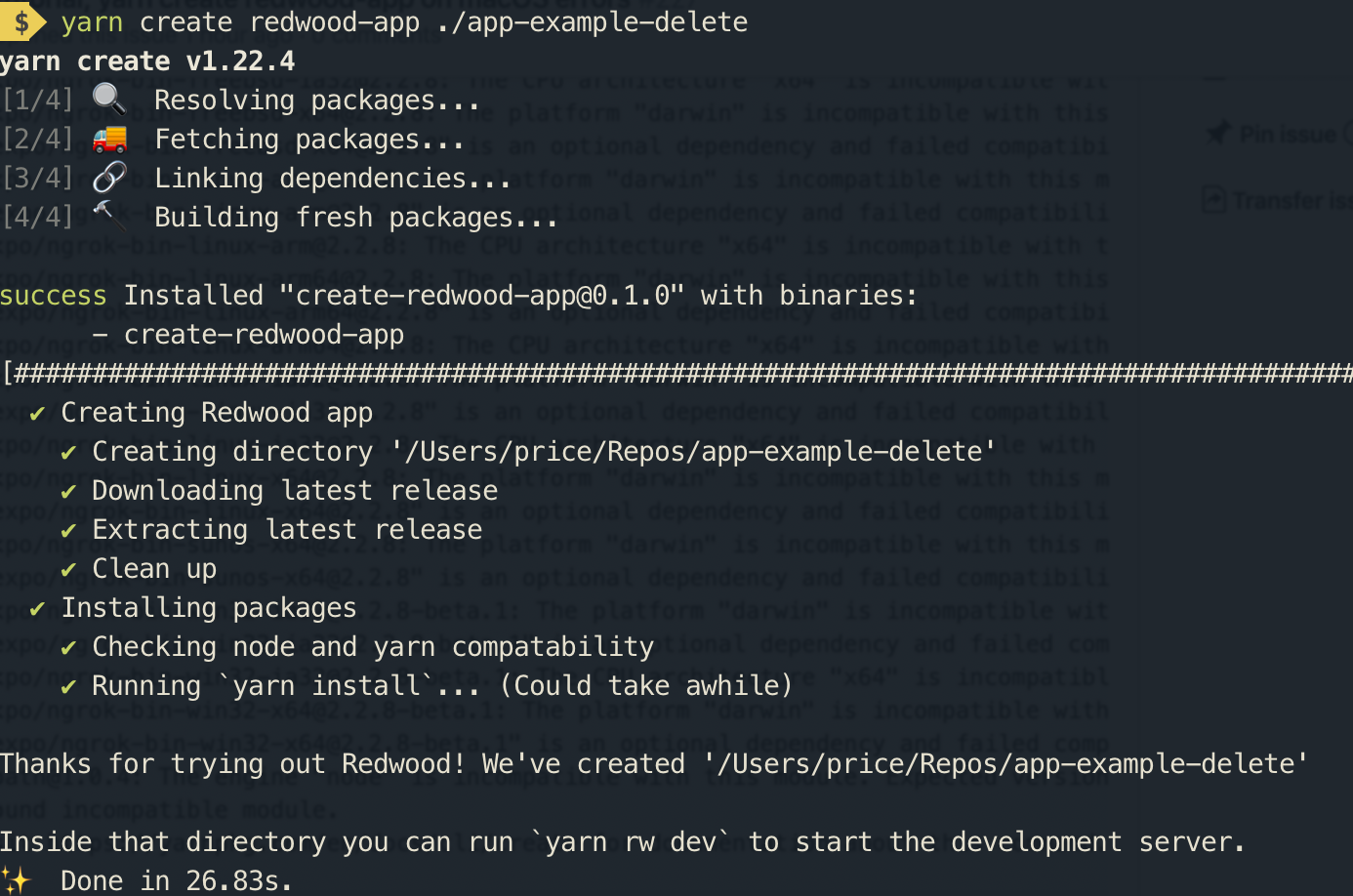
Steps 1-4 are just yarn getting the executable package from NPM. Then the executable (installer) runs starting with "Creating Redwood app".
Also, the @expo/... packages are not used anywhere in the Redwood app (packag.json or dependencies).
Seems most likely something related to your specific system. I'm not at all familiar with https://github.com/tj/n Is there a reason to not use NVM in your case? And how are you managing yarn installation as well?
We'll get you going soon enough! It'll be worth it 😄
 thedavidprice
on 12 Mar 2020
thedavidprice
on 12 Mar 2020
I receive the same error as well:
error @google-cloud/[email protected]: The engine "node" is incompatible with this module. Expected version "~6".
error Found incompatible module
Of course, this is from the google-cloud functions emulator, which I assume is not anywhere in this project.
 elebumm
on 12 Mar 2020
elebumm
on 12 Mar 2020
A one time fix is to do: yarn config set ignore-engines true and then run the command from the tutorial again. That worked for me.
I believe the issue comes up with multiple version with yarn and it not being managed by nvm etc.
elebumm
on 12 Mar 2020
More weirdness indeed. Did a quick search on https://github.com/yarnpkg/yarn/issues and found something similar but unresolved and unhelpul.
Would be helpful to know if you’re using anything other than these recommendations to install/manage yarn:
https://classic.yarnpkg.com/en/docs/install#mac-stable
Yarn is currently at v1.22.4 — possible to update to latest?
And given that your Node and Yarn versions meet the engine requirments, have you tried running without the —ignore-engines flag?
There are a couple manual workarounds I can suggest including cloning the create-redwood-app repo. Let me know if that would be most helpful for now.
thedavidprice
on 12 Mar 2020
Thanks for the reply @thedavidprice.
I truly believe the issue came down to having multiple versions of yarn. Running a which yarn showed that the yarn was running in /usr/local/bin/yarn which meant it wasn't running in my local nvm instance.
I brew uninstall yarn and then did a npm install -g yarn in my nvm instance which then made a new yarn in that nvm instance.
I still found that when I did a yarn create... it gave me the same error, but this time I was able to ignore engines using the command in my previous answer. Perhaps a caching issue on mac and yarn?
Glad I got it working though. Hopefully @zischwartz this answer helps you too.
Going through the tutorial and it's working great. Loving redwood so far.
Cheers David.
elebumm
on 12 Mar 2020
@elebumm good to hear and thanks for sharing the details.
@zischwartz any chance you’ve got things to work?
thedavidprice
on 12 Mar 2020
Did some more investigating, including updated n to the latest version, cleaning my yarn cache, but so far the only thing that worked was the one time fix yarn config set ignore-engines true. But it worked, I'm able to successfully run yarn create redwood-app ./blog now! 🎉
Seems most likely something related to your specific system. I'm not at all familiar with https://github.com/tj/n Is there a reason to not use NVM in your case?
Totally just my personal preference for n over NVM. Looking at the usage stats in both of those repos, while NVM is certainly more popular, n does seem to get a significant amount of use. Maybe a note in the documentation here is in order? Something like, "We recommend NVM, if you use n you may need to run yarn config set ignore-engines true"?
(Also sorry for all that expo related output in the log, hope I didn't confuse anybody!)
zischwartz
on 12 Mar 2020
Hi All. Thanks again for your help and troubleshooting here.
I have created a new category in our forum for "Troubleshooting & How To", which also includes a new topic that attempts to address everything you've reported here. Please do read through the following and provide feedback as needed:
https://community.redwoodjs.com/t/installation-error-multiple-versions-of-yarn-or-using-version-manager-other-than-nvm/102
I'm assuming everyone is in a good place and has now moved forward. If not, please open another Issue as needed. I'm cllosing this one for now.
Looking forward to seeing some future apps in our "Show & Tell" on the forum! 🚀
thedavidprice
on 13 Mar 2020
Just to chime in; the cause of the errors is because there are global modules installed which are incompatible with your current node version. Running yarn create is equivalent to yarn global add, which means that it validates the globally installed packages.
For example; use an old version of node and install a module that targets older node versions and then switch to a newer version and do a global install. This will fail due to incompatible engines, specified by the module.
The issue itself is that yarn create accept arguments like --ignore-engines to have yarn ignore engines as part of the validation.
 fnky
on 21 Mar 2020
fnky
on 21 Mar 2020
Related issues
 balaji-balu
·
3Comments
balaji-balu
·
3Comments
 jeliasson
·
3Comments
jeliasson
·
3Comments
 wispyco
·
3Comments
wispyco
·
3Comments
 weaversam8
·
4Comments
weaversam8
·
4Comments
 Tobbe
·
4Comments
Tobbe
·
4Comments
Most helpful comment
Just to chime in; the cause of the errors is because there are global modules installed which are incompatible with your current node version. Running
yarn createis equivalent toyarn global add, which means that it validates the globally installed packages.For example; use an old version of node and install a module that targets older node versions and then switch to a newer version and do a global install. This will fail due to incompatible engines, specified by the module.
The issue itself is that
yarn createaccept arguments like--ignore-enginesto have yarn ignore engines as part of the validation.