Redshift: geoclue2 provider: Unable to start GeoClue client
Hi.
Using redshift 1.10 on OpenBSD, I cannot use the geoclue2 provider.
It fails with:
$ redshift
Trying location provider geoclue2'...
Using providergeoclue2'.
Unable to start GeoClue client: GDBus.Error:org.freedesktop.DBus.Error.AccessDenied: Access denied.
Unable to connect to GeoClue.
Unable to get location from provider.
All other apps using geoclue2 work fine (e.g. gnome-maps).
Is there an obvious configuration tweak that I missed?
Thanks.
 ajacoutot
All 73 comments
None that I know of. Please report back if you figure out what the cause is.
 jonls
on 12 Jan 2015
jonls
on 12 Jan 2015
No cause sorry. But it's fully reproducible on Arch Linux as well.
ajacoutot
on 12 Jan 2015
I can reproduce it in archlinux as well
 joelmarty
on 13 Jan 2015
joelmarty
on 13 Jan 2015
On 01/13/2015 02:20 PM, Joël Marty wrote:
I can reproduce it in archlinux as well
Reply to this email directly or view it on GitHub:
https://github.com/jonls/redshift/issues/158#issuecomment-69832181
Ubuntu-14.04 as well.
 spikebike
on 13 Jan 2015
spikebike
on 13 Jan 2015
Anyone worked out a solution for this yet? I too am running arch & have this error.
 monkeydump
on 18 Jan 2015
monkeydump
on 18 Jan 2015
Mint 17.1 kde the same issue :
Failed to run Redshift
Trying location provider `geoclue2'...
Unable to connect to GeoClue.
Unable to get location from provider.
console output:
./redshift-gtk
* (redshift-gtk:13902): WARNING *: Error retrieving accessibility bus address: org.freedesktop.DBus.Error.ServiceUnknown: The name org.a11y.Bus was not provided by any .service files
 zbyna
on 22 Jan 2015
zbyna
on 22 Jan 2015
Slightly progress:
after installing:
Commit Log for Thu Jan 22 21:51:18 2015
at-spi2-core (2.10.2.is.2.10.1-0ubuntu1)
disappeared :
* (redshift-gtk:13902): WARNING *: Error retrieving accessibility bus address: org.freedesktop.DBus.Error.ServiceUnknown: The name org.a11y.Bus was not provided by any .service files
and /usr/share/dbus-1/services/org.a11y.Bus.service was created
output:
./redshift-gtk
Failed to run Redshift
Trying location provider `geoclue2'...
Unable to connect to GeoClue.
Unable to get location from provider.
console output:
nothing
without gui:
./redshift
Zkouší se poskytovatel polohy geoclue2'... trying location provider ..
Používám poskytovatelegeoclue2'. using location provider ...
Unable to connect to GeoClue.
Nebylo možné získat polohu od poskytovatele. Unable to get location from provider.
zbyna
on 22 Jan 2015
Ditto on up-to-date Arch, except my error message leaves out the last two lines (even after waiting 1.5 hours before hitting CTRL+C):
Trying location provider `geoclue2'...
Using provider `geoclue2'.
Unable to start GeoClue client: GDBus.Error:org.freedesktop.DBus.Error.AccessDenied: Access denied.
 robr3rd
on 23 Jan 2015
robr3rd
on 23 Jan 2015
It works, here are all my libs related "geoclue" installed, geoclue-2.0 seems to be the problem (at-spi2-core which I mentioned in previous post can be uninstalled without affecting redshift running :confused: ):
ii geoclue 0.12.99-3ubuntu1 amd64 Geographic information framework
ii geoclue-2.0 2.0.0-4 amd64 geoinformation service
ii geoclue-geonames 0.12.99-3ubuntu1 amd64 Geocoder provider for GeoClue (geonames)
ii geoclue-gpsd 0.12.99-2ubuntu2 amd64 Position server for GeoClue (GPS)
ii geoclue-gsmloc 0.12.99-3ubuntu1 amd64 Position server for GeoClue (GSM)
ii geoclue-gypsy 0.12.99-2ubuntu2 amd64 Position server for GeoClue (GYPSY)
ii geoclue-hostip 0.12.99-3ubuntu1 amd64 Position server for GeoClue (hostip)
ii geoclue-localnet 0.12.99-3ubuntu1 amd64 Position server for GeoClue (local network)
ii geoclue-manual 0.12.99-3ubuntu1 amd64 Position server for GeoClue (manual)
ii geoclue-nominatim 0.12.99-3ubuntu1 amd64 Geocoding and reverse-geocoding server for GeoClue (Nominatim)
ii geoclue-plazes 0.12.99-3ubuntu1 amd64 Position server for GeoClue (Plazes)
un geoclue-provider <žádná> <none> (popis není k dispozici)
ii geoclue-skyhook 0.12.99-3ubuntu1 amd64 Map and geocode server for GeoClue (Skyhook)
ii geoclue-ubuntu-geoip 1.0.2+14.04.20131125-0u amd64 Provide positioning for GeoClue via Ubuntu GeoIP services
ii geoclue-yahoo 0.12.99-3ubuntu1 amd64 Map and geocode server for GeoClue (Yahoo)
ii libgeoclue-dev 0.12.99-3ubuntu1 amd64 C API for GeoClue (development files)
ii libgeoclue0:amd64 0.12.99-3ubuntu1 amd64 C API for GeoClue
ii python-geoclue 0.1.0-4build1 all Python module to access Geoclue data
@ajacoutot @joelmarty @monkeydump Did any of you Arch people try to change /etc/geoclue/geoclue.conf? It seems from this post that it is locked down to a few programs by default.
jonls
on 24 Jan 2015
That's correct. Adding this to geoclue.conf did the trick.
Thanks for the link!
[redshift]
allowed=true
system=false
users=
Great, thanks for testing. This appears to actually be the default setup for more recent versions of GeoClue2 so it will probably also be a problem in other distributions when GeoClue2 is updated.
jonls
on 24 Jan 2015
had the same issue on fedora 21 - adding the 3 lines mentioned above in the .conf solved the issue as expected.
Thanks.
 yafp
on 21 Feb 2015
yafp
on 21 Feb 2015
If this is not a bug with redshift, then it should be reported with upstream geoclue or at least with individual distributions' packaging of it. I have filed a report for Fedora GNU here, and encourage others to do the same for their distros: https://bugzilla.redhat.com/show_bug.cgi?id=1214978
 heyakyra
on 24 Apr 2015
heyakyra
on 24 Apr 2015
IMHO this is a redshift bug too, it should continue with a manual fallback in case of error.
 naufraghi
on 5 Jun 2015
naufraghi
on 5 Jun 2015
I've reported the bug to geoclue upstream, see:
 bigon
on 6 Jul 2015
bigon
on 6 Jul 2015
As mentioned in the upstream bugreport, adding a redshift.desktop file is fixing the issue for me
bigon
on 6 Jul 2015
The same 3 lines in /usr/lib/geoclue/geoclue.conf (Ubuntu 14.04) have not solved this issue
 jamb0ss
on 17 Aug 2015
jamb0ss
on 17 Aug 2015
Adding those lines to geoclue.conf worked for me after a reboot.
 praest76
on 17 Aug 2015
praest76
on 17 Aug 2015
Like jamb0ss I am running Ubuntu 14.04 and cannot get redshift to work with geoclue. I'd prefer not having to hardcode the latitude and longitude.
 jcrace
on 17 Aug 2015
jcrace
on 17 Aug 2015
You can try to add this file https://github.com/bigon/redshift/blob/master/data/applications/redshift.desktop.in in /usr/share/applications/redshift.desktop
bigon
on 18 Aug 2015
For this issue You can use manual configuration file '~/.config/redshift.conf' with content similar to one provided in archwiki
Note: I had to change my location (obviously) and to change monitor from 1 to 0.
 bokiscout
on 21 Sep 2015
bokiscout
on 21 Sep 2015
Currently the only way I was able to get around the bug was by typing "sudo redshift" in the terminal. Albeit not safe, but works.
Update: If using this method use "sudo redshift-gtk" to get the tray icon. Seems to me Geocode2 is having authority issues.
 drannex42
on 6 Oct 2015
drannex42
on 6 Oct 2015
All three solutions work for me on a Fedora 22 workstation:
- Run as
sudo redshift-gtkorsudo redshift. - Provide a
/usr/share/applications/redshift.desktopfile instead of / in addition to/usr/share/applications/redshift-gtk.desktop. In recent Linux desktops, I understand executables must be associated to a.desktopfile to have access to geoclue. This is clearly work in progress, but as far as I can understand the intent is to associate permissions to “apps” just like on Android, and the.desktopfile is the pivotal point of this effort. - Append to
/etc/geoclue/geoclue.conf:
[redshift]
allowed=true
system=false
users=
According to comments on the Fedora bug tracker (Bug 1214978 - Not installing redshift.desktop file breaks geoclue authorization), the correct way of handling this is 2. Unfortunately there's the issue that .desktop files are usually given the name of the graphical front-end (_redshift-gtk_), but the name of the .desktop files is also currently used to identify back-end executables (_redshift_) that need _permission_ to access resources such as GeoClue. So there is a tension between different submodules of the desktop that need inconsistent *.desktop names for different needs.
 DimitriPapadopoulos
on 4 Nov 2015
DimitriPapadopoulos
on 4 Nov 2015
The redshift.desktop file is already in the redshift git repository (https://github.com/jonls/redshift/blob/master/data/applications/redshift.desktop.in)
The debian package is already containing it. So either, redshift should do a new release that install that .desktop file or other distribution should carry a patch for now
bigon
on 5 Nov 2015
Ran into this on arch today. Adding the desktop file contents from https://github.com/jonls/redshift/blob/master/data/applications/redshift.desktop.in to /usr/share/applications/redshift.desktop fixed the issue and is the most correct workaround.
This file should be created on install but isn't.
 bcomnes
on 6 Nov 2015
bcomnes
on 6 Nov 2015
Same here. The following solved my problem:
echo """
[Desktop Entry]
Version=1.0
_Name=Redshift
_GenericName=Color temperature adjustment
_Comment=Color temperature adjustment tool
Exec=redshift
Icon=redshift
Terminal=true
Type=Application
Categories=Utility;
NoDisplay=true
""" | sudo tee /usr/share/applications/redshift.desktop
Would be nice if it could be done automatically. @jonls do you have any suggestions ? I could not figure it out myself...
 cadesalaberry
on 14 Nov 2015
cadesalaberry
on 14 Nov 2015
The next release of Redshift will install a desktop file.
jonls
on 16 Nov 2015
Sweet ! thanks.
cadesalaberry
on 19 Nov 2015
For me, the .desktop files were already in place. I needed to add redshift togeoclue.conf as per @DimitriPapadopoulos 3 point here: https://github.com/jonls/redshift/issues/158#issuecomment-153847465
 seyDoggy
on 10 Mar 2016
seyDoggy
on 10 Mar 2016
Does geoclue are depending with http://api.hostip.info ? I installed geoclue-test-gui and I caught this warning :
# geoclue-test-gui
** (geoclue-test-gui:16315): WARNING **: Error getting address for Manual: No manual address set
** (geoclue-test-gui:16315): WARNING **: Error getting position from Hostip: xmlNanoHTTPMethod did not get a response from http://api.hostip.info/
** (geoclue-test-gui:16315): WARNING **: Error getting address for Hostip: xmlNanoHTTPMethod did not get a response from http://api.hostip.info/
** (geoclue-test-gui:16315): WARNING **: Error getting position from Plazes: Could not understand reply from server
** (geoclue-test-gui:16315): WARNING **: Error getting position from Skyhook: Web service returned an error
** (geoclue-test-gui:16315): WARNING **: Error getting address for Plazes: Could not understand reply from server
** (geoclue-test-gui:16315): WARNING **: Error getting position from Geoclue Master: xmlNanoHTTPMethod did not get a response from http://api.hostip.info/
** (geoclue-test-gui:16315): WARNING **: Error getting address for Geoclue Master: xmlNanoHTTPMethod did not get a response from http://api.hostip.info/
 Kriptonium
on 17 Mar 2016
Kriptonium
on 17 Mar 2016
@Kriptonium there is a difference between geoclue and geoclue2
geoclue-test-gui is part of geoclue which is dead upstream and shouldn't be used anymore IMVHO
bigon
on 18 Mar 2016
@ajacoutot did the trick for me as well, thank you! Ubuntu 14.04.4
@jonls what about adding this recipe into the project wiki\docs? because it seems like there're bunch of people facing this exact issue
 MInner
on 23 Mar 2016
MInner
on 23 Mar 2016
Hello, I'm new to Linux and have problems getting Redshift work on Lubuntu 14.04. I tried to follow the advice here but nothing seems to work/I am unable to do it because the mentioned files/directories don't exist on my computer.
I installed redshift, redshift-gtk and geoclue-2.0 (first through the Software Center, than through the terminal). Whatever I do, I get the following error:
myname:~$ redshift -t 6500:3700
Trying location provider geoclue'...
Started Geoclue providerGeoclue Master'.
Using provider `geoclue'.
Could not get location (3 retries left): xmlNanoHTTPMethod did not get a response from http://api.hostip.info/
Redshift works if I add the coordinates by hand, but it would be great to have automatic updates.
Also, there is no toolbar icon (which I thought I would get with redshift-gtk)
I would be grateful for any help!
 wewetho
on 10 Apr 2016
wewetho
on 10 Apr 2016
PS: I did try the 3 steps recommended by @DimitriPapadopoulos but none of them worked.
There was only a redshift-gtk.desktop file in /usr/share/applications, so I added the redshift.desktop as provided on https://github.com/jonls/redshift/blob/master/data/applications/redshift.desktop.in
There was no geoclue folder in /etc so I created it and copied the geoclue.conf file with the three lines added.
Also, if I configure Redshift by manually providing the coordinates, it does not load on start after rebooting.
Any ideas?
wewetho
on 11 Apr 2016
@wewetho Is this Lubuntu 14.04 computer behind a firewall / proxy?
See for example:
https://bugs.launchpad.net/redshift/+bug/1170333
In your case Geoclue does start as far as I can see - but then it is unable to contact hostip.info to guess the location of your IP address. The tricks suggested for my Fedora 22 workstation do not necessarily apply to this Lubuntu 14.04 computer since geoclue does start here. This other trick might apply to your case (creation of a Redshift configuration file):
https://www.reddit.com/r/linuxquestions/comments/4cwjhv/redshift_not_working_on_xubuntu_1404/
DimitriPapadopoulos
on 12 Apr 2016
@wewetho there is a difference between geoclue and geoclue-2.0 in debian/ubuntu distributions, you need the later(if you don't have a /etc/geoclue directory I suspect you don't have the correct version)
bigon
on 12 Apr 2016
Thanks! The .conf file finally worked for me. Redshift is starting automatically and the GTK Icon is there.
Automatic location doesn't work, however. I deinstalled goeclue and installed geoclue-2.0. But I get the message "unable to start location provider" if I use geoclue or geoclue2 or geoclue-2.0 in the .conf file.
PS: Sorry for the delayed reply, work kept me crazy busy.
wewetho
on 17 Apr 2016
I've been having these issues as well. I am on debian stable and I've made edits to my .desktop file as well as all other suggestions, I just haven't written that .conf file yet but this is a bit annoying, why? Because I have redshift as an autostart application but sometimes it doesn't kick in.
I go into terminal and type redshift and get this output
blubee@dn:~$ redshift
Trying location provider `geoclue'...
Started Geoclue provider `Geoclue Master'.
Using provider `geoclue'.
Could not get location: Could not understand reply from server.
Unable to get location from provider.
but if i do sudo redshift it'll just work and find my location. What is going on with redshift?
here's an aptitude output of geoclue installed pacakges
i geoclue - Geographic information framework
p geoclue:i386 - Geographic information framework
i geoclue-2.0 - geoinformation service
p geoclue-2.0:i386 - geoinformation service
p geoclue-examples - GeoClue example clients
p geoclue-examples:i386 - GeoClue example clients
i geoclue-geonames - Geocoder provider for GeoClue (geonames)
p geoclue-geonames:i386 - Geocoder provider for GeoClue (geonames)
i geoclue-gsmloc - Position server for GeoClue (GSM)
p geoclue-gsmloc:i386 - Position server for GeoClue (GSM)
i geoclue-hostip - Position server for GeoClue (hostip)
p geoclue-hostip:i386 - Position server for GeoClue (hostip)
i geoclue-localnet - Position server for GeoClue (local network)
p geoclue-localnet:i386 - Position server for GeoClue (local network)
pi geoclue-manual - Position server for GeoClue (manual)
p geoclue-manual:i386 - Position server for GeoClue (manual)
i geoclue-nominatim - Geocoding and reverse-geocoding server for GeoClue (Nominatim)
p geoclue-nominatim:i386 - Geocoding and reverse-geocoding server for GeoClue (Nominatim)
i geoclue-plazes - Position server for GeoClue (Plazes)
p geoclue-plazes:i386 - Position server for GeoClue (Plazes)
v geoclue-provider -
v geoclue-provider:i386 -
i geoclue-skyhook - Map and geocode server for GeoClue (Skyhook)
p geoclue-skyhook:i386 - Map and geocode server for GeoClue (Skyhook)
i geoclue-yahoo - Map and geocode server for GeoClue (Yahoo)
p geoclue-yahoo:i386 - Map and geocode server for GeoClue (Yahoo)
p libgeoclue-dev - C API for GeoClue (development files)
p libgeoclue-dev:i386 - C API for GeoClue (development files)
i libgeoclue0 - C API for GeoClue
p libgeoclue0:i386 - C API for GeoClue
i python-geoclue - Python module to access Geoclue data
here is my .desktop file
[Desktop Entry]
Version=1.0
Name=Redshift
GenericName=Color temperature adjustment
Comment=Color temperature adjustment tool
Exec=redshift-gtk
Icon=redshift
Terminal=false
Type=Application
Categories=Utility;
StartupNotify=true
What's the deal with this?
 teamblubee
on 26 Apr 2016
teamblubee
on 26 Apr 2016
@teamblubee: You also need a redshift.desktop file
bigon
on 26 Apr 2016
@bigon that's all handled as a part of the package install from apt. In my above post I even wrote out the redshift.desktop file.
teamblubee
on 26 Apr 2016
@teamblubee the file you posted was redshift-gtk.desktop, not redshift.desktop
Exec=redshift-gtk
bigon
on 26 Apr 2016
 devrajatverma
on 9 Jul 2016
devrajatverma
on 9 Jul 2016
On Linux Mint 18 64x I ran sudo apt-get install geoclue-2.0 and this worked for me now RedShift and RedShift-gtk work for me. I tried the other fixes but none of them worked. Thanks to bigon's suggestion of different versions of Geoclue in Ubuntu / Debian for the idea that led me to the fix.
 n1tr0-Sec
on 15 Jul 2016
n1tr0-Sec
on 15 Jul 2016
You may want to use Markdown when commenting on GitHub, as in sudo apt-get install geoclue-2.0.
 johnyf
on 15 Jul 2016
johnyf
on 15 Jul 2016
@n1tr0-Sec Thanks!!! This was driving me nuts. No config file to find, so thank god I found this!
 lourivellini
on 30 Jul 2016
lourivellini
on 30 Jul 2016
in my case it worked for a while but then it stopped working. The fix on fedora 23 was to dnf reinstall geoclue2
 mihaidma
on 3 Aug 2016
mihaidma
on 3 Aug 2016
yeah all I had to do was install geoclue 2.0!
 scottymiller9
on 5 Aug 2016
scottymiller9
on 5 Aug 2016
Installing geoclue-2.0 did the trick.
 freddyfernando
on 9 Sep 2016
freddyfernando
on 9 Sep 2016
sudo apt-get remove geoclue*
sudo apt-get install geoclue-2.0
fixed an issue for me
 unxed
on 10 Oct 2016
unxed
on 10 Oct 2016
Appending to /etc/geoclue/geoclue.conf solved the problem for me on a ubuntu 16.04 machine.
 kindlychung
on 7 May 2017
kindlychung
on 7 May 2017
In my case the issue does not always happens. If I have no internet connection at startup redshift will not work. But even after getting web I need to restart redshift a few times until it works. It should save my location so it won't have to go online every time the system boots. Tried a few of these solutions, let's see if it works now.
 PedroMAlves
on 28 Aug 2017
PedroMAlves
on 28 Aug 2017
Still having Geoclue problems in 03/2018.
None of the solutions work on Xfce, only manually setting the lat/lng:
redshift-gtk -l 51:17
(in my case)
 nkkollaw
on 17 Mar 2018
nkkollaw
on 17 Mar 2018
Reproducible under Tumbleweed (05/06/18.)
 fleamour
on 5 Jun 2018
fleamour
on 5 Jun 2018
still problem under debian xfce
conta@debianbook:~$ sudo redshift
Trying location provider `geoclue2'...
Using provider `geoclue2'.
Unable to start GeoClue client: GDBus.Error:org.freedesktop.DBus.Error.AccessDenied: 'redshift' disallowed, no agent for UID 0.
Unable to connect to GeoClue.
Unable to get location from provider.
 hovancik
on 11 Jun 2018
hovancik
on 11 Jun 2018
One solution is to manually set lat:long.
fleamour
on 11 Jun 2018
It would be much better, if redshift continue even if access is denied. Or present more useful error message with hints what to do.
On a side note, I personally think that geoclue is way too restrictive, and should by default provide some minimal level of geolocation, i.e. GeoIP data to a level of city or state, because redshift is already capable of doing own TCP/HTTP connections to external serverer and figure this out without use of geoclue services.
https://bugs.debian.org/900936 for related geoclue bug.
Notice the "no agent for UID ...". I guess agent, is some auxilary program, that pops up to ask user in secure context to allow or disallow dynamically new applications.
I am using MATE DE, and that is probably the problem. Again this is a design flaw in geoclue, as one cannot implement all possible agents for various services directly in desktop manager.
In Debian sid/unstable, one can find a package geoclue-2-demo, version 2.4.10-1, and an executable /usr/lib/geoclue-2.0/demos/agent, that implements generic agent. Try running it. (In fact is also mentioned in /etc/xdg/start/, so it should autostart in all reasonable desktop environments). And if Debian maintainer is reading this, I would suggest to split geoclue-2-demo into separate package with demo and with agent (and put agent into /usr/bin with reasonable name!). Then in redshift-gtk add Recommends to install this geoclue-2-gtk-agent. (and also to libgeoclue-2-0 package itself, so any app using C library also recommends agent).
Anyhow when I run geoclue demo agent, and where-am-i demos, I receive briefly a notification from MATE in corner with timeout and question yes, no, if I want to allow access to location information. But clicking Yes does nothing, or it disappears quicker than timeout. Sometimes it doesn't show at all. No idea what is going on.
 baryluk
on 13 Jun 2018
baryluk
on 13 Jun 2018
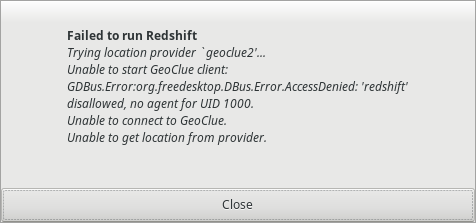
Same issue in Fedora 28:
 joshmule
on 13 Jun 2018
joshmule
on 13 Jun 2018
Update: Installing geoclue-2-demo in Debian, and restarting my DE (or logging again), seems to solved the issue.
baryluk
on 14 Jun 2018
Reproduced in Ubuntu 16.04.
 justinkterry
on 14 Jun 2018
justinkterry
on 14 Jun 2018
Debian sid with XFCE: I've installed geoclue-2-demo. After restart it asks me if I wanna allow redshift to access location, but it still doesn't work, same error
hovancik
on 14 Jun 2018
I think that an other bug should be opened for that.
The initial bug here was that redshift was not providing a .desktop file
The recent new issues are related to a change in geoclue 2.4.10 and is completely different. As a side note, bugs should be opened in the different DE (KDE, Mate,....) to support the geoclue agent
bigon
on 14 Jun 2018
On Fedora KDE, you will need to add yourself to the geoclue group.
Logout & login and it works
 smetj
on 22 Jun 2018
smetj
on 22 Jun 2018
None of the suggestions worked for me (Debian Sid with xfce), except for providing the location manually in ~/.config/redshift.conf:
[redshift]
location-provider=manual
[manual]
lat=48.2
lon=16.4
 darioseidl
on 23 Jun 2018
darioseidl
on 23 Jun 2018
@darioseidl your solution, manual redshift.conf, worked. thanks!
 nycjv321
on 6 Jul 2018
nycjv321
on 6 Jul 2018
The geoclue-demo-agent.desktop will activate geoclue.service through DBUS, but
geoclue.service will auto exit if no use in 5 seconds, this is the problem.
It works on archlinux with following steps:
1, Append configuration section to /etc/geoclue/geoclue.conf
[redshift]
allowed=true
system=false
users=
2, Startup geoclue-demo-agent.desktop and redshift-gtk.desktop one by one
dex /etc/xdg/autostart/geoclue-demo-agent.desktop
dex /usr/share/applications/redshift-gtk.desktop
 tangxinfa
on 23 Jul 2018
tangxinfa
on 23 Jul 2018
In the second (Startup) step, when editing the .desktop files with dex, what is supposed to be added, changed, or removed?
 stpeters00
on 23 Jul 2018
stpeters00
on 23 Jul 2018
I proceeded according @tangxinfa instructions. But instead dex I used kioclient exec (KDE command for run _.desktop_ files):
- First console:
$ kioclient exec /usr/share/applications/geoclue-demo-agent.desktop
Geolocation service not in use
Geolocation service in use  # ... displayed after run redshift command
- Second console:
$ redshift-qt
"Using provider `geoclue2'."
"Solar elevations: day above 3.0, night below -6.0"
"Temperatures: 6500K at day, 4500K at night"
"Brightness: 1.00:1.00"
"Gamma (Daytime): 1.000, 1.000, 1.000"
"Gamma (Night): 1.000, 1.000, 1.000"
"Using method `randr'."
"Location: 52.28 N, 9.97 E"
"Color temperature: 6500K"
"Brightness: 1.00"
"Status: Enabled"
"Period: Daytime"
Redshift status change:  disabled
"Status: Disabled"
"Period: None"
Redshift status change:  enabled
"Status: Enabled"
"Period: Daytime"
... now redshift seems to be started and run (I'll checked it later now I have 9.00 AM :] )
 waldauf
on 24 Jul 2018
waldauf
on 24 Jul 2018
Is there a dex that does something similar to kioclient exec?
I'd never heard of a dex command, but a Fedora 28 dnf search dex turned up a package for a text editor called dex. Some googling turned up other things called dex, but none of them look like a program to run .desktop files.
Also, where did redshift-qt come from?
stpeters00
on 24 Jul 2018
Trying location provider `geoclue2'...
Using provider `geoclue2'.
Using method `randr'.
Waiting for initial location to become available...
Unable to start GeoClue client: GDBus.Error:org.freedesktop.DBus.Error.NoReply: Message recipient disconnected from message bus without replying.
Unable to get location from provider.
Downgrading geoclue (2.4.10-1 => 2.4.7-1) worked like a charm.
 MarcinWieczorek
on 24 Jul 2018
MarcinWieczorek
on 24 Jul 2018
I'm also getting this on Arch Linux even after adding the lines to the config:
redshift 1.12
geoclue2 2.4.11
 RatanRSur
on 13 Aug 2018
RatanRSur
on 13 Aug 2018
Same issue here, adding lines to geoconf config does not fix the issue.
 silverbluep
on 24 Aug 2018
silverbluep
on 24 Aug 2018
It looks like some of you are seeing the same error as https://github.com/jonls/redshift/issues/636. Please take a look at the summary here: https://github.com/jonls/redshift/issues/636#issuecomment-412295941 for workarounds and take a look at the comments by zeenix in that issue.
This issue has been closed for a while and the original issue was resolved with a workaround. What some of you are experiencing is probably different issues that don't belong here so I'll lock this thread and you can go ahead and open new issues if you are still having issues. However, please take a minute to consider if you issue is with your distro or with GeoClue, in which case you should open an issue with those projects instead of here!
jonls
on 24 Aug 2018
Related issues
 gamalan
·
4Comments
gamalan
·
4Comments
 freedomd1v3
·
4Comments
freedomd1v3
·
4Comments
 dimqua
·
3Comments
dimqua
·
3Comments
 GITMichaelK
·
4Comments
GITMichaelK
·
4Comments
 Avispa
·
4Comments
Avispa
·
4Comments
Most helpful comment
That's correct. Adding this to
geoclue.confdid the trick.Thanks for the link!