Recyclerlistview: No layout available for index: 0
I'm seeing errors coming through in Bugsnag that seem to be from my implementation of RecyclerListView. The error says No layout available for index: 0. I can't seem to reproduce it myself but I know that it's causing some of my users pain. As far as I know I've set up everything correctly, but maybe I'm missing something. Here's the applicable code from my component.
// different layout types
enum layoutStyle {
  GRID = 'Grid',
  LIST = 'List',
}
  // starting up the component
  constructor(props: Props) {
    super(props);

    this.dataProvider = new DataProvider(
      (p1: Adult | Student, p2: Adult | Student) => {
        return (
          p1.uniqueidentifier !== p2.uniqueidentifier ||
          p1.firstName !== p2.firstName ||
          p1.lastName !== p2.lastName
        );
      }
    );

    this.state = {
      layout: layoutStyle.GRID,
    };

    const pageWidth = Dimensions.get('window').width;
    const columnCount = Math.floor(pageWidth / Person.minTileWidth);
    const gridWidth = Math.floor(pageWidth / columnCount);

    this.layoutProvider = new LayoutProvider(
      () => this.state.layout,
      (
        type: layoutStyle,
        dim: {
          width: number;
          height: number;
        }
      ) => {
        switch (type) {
          case layoutStyle.GRID:
            dim.width = gridWidth;
            dim.height = 96;
            break;
          case layoutStyle.LIST:
            dim.width = Dimensions.get('window').width;
            dim.height = 70;
            break;
          default:
            dim.width = 0;
            dim.height = 0;
        }
      }
    );
  }
        // in the render function
        <RecyclerListView
          layoutProvider={this.layoutProvider}
          dataProvider={this.dataProvider.cloneWithRows(people)}
          rowRenderer={this.rowRenderer}
          renderAheadOffset={200}
          extendedState={this.state}
          ref={(ref: RecyclerListView) => {
            if (ref) {
              this.listViewRef = ref;
            }
          }}
        />
From the error message it sounds like my LayoutProvider instance may not be configured correctly, but I went back through and reviewed the demo code in this repo and it looks like it should work fine to me.
Any help on this would be appreciated. Thanks!
 jasonmerino
All 6 comments
I'm facing the same problem now, in my case, the error happens when loaded with some rows first, then reload without any data for the list, then the error will be shown.
 devilyard
on 19 Apr 2019
devilyard
on 19 Apr 2019
I have new find, the issue reproduces when changing the layoutProvider in componentWillReceiveProps, in my case the code is something looks like below:
class SampleList extends Component {
    render() {
        return <RecordList/>
    }
    ...
}

class RecordList extends Component {
    constructor(props) {
        super(props);
        this._layoutProvider = new LayoutProvider(() => {
            return 0;
        }, (type, dim) => {
            dim.height = this.props.rowHeight;
            dim.width = deviceWidth;
        });
    }

    render() {
        return (
            <RecyclerListView
                rowRenderer={this.props.renderRow}
                dataProvider={this.state.dataProvider}
                layoutProvider={this._layoutProvider}
            />
    }

    componentWillReceiveProps(nextProps, nextContext) {
       // if we change the layoutProvider here then the error will be thrown
        this._layoutProvider = new LayoutProvider(() => {
            return 0;
        }, (type, dim) => {
            dim.height = nextProps.rowHeight;
            dim.width = deviceWidth;
        });
    }
}
I have a simple solution that do change in getOffsetForIndex(index) where locate in LayoutManager.js
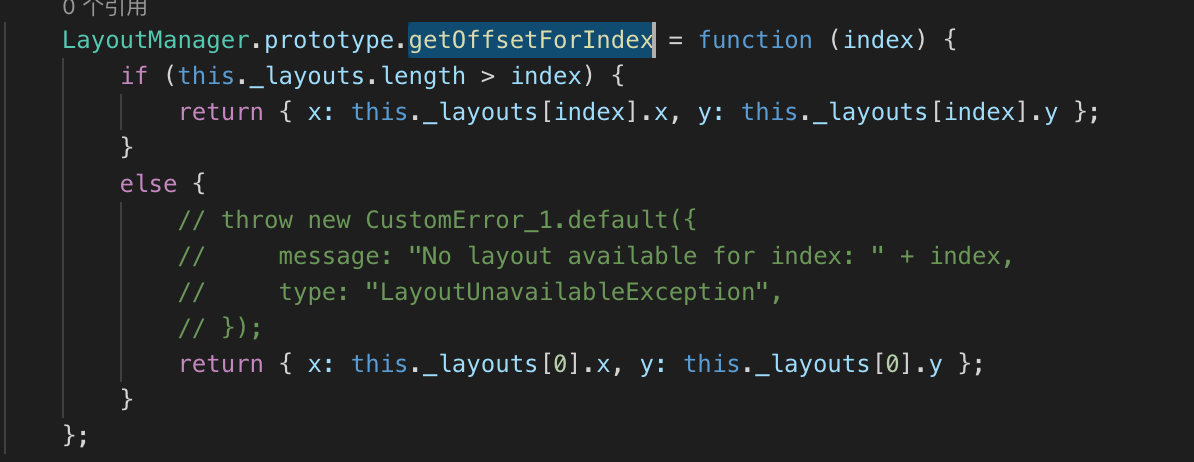
I hope will help you :)
 WickyLeung
on 20 May 2019
WickyLeung
on 20 May 2019
I'm also seeing this error. It occurs when I first render some rows, then use extendedState to refresh the list, this time with no items.
 obibring
on 3 Aug 2019
obibring
on 3 Aug 2019
Today I finally got around to dealing with this error. My solution is not ideal, but it works.
Right before rendering the RecyclerListView component I check to make sure that the items I'm trying to render are greater than 0. If the length of my array of items is 0 I just render an empty View component instead of the RecyclerListView. Not ideal, but it seems to do the trick in my situation.
jasonmerino
on 6 Sep 2019
A Warning has been added for this case when the recyclerlistview is rendered with no items. As suggested by @jasonmerino, a check can be made to see if the data provider is empty before rendering and not render it in case it is zero.
https://github.com/Flipkart/recyclerlistview/blob/6c191661214a53f6ba24567528f0de7902ffda6c/src/core/RecyclerListView.tsx#L200
 arunreddy10
on 24 Oct 2019
arunreddy10
on 24 Oct 2019
Related issues
 sm2017
·
5Comments
sm2017
·
5Comments
 gilra2000
·
6Comments
gilra2000
·
6Comments
 h-asadollahi
·
8Comments
h-asadollahi
·
8Comments
 nehacurefit
·
4Comments
nehacurefit
·
4Comments
 waheedakhtar694
·
6Comments
waheedakhtar694
·
6Comments
Most helpful comment
I'm facing the same problem now, in my case, the error happens when loaded with some rows first, then reload without any data for the list, then the error will be shown.