Recyclerlistview: Performance on android is too bad
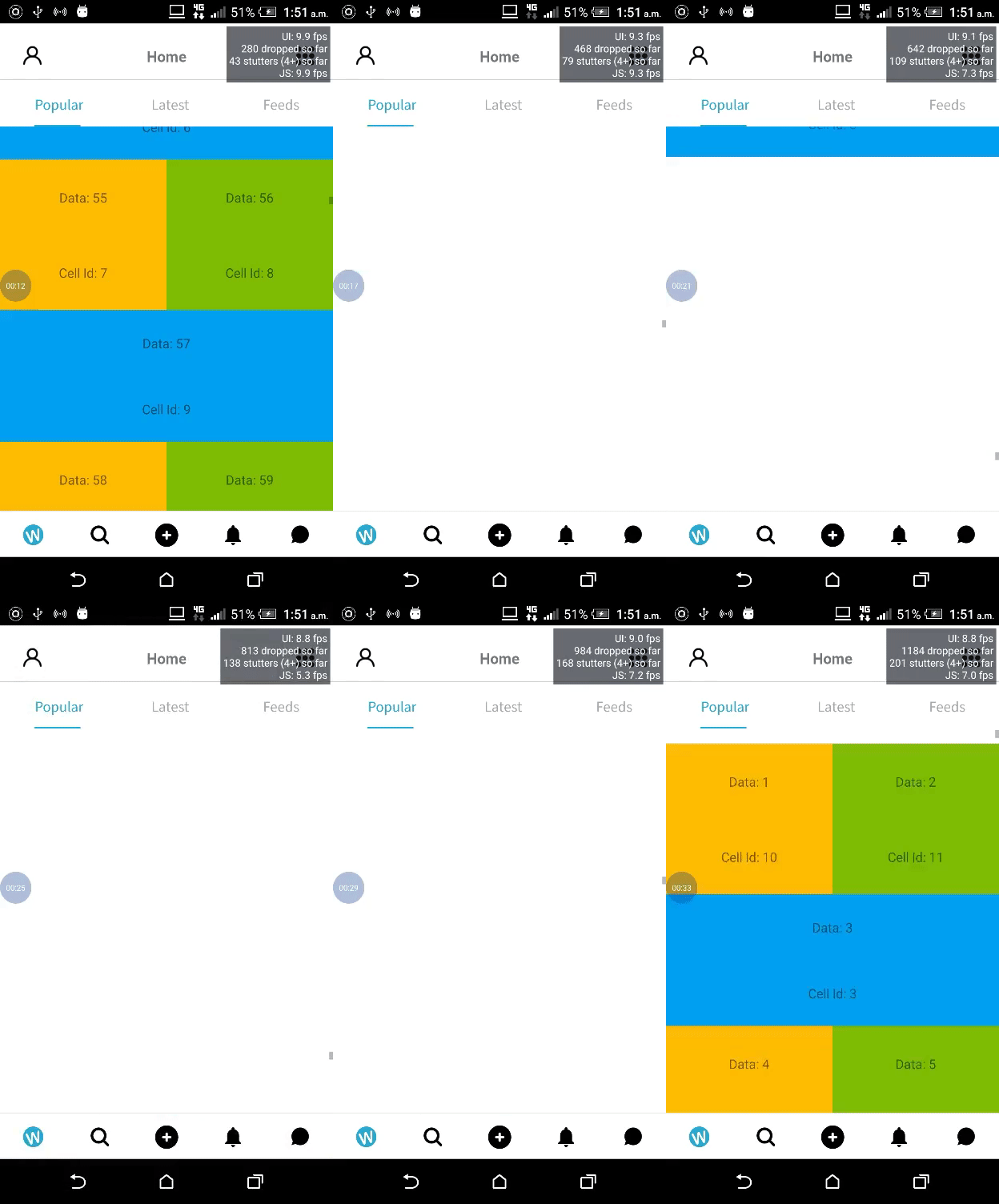
Previously i was using Flatlist for listing of infinite scroll of images but due to memory and performance issue we decided to switch to this Amazing library and to be honest when i run this library on ios first time i was pretty happy about it but on android i saw too bad performance i am attaching a gif with this so you can also get the idea how bad performance it is.
This is an average phone(HTC M8 One 2GB Ram 16GB ROM) that i have used for testing RecyclerListView but i also used this phone for testing Flatlist performance and it was far better then this as you can see Dropped FPS rate.
I Just copy paste this snack code for showing the demo.
https://snack.expo.io/r11citYvz
Also i noticed on ios in dev mode it was working really nice but when i goes into production app get slow.
I have tested same code on IOS too and it works on 60 FPS but running on android is like a nightmare.
 waheedakhtar694
All 6 comments
I tried your expo. It seems to runs just fine on Android. I will need a better sample to look into your issue.
 naqvitalha
on 17 Aug 2019
naqvitalha
on 17 Aug 2019
@naqvitalha here is my code for rendering my data and i also used in this component i used above mentioned snack by just copy pasting it.
Please let me know if anything more required.
 import React, { PureComponent} from 'react'
 import { View, ActivityIndicator, StyleSheet, RefreshControl, BackHandler, Platform, Dimensions}
 from 'react-native'
 import Modal from 'react-native-modal'
 import _ from 'lodash'
 import { withCreations } from '../../Redux/hoc/withCreations/withCreations'
 import MediaView from '../../Components/MediaView/MediaView'
 import Loading from '../../Components/Loader/Loader'
 import CreationTiles from '../../Components/CreationTiles/CreationTiles'
 import { handleDataChange } from '../../Utils/handlePusherChange'
 import { popularCreationsParams } from '../../Utils/params'
 import Colors from '../../Styles/Colors'
 import DeviceSizes from '../../Styles/DeviceSizes'
 import { RecyclerListView, DataProvider, LayoutProvider } from 'recyclerlistview'
 const apiType = 'creation?'
 class Creations extends React.PureComponent {
 pageLimit = 10;
 pageOffset = 0;

   constructor (props) {
     super(props)
     this.state = {
      modalVisible: false,
      selectedData: {},
      selectedMediaData: {},
      data: [],
      updated: false,
      PusherIncremented: 0,
      renderList: false,
      refreshing: false,
      dataProvider: new DataProvider((r1, r2) => {
         return r1 !== r2
      })
      }
     this._layoutProvider = new LayoutProvider(
     index => {
         return 'VSEL'
      },
      (type, dim, index) => {
        switch (type) {
          case 'VSEL':
            dim.width = DeviceSizes.DEVICE_WIDTH * 0.93
            dim.height = DeviceSizes.DEVICE_HEIGHT * 0.40
             break
            default:
            dim.width = 0
            dim.heigh = 0
          }
        }
      )
    }
     componentDidMount () {
     this.fetchCreations(this.pageLimit, this.pageOffset, false)
     this.list = setTimeout(() => { this.setState({ renderList: true }) }, 0)
     }

    fetchCreations (limit, offset, loadMore) {
    console.log('About to fetch creations............. >>> 01')
    const params = popularCreationsParams(limit, offset, loadMore)
    this.props.fetchCreationsData(params, apiType)
    }

       handleOnPress=(item, index) => {
      this.setState({ modalVisible: true, selectedMediaData:
       JSON.parse(item.attributes.mediaMetadata), selectedData: this.props.data.slice(index, index
      + 5) })
       }
       componentWillUnmount () {
       clearTimeout(this.list)
        }

       endScroll =() => {
       const apiType = 'creation?'
       this.pageOffset += this.pageLimit
       const params = popularCreationsParams(this.pageLimit, this.pageOffset, true)
       console.log('parseInt(this.props.totalCount)', this.props.data.length)
       if ((parseInt(this.props.totalCount) > this.props.data.length && !this.pageOffset <
       this.props.totalCount)) {
       console.log('About to fetch creations............. >>> 02')
       this.props.fetchCreationsData(params, apiType)
       }
     }

     handleCloseModal=() => { this.setState({ modalVisible: false }) }
     renderFooter=() => {
        if (this.props.isLoading) {
       return (
           <ActivityIndicator style={styles.loader} size='large' color='#2AAAD2' />
        )
       } else {
       return null
     }
    }

     _scrolled=() => {
      this.setState({ flatListReady: true })
      }

    async componentWillReceiveProps (nextProps, nextContext) {
    console.log('DATA RECEIVED................................................', nextProps)
    const { data } = this.state
    this.setState({ dataProvider: this.state.dataProvider.cloneWithRows(nextProps.data) })
    if (nextProps.PusherData) {
     const ChangedDataAfterPusherEvent = await handleDataChange(data,nextProps.PusherData)
          this.setState({ data: ChangedDataAfterPusherEvent })
     }
    }

   onRefresh =() => {
    this.setState({ refreshing: true })
     this.fetchCreations(50, 0, false)
    }
     showSecondModal=() => {
    this.setState({ modalVisible2: this.state.modalVisible2 })
     }
     renderItem=(type, data, index) => {
     const item = data
     console.log('data', data)
     const metadata = JSON.parse(item.attributes.mediaMetadata)
      return (<CreationTiles isLoading={this.props.isLoading} refiqesCount= .
      {item.attributes.refiqesCount} likesCount={item.attributes.likesCount} nid=
      {item.attributes.drupalInternalNid} viewsCount={item.attributes.viewsCount} index={index}
      handleCloseModal={this.handleCloseModal} handleOnPress={this.handleOnPress}
      isFetchingMore={this.props.isLoading} item={item} metadata={metadata} />)
       }

 render () {
   console.log(' list render props', this.props)
    const { data, modalVisible, renderList, modalVisible2, refreshing } = this.state

    if ((this.props.isLoading && this.props.data.length < this.pageLimit) || !renderList) {
  return (
    <Loading />

  )
}
if (this.props.data.length > 0) {
  return (
    <View style={styles.root}>
      <Modal
        hideModalContentWhileAnimating
        style={styles.modal}
        isVisible={modalVisible}
        animationOut='bounceOutDown'
        onBackButtonPress={() => this.handleCloseModal()}
        backdropOpacity={0.3}
      >
        <Modal
          hideModalContentWhileAnimating
          style={styles.modal2}
          isVisible={modalVisible2}
          animationOut='bounceOutDown'
        >
          <View style={{ height: 400, backgroundColor: 'white', zIndex: 10 }} />
        </Modal>
        <MediaView showSecondModal={this.showSecondModal} closeModal={this.handleCloseModal}
          selectedData={this.state.selectedData} selectedMediaData={this.state.selectedMediaData}
          mediaData={this.state.selectedData} />
      </Modal>
      {renderList && this.props.data.length > 0 &&
      <RecyclerListView
        style={{ flex: 1, paddingLeft: 12 }}
        rowRenderer={this.renderItem}
        dataProvider={this.state.dataProvider}
        layoutProvider={this._layoutProvider}
        onEndReached={this.endScroll}
        renderFooter={this.renderFooter}
        renderAheadDistance={100}
      />
      }
    </View>)
   }
  }
}
Now here is the code of the render item component that is rendering on each item.
  import React from 'react'
  import { Image, StyleSheet, Text, View, Animated, TouchableOpacity, Platform, ActivityIndicator,
  TouchableWithoutFeedback, InteractionManager } from 'react-native'
  import FastImage from 'react-native-fast-image'
  import { Card } from 'native-base'
  import Wefiq from '../CustomIcons/CustomIcons'
  import Sizes from '../../Styles/DeviceSizes'
  import Colors from '../../Styles/Colors'
  import _ from 'loadash'
  import Images from '../../Images/rootImages/index'
  import { withsubscribeChannel } from '../../Redux/hoc/withPusher/Pusher'
  import { hitSlop } from '../../Utils/hitslop'
  import Shimmer from '../Shimmer'
  class CreationTiles extends React.Component {
  channenls = [];

  constructor (props) {
  super(props)
    this.animatedValue = new Animated.Value(0)
    this.state = {
      updated: false,
     subscribedChannels: false
     }
   }
   componentDidMount () {
    // first check if pusher is connected
    // then run below
   // create an array with all possible channels
   // subscribing
   if (this.props.pusherConnected && !this.state.subscribedChannels) {
  this.setState({ subscribedChannels: true })
}
}
componentWillReceiveProps (nextProps, nextContext) {
if (nextProps.pusherConnected && !this.props.isLoading && !this.state.subscribedChannels) {
// setTimeout(()=>this.pusherSubscription(this.props.nid), 2000)
this.setState({ subscribedChannels: true })
}
}
       shouldComponentUpdate (nextProps, nextState, nextContext) {
        if (nextProps.likesCount !== this.props.likesCount || nextProps.refiqesCount !==
           this.props.refiqesCount || nextProps.viewsCount !== this.props.viewsCount) {
              return true
           } else {
             return false
           }
        }

      gettime (createdAt) {
       var diff = new Date() - new Date(createdAt * 1000)
         return Math.floor(diff / (1000 * 3600 * 24))
       }
     render () {
       const { item, metadata, handleOnPress, likesCount, viewsCount, refiqesCount, isLoading,
       section, row, index } = this.props
      const { attributes } = item.relationships.uid.data[0]
      const customWidth = '/width/400'
      console.log('i am rendering ')
     const improveImageQuality = `${metadata.thumbnailUrl}${customWidth} `
     return (
       <TouchableOpacity onPress={() => handleOnPress(item, index)}>
      <View
       style={{height: Sizes.DEVICE_HEIGHT * 0.40, width: Sizes.DEVICE_WIDTH * 0.93}}
      >
    <Card style={styles.CardStyle}>
      <FastImage
        // onProgress={(e) => this.onProgress(e)}
        resizeMode='cover'
        resizeMethod='scale'
        style={[styles.Thumbnail]}
        placeholder={Images.placeHolder}
        source={metadata.thumbnailUrl ? { uri: metadata.thumbnailUrl.search('kaltura') > 0 ? improveImageQuality : metadata.thumbnailUrl } : Images.placeHolder} />
        {/*source={Images.placeHolder} />*/}
      <Text style={styles.title}>{item.attributes.title}</Text>
      <View style={styles.horizontalView}>
        <View style={[styles.description, { marginBottom: 5 }]}>
          <Text ellipsizeMode='tail' numberOfLines={1} style={[styles.descriptionText, {width: 110}]}>{ attributes ? attributes.profileName : '' }</Text>
          <View style={[styles.descriptionText, { flexDirection: 'row', left: 130, position: 'absolute' }]}>
            <Wefiq name='eye' style={styles.icon} size={13} color='#C2C2C2' />
            <Text style={styles.descriptionText}>{viewsCount} View</Text>
          </View>
          <Text style={styles.descriptionText}>{this.gettime(item.attributes.created)}  days ago</Text>
          <View style={styles.mediaIcon}>
            {item.attributes.mediaType === '1' && <Wefiq name='video' color='#fff' size={17} />}
            {item.attributes.mediaType === '2' && <Wefiq name='photo' color='#fff' size={17} />}
            {item.attributes.mediaType === '5' && <Wefiq name='music' color='#fff' size={17} />}
          </View>
        </View>
      </View>
    </Card>
  </View>
  </TouchableOpacity>
)
   }
 }
@appify-waheed Hi, did you find a solution for this problem because I am facing the same on android whether I retrieved the data from the database or using hard coded arrays as my data?
 maha-bk
on 22 Aug 2019
maha-bk
on 22 Aug 2019
@maha-bk can you please elaborate a little bit more about your environment and how this issue is produced in your case, Are you using redux etc ? so i can give you a better advice.
waheedakhtar694
on 22 Aug 2019
Guys, I will need an expo/codesandbox with a repro to the problem. Looking at this code won't help. Please reopen once you have one.
naqvitalha
on 23 Aug 2019
I found the problem, somehow this flag was added in my AndroidMenifest.xml
android:hardwareAccelerated="false" and it was causing problem everywhere.
waheedakhtar694
on 11 Feb 2020
Related issues
 witalobenicio
·
8Comments
witalobenicio
·
8Comments
 andrea7887
·
6Comments
andrea7887
·
6Comments
 sm2017
·
5Comments
sm2017
·
5Comments
 abrenoch
·
6Comments
abrenoch
·
6Comments
 VilleKokkarinen
·
6Comments
VilleKokkarinen
·
6Comments