Recyclerlistview: Getting blank page with no views
I have integrated this library using flag forceNonDeterministicRendering = true since, we don't know width and height of each element, but seeing whole page as blank sometimes.
<RecyclerListView
                style={{ flex: 1 }}
                onVisibleIndexesChanged={this.onVisibleIndexesChanged.bind(this)}
                forceNonDeterministicRendering={true}
                layoutProvider={this.layoutProvider}
                dataProvider={this.state.dataProvider}
                rowRenderer={this._rowRenderer} />
Layout provider code:
this.layoutProvider = new LayoutProvider(
            index => {
                return this.getDataSource()[index].widgetType
            },
            (type, dim) => {
                dim.width = width;
                dim.height = height;
            }
        );
Please help me getting this resolved
 nehacurefit
All 12 comments
Are you sure that the issue isn't actually with the data source itself. Also, are the estimated dimensions close to the actual ones?
Also read the perf guide: https://github.com/Flipkart/recyclerlistview/tree/master/docs/guides/performance
 naqvitalha
on 28 May 2018
naqvitalha
on 28 May 2018
@nehacurefit I was having same issue when forceNonDeterministicRendering={true}. After removing this prop it works fine.
 ashokkumar88
on 28 May 2018
ashokkumar88
on 28 May 2018
yes, the same issue am too getting first two row is visible after that its blank page just keeps scrolling till data ends.
current version : "recyclerlistview": "^1.4.0-beta.4", and even in stable version same issue
@ashokkumar88 in my recyclerview i didn't use forceNonDeterministicRendering={true} then also i am getting issue. can you share the part for code in expo.
 yuvaraj119
on 28 May 2018
yuvaraj119
on 28 May 2018
@naqvitalha : We dont know the dimensions for items in the list as those are variable height items, so i have defined width and height as window width and height in LayoutProvider.
nehacurefit
on 28 May 2018
@nehacurefit It is important that the given values are close estimates. It is very important for good perf. You don't have to know exact values, just close approximations.
@yuvaraj119 Are you sure there were no JS errors in your code?
naqvitalha
on 28 May 2018
@naqvitalha yes no JS error in the code.
part of the code which i am using for showing gridView with 3 columns
this.state = {
            dataProvider: new DataProvider((r1, r2) => {
                return r1 !== r2;
            }).cloneWithRows(FlightData),
            layoutProvider: LayoutUtil.getLayoutProvider(6, 6),
            count: FlightData.length
        };

_renderRow = ({ item }) => (
        <GridImageView imageUrl='https://avatars0.githubusercontent.com/u/22407074?s=400&v=4' />
    )

{this.state.count > 0
                        ?
                        <RecyclerListView
                            style={{ flex: 1 }}
                            contentContainerStyle={{ margin: 1, backgroundColor: 'white', }}
                            dataProvider={this.state.dataProvider}
                            layoutProvider={this.state.layoutProvider}
                            rowRenderer={this._renderRow}
                        />

                        : <Text style={{ textAlign: 'center', alignItems: 'center', margin: 5 }}>No Data</Text>}
@yuvaraj119 Can you provide a repro on expo? I can then quickly check. Most likely it's a bug in your implementation.
naqvitalha
on 29 May 2018
expo link: https://snack.expo.io/Hy8WSjc1m
In expo, I am getting the error.
yuvaraj119
on 29 May 2018
@yuvaraj119 If that's the error you're talking about
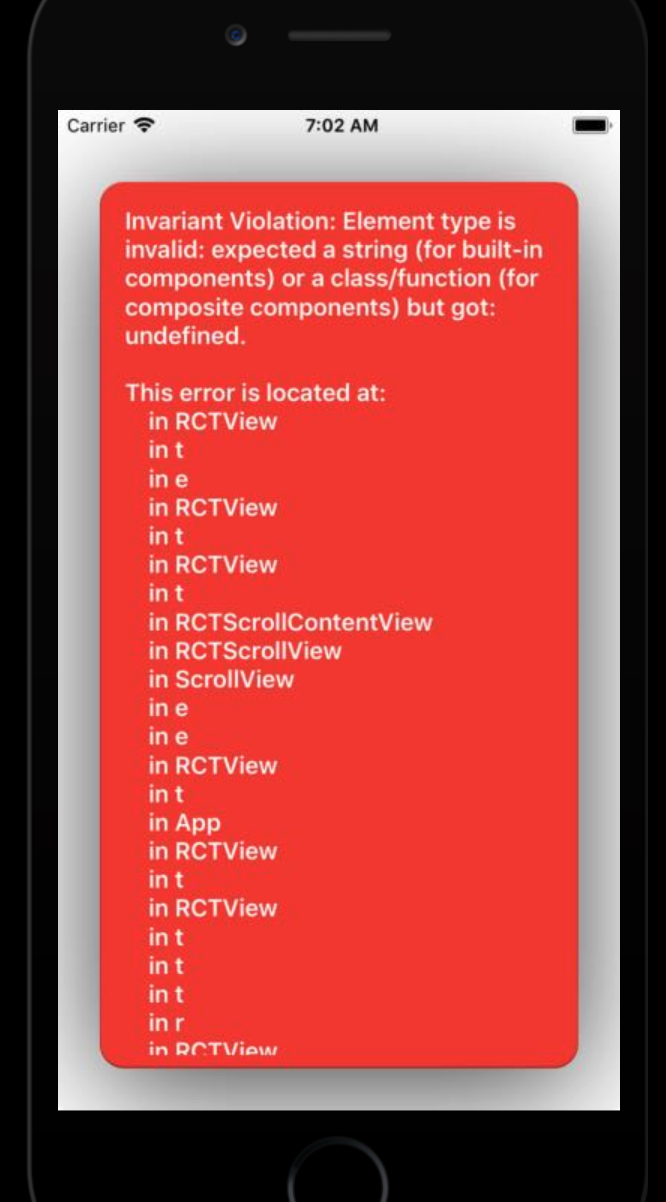
It happens because you forgot to export your GridImageView class as the default export.
 AbdallaElabd
on 29 May 2018
AbdallaElabd
on 29 May 2018
This issue has been resolved for me . Thanks @naqvitalha foe help
nehacurefit
on 29 May 2018
@AbdallaMohamed
ah in this i forgot to export the GridImageView and but in my main code now i fixed the issue of showing only the first two rows with other blank pages this happened because i was using recyclerview within the scrollview. i remove scrollview it worked.
This was my issue : https://snack.expo.io/rkvlX05kX
Thanks @naqvitalha for instant support.
yuvaraj119
on 29 May 2018
Great. Closing this.
naqvitalha
on 30 May 2018
Related issues
 andrea7887
·
6Comments
nehacurefit
·
4Comments
andrea7887
·
6Comments
nehacurefit
·
4Comments
 h-asadollahi
·
8Comments
h-asadollahi
·
8Comments
 mmamoyco
·
7Comments
mmamoyco
·
7Comments
 abrenoch
·
6Comments
abrenoch
·
6Comments
Most helpful comment
@nehacurefit It is important that the given values are close estimates. It is very important for good perf. You don't have to know exact values, just close approximations.
@yuvaraj119 Are you sure there were no JS errors in your code?