Realsense-ros: `rs_rgbd.launch` fails for D435 (ResourceNotFound: rgbd_launch)
On ubuntu 16.04 with a fresh ROS kinetic install, roslaunch realsense_ros_camera rs_camera.launch starts up just fine, but roslaunch realsense_ros_camera rs_rgbd.launch fails with a Python error:
catkin_ws$ roslaunch realsense_ros_camera rs_rgbd.launch
... logging to /home/myhome/.ros/log/aec32d7c-0d01-11e8-80a5-0800275780e7/roslaunch-myhome-VirtualBox-7697.log
Checking log directory for disk usage. This may take awhile.
Press Ctrl-C to interrupt
Done checking log file disk usage. Usage is <1GB.

Traceback (most recent call last):
  File "/opt/ros/kinetic/lib/python2.7/dist-packages/roslaunch/__init__.py", line 306, in main
    p.start()
  File "/opt/ros/kinetic/lib/python2.7/dist-packages/roslaunch/parent.py", line 268, in start
    self._start_infrastructure()
  File "/opt/ros/kinetic/lib/python2.7/dist-packages/roslaunch/parent.py", line 217, in _start_infrastructure
    self._load_config()
  File "/opt/ros/kinetic/lib/python2.7/dist-packages/roslaunch/parent.py", line 132, in _load_config
    roslaunch_strs=self.roslaunch_strs, verbose=self.verbose)
  File "/opt/ros/kinetic/lib/python2.7/dist-packages/roslaunch/config.py", line 451, in load_config_default
    loader.load(f, config, verbose=verbose)
  File "/opt/ros/kinetic/lib/python2.7/dist-packages/roslaunch/xmlloader.py", line 748, in load
    self._load_launch(launch, ros_config, is_core=core, filename=filename, argv=argv, verbose=verbose)
  File "/opt/ros/kinetic/lib/python2.7/dist-packages/roslaunch/xmlloader.py", line 720, in _load_launch
    self._recurse_load(ros_config, launch.childNodes, self.root_context, None, is_core, verbose)
  File "/opt/ros/kinetic/lib/python2.7/dist-packages/roslaunch/xmlloader.py", line 654, in _recurse_load
    default_machine, is_core, verbose)
  File "/opt/ros/kinetic/lib/python2.7/dist-packages/roslaunch/xmlloader.py", line 684, in _recurse_load
    val = self._include_tag(tag, context, ros_config, default_machine, is_core, verbose)
  File "/opt/ros/kinetic/lib/python2.7/dist-packages/roslaunch/xmlloader.py", line 95, in call
    return f(*args, **kwds)
  File "/opt/ros/kinetic/lib/python2.7/dist-packages/roslaunch/xmlloader.py", line 588, in _include_tag
    inc_filename = self.resolve_args(tag.attributes['file'].value, context)
  File "/opt/ros/kinetic/lib/python2.7/dist-packages/roslaunch/xmlloader.py", line 183, in resolve_args
    return substitution_args.resolve_args(args, context=context.resolve_dict, resolve_anon=self.resolve_anon)
  File "/opt/ros/kinetic/lib/python2.7/dist-packages/roslaunch/substitution_args.py", line 370, in resolve_args
    resolved = _resolve_args(resolved, context, resolve_anon, commands)
  File "/opt/ros/kinetic/lib/python2.7/dist-packages/roslaunch/substitution_args.py", line 383, in _resolve_args
    resolved = commands[command](resolved, a, args, context)
  File "/opt/ros/kinetic/lib/python2.7/dist-packages/roslaunch/substitution_args.py", line 151, in _find
    source_path_to_packages=source_path_to_packages)
  File "/opt/ros/kinetic/lib/python2.7/dist-packages/roslaunch/substitution_args.py", line 197, in _find_executable
    full_path = _get_executable_path(rp.get_path(args[0]), path)
  File "/usr/lib/python2.7/dist-packages/rospkg/rospack.py", line 203, in get_path
    raise ResourceNotFound(name, ros_paths=self._ros_paths)
ResourceNotFound: rgbd_launch
ROS path [0]=/opt/ros/kinetic/share/ros
ROS path [1]=/home/mypath/Projects/myproject/catkin_ws/src
ROS path [2]=/opt/ros/kinetic/share
I followed the steps at https://github.com/intel-ros/realsense/blob/development/README.md . I compiled librealsense 2.9.1 as well as roswrapper for realsense 2.0.2
 moorage
All 10 comments
It looks like running sudo apt install ros-kinetic-rgbd-launch helps at least
moorage
on 8 Feb 2018
Hi @moorage, do you still need help with this issue or did you resolve it?
Jesus
 jlgarcia75
on 8 Feb 2018
jlgarcia75
on 8 Feb 2018
hey @jlgarcia75 thanks for the reply. I resolved that particular error, but still cannot view a depth cloud as described in the readme.
For this image: https://user-images.githubusercontent.com/17433152/35396613-ddcb1d6c-01f5-11e8-8887-4debf178d0cc.gif the README suggests starting the depth camera on roslaunch realsense_ros_camera rs_rgbd.launch, and then rosrun rviz... I can see the color raw_image, but when I select "PointCloud2", it never shows up.
see:
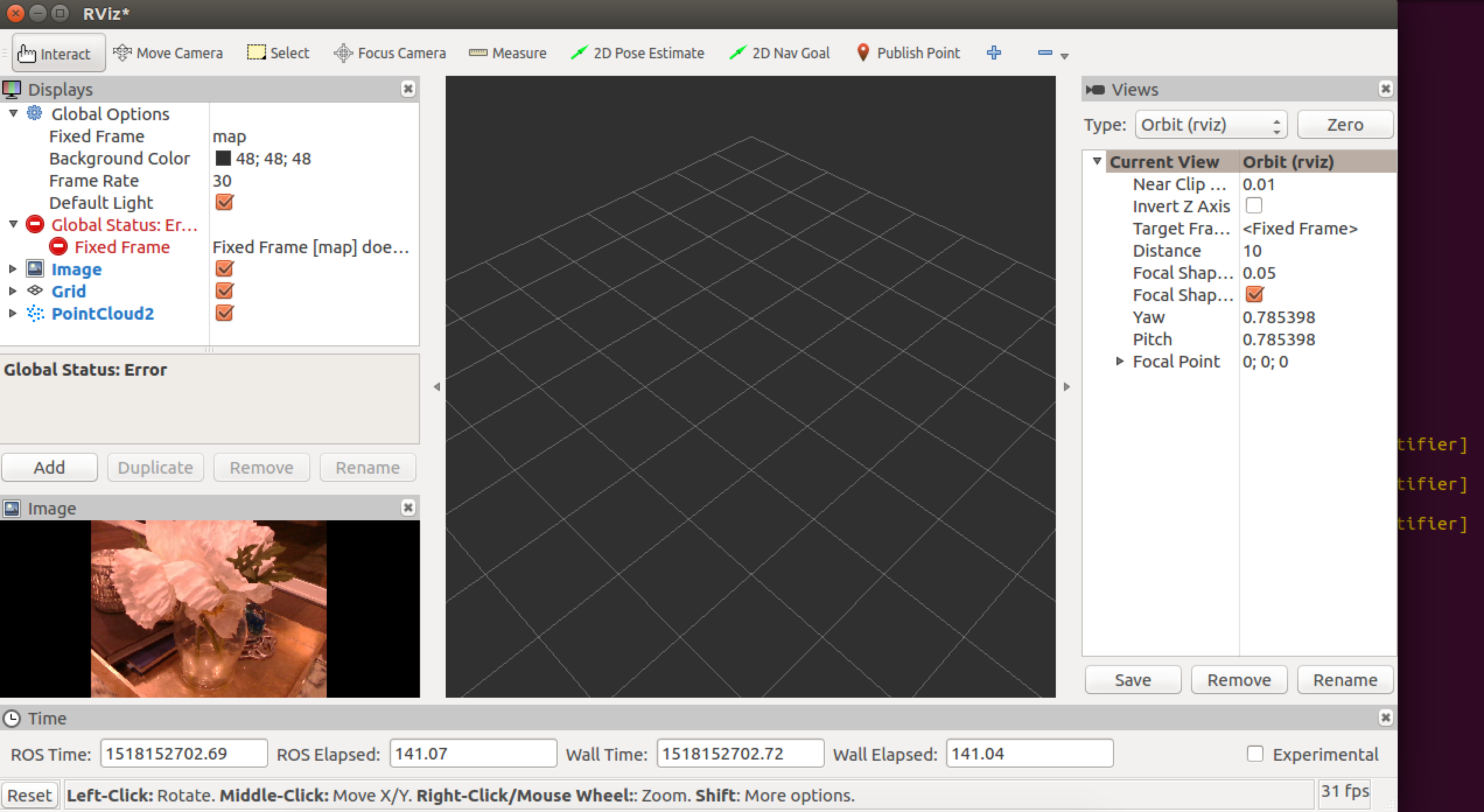
I am getting a lot of these warnings to the terminal:
08/02 21:05:55,595 WARNING [140493291570944] (backend-v4l2.cpp:827) Frames didn't arrived within 5 seconds
 08/02 21:06:00,601 WARNING [140493291570944] (backend-v4l2.cpp:827) Frames didn't arrived within 5 seconds
 08/02 21:06:05,607 WARNING [140493291570944] (backend-v4l2.cpp:827) Frames didn't arrived within 5 seconds
 08/02 21:06:10,613 WARNING [140493291570944] (backend-v4l2.cpp:827) Frames didn't arrived within 5 seconds
 08/02 21:06:15,624 WARNING [140493291570944] (backend-v4l2.cpp:827) Frames didn't arrived within 5 seconds
 08/02 21:06:20,630 WARNING [140493291570944] (backend-v4l2.cpp:827) Frames didn't arrived within 5 seconds
 08/02 21:06:25,632 WARNING [140493291570944] (backend-v4l2.cpp:827) Frames didn't arrived within 5 seconds
Is that specific to the point cloud? Would the point cloud at least display something? Is there some other way I should be adding PointCloud2?
moorage
on 9 Feb 2018
@moorage I ran into the same issue this morning after upgrading librealsense to v2.10.0. I downgraded to v2.9.1 and resolved the issue. v2.10.0 was only released yesterday it seems and might have broken something in the ROS package. Note that after downgrading librealsense you'll need to rebuild the realsense_ros_camera ROS package as well.
 dpipemazo
on 9 Feb 2018
dpipemazo
on 9 Feb 2018
@dpipemazo thanks! How did you install v2.9.1 -- building from source? I've been on v2.9.1 all along, and can't get the pointcloud2 to work. Which issue are you running into exactly?
moorage
on 9 Feb 2018
Yes, I installed both librealsense and this package from source. I followed the instructions hidden in librealsense's docs that don't seem to be the main ubuntu installation instructions linked from their README here. I checked out their repo to tag v2.9.1 before building. For this repo I'm building off of tag v2.0.2.
I have also noticed that I need to unplug and and re-plug the camera between runs of
roslaunch realsense_ros_camera rs_rgbd.launch
otherwise I run into the "Frames didn't arrived" issue. This is the same issue I was consistently seeing on v2.10.0.
Perhaps though, looking at your screenshot, there are other issues at play in your RVIZ configuration. To verify functionality I'd recommend setting the fixed frame to camera_link and then be sure that you select the /camera/depth/points topic after adding the PointCloud2 source in RVIZ.
dpipemazo
on 9 Feb 2018
@dpipemazo thanks for the continued thoughts here. What in my screenshot made you think there were issues at play? Was it the global status error?
I tried reinstalling v2.9.1, as well as upping to v2.10.1 and am still not able to see the pointcloud2. I can see an updating flat image from the /camera/color/image_raw topic, but I can't get anything on pointcloud2. FWIW there is no /camera/depth/points topic, but rather:
/camera/depth/camera_info
/camera/depth/image_rect_raw
/camera/depth/image_rect_raw/compressed
/camera/depth/image_rect_raw/compressed/parameter_descriptions
/camera/depth/image_rect_raw/compressed/parameter_updates
/camera/depth/image_rect_raw/compressedDepth
/camera/depth/image_rect_raw/compressedDepth/parameter_descriptions
/camera/depth/image_rect_raw/compressedDepth/parameter_updates
/camera/depth/image_rect_raw/theora
/camera/depth/image_rect_raw/theora/parameter_descriptions
/camera/depth/image_rect_raw/theora/parameter_updates
/camera/depth_registered/points
I do receive some warnings when I start rs_rgbd.launch:
expand
$ roslaunch realsense_ros_camera rs_rgbd.launch log output...
$ roslaunch realsense_ros_camera rs_rgbd.launch

... logging to /home/myhome/.ros/log/5693baca-1050-11e8-b094-0800275780e7/roslaunch-myhome-VirtualBox-1958.log

Checking log directory for disk usage. This may take awhile.

Press Ctrl-C to interrupt

Done checking log file disk usage. Usage is <1GB.
started roslaunch server http://myhome-VirtualBox:46483/
SUMMARY
PARAMETERS
- /camera/realsense_ros_camera/accel_fps: 1000
- /camera/realsense_ros_camera/accel_optical_frame_id: camera_accel_opti...
- /camera/realsense_ros_camera/align_depth: True
- /camera/realsense_ros_camera/camera_aligned_depth_to_color_frame_id: camera_aligned_de...
- /camera/realsense_ros_camera/camera_aligned_depth_to_fisheye_frame_id: camera_aligned_de...
- /camera/realsense_ros_camera/camera_aligned_depth_to_infra1_frame_id: camera_aligned_de...
- /camera/realsense_ros_camera/camera_aligned_depth_to_infra2_frame_id: camera_aligned_de...
- /camera/realsense_ros_camera/color_fps: 30
- /camera/realsense_ros_camera/color_height: 480
- /camera/realsense_ros_camera/color_optical_frame_id: camera_color_opti...
- /camera/realsense_ros_camera/color_width: 640
- /camera/realsense_ros_camera/depth_fps: 30
- /camera/realsense_ros_camera/depth_height: 480
- /camera/realsense_ros_camera/depth_optical_frame_id: camera_depth_opti...
- /camera/realsense_ros_camera/depth_width: 640
- /camera/realsense_ros_camera/enable_color: True
- /camera/realsense_ros_camera/enable_depth: True
- /camera/realsense_ros_camera/enable_fisheye: True
- /camera/realsense_ros_camera/enable_imu: True
- /camera/realsense_ros_camera/enable_infra1: True
- /camera/realsense_ros_camera/enable_infra2: True
- /camera/realsense_ros_camera/enable_pointcloud: False
- /camera/realsense_ros_camera/enable_sync: True
- /camera/realsense_ros_camera/fisheye_fps: 30
- /camera/realsense_ros_camera/fisheye_height: 480
- /camera/realsense_ros_camera/fisheye_optical_frame_id: camera_fisheye_op...
- /camera/realsense_ros_camera/fisheye_width: 640
- /camera/realsense_ros_camera/gyro_fps: 1000
- /camera/realsense_ros_camera/gyro_optical_frame_id: camera_gyro_optic...
- /camera/realsense_ros_camera/infra1_fps: 30
- /camera/realsense_ros_camera/infra1_height: 480
- /camera/realsense_ros_camera/infra1_optical_frame_id: camera_infra1_opt...
- /camera/realsense_ros_camera/infra1_width: 640
- /camera/realsense_ros_camera/infra2_fps: 30
- /camera/realsense_ros_camera/infra2_height: 480
- /camera/realsense_ros_camera/infra2_optical_frame_id: camera_infra2_opt...
- /camera/realsense_ros_camera/infra2_width: 640
- /camera/realsense_ros_camera/json_file_path:
- /camera/realsense_ros_camera/serial_no:
- /rosdistro: kinetic
- /rosversion: 1.12.12
NODES
/camera/
color_rectify_color (nodelet/nodelet)
points_xyzrgb_hw_registered (nodelet/nodelet)
realsense_ros_camera (nodelet/nodelet)
realsense_ros_camera_manager (nodelet/nodelet)
auto-starting new master
process[master]: started with pid [1969]
ROS_MASTER_URI=http://localhost:11311
setting /run_id to 5693baca-1050-11e8-b094-0800275780e7
process[rosout-1]: started with pid [1982]
started core service [/rosout]
process[camera/realsense_ros_camera_manager-2]: started with pid [1985]
process[camera/realsense_ros_camera-3]: started with pid [2000]
process[camera/color_rectify_color-4]: started with pid [2001]
process[camera/points_xyzrgb_hw_registered-5]: started with pid [2002]
12/02 15:56:28,704 WARNING [140299245901696] (sensor.cpp:313) Unregistered Media formats : [ UYVY ]; Supported: [ ]
12/02 15:56:28,719 WARNING [140299245901696] (backend-v4l2.cpp:1098) Pixel format 36315752-1a66-a242-9065-d01814a likely requires patch for fourcc code RW16!
12/02 15:56:28,720 WARNING [140299245901696] (sensor.cpp:313) Unregistered Media formats : [ RW16 ]; Supported: [ ]
12/02 15:56:28,873 WARNING [140298478892800] (ds5-timestamp.cpp:64) UVC metadata payloads not available. Please refer to installation chapter for details.
12/02 15:56:29,238 WARNING [140298468026112] (ds5-timestamp.cpp:64) UVC metadata payloads not available. Please refer to installation chapter for details.
12/02 15:56:29,346 ERROR [140299245901696] (types.h:178) xioctl(VIDIOC_S_CTRL) failed Last Error: Numerical result out of range
Thanks so much for any continued help getting this to run with ROS!
moorage
on 13 Feb 2018
I figured out this particular issue ... I needed to set rviz “Fixed Frame” to be set to camera_color_optical_frame or camera link.
Unfortunately now my pointcloud freezes in rviz after 60 seconds of running, and he depth sensor stops sending out laser red light on the hardware, but that’s a different issue to open. Closing this one as solved.
Ideally the README would mention this camera link or camera_color_optical_frame requirement
moorage
on 13 Feb 2018
Since the launch file depends on rgbd_launch, the package should at least have an exec_depend
 reinzor
on 2 Jun 2018
reinzor
on 2 Jun 2018
害
 yyxr75
on 4 Dec 2019
yyxr75
on 4 Dec 2019
Related issues
 KentaKawamata
·
3Comments
KentaKawamata
·
3Comments
 jattiogbe
·
3Comments
jattiogbe
·
3Comments
 tulku
·
6Comments
tulku
·
6Comments
 slamhuangxin
·
4Comments
slamhuangxin
·
4Comments
 jacobmoroni
·
4Comments
jacobmoroni
·
4Comments
Most helpful comment
It looks like running
sudo apt install ros-kinetic-rgbd-launchhelps at least