Realm-js: Can't build on iOS due supporting "n" version manager
Goals
Fix issue with shellScript
Need to revert this PR https://github.com/realm/realm-js/pull/2078
Expected Results
Build and Run iOS app
Actual Results
RealmJS requires a node package manager (n or nvm).
Command /bin/sh failed with exit code 1
Steps to Reproduce
Replace shellScript in file src/RealmJS.xcodeproj on line 863 with code before PR:
shellScript = "if [[ -d \"$HOME/.asdf/shims\" ]]; then\n export PATH=$HOME/.asdf/shims:$PATH\nfi\n\n[ -z \"$NVM_DIR\" ] && export NVM_DIR=\"$HOME/.nvm\"\n\nif [[ -s \"$HOME/.nvm/nvm.sh\" ]]; then\n . \"$HOME/.nvm/nvm.sh\"\nelif [[ -x \"$(command -v brew)\" && -s \"$(brew --prefix nvm)/nvm.sh\" ]]; then\n . \"$(brew --prefix nvm)/nvm.sh\"\nfi\n \nif [[ \"$(command -v nvm)\" ]]; then\n nvm install 7.10.0\nfi\n \n node ../scripts/download-realm.js ios --sync";
It works
Version of Realm and Tooling
- Realm JS SDK Version: 2.19
- Node or React Native: Node 10.13, ReactNative 0.57.4
- Client OS & Version: MacOS 10.13
 radeno
All 25 comments
I have only npm installed, and I haven't been able to reproduce it yet. I have a little RN app with a 2.19.0 dependency. When I do npm install && react-native run-ios I get the following output (together with a lot more):
WriteAuxiliaryFile /Users/kneth/tmp/RealmTestApp/ios/build/Build/Intermediates.noindex/RealmJS.build/Debug-iphonesimulator/RealmJS.build/Script-F63FF2C51C12462600B3B8E0.sh (in target: RealmJS)
    cd /Users/kneth/tmp/RealmTestApp/node_modules/realm/src
    write-file /Users/kneth/tmp/RealmTestApp/ios/build/Build/Intermediates.noindex/RealmJS.build/Debug-iphonesimulator/RealmJS.build/Script-F63FF2C51C12462600B3B8E0.sh

PhaseScriptExecution Download\ Core /Users/kneth/tmp/RealmTestApp/ios/build/Build/Intermediates.noindex/RealmJS.build/Debug-iphonesimulator/RealmJS.build/Script-F63FF2C51C12462600B3B8E0.sh (in target: RealmJS)
    cd /Users/kneth/tmp/RealmTestApp/node_modules/realm/src

... a lot of output ...
v7.10.0 is already installed.

Now using node v7.10.0 (npm v4.2.0)

Resolved requirements: { SYNC_SERVER_FOLDER: 'sync',
  SYNC_ARCHIVE: 'realm-sync-cocoa-3.13.1.tar.gz',
  SYNC_ARCHIVE_ROOT: 'core' }

No lockfile found at the target, proceeding.

Download url: https://static.realm.io/downloads/sync/realm-sync-cocoa-3.13.1.tar.gz

Downloading realm-sync-cocoa-3.13.1.tar.gz

Extracting realm-sync-cocoa-3.13.1.tar.gz => /Users/kneth/tmp/RealmTestApp/node_modules/realm/vendor/realm-ios

Success
Is it possible for you to create a small project which can reproduce it?
 kneth
on 9 Nov 2018
kneth
on 9 Nov 2018
@kneth Do you use nvm? Because i don't use any nvm nor n. My node versions are handled with homebrew
radeno
on 9 Nov 2018
There is unminified script:
if [[ -d "$HOME/.asdf/shims" ]]; then
  export PATH=$HOME/.asdf/shims:$PATH
fi

if [[ -d "$HOME/.n" ]]; then
  export N_PREFIX="$HOME/.n"; [[ :$PATH: == *":$N_PREFIX/bin:"* ]] || PATH+=":$N_PREFIX/bin"
fi

if [[ "$(command -v n)" ]]; then
 n 7.10.0
else
  [ -z "$NVM_DIR" ] && export NVM_DIR="$HOME/.nvm"

  if [[ -s "$HOME/.nvm/nvm.sh" ]]; then
    . "$HOME/.nvm/nvm.sh"
  elif [[ -x "$(command -v brew)" && -s "$(brew --prefix nvm)/nvm.sh" ]]; then
    . "$(brew --prefix nvm)/nvm.sh"
  fi

  if [[ "$(command -v nvm)" ]]; then
    nvm install 7.10.0
  else
    echo "RealmJS requires a node package manager (n or nvm)."
    exit 1
  fi
fi

node ../scripts/download-realm.js ios --sync
I if understand it right then exit is always execute when nvm or n is not available
Original unminified:
if [[ -d "$HOME/.asdf/shims" ]]; then
  export PATH=$HOME/.asdf/shims:$PATH
fi

[ -z "$NVM_DIR" ] && export NVM_DIR="$HOME/.nvm"

if [[ -s "$HOME/.nvm/nvm.sh" ]]; then
  . "$HOME/.nvm/nvm.sh"
elif [[ -x "$(command -v brew)" && -s "$(brew --prefix nvm)/nvm.sh" ]]; then
  . "$(brew --prefix nvm)/nvm.sh"
fi

if [[ "$(command -v nvm)" ]]; then
 nvm install 7.10.0
fi

 node ../scripts/download-realm.js ios --sync
Need to remove information about requirement and exit statement. There are more than two ways how to install node.js.
radeno
on 9 Nov 2018
Or better way.
Check first if node command is available and then check version with node -v
After that check if any node is not available or version missmatch. Then show error message. Do not force autoinstall. Is not worse than make what user does not except. If someone want to use Node.js package it is in 99,9% true that has installed node.js. Just required minimal version can be different.
radeno
on 9 Nov 2018
@radeno I must have misunderstood you. Yes, I use nvm, and so far we have required that you use a node version manager. I can see that we have never actually documented it in README.md.
I will try to get some time next week to create a more robust script for Xcode.
kneth
on 9 Nov 2018
I am also getting the same error. I have created a new project with "react-native init NewRealmProject" and then added realm and "react-native link realm" but it is not working in ios with the same above error. Its working in Android without any hassle
 shubham1164
on 11 Nov 2018
shubham1164
on 11 Nov 2018
I have created this project today and facing the issue. Just 1 month back, I was using lower version of react/react-native/realm/Xcode and everything was working fine. Please help to resolve it
My latest (created on 11 Nov) project spec versions:
"react": "16.6.0-alpha.8af6728",
"react-native": "0.57.4",
"realm": "^2.19.0",
Xcode: Version 10.1 (10B61)
shubham1164
on 11 Nov 2018
@radeno , you have said that replacing the above in shellscript solves the issue. Could you please explain me how to do that so that it can act as temp. fix.
shubham1164
on 11 Nov 2018
@shubham1164 You can replace the line using any editor. The file is node_modules/realm/src/RealmJS.xcodeproj/project.pbxproj. Simply replace the line with the line suggested by @radeno.
kneth
on 12 Nov 2018
@shubham1164 or just rewrite line 863 with shellScript = "node ../scripts/download-realm.js ios --sync";
radeno
on 12 Nov 2018
I can't build Release version because of it. Realm switches nvm to 7.10.0 and react-packager does not support this version:
│ You are currently running io.js v7.10.0. │
│ │
│ React Native runs on Node 8.3 or newer. There are several ways to │
│ upgrade Node.js depending on your preference. │
 aljs
on 13 Nov 2018
aljs
on 13 Nov 2018
@aljs Thanks for reporting. I'll take time tomorrow to fix it.
kneth
on 13 Nov 2018
Thanks radeno for the fix, I got built on iOS working now, but this should not be an error :(
 donghungx
on 14 Nov 2018
donghungx
on 14 Nov 2018
@aljs Thanks for reporting. I'll take time tomorrow to fix it.
Just use 8.3.0 over 7.10.0 - works fine with realm and react-native.
aljs
on 14 Nov 2018
@aljs @donghungx @shubham1164 @radeno I have opened a PR to support "naked" node installation and n and nvm. Please take a look at #2109.
kneth
on 14 Nov 2018
@aljs Just use 8.3.0 over 7.10.0 - works fine with realm and react-native.
I am facing the same issue on Bitrise CI with node 8.12.0
 ramki1979
on 15 Nov 2018
ramki1979
on 15 Nov 2018
@kneth any progress of this? I know it is paused due test issues https://github.com/realm/realm-js/pull/2109 . Quick hot fix should be removing exit statement. It will work like before merging commit but still support of n
radeno
on 26 Nov 2018
@radeno I hope to return to it this week 🤞
kneth
on 26 Nov 2018
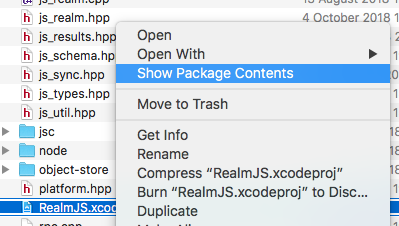
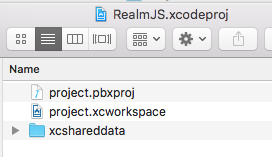
@kneth @radeno I can't find node_modules/realm/src/RealmJS.xcodeproj/project.pbxproj, can you guys give me more information?
Edit
Never mind, need google it how to open xcode project content
 nald-dev
on 7 Dec 2018
nald-dev
on 7 Dec 2018
Doesn't anyone check these PR's before they're merged? Seriously this is not cool.
To quote the original PR's commit message "Currently Realm expects to use nvm. However, n is a valid alternative. This change adds support for users using the n version manager."
That's cute but it _breaks_ the original use of nvm which I (and many others obviously) have been using till now.
So to clarify -- you now can't even build Realm from a clean initialized project -- do i need to list steps to reproduce, lol?
 ozburo
on 9 Dec 2018
ozburo
on 9 Dec 2018
@kneth until PR https://github.com/realm/realm-js/pull/2109 will be shipped, could you revert problematic commit?
I think there are lot of developers which use "naked" node so modify same file after every node_modules update is really annoying.
radeno
on 11 Dec 2018
i have this error
realmjs requires a node package manager (n or nvm).
radeno solution not work
 alihbk
on 12 Jan 2019
alihbk
on 12 Jan 2019
@alihbk Which Realm JS version do you use?
kneth
on 14 Jan 2019
I personally prefer nodenv. It works the exact same way as rbenv, if you're familiar with that. _But_, realm wants either n or nvm, which I think isn't fair. It should just want and expect _a_ version of node. Not any, or worse a specific, node package manager.
 joshuapinter
on 8 Apr 2019
joshuapinter
on 8 Apr 2019
@joshuapinter #2307 is an attempt to do what you ask for.
kneth
on 8 Apr 2019
Related issues
 timanglade
·
3Comments
timanglade
·
3Comments
 gwanjar
·
3Comments
gwanjar
·
3Comments
 jmartindivmedianet
·
3Comments
jmartindivmedianet
·
3Comments
 max-zu
·
3Comments
max-zu
·
3Comments
 blagoev
·
3Comments
blagoev
·
3Comments
Most helpful comment
@shubham1164 or just rewrite line
863withshellScript = "node ../scripts/download-realm.js ios --sync";