Realm-js: constructor must be of type 'function' on debugger mode
Goals
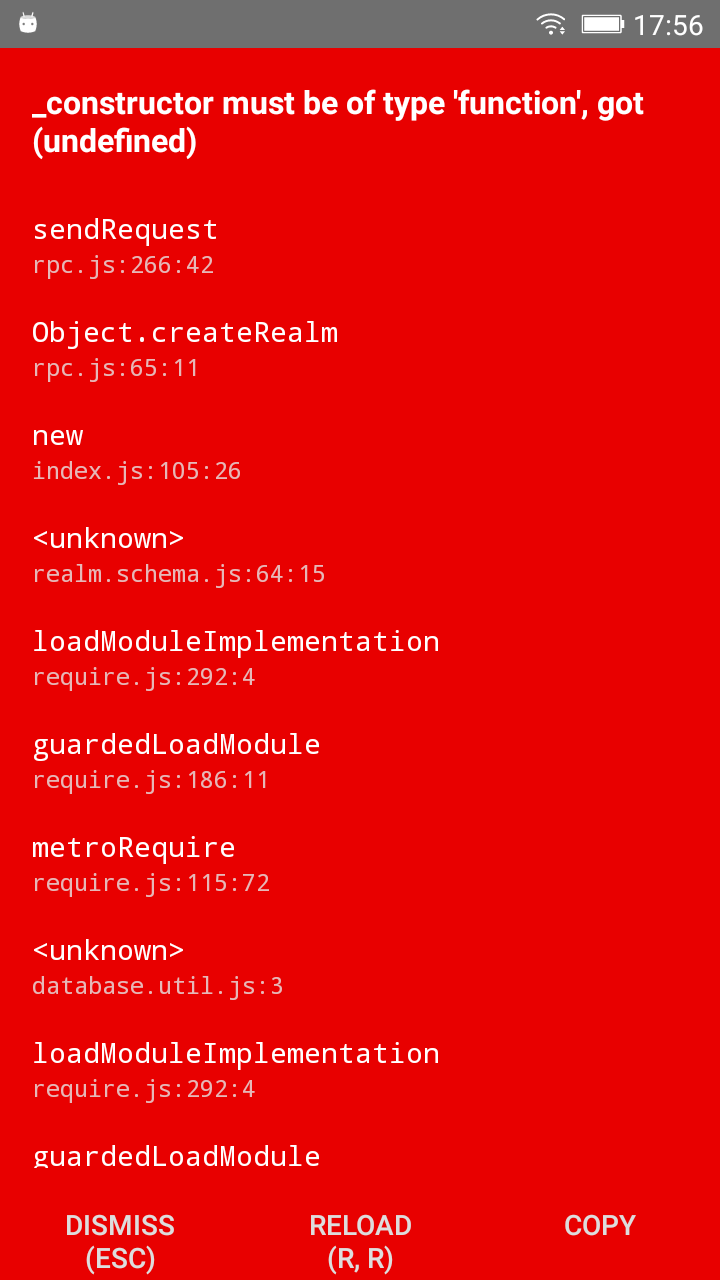
It is working as well without debugger mode. But on debugger mode, we are getting error when try to create Realm object with schema parameters.
Expected Results
It should work like without debugger
Actual Results


Code Sample

Version of Realm and Tooling
- Realm JS SDK Version: 2.17.0
- React Native: 0.57.1
- Client OS: Android
- Which debugger for React Native: Chrome
 mistikk
All 32 comments
I am still getting this error with realm v2.18.0
mistikk
on 9 Oct 2018
+1
 ithustle
on 10 Oct 2018
ithustle
on 10 Oct 2018
I'm having the exact same issue as op
 Copterdoctor
on 10 Oct 2018
Copterdoctor
on 10 Oct 2018
+1 . How to fix this. Previously its working fine. I updated my OS. started getting this error. Please help
### Version of Realm and Tooling
Realm JS SDK Version: 2.16.0
React Native: 0.57.0
Client OS: Android
Which debugger for React Native: Chrome
 NaveenJ-ICARUS
on 11 Oct 2018
NaveenJ-ICARUS
on 11 Oct 2018
Version 2.16.0 its working fine on RN 0.57.2
ithustle
on 11 Oct 2018
@NaveenJayaram94 You upgraded from which OS to which OS?
 bmunkholm
on 11 Oct 2018
bmunkholm
on 11 Oct 2018
Actually, I've downgraded to 2.16.0. I did it yesterday. I was suffering about last 2 weeks because of this. I'm working on two differents machines. Win and MacOS. (10 and High Sierra)
ithustle
on 11 Oct 2018
I downgraded from Ubuntu 18.10 to 17.10.
Yesterday in 18.10 its working fine, today downgraded my os, in first compile only its throwing this error. I don't know what to do
NaveenJ-ICARUS
on 11 Oct 2018
Happening to me too. I haven't updated my OS or realm version. Not sure this is related, but the error started popping up after I ran these commands:
rm -rf node_modules
npm cache clean
npm install
 jgplane
on 11 Oct 2018
jgplane
on 11 Oct 2018
but its work well without debugging, but without chrome debugging its very difficult develop RN App. Searching for other mobile NoSql DB.
NaveenJ-ICARUS
on 11 Oct 2018
@NaveenJayaram94 Have you tried to use Safari on Mac? Others have great experience with that instead of Chrome.
bmunkholm
on 11 Oct 2018
@bmunkholm , I use Ubuntu 17.10. so only option left is the firefox browser. Tomorrow I'll test it and update here. thanks
NaveenJ-ICARUS
on 11 Oct 2018
+1111
 figure-ai
on 12 Oct 2018
figure-ai
on 12 Oct 2018
@bmunkholm even in firefox same error. searching for alternatives with NoSQL and real time database.
NaveenJ-ICARUS
on 12 Oct 2018
Some fix for this?
 wesleyguirra
on 13 Oct 2018
wesleyguirra
on 13 Oct 2018
It is related from last version of realm(v2.18.0). You should downgrade to 2.16.0.
And dont forgot to check version number on package.json. It should be "realm": "2.16.0" not "realm": "ˆ2.16.0". I lost 1 day for that :triumph:
After that, run this code for reset all packages;
watchman watch-del-all && rm -rf $TMPDIR/react-native-packager-cache-* && rm -rf $TMPDIR/metro-bundler-cache-* && rm -rf node_modules/ && yarn cache clean && yarn install && yarn start -- --reset-cache
mistikk
on 13 Oct 2018
@mistikk Thanks budy. You saved me from disaster
it worked after downgrading my node from 10.X.X to 9.8.0
NaveenJ-ICARUS
on 15 Oct 2018
+1 on react-native for 2.18.0
 JackHull
on 21 Oct 2018
JackHull
on 21 Oct 2018
I have same issue in v2.18.0. Downgrade to v2.17.0 is solve.
 sinhpn92
on 25 Oct 2018
sinhpn92
on 25 Oct 2018
Got it fixed by upgrading to 2.19.0-rc.4.
JackHull
on 27 Oct 2018
I've commented out the line 80 from "node_modules\realm\lib\browser\index.js".
[80] //config = this._constructor(config);
[81] let schemas = typeof config == 'object' && config.schema;
[82] let constructors = schemas ? {} : null;
It had a very slow start (when debug is on) but it worked fine for me on v2.19.0.
 Jefferson-Henrique
on 14 Nov 2018
Jefferson-Henrique
on 14 Nov 2018
+1 for 2.19.0. Working ok on 2.17.0
 alexmbp
on 14 Nov 2018
alexmbp
on 14 Nov 2018
still there on 2.19.1 :(
 achilles-kosun
on 27 Nov 2018
achilles-kosun
on 27 Nov 2018
Hey - looks like you forgot to add a T:* label - could you please add one?
![realm-probot[bot] picture](https://avatars.githubusercontent.com/in/13999?v=4&s=40) realm-probot[bot]
on 27 Nov 2018
realm-probot[bot]
on 27 Nov 2018
@achilles-kosun, it’s fixed in 2.20, but there is one more issue with debug mode , that already fixed on master branch
alexmbp
on 27 Nov 2018
@alexmbp That's wonderful!
achilles-kosun
on 27 Nov 2018
Get very similar error:

Version of Realm and Tooling
Realm JS SDK Version: 2.20.1
React Native: 0.57.7
Client OS: Android / iOS
Which debugger for React Native: React Native Debugger / Chrome
 radeno
on 30 Nov 2018
radeno
on 30 Nov 2018
@radeno I've created a patch for myself
You can use it. It require patch-package installed and used. You will need to remove this .txt extension.
alexmbp
on 30 Nov 2018
@alexmbp your patch adding something is already available in 2.20.1 and as i have written what i use that version :) https://github.com/realm/realm-js/blob/cfb54f07fc7530530fc7d4e285d531d157489c33/lib/browser/index.js#L136
So there must be another issue.
radeno
on 30 Nov 2018
@radeno Than it should work already. I've hardcoded version to 2.20.0
alexmbp
on 30 Nov 2018
@alexmbp trust me, it doesn't.
Anyway my issue is connected with https://github.com/realm/realm-js/issues/2128 and will be fixed for real with this PR https://github.com/realm/realm-js/pull/2157
radeno
on 1 Dec 2018
I tested with a completely new project using RealmJS 2.21.1 and debugging seems to work fine there. Closing.
 cmelchior
on 14 Dec 2018
cmelchior
on 14 Dec 2018
Related issues
 bdebout
·
3Comments
bdebout
·
3Comments
 ugendrang
·
3Comments
ugendrang
·
3Comments
 Chris-Petty
·
3Comments
Chris-Petty
·
3Comments
 laznrbfe
·
3Comments
laznrbfe
·
3Comments
 max-zu
·
3Comments
max-zu
·
3Comments
Most helpful comment
It is related from last version of realm(v2.18.0). You should downgrade to 2.16.0.
And dont forgot to check version number on package.json. It should be "realm": "2.16.0" not "realm": "ˆ2.16.0". I lost 1 day for that :triumph:
After that, run this code for reset all packages;
watchman watch-del-all && rm -rf $TMPDIR/react-native-packager-cache-* && rm -rf $TMPDIR/metro-bundler-cache-* && rm -rf node_modules/ && yarn cache clean && yarn install && yarn start -- --reset-cache