Realm-js: Chrome debug mode is Extremely slow
When chrome debugger is attached realm is extremely slow! makes it unusable for development
Happens both on IOS Simulator / Android Emulator
 anativ
All 171 comments
+1
 dovfrank
on 14 Jun 2016
dovfrank
on 14 Jun 2016
+1
 CodeTitanian
on 14 Jun 2016
CodeTitanian
on 14 Jun 2016
We know android is very slow. We have seen RPC roundtrip times on the order of ~40ms per operation which would slow things down to a halt for complex apps. Things on iOS should be up to a few orders of magnitude faster though.
 alazier
on 15 Jun 2016
alazier
on 15 Jun 2016
It is extremely slow on iOS.
Basically it can't be used as development is not feasible.
CodeTitanian
on 15 Jun 2016
@CodeTitanian Are you seeing this on device or in the iOS simulator as well? Can you report what the response times look like for the rpc requests by looking at the Network tab in the Web Inspector? I see them averaging around 1ms.

 appden
on 15 Jun 2016
appden
on 15 Jun 2016
It seems that every get_property takes ~4ms
The problem is that it seems that I have around ~3000 requests
How can I minimize the get_property requests?

anativ
on 15 Jun 2016
A get_property is made every time you access a property value on one of the objects returned from the Realm apis. For Realm objects accessing any property would trigger this call. For List or Results objects, accessing the length property or accessing objects at a given index would trigger this. I suspect you are looping through a set of objects which could results in multiple get_property calls for each element in your collection.
Probably the best you can do to minimize these calls is to cache any information that is reused. Results.length would be an obvious choice here if you are looping through a results set - storing this in a variable could prevent a call being made for each element. If you are reusing object properties you could also try storing those in a var and reusing that. Another thing you could try doing is calling slice on a Results object and then using the returned JS Array rather than accessing the Results directly. This would essentially cache the length property and batch create objects at every index with the downside that the returned Array will not be updated when objects are changed or added.
Beyond that I'm not sure what else you can do easily. There are internal changes we could make to minimize some of these calls - we may be able to cache some property values internally and possibly even cache object properties or preemptively batch fetch some data. For the cases where performance issues are caused by looping through a set of objects these optimizations could possibly speed things up 2x-5x or more at the cost of added complexity. I'm not sure if this would be enough of a speedup to resolve the issues you guys are seeing.
The other alternative would be re-architect the way we do chrome debugging to do more work in js rather than forwarding all operations over rpc to the core Realm implementation. This would be considerable more work but may be necessary if the optimizations mentioned above are not sufficient. It isn't clear if this will be worth the effort as it seems that ReactNative will be moving away from chrome debugging to other alternatives.
alazier
on 15 Jun 2016
It's definitely significantly slower on Android simulators than iOS. I suspect the issue on Android may either be from overhead with the virtual machine networking stack or the passing everything through the JNI.
appden
on 29 Jun 2016
There should be a note about this behaviour in the documentation. I was making research about using a different mobile database for next project in my company. I almost totally ditched realm react native because I was measuring performance by performance.now (which ofc requires debugger attached) and it was really bad.
 krzkaczor
on 7 Jul 2016
krzkaczor
on 7 Jul 2016
@krzkaczor - we will definitely add this.
alazier
on 9 Jul 2016
Wish I had something more constructive to add here other than to say that performance in the chrome debugger is (at least in the short term) making it hard to adopt it.
For example: I have a scene that lists 50 U.S. states and a set of stats for each. This represents two 'queries': one to get all the states and another to get all the stats. The result sets are dumped into a redux store and are then connected to the scene component. The scene component implements a ListView that renders the states.
In the debugger loading the scene results in 6776 get_property requests for a total request time of around 40 seconds.
Without the debugger the scene takes around 500ms to fully render (using the scientific "One One-Thousand" measuring technique)
In the release build the scene loads basically instantaneously (probably around 50ms)
So, the 'real-life' performance of Realm has exceeded my expectations and the API hasn't been too hard to get use to, but the fact that my complex scenes are now virtually un-debuggable means I'm not sure I can stomach it even though it will deliver the best experience to the user.
I'm happy to provide whatever help or experience I can to improve this because the end-result would be a fast, stable db.
Note: I'm experimenting with replacing react-native-local-mongodb with realm. That library has worked fine for me but has much much slower insert times, somewhat slower reads, and I'm concerned about a lack of stability and support as compared to Realm.
 cpsubrian
on 22 Jul 2016
cpsubrian
on 22 Jul 2016
Thanks @cpsubrian for the detailed use case. It's clear that chrome debugging performance is subpar and needs to be improved. The good news is that we should be able to speed things up considerably and just need to find the time to put the work in. I detailed some of the caching and batch-fetch optimizations we could make here https://github.com/realm/realm-js/issues/491#issuecomment-226243882 - will try to bump of the priority of working on this and will try to knock off some of the low hanging optimizations sooner rather than later. In the meantime if you want to have a crack at making some of these improvements 'm happy to help you get started.
alazier
on 23 Jul 2016
how to solve the problems, many get_properties when I use Chrome Debug react native realm???
 hbsndg
on 4 Aug 2016
hbsndg
on 4 Aug 2016
Is it possible to turn off debugging only for Realm? It could be a workaround for this problem because I don't really need to debug Realm Network calls and things like that. ;)
 jrwm
on 17 Aug 2016
jrwm
on 17 Aug 2016
I wonder how anyone can possibly use Realm since Chrome debugging is essential for developing a React native app...
jrwm
on 18 Aug 2016
Any advancement in regard to this issue
 ismdcf
on 23 Aug 2016
ismdcf
on 23 Aug 2016
Any update on this? This is critical for me, as I've got a pretty complex app with multiple Schemas (i have more than 30000 requests to get_property, it's been 25 minutes and I can't even start the app to debug it properly...)
 mlumbroso
on 31 Aug 2016
mlumbroso
on 31 Aug 2016
I use chrome dev tools only for showing console.log() output. I've found that Mac OS console logging tool is working with Realm much more faster. Use $ react-native log-ios or $ react-native log-android in your terminal. https://facebook.github.io/react-native/docs/debugging.html#accessing-console-logs
 nulleof
on 10 Sep 2016
nulleof
on 10 Sep 2016
I found that when keeping the chrome tab active and visible, the speed is normal. When the chrome tab is not active or hidden by an application running in the foreground it slows down.
The chrome tab has to be completely hidden, if an application is transparent its still normal speed.
 benoist
on 18 Oct 2016
benoist
on 18 Oct 2016
Any updates on this issue?
I have the same issue, debugging is really a pain, why does realm make so many rpc calls for get_property?
Does it call the get_property "Every Time" I access a prop of an object?
 Arman92
on 6 Dec 2016
Arman92
on 6 Dec 2016
Any news on the issue?
 invibot
on 5 Jan 2017
invibot
on 5 Jan 2017
@invibot, sorry, not at this point. I will keep this issue updated when I make some progress.
 kristiandupont
on 5 Jan 2017
kristiandupont
on 5 Jan 2017
I'm using reactotron debugger for fast debugging. See their Tips & Tricks so you can ditch console.log to console.tron. Also, reactotron displays realm results properties nicely as well (good for inspecting data).
Hope this helps.
 lodev09
on 16 Feb 2017
lodev09
on 16 Feb 2017
From what I've seen of reactotron there is no support for stepping through code or seeing the backtrace for exceptions (is that correct?).
Is the issue that realm calls get pumped through the network panel just for the purposes of debugging? I have a list of 3000 objects which loads instantly with debugger off and takes 1-2 minutes with debugger on.
If so, could somebody point me in the direction of where these realm falls get passed into the network panel for debugging? I've had a look but I'm having a hard time understanding the flow. Happy to help with a pull request to move the extra debugging information underneath a global flag on realm so we can choose to disable the network request debugging to speed up development. Waiting 1-2 minutes to load my app whenever I make a change and need to debug is making it challenging to get any work done - but realm is so awesomely fast when not in debug mode!
 martsie
on 16 Feb 2017
martsie
on 16 Feb 2017
@martsie yes I think they don't have that feature yet. As for me, I can live with it by just inspecting data and doing some log traces until they fix this issue.
lodev09
on 17 Feb 2017
Can't believe this issue is not fixed by now!
Arman92
on 18 May 2017
It's open source, you can't complain.
lodev09
on 20 May 2017
In general I'd agree however it's open source tied to a PAAS that has a $1500/month plan (as well as a very generous free plan). Because of this bug the product virtually unusable for professional React Native development where you may need more advanced debugging than just logging data.
martsie
on 23 May 2017
I'd better contact their support directly if I'm subscribed to that plan rather than complaining publicly - I might get direct answer from dev :)
lodev09
on 23 May 2017
With this thread open developers can quickly find out why their debugging is so slow and abandon realm if they need to. Follow up frustration messages keep the topic alive and allow people to see that it's still a current issue even if it's being ignored by developers.
Unfortunately this seems like a really hard bug to fix. I had a good look into how this is being done and there didn't seem to be any clean solutions that I could send a pull request in for.
martsie
on 23 May 2017
I guess you're right but I'm pretty sure they have their reasons why they haven't fixed this yet. complaining doesn't really help :(
lodev09
on 23 May 2017
Pretty sure realm wants to know if they are losing customers over a developer pain point. They lost me over this one :man_shrugging:
cpsubrian
on 23 May 2017
and me 😕
invibot
on 23 May 2017
Hi guys, I'm working in a project with realm and it's getting REALLY hard to debug things, for now we're looking for options without replacing Realm, which is very good and fast...but software development it's not only about perfomance, it's too muh related with humans...and humans need to do very deep debugging to get closer to solve things and Realm is not helping at all in this sense...
I want to know if theres some plan or something that you guys are doing about this. I want to help if possible, I think that this is VERY important to all companies relying in Realm, if we can't debug, we can't scale and deliver our product.
Thanks in advice and I really appreciate the work done in Realm!
 fidelisrafael
on 23 May 2017
fidelisrafael
on 23 May 2017
I've since migrated away from realm. Not because I can't debug realm but because it stopped me from debugging the rest of my application as well
benoist
on 23 May 2017
It's not the end of the world guys, there are alternatives to chrome debugging like reactotron or even console.warn(). For me, I'd always go for performance with little debugging pain.
It's not like you can't run your app without debugging every line of your code :)
lodev09
on 23 May 2017
I understand your point @lodev09, but real debugging and only logging are different things, I can't debug my application every time with Reactotron and only console.log(), I need breakpoints...
With reactotron and console.log I will waste TOO much time debugging(logging), and as @benoist it's not a problem with Realm not being "debugable", the real problem is that Realm don't let me debug my application...Right now I'm having a problem and I can even start the Chrome Debugging(or VSCode debugging for react-native) cuz when app launches and Remote JS Debug is enabled Realm dont allow debugging...
fidelisrafael
on 23 May 2017
Well I guess I'm not in the point of needing to do breakpoints. So yeah, since I want performance, then I'll have to live with it. If they fix it, great, and if they don't, then I have no choice - there's always a downside :(
lodev09
on 23 May 2017
We are not ignoring this, we are painfully aware of the severity. I really hope and expect that we will be able to prioritize this very soon.
kristiandupont
on 31 May 2017
totally agree with @fidelisrafael.
@kristiandupont you should maybe warn users in your documentation that debugging in chrome is currently very unstable. I'm giving it an extra day or two to try to fix my debugging issues with realm, but if I have to sacrifice debugging vs realm, at this point, it's much simpler for me to go for another db.
 jcharlet
on 19 Jun 2017
jcharlet
on 19 Jun 2017
Ah ... the new project I joined chose to adopt Realm and now I'm sitting here again with 5-minute app startup times all over again. It would be really great to fix this soon.
Does anybody have some alternatives to Realm that they've switched to? I can find some time to write a bridging adapter that will allow developers to continue to use the Realm calls but with a different back-end that doesn't make debugging impossible.
martsie
on 29 Jun 2017
Does anybody have an idea of whether it would be possible to do the following:
Incorporate the Cocoa and Android version of Realm into a react-native plugin then instead of using realm-js you could use something like 'realm-react-native' which would then send every request using the react native bridge, and then the RPC would happen on the device instead of through the debugger?
It wouldn't be super fast but it could be a lot better than what we have now.
martsie
on 29 Jun 2017
I'm loving realm for its fastness. But it's very hard to compromise for 5+ minutes to debug the app, since react native needs debugging in the first place. I'm having no options but to move away from realm 😞
 sheshavpd
on 1 Aug 2017
sheshavpd
on 1 Aug 2017
Hey Realm maintainers, how we can help to solve this? We can create a topic to discuss the possible ideias to solve? Or maybe here? Can you guys help us with some directions? (Maybe some links where we maybe fix the code or something like this).
Are you guys really looking at this? RIght now my application is still using Realm(it's amazing!), but this will be a real problem in a few months when our team grows up. Let's try to look a this which is one of the major problems(for me the unique "real") of Realm today...
fidelisrafael
on 5 Aug 2017
Just leave Realm. It's dead project.
jrwm
on 5 Aug 2017
@jrwm Sad to hear that's your impression :-( That is however not the case. We have tons of good feature requests and limited resources. So it's really great to hear that some devs (e.g. @fidelisrafael ) are willing to step up and help us out!
We should definitely list up some of the ideas for how to improve this. We will get back asap on that.
 bmunkholm
on 7 Aug 2017
bmunkholm
on 7 Aug 2017
Rafael, Brian, great to hear! looking forward :)!
jcharlet
on 7 Aug 2017
@alazier actually made some suggestions way back: https://github.com/realm/realm-js/issues/491#issuecomment-226243882. @fidelisrafael what else would you need to get started?
bmunkholm
on 8 Aug 2017
Alazier's suggestion didn't mention using ReactNative bridge instead of setting up an RPC server on the device.
I made a bit of progress setting it up through React Native bridge and I think it's a pretty maintainable solution but I don't know about performance just yet. If using the ReactNative bridge ends up being performant I think it'll be the most 'correct' solution as Realm will be running native on the device and its javascript library will be pushing and pulling data from it (which is how RN libraries generally work).
martsie
on 8 Aug 2017
@bmunkholm Thank you for your followup! As @martsie said, I'm using Realm with React Native too and I even cant reach the step where the requests are made...For what I remember for this step: Looks like Realm theres a HTTP/RPC server embeded, right? When I launch my application I was getting the error described in #284.
I did the adb forward tcp:8082 tcp:8082 trick but this worked just for a few times...
For me the main problem is not being slow, most of time it's just not letting me launch my application in development (I tried in Ubuntu 14.04, and o Mac OS Sierra...the adb trick worked better in Mac OS.
@martsie If this allow users to debug better while this problem is not solved, can be at least one recommendation in documentation, I think.
fidelisrafael
on 8 Aug 2017
@fidelisrafael
I did the adb forward tcp:8082 tcp:8082 trick but this worked just for a few times...
if it worked and afterwards it is not maybe the adb server got stopped/killed and then the ports are not forwarded anymore. You can check the adb server is running when this happens. Also you can do this command to see if the adb server was not restarted in the meantime.
adb forward --list
if there are not port forwards then this means server was restarted and you can't attach a debugger to the device port until you do adb forward tcp:8082 tcp:8082 again.
This issue is for the case when you are able to attach the debugger but the debugging experience is not great since the debugger itself does a lot of requests for realm object's properties.
cheers
 blagoev
on 10 Aug 2017
blagoev
on 10 Aug 2017
Thanks for tips @blagoev
@brunodahora @thiagoterleski you guys may want to know about this,
fidelisrafael
on 10 Aug 2017
Assuming we can agree the debugger works, and we are "only" talking about it being unbearably slow, are any of you still up for trying to improve the speed? @fidelisrafael @martsie ?
bmunkholm
on 11 Aug 2017
1274 may help with this (or may have close to no effect if it turns out that debugging was slow for different reasons than the tests).
 tgoyne
on 1 Sep 2017
tgoyne
on 1 Sep 2017
Perhaps we can for the time being set a flag that returns the data rather than references to the data? It wouldn't be a direct solution to this issue, but might help in some use cases.
 PvanHengel
on 8 Sep 2017
PvanHengel
on 8 Sep 2017
Any new solution / temporary solution?. Its really extremely slow in debugger mode on real device. very slow for development.
 NavaneeBaskaran
on 24 Oct 2017
NavaneeBaskaran
on 24 Oct 2017
I almost chose realm...
 EAT-CODE-KITE-REPEAT
on 28 Oct 2017
EAT-CODE-KITE-REPEAT
on 28 Oct 2017
I've been having a look at this in my spare time. It looks like the JS library is synchronous, all the RPC requests block the JS thread. Is that correct?
I experimented with adding the command:
RCT_EXPORT_METHOD(sendRpcMessage:(NSDictionary *)options
                  resolver:(RCTPromiseResolveBlock)resolve
                  rejecter:(RCTPromiseRejectBlock)reject)
{
    //NSNumber* jobId = options[@"jobId"];
    NSLog(@"send rpc message %@", options);
}
to the objective-c bridge and modifying rpc.js sendRequest to send the data directly to the objective C bridge but then I realised everything looks to be synchronous. If that's the case then no wonder it's slow!
Ideally, native code should return promises or callbacks using RCTPromiseResolveBlock or RCTResponseSenderBlock and the JS should response asynchronously to them. It looks like Realm is actually synchronous from the ground up, or at least the API looks that way - which is not optimal for single-threaded JavaScript applications. My guess is that Realm was never designed with JavaScript in mind and ported across.
Please feel free to correct anything I said above, I might be off the mark. It's a fairly complex module to get my head around and understand and I'm by no means a database expert.
martsie
on 10 Nov 2017
+1
I'm also facing the same problem. Chrome debugging becomes extremely slow and unusable after integrating realm.
Thinking of dropping realm to gain back my debugger
 edward-s
on 18 Nov 2017
edward-s
on 18 Nov 2017
+1
This is really cutting debug productivity. Using adb logging as a work-around is terribly inefficient and I too am considering switching to alternatives to realm for this reason.
Compared to slowing down the debugging for the entire app, the time required to switch away from realm is a low cost to pay.
Having to fall back to logging has a terrible cost in loss of development productivity.
 esutton
on 19 Nov 2017
esutton
on 19 Nov 2017
reactotron has been working well for me all this time.
lodev09
on 19 Nov 2017
Does reactotron do step through debugging?
On 19 Nov 2017, at 12:21 pm, Jovanni Lo notifications@github.com wrote:
reactotron has been working well for me all this time.
—
You are receiving this because you were mentioned.
Reply to this email directly, view it on GitHub, or mute the thread.
martsie
on 20 Nov 2017
this should be highlighted at the main page, its a deal breaker that this library slows down the debugger to the point of unusable.
I’m upset that I had wasted many hours getting realm to work in my app, now had to tear it down.
Let this be a lesson to all those wanting to use realm, should have stick to the true and tested sqlite
edward-s
on 20 Nov 2017
Good idea @edward-s , I've raised a pull request at https://github.com/realm/realm-js/pull/1508 to address this issue.
martsie
on 20 Nov 2017
Update: I attempted to add a pull request to the Readme file to inform developers that debugging would be affected by Realm and a developer closed the pull request without merging.
martsie
on 20 Nov 2017
The suggestion to put a notice in the readme.md is ok if we don't find a good solution to the issue. And the issue was labeled "In Active Progress' to notify all we are looking into it. Let's leave the readme.md change as a fallback if we don't find a way to fix this.
blagoev
on 20 Nov 2017
At our weekly meeting we decided to add a disclaimer about the debugging issue similar to the one proposed. Here is a PR for that https://github.com/realm/realm-js/pull/1515. We have dedicated resources to investigate and act on the issue so it is In Active Progress state. We will post updates here.
As always any help from the community is highly appreciated.
cheers
blagoev
blagoev
on 20 Nov 2017
Aw... thats why i have to wait about 4 mins until i can finally debug on vs code (which uses chrome debugger) !
Meanwhile i've been using https://github.com/jhen0409/react-native-debugger ever since i started react native 10 months ago. Not too bad, still get some lags here and there i figured it was caused by realm.
 wilomgfx
on 24 Nov 2017
wilomgfx
on 24 Nov 2017
@wilomgfx I just tried https://github.com/jhen0409/react-native-debugger and it takes the same 5 minutes to load my app when Remote JS Debugging.
I use a mixture of Genymotion and real devices for Android development.
How to Debug Your App If You Use Realm
1) Stare at your white screen emulator waiting for app load. ( It literally takes 5 minutes )
2) Make quick code change
3) Press Reload to test, go to step 1 and wait 5 minutes, repeat
        "react": "^16.0.0",
        "react-native": "^0.50.3",
        "realm": "^2.0.12",
Work-Around:
None. Anybody?
Both Chrome debugger and react-native-debugger take 5 minutes to load after every code change.
It is not debugging realm usage that is the problem. My app uses 50 dependencies. I must use adb to debug the entire app.
While waiting, you can watch thousands of ~50 millisecond get_Property calls scroll by in the Network tab while you wait to test your code change.

esutton
on 5 Dec 2017
It works really well. But it crashes from time to time, it's caused by
realm too.
On Tue, Dec 5, 2017, 15:57 Eddie, notifications@github.com wrote:
@wilomgfx https://github.com/wilomgfx I will give
https://github.com/jhen0409/react-native-debugger a try. I have no choice.I cannot use Chrome debugger at all. I use a mixture of Genymotion and
real devices for Android development.
How to Debug Your App If You Use Realm
- Stare at your white screen emulator waiting for app load. ( It
literally takes 5 minutes )- Make quick code change
Press Reload to test, go to step 1 and wait 5 minutes, repeat
"react": "^16.0.0",
"react-native": "^0.50.3",
"realm": "^2.0.12",—
You are receiving this because you were mentioned.
Reply to this email directly, view it on GitHub
https://github.com/realm/realm-js/issues/491#issuecomment-349438988, or mute
the thread
https://github.com/notifications/unsubscribe-auth/AGTiIwSbVBGO01XtmHUhIfdvCPOek8oqks5s9a4xgaJpZM4I1For
.>
William Cantin
Étudiant en Génie logiciel/Student in Software Engineering
Programmeur/Développeur - Programmer/Developer
Site Web/Website : www.wcantin.ca http://www.wcantin.ca/
wilomgfx
on 5 Dec 2017
Can someone reproduce 100% CPU after reloading the react native app with CMD + R in iOS Simulator __without__ the debugger open? Trying to debug this for days and I have the feeling realm is responsible.
Edit: Found it. Don't pass realm results as props. Issue came up when network speed was limited. Used Additional Tools for XCode to Debug. Happy Coding!
 michelalbers
on 7 Dec 2017
michelalbers
on 7 Dec 2017
Folks, we know the debugging experience in React Native apps with Realm is unusable to the point of being broken. We've tried to come up with small fixes and improvements, but nothing we've been able to do has adequately addressed the performance issues a moderately-sized app using Realm experiences in the Chrome debugger. I'll try to shed light on the causes for this as transparently as possible below, and outline the possible ways forward that we've identified.
In React Native the JavaScript context runs on a separate worker thread and cannot be directly accessed from native code - instead React Native provides a "bridge" that allows native code and JavaScript code to talk to each other by asynchronous JSON messages. Realm circumvents this by using private React Native APIs to gain access to the JavaScript context and make its APIs available directly in the JavaScript worker thread, rather than via the React Native Bridge. This allows us to offer fast and convenient APIs to work with Realm inside the worker thread without impacting the main UI thread in any way (though Realm was designed from the ground up to be able to run on the main thread in native iOS and Android apps with minimal performance impact to begin with).
The React Native Chrome Debugger builds on top of the bridge - in this case the application's (and all its modules') JavaScript code runs inside Chrome and the native code runs on the device, with a websocket between the two for the JSON messages to flow through. This breaks Realm because in this case there is no JavaScript context whatsoever for it to attach to - JavaScript runs in another process on another machine. That's why Realm has a Remote Procedure Call layer that runs alongside the React Native debugger. It's implemented on top of blocking XMLHttpRequests that emulate the synchronous Realm API. Every time the Realm API is hit, even for a thing as small as a property access on a Realm object, a blocking request is fired that takes dozens of milliseconds to complete. The more you use Realm, the more your application spends time blocked when running in the React Native debugger.
Possible ways forward
1. React Native switches to a proper remote debugger
Our ideal scenario is one where React Native ditches the current Chrome debugger implementation where JavaScript runs inside Chrome and not on the device. This is how the Node.js and Electron debuggers work, as well as every browser debugger ever. Realm runs just fine inside the Node.js debugger with no apparent slowness, and the same should apply for a hypothetical React Native remote debugger. We already know it's possible to implement such a debugger because NativeScript - which uses the same JavaScript engine as React Native, has already done so.
This would have broad benefits for React Native as a whole as it would make debugged applications run much the same way as regular applications - it would run under the same JavaScript engine, on the same device. Right now a React Native application running on a low-end Android device is bafflingly faster when debugged, because then its JavaScript code runs on a desktop machine with a quad-core processor. But most importantly for us it would make Realm work inside a React Native app that's being debugged the same way it works in production.
There are hints that maybe React Native is going to get such a debugger - the facebook::react::IInspector interface looks just like JavaScriptCore's Remote Inspector, but I've yet to see this intention be confirmed on a public forum.
2. Reimplement Realm from the ground up as a React Native module
It is possible to implement Realm on top of the React Native bridge, if we sacrifice everything that makes Realm what it is. All the APIs will need to be asynchronous, and we will lose key features such as live objects and zero-copy because everything will need to be serialized as JSON back and forth. Realm for React Native will become like any other remote database. On the plus side, debugging will "just work" because everything will use the React Native bridge which is already handled by the Chrome debugger.
3. Try to cache things inside the RPC debugger
Right now every time a Realm API or object is accessed a blocking HTTP request is fired to the RPC debugger server running on the device. It should be possible to cache some of the data accessed locally instead of hitting RPC every time. However, we believe that this approach is potentially error-prone and hard to implement. There are lots of potential issues with cache staleness that would make the debugger so unreliable it would be as unusable as it is today.
Right now the approaches detailed in point 2 and point 3 require engineering resources our team does not have at the moment, and will detract from the ideal experience of using Realm by either degrading APIs or introducing subtle debugging bugs. Our best hope is point 1 because it requires little to no engineering effort on our part, does not compromise the way Realm runs outside a debugger in any way, and completely solves the performance issue when running inside a debugger.
Let me reiterate - we think that the best outcome is that React Native implements a new debugger on top of the JavaScriptCore Remote Inspector protocol. My personal research leads me to believe that such efforts are already underway. Is there a member of the community who knows more on the subject?
 fealebenpae
on 11 Dec 2017
fealebenpae
on 11 Dec 2017
Thanks for the clear an ddetailed answer. Now that the debugger disclaimer and this detailed response is up, future devs will be able to make a really informed decision on whether or not to use Realm (for the record, one of my projects uses Realm which is why I was so vocal on this thread).
I did a quick Google and wasn't able to find anything on point 1. If anybody finds any issues to track regarding on device javascript debugging for react native then plz post it here as I'm keen to track it.
martsie
on 11 Dec 2017
@fealebenpae Thanks for being transparent, that's really cool and I learned new things with your contextualization, nice!!
For me the option 1 looks the "ideal" way, but this is not in control of Realm so it can take a while...or never happen, otherwise option 3 looks complex, but more "possible": Cache is so easy to save, really hard to invalidate correct...but if this can solve the debugging problem and develop this as a separated lib(something "temporary") this may be a solution for now. (I mean, some kind of "monkey patch" to open the RPC functions inside RealmJS and force caching only for DEVELOPMENT, in production this new lib can be removed to avoid conflicts..)
fidelisrafael
on 12 Dec 2017
Any news about this issue?
 vivi7
on 6 Jan 2018
vivi7
on 6 Jan 2018
Why don't we create a database manager for debugging easily Realm? It will be easier to debug, manage, have a global sight of the current db state. Here is a good inspiration: http://mongotron.io
Anyway, if anybody has a plan, I can get involved as well. We need to fix this by 2018.
 popo63301
on 16 Jan 2018
popo63301
on 16 Jan 2018
@popo63301 What's the feature you would want from that? How is it different than Realm Studio? I'm not sure I understand how that would solve this problem?
bmunkholm
on 16 Jan 2018
@bmunkholm I didn't know Realm Studio existed. I need to check it out if it works well with React Native. I think a management interface helps to modify the content of the db "on the go". It can helps to create mock data to test things out. I don't know if Realm Studio has performance issues like the Chrome debugger though.
Anyway, is there anything new with this issue? 😄
popo63301
on 16 Jan 2018
@popo63301 Realm Studio works very well with all SDKs. It can open local files as well as remote (Realm Object Server hosted) and you can inspect and change data as you like. Besides import/export and schema editing :-)
Unfortunately there is no other news regarding this core issue :-(
bmunkholm
on 16 Jan 2018
FWIW: I am able to run and debug iOS app using Safari dev tools. Instead of clicking "Debug JS remotely" I attached Safari's debugger to a JS context running in the iOS Simulator. Also, I switched to Haul to get source maps working with react-native JS debugging turned off.
If you're stuck with realm and had to debug iOS app, then it should make your life easier.
 slawekkolodziej
on 11 Mar 2018
slawekkolodziej
on 11 Mar 2018
@slawekkolodziej yes, it doesn't solve Crome debug problem, but makes my life easier http://adaptivejs.mobify.com/v2.0/docs/debug-on-ios-devices-and-the-ios-simulator/
 vovanmozg
on 30 Mar 2018
vovanmozg
on 30 Mar 2018
You really need to delete this marketing hype until you can actually debug without everything crawling to halt on a middle to large size dataset.
https://realm.io/blog/introducing-realm-react-native/
This was so promising until I hit this issue. Realm solves a ton of problems, but I cannot hamstring the debugging workflow like this .. so I have to pass on the platform.
 bitfrost
on 3 Apr 2018
bitfrost
on 3 Apr 2018
@bitfrost I would have looked hard for alternatives had I known. Too late for me. :-(
esutton
on 3 Apr 2018
My app freezes on Debug JS after a couple of reloads.
 edo1493
on 31 May 2018
edo1493
on 31 May 2018
One could be hopeful that https://facebook.github.io/react-native/blog/2018/06/14/state-of-react-native-2018 will enable proper debugging. Not sure about the actual changes though...
bmunkholm
on 15 Jun 2018
Using realm in a separate thread with react-native-threads does speed things up, at least I was having a lot of performance issues, until I decided to use realm only as a persistent store on a different thread.
It also improves performance while debugging. The only thing that you will not be able to debug is your query thread, which is fine, since all it does is use realm.
That implies, you will loose zero-copy, and live views, and that you have to copy the results manually over to the main thread, but I am mostly interested in the POJO model definition (like most ORMs), and the simple query language.
- Mutable live views are a bad idea with redux.
- Synchronous I/O is a bad idea in javascript.
So, it does sound like you loose stuff, but you actually gain a nice db layer, that conforms to JS conventions.
 galileopy
on 10 Jul 2018
galileopy
on 10 Jul 2018
@galileopy can you expand more on your approach. How are you sending commands into the new thread JSON?
 scottwio
on 10 Jul 2018
scottwio
on 10 Jul 2018
@scottwio , I'm using JSON to pass around commands and results, which does remove the whole "zero-copy", "feature", and I'm using a sort of improvised memory work queue to know when to resolve the right Promise with the results.
I have published a gist, with the basics of how it is implemented right now, I have stripped it of some application specific parts, so it might have some syntax errors.
Please be aware this is a work in progress, gist
If you're specifically using React/Redux, and you're just starting out I would recommend to look around for other options, I went the extra mile just because I had to finish a demo with a crazy deadline, and I had already invested some code in realm.
I will drop realm once I have all the UIX implemented.
galileopy
on 11 Jul 2018
For anyone who is on Mac and is looking for a slightly more sane way to debug their code while the Realm/React Native teams are working on addressing this:
You can use built-in Safari debugger (essentially what @fealebenpae called "proper remote debugger" earlier) to debug your React Native app "in place", without attaching React Native "remote debugger".
Since your code is executed on the actual device (rather than in Chrome), the performance is much more bearable, and, as an added bonus, you don't have to deal with subtle differences between the JS environments.
To attach Safari debugger to your RN app, simply launch Safari while your app is running in the Simulator, then go to Develop > Simulator >

Two major downsides of this approach are:
- No source maps, all your code is transpiled (but not minimized) and is shown as one giant bundle.
- Every time you do "Reload", Safari adds a new "JSContext" menu item; the one you want is at the end of the list. This one might drive you nuts, but probably not as much as the slowness of the Chrome debugger.
 agurtovoy
on 13 Jul 2018
agurtovoy
on 13 Jul 2018
Thanks a bunch for providing those instructions @agurtovoy !
bmunkholm
on 13 Jul 2018
@galileopy here realm not works fine with react-native-threads has some issue when instancing threads. Have you figured yet some issue too?
 joaom182
on 14 Jul 2018
joaom182
on 14 Jul 2018
@joaom182 This does not seem related to this issue about slow chrome debugging?
bmunkholm
on 14 Jul 2018
@bmunkholm as the sugestions of @galileopy to use react-native-threads it's important to this topic to alert about issues with realm + react-native-threads
joaom182
on 14 Jul 2018
@joaom182 I do agree with @bmunkholm that this is not relevant to the issue, since is a workaround that comes with a big bag of consequences about the way realm should be used. I suggest that you prepare a SO question with all the details relevant with your setup and what doesn't work properly. All I did was follow the instructions on the react-native-threads README.md, it is very likely that you missed a step.
galileopy
on 16 Jul 2018
@galileopy @bmunkholm 👍
joaom182
on 16 Jul 2018
Is there no way to disable all the realm debugging? I can live without debugging realm so long as i can use the debugger for other stuff.
 thijssteel
on 22 Jul 2018
thijssteel
on 22 Jul 2018
Setting mobile device time ahead some seconds from computer system time, solved the slowless issue for me, as this post describe
https://stackoverflow.com/questions/42142933/react-native-debugger-is-too-slow/51690840#51690840
 micaelFerreira
on 5 Aug 2018
micaelFerreira
on 5 Aug 2018
This is getting ridiculous, after 2 years this problem is still happening.
 guiherzog
on 12 Aug 2018
guiherzog
on 12 Aug 2018
@thijssteel The slowness comes from keeping the Chrome debugger up to date since Realm is running on the device or emulator. If you are debugging a part of the app which does not involve Realm, I can see your point. But I am not so certain if it is easy to disable it so easily.
 kneth
on 13 Aug 2018
kneth
on 13 Aug 2018
Is there no way to disable all the realm debugging? I can live without debugging realm so long as i can use the debugger for other stuff.
@kneth I think almost all developers using realm-js would be very, very, happy with @thijssteel suggestion to add a way to disable the realm Chrome debugging.
Could someone please look into this?
Even if I you have to comment out some realm-js code and re-build, or make your own realm-js fork and remove the Chrome debug code, it would be extremely valuable to be able to Chrome debug again like the days before I added realm to my app.
As it is, if you have a react native app that uses realm, Chrome debugging practically 100% broken for development. Because of this issue, I must use to console.logs to debug anything.
esutton
on 13 Aug 2018
@guiherzog I highly recommend trying out Safari debugger as per https://github.com/realm/realm-js/issues/491#issuecomment-404670910. We switched from debugging in Chrome to Safari almost exclusively, initially to work around this issue, and then realizing that Chrome debugger is way slow even if you are not using Realm and we are more productive using Safari.
agurtovoy
on 13 Aug 2018
@agurtovoy massive thanks, I basically wasted 3 days to figure out how to debug realm from Chrome (had an issue with ports or something), and your solution (with the Safari debugger) saved me!
 johnnyfekete
on 22 Aug 2018
johnnyfekete
on 22 Aug 2018
@johnnyfekete I tried this without success?
Here is what I tried:
From #491 (comment):
To attach Safari debugger to your RN app, simply launch Safari while your app is running in the Simulator, then go to Develop > Simulator >
> JSContext:
- Safari opens a Web Inspector window.
- Contents of Resources, Debugger, and Console are blank
I see no console.logs like I do in Chrome debugger?
esutton
on 22 Aug 2018
Is there a way to reduce latency for android emulator? mine is 30-50ms per get_property. it takes quite a while for objects with 200 properties.
we are using windows/linux BTW.
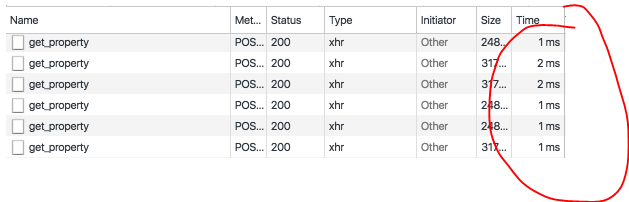
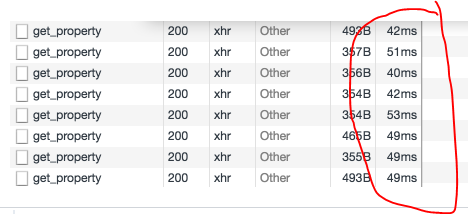
Also, If possible, maybe add a flag to disable features such as live objects and zero-copy during dev mode. Instead of getting multiple properties, maybe realm can do a single copy/return everything on a single query like asyncStorage. It will be slower but for dev mode, I think this is ok. Default features will be enabled on prod build.
 jerdie
on 12 Sep 2018
jerdie
on 12 Sep 2018
None shit given on the realm side I guess.
 Batuu13
on 20 Sep 2018
Batuu13
on 20 Sep 2018
@Batuu13 I'm sorry you feel this way, but that is not the case. If you read @fealebenpae's detailed response, you'll see that we've evaluated many approaches and the only one that is viable and doesn't sacrifice the production quality of Realm is for Facebook to improve the react native debugger.
 nirinchev
on 25 Sep 2018
nirinchev
on 25 Sep 2018
@nirinchev Have you contacted the RN team and asked whether a real debugger is in the works?
It's all well and good that the root cause of the problem is in another module, but if it's impacting your product in such a big way, it should probably one of your top priorities to follow up on a solution? Especially since it sounds like the problem only exists because you are using private RN APIs, so it's unlikely to even be on the radar of the RN team.
 nielsmadan
on 30 Sep 2018
nielsmadan
on 30 Sep 2018
What private APIs are you talking about? And yes, it's surely on their radar - the fact the debugger runs on a different platform than the code itself is not the greatest design, so they'll hopefully address that 🙂 That being said, I'm not aware of their roadmap and if they consider it a major annoyance worth fixing.
nirinchev
on 30 Sep 2018
I was referring to the detailed explanation where it says:
In React Native the JavaScript context runs on a separate worker thread and cannot be directly accessed from native code - instead React Native provides a "bridge" that allows native code and JavaScript code to talk to each other by asynchronous JSON messages. Realm circumvents this by using private React Native APIs to gain access to the JavaScript context and make its APIs available directly in the JavaScript worker thread, rather than via the React Native Bridge.
nielsmadan
on 30 Sep 2018
@nielsmadan They are well aware and are working on solutions according to https://facebook.github.io/react-native/blog/2018/06/14/state-of-react-native-2018#architecture
 cmelchior
on 1 Oct 2018
cmelchior
on 1 Oct 2018
To add to @agurtovoy awesome steps, you can make Safari automatically open the new JSContext when you manually reload (CMD+R) the app or Live Reload by selecting the Automatically Show Web Inspector for JSContexts:

 Eyesonly88
on 2 Oct 2018
Eyesonly88
on 2 Oct 2018
I can confirm that switching to Haul solved this for me. I now use safari for debugging, and I can even inspect Realm objects properly.
Switching to Haul for the time being seems to be the only thing that works right now.
 csotiriou
on 21 Oct 2018
csotiriou
on 21 Oct 2018
Hey hi, i was just looking around this thread. The console.log statement works good enough for me but makes it really painful to inspect elements. It would be really helpful if we could disable realm debugger in some way and things could just work.
Thanks.
 guptaamol
on 27 Oct 2018
guptaamol
on 27 Oct 2018
I just read the warning in the README.cmd https://github.com/realm/realm-js#issues-with-debugging it is an understatement. Not "some users" but all users that tried to debug and not "being too slow" but unusable. We shall be fair with the community
 philjoseph
on 29 Oct 2018
philjoseph
on 29 Oct 2018
When my debugger is turned off, the Realm didn't work and I cannot know why :(
Now my only option is to debug in slow motion.
 jfbaraky
on 30 Oct 2018
jfbaraky
on 30 Oct 2018
@jfbaraky If you are on Mac, please try https://github.com/realm/realm-js/issues/491#issuecomment-404670910, it saved our sanity.
agurtovoy
on 30 Oct 2018
Hey - I develop on windows, and the others in my team on mac. I cannot use chrome debugger because of Realm. I even went to the amazing lengths of isolating all my realm queries, writes and updates to a single module (needed to be done anyway!), and put in the ability by config switch to open and close the realm for every call (in other words, even though we are in react-native and using javascript realm.io, I can open the db, make my query or updates, close the db and return an object which isn't realm but an array of objects. I wanted to see if it was Realm being open that was our issue. It seems that it's just doing something, anything in Realm which causes the slowness. Some simple queries and updates can take up to 25 seconds when the debugger is running, and they are almost instantaneous out of the debugger.
Because we use RealmSync for our project with the realm cloud, turning off and on the db wasn't production anyway, but I can test and develop with a local realm and turn on Sync for when we test for the cloud (production use).
This has to be solved. Every single field in every query, gets posted back and forth across the bridge taking up to 160ms each. A small query means 100's of them!
 cyphire
on 30 Oct 2018
cyphire
on 30 Oct 2018
Guys, the team is actively working for this issue... now is year
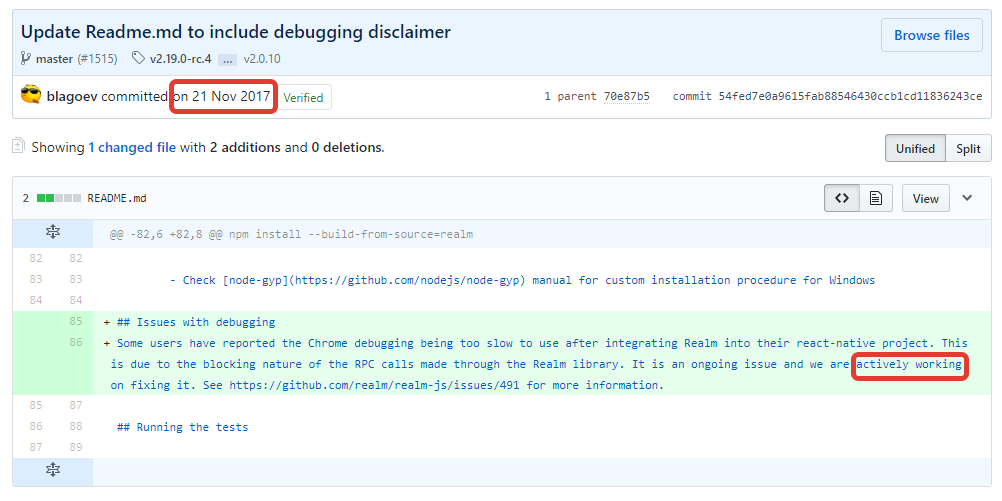
to infinity and beyond
 jeshio
on 5 Nov 2018
jeshio
on 5 Nov 2018
Is there way of disabling Realm debuger???
 eaazumah
on 5 Nov 2018
eaazumah
on 5 Nov 2018
@eaazumah Adding a way to disable Real debugger would be a great solution.
Sadly, I do not think it will happen.
esutton
on 5 Nov 2018
Guys, the team is actively working for this issue... now is year
to infinity and beyond
Getting that paragraph on the Readme was a win and took a bunch of back-and-forth in this thread. My understanding is that the realm team are waiting for react-native to change. It looks like Fabric may allow direct communication between js and native which would work with how realm works.
It's a waiting game now. Lets keep this thread alive so that other people don't waste time trying to figure out why their development environment slowed down - but otherwise I don't think there's much the realm team will do besides wait for Fabric. If you find other libraries like expo who are considering implementing Realm they need to be told about the debugging issues and sent to this thread so they can make an informed opinion.
martsie
on 5 Nov 2018
Fair point @jeshio, so I updated the readme to reflect reality.
I wish I could say more, but the current alternatives to Chrome, using Haul or Safari seems to be the best we can do until Facebook updates RN.
bmunkholm
on 5 Nov 2018
@martsie Adding a note to the README.MD is not what I consider "actively working" on this issue.
Sorry. I have no intention to be mean to anyone.
Passively waiting and "crossing your fingers" seems more accurate.
The current state is waiting for Facebook to change some debugging internals that may or may not improve Realm JS debugging performance. From what I understood from November 1, 2018, Blog · React Native - Facebook Engineering Blog, this rearchitecting will take more than one year to complete.
We're planning to land these projects throughout the next year or so
And after one or two years, can anyone say with 100% confidence that Realm JS debugging will work as well as debugging any other app that does not use Realm?
Something like this would help now:
Disable debug mode only for Realm in React Native? #2070
esutton
on 5 Nov 2018
After seeing the new blog post on react native, it seems that the first steps have already been made-jsi has landed on the open source version of RN.
JSI is different than what Realm was hoping for, but it should help nonetheless. I would propose Realm to take a look at the RN 0.58 and see if it helps in any way when I officially lands.
csotiriou
on 5 Nov 2018
@csotiriou Thanks for the update! We will surely look into this.
bmunkholm
on 6 Nov 2018
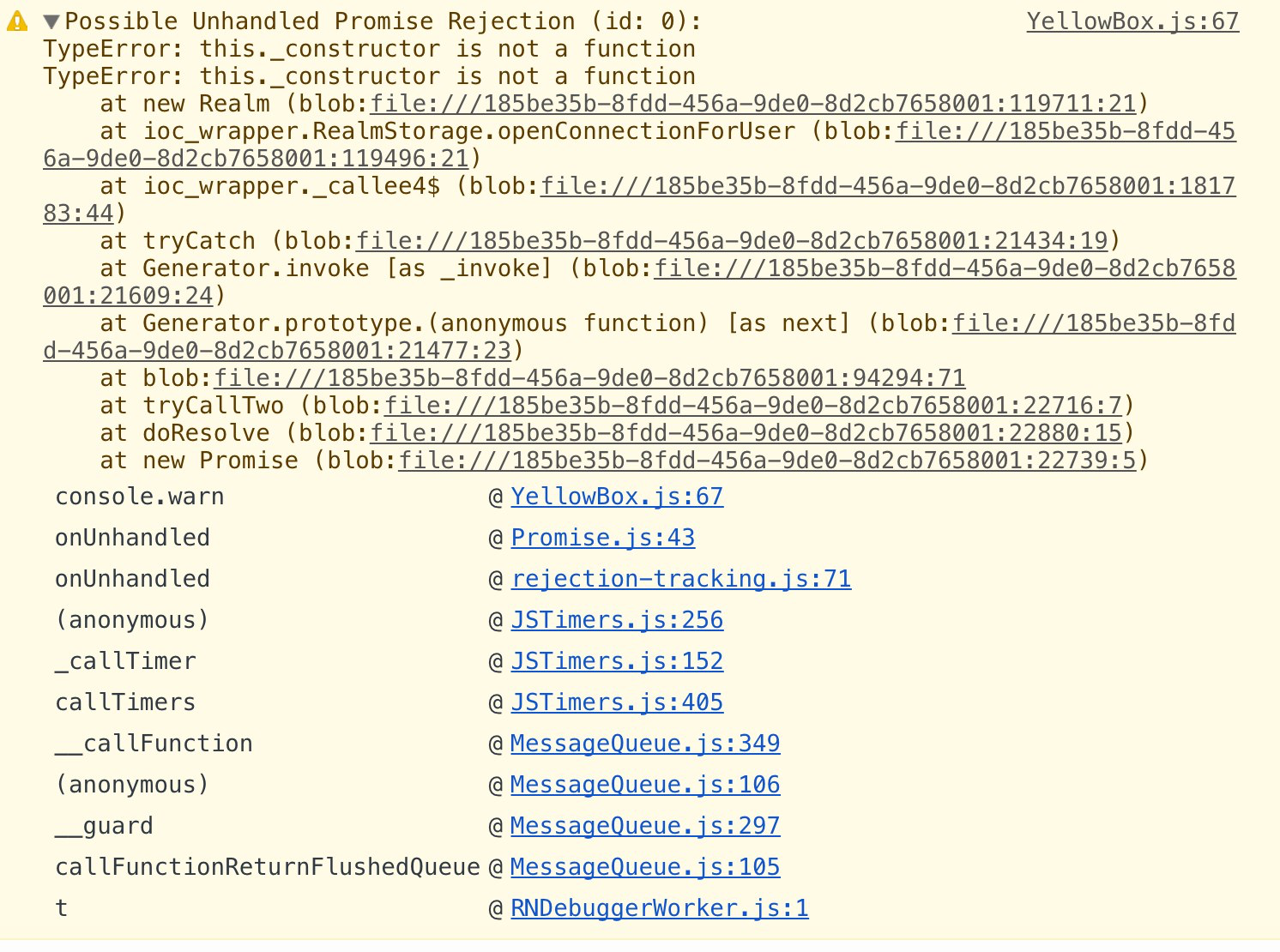
In realm 2.19.0 I'm not able to use debug mode at all (_construct error), but can use in 2.17.0. Is that connected issues?
 alexmbp
on 14 Nov 2018
alexmbp
on 14 Nov 2018
@alexmbp Please post the entire error message. I have a hypothesis what we are missing but I would like to verify it.
kneth
on 14 Nov 2018
@kneth actually same issue is already there:
https://github.com/realm/realm-js/issues/2053
Just to duplicate:
alexmbp
on 14 Nov 2018
@alexmbp this is absolutely not the same issue.
This issue you mention appeared in 2.18. The issue discussed in this thread exists a long time now and it is an architectural one.
csotiriou
on 14 Nov 2018
@csotiriou @alexmbp Indeed, it is another issue. For some reason, we forgot to add _constructor to the debugging support library.
kneth
on 15 Nov 2018
@kneth @csotiriou Thank you guys! I thought it's related because appears in debug mode.
alexmbp
on 15 Nov 2018
@alexmbp No worries! The reason I asked for the full error message was to confirm that it is a separate issue :smile:
kneth
on 15 Nov 2018
lol. This issue isn't fixed for pretty 3 years. WOW.
 abrarum
on 21 Nov 2018
abrarum
on 21 Nov 2018
Worth to mention: https://github.com/react-native-community/discussions-and-proposals/issues/64#issuecomment-444783475
kneth
on 6 Dec 2018
Waiting for updates.
 Jarzka
on 16 Jan 2019
Jarzka
on 16 Jan 2019
Waiting for updates.
I am now using Safari to at least make my work bearable.
guiherzog
on 16 Jan 2019
I don't see how using a different browser would solve this problem. The debugging is still slow even if I open Safari and point it at the debugging url: http://localhost:8081/debugger-ui/
Jarzka
on 16 Jan 2019
I'm thinking that i'll write a basic wrapper around the usage I have around realm.
which will allow me to switch over to JS based objects and disable realm for chrome debugging purposes.
This is a theory and I'm about to implement it. So not sure if it'll work with the realm binaries sitting idle on the app.
This is one of the biggest killers for this project. There's not many other alternatives. AsyncStorage causes OOM errors on Android for any data mb's in size.
 export-mike
on 20 Jan 2019
export-mike
on 20 Jan 2019
Don't do it. I tried. It doesn't help.
Problem is under JavaScript that the realm objects that you bring back can
be stringifed then parsed, pushed to an array and now they exist perfectly
as non realm objects. That works fine the problem is that there is no way
that we found 2 stop and close the realm handles. Additionally if you're
doing anything with realm cloud it stops working. So you still get the same
constant pinging of the debugger but everything is still just as slow.
Don't waste your time but if you do make it work please show us how!
On Sun, Jan 20, 2019, 2:29 PM Mike James <[email protected] wrote:
I'm thinking that i'll write a basic wrapper around the usage I have
around realm.
which will allow me to switch over to JS based objects and disable realm
for chrome debugging purposes.This is a theory and I'm about to implement it. So not sure if it'll work
with the realm binaries sitting idle on the app.This is one of the biggest killers for this project. There's not many
other alternatives. AsyncStorage causes OOM errors on Android for any data
mb's in size.—
You are receiving this because you are subscribed to this thread.
Reply to this email directly, view it on GitHub
https://github.com/realm/realm-js/issues/491#issuecomment-455894708, or mute
the thread
https://github.com/notifications/unsubscribe-auth/AAUnhmiuL5-IgDQIp64VhmanlSPH1RLCks5vFMOYgaJpZM4I1For
.
cyphire
on 20 Jan 2019
This is one of the biggest killers for this project. There's not many other alternatives. AsyncStorage causes OOM errors on Android for any data mb's in size.
@export-mike I agree. The debugging performance is a serious major productivity penalty for using realm-js.
I am working on making my realm Android/iOS app support typeorm with SQLite. I plan to support both realm and typeorm temporarily then cutover to typeorm.
Getting typeorm to work with react native has not been as easy as getting started with realm-js.
esutton
on 21 Jan 2019
I don't see how using a different browser would solve this problem. The debugging is still slow even if I open Safari and point it at the debugging url: http://localhost:8081/debugger-ui/
@Jarzka See https://github.com/realm/realm-js/issues/491#issuecomment-404670910
agurtovoy
on 21 Jan 2019
@esutton I've since moved back to using AsyncStorage and sending over smaller JSON payloads. Also all Writes and Reads are Wrapped in
InteractionManager.runAfterInteractions(() => AsyncStorage...
its behaving faster than realm for me, the code I did have for realm was triggering lots of property lookups over http.
export-mike
on 21 Jan 2019
I've started using reactotron to get some debugging functionality. You can't step through the code, but at least you can see logs, network requests, and redux state / actions.
nielsmadan
on 1 Feb 2019
@esutton
But AsyncStorage only works will small data size.
I still using Realm and using logcat for debug.
 goncalvesej
on 22 Feb 2019
goncalvesej
on 22 Feb 2019
@eraldojr I've since been using react-native-sqlite-storage.
export-mike
on 25 Feb 2019
What a hell :(
 brayanL
on 11 Apr 2019
brayanL
on 11 Apr 2019
@brayanL I've rolled my own offline storage using sqlite
export-mike
on 11 Apr 2019
It's tough not having the ability to use a debugger.. I've spent weeks on workarounds, including building a version of my application which opens and closes realm so theoretically it would not stay open and thus destroy debugging. Nothing worked. I use Reactotron to pass console messages and it's pretty effective. Much slower than having the ability to debug which realm.io has taken away.
Use Reactotron vs. the console. Between console and the ability to see my redux state, it works pretty well!
cyphire
on 12 Apr 2019
@cyphire If you are on a Mac, you can use built-in Safari debugger (essentially what @fealebenpae called "proper remote debugger") to debug your React Native app "in place", without attaching React Native "remote debugger": https://github.com/realm/realm-js/issues/491#issuecomment-404670910.
It truly works as advertised; if/when logging is not enough, I highly recommend giving this a try.
agurtovoy
on 12 Apr 2019
I will give that a shot... Unfortunately, while I switch back and forth between machines, I primarily develop on a windows system, but have an older iMac also to test the iPhone side. My partner does the iPhone work primarily, but it might be worth developing on the iMac if this gives me debugging... Thanks for the update!
cyphire
on 12 Apr 2019
Like everyone else, implemented it, really liked how it works until it is time to debug. Definitely a big let down so we'll be moving pass realmjs for now.
 geriux
on 25 Apr 2019
geriux
on 25 Apr 2019
@tgoyne @kneth Hey folks, any words on this? My team is also doing spikes on moving away from Realm.js right now simply because the debugging story is totally broken (we've been using it for 2 years straight but finally decided we're fed up) but I feel like it might be great to ping you guys and see if there's still any hope on this issue.
 gsklee
on 9 May 2019
gsklee
on 9 May 2019
@gsklee @agurtovoy Your best bet is to use Safari debugger.
To add to @agurtovoy 's comments: The comment he linked mentions that you won't have source map support. You can overcome even that. Just follow the linked comment, and use Haul as your bundler. You will have much better debugging experience than even with the original chrome.
Other than that, the only hope is for realm to refactor the code to take advantage of the new JSI which is suitable for these purposes. Now that Mongo has bought Realm, I don't quite know if and when this issue will be fixed 100%.
csotiriou
on 9 May 2019
The JSI stuff doesn't have any relevance to this as the slowness isn't due to how we interact with react native. You'd see the same poor performance if you used the browser implementation of the Realm API in a normal webapp with no React involved at all. Making a HTTP request for every property read just inherently can't perform well and making big gains requires coming up with a less chatty protocol.
tgoyne
on 9 May 2019
@tgoyne thank you for the clarification, but I just re-read the comment in https://github.com/realm/realm-js/issues/491#issuecomment-350718316 .
According to the information I have read here, a get-property call is being made as an RPC call. Realm is not developed as a proper React Native module from the ground up, and that is what causes the need for RPC calls. If Realm was developed as a React Native module, it would lose it's edge, since Realm is Synchronous, and React Native modules force it to be asynchronous.
However:
This is exactly the reason why the React Native team is rearchitecting React Native. JSI and TurboModules will allow NATIVE code to be executed synchronously and provide results on the JS side. Not only that, but there will be shared memory across the Native and JS side. Which is exactly what Realm needs to become a proper React Native module from the start without losing its edge, isn't it?.
I'm sorry if I have misunderstood the points made by both members of Realm and React Native, but it seems to me like React Native is moving fast towards providing interfaces like the ones Realm needs.
https://medium.com/@christian.falch/https-medium-com-christian-falch-react-native-jsi-challenge-1201a69c8fbf
csotiriou
on 9 May 2019
When using chrome debugging, your app's javascript is actually running in a normal web app in a chrome tab, rather than in a javascript context running in your mobile app. You can't load native modules when running in Chrome, so React Native turns these into RPC calls over a websocket to the code running in the mobile app. Since we don't go through the react native native module API we have to implement a similar RPC mechanism ourselves, but it's not fundamentally different from what ends up happening for a normal RN native module.
The reason why this is such a big performance problem for us and not for anyone else mostly comes down to API design. With a proper RN-style async API, you'd normally make a handful of native calls when updating your state and zero in your render function. Tacking on a few ms to each of those calls is completely unnoticeable. Realm, OTOH, is designed around making lots and lots and lots of native calls. When native calls are cheap this performs very well; when you add even 1ms delay onto each native call it performs terribly (and it's often quite a bit more than 1ms).
The TurboModules/JSI work is sort of orthogonal to all of this. It theoretically might be possible to reimplement Realm on top of it as a proper RN module and that'd let us delete all of our chrome debugger-related code, but that wouldn't inherently make our chrome debugger performance problems go away. It wouldn't change the fact that the Realm native library and the JS code being debugged are running in separate JS engines that have to communicate too frequently.
tgoyne
on 9 May 2019
https://github.com/realm/realm-js/pull/2373 brings some improvements here. It adds a caching layer which for Rocket.Chat has a ~95% hit rate on property reads and makes the app at least somewhat usable in chrome debugging mode. It's still not a great experience, but I'd be interested in feedback on if it does enough that further incremental improvements would be worthwhile, or if it's still not in the range where trying to use it is actually productive.
tgoyne
on 16 May 2019
Exciting news @tgoyne, really appreciate the effort! 😸
Some update from my part:
Our team is experimenting with a new debugging setup with Reactotron as the new primary debugger. It doesn't offer a component inspector or the ability to step through breakpoints, so we still need to keep React Native Debugger handy, though at the same time it brings some new and powerful benefits such as saga debugging and custom commands. Our hope is that Reactotron will be able to cover up to at least 80% of our daily debugging needs so we won't need to deal with the crappy debugging experience that often.
gsklee
on 17 May 2019
I thought of adding Realm to my app but after seeing this issue I'm in doubt.
Does anybody solved it?
 kesha-antonov
on 17 May 2019
kesha-antonov
on 17 May 2019
We have released v2.28.0 which contains #2373. Not that it will take away all the pain of debugging, but we hope that you will find the improvements useful.
kneth
on 22 May 2019
Hi guys! I started a project using Realm as the database engine. When I faced the debugging issue sadly I had to move to another one. After v2.28.0 is it any better? Could anyone give some feedback?
Thanks in advance
 nuvolarmobileteam
on 17 Jun 2019
nuvolarmobileteam
on 17 Jun 2019
I have use the 2.28.0, it has some improvement but still unbearable for my case.
 cheansiong
on 17 Jun 2019
cheansiong
on 17 Jun 2019
@cheansiong For future work, it would be great if you can provide some context - for example how large is your data set?
kneth
on 27 Jun 2019
@cheansiong For future work, it would be great if you can provide some context - for example how large is your data set?
@kneth
Sorry for that as I think my use case is pretty straight forward. Let me give some datas here.
It has two object type, eg: Setting, AppObject
Setting
- about 10 attributes storing server, user info, etc
- always only 1 object.
AppObject
- about 34 attributes storing combination of string and number, with id as primary key.
- has about 300 objects.
Notes:
Of course, the project has now grows to more object types now. And I have been using the Reactroton for log debugging.
The slowness is only experienced when "Debug JS Remotely" turned on.
Hopes this helps. :)
cheansiong
on 27 Jun 2019
Hey guys, just wanted to let you know that I wanted to give another try to Realm. Last time I tried I was using 2.6.x.
I installed 3.0.0-beta.1 and in my opinion the debugging experience is better. Right now the database has something like 1000 records across 6 different tables.
nuvolarmobileteam
on 28 Jun 2019
@nuvolarmobileteam
Yes, I agrees that it is significantly better. However, I think the performance is still not usable for scenarios where reading / writing about 200-300 objects at one point is required. My test scenario is each object has about 20-30 properties.
cheansiong
on 3 Jul 2019
@cheansiong In our case we are writing 500 objects at once and still performing good. It's also true that when we do so the db is empty, I don't know if that may affect.
nuvolarmobileteam
on 3 Jul 2019
Version 2.28.0 is really far away from being usable for development. Sad!
 witalobenicio
on 4 Jul 2019
witalobenicio
on 4 Jul 2019
I was experiencing slow debugging as well when starting to use realm-js with react-native. I was just using a single schema with 2 fields, empty db. Nevertheless, a simple transaction to a single object property froze the UI for 1 or 2 seconds. Without debugging the performance was great though. I was pretty must ready to give up on using realm-js because of this.
However, I was using the debugger from Visual Studio Code. When I switched to the Chrome debugger the performance was acceptable / good. It's not completely related to this issue but it might help people experiencing a similar issue when using Visual Studio Code's debugger.
- Realm JS SDK Version: 2.29.2
- Node / React Native: 10.16.3 / 0.60.4
- Client OS & Version: iPhone SE / iOS 12.1 simulator
 mattijsf
on 24 Aug 2019
mattijsf
on 24 Aug 2019
That is a nice tip @mattijsf . Thanks for sharing!
nuvolarmobileteam
on 26 Aug 2019
Decided to give a try to realm with react native as it looked like it could help our offline storage to become more maintainable and "jimmy proof" rather than our custom file namming.
The use case is : storing timeseries (datetime + up to three value) shown to the user for each day for 3 variables at the same time.
Showing only two years at a time (for deltas). And the result is that i can't display the year screen in debug anymore. It is fine with a release build.
So the data volume is about "365 * 2 (years) * 3 (variables)" entries.
I really liked the way realm integrates with react native (migrations, schema, queries etc..) but that's definitely a blocker for us.
 cyqui
on 16 Sep 2019
cyqui
on 16 Sep 2019
Related issues
 max-zu
·
3Comments
max-zu
·
3Comments
 ashah888
·
3Comments
ashah888
·
3Comments
 kevinnguy
·
3Comments
kevinnguy
·
3Comments
 laznrbfe
·
3Comments
laznrbfe
·
3Comments
 bdebout
·
3Comments
bdebout
·
3Comments
Most helpful comment
I wonder how anyone can possibly use Realm since Chrome debugging is essential for developing a React native app...