Readthedocs.org: Custom Domains don't work with Cloudflare
Details
As of today afternoon, we started getting this error:
https://support.cloudflare.com/hc/en-us/articles/213432887-Error-1014-CNAME-Cross-User-Banned
http://docs.citusdata.com/
We followed the instructions here: https://docs.readthedocs.io/en/latest/alternate_domains.html#cname-support.
- Read the Docs project URL:
http://citus-docs.readthedocs.io/en/v7.4/ - Build URL (if applicable):
- Read the Docs username (if applicable):
Expected Result
I presume RTD recently signed-up for Cloudflare, or the policy was just implemented recently. In either case, it seems like the documentation should be updated to account for both parties being on Cloudflare.
Actual Result
A description of what actually happened
 sumedhpathak
All 22 comments
Read the Docs did just sign up for Cloudflare for DNS on readthedocs.io. Our goal is to provide HTTPS for all the custom domains we host.
You mentioned you followed the instructions but I don't see a CNAME for docs.citusdata.com in your DNS setup:
$ dig docs.citusdata.com CNAME +short # returns nothing
Did you change that when you started receiving this error? I'd love to understand this as I'm actively working on it.
 davidfischer
on 17 Jul 2018
davidfischer
on 17 Jul 2018
We confirmed that the problem arose from the DNS change on readthedocs.io combined with our existing CloudFlare settings. We were already proxying through CloudFlare for their SSL support:

This resulted in A records rather than CNAME:
docs.citusdata.com.    300    IN    A    104.25.47.11
docs.citusdata.com.    300    IN    A    104.25.46.11
Apparently when readthedocs.io started using CloudFlare it caused a situation where CloudFlare was perhaps attempting to proxy itself. We changed the settings on our end to bypass CloudFlare's proxy and our docs now load.
New output from dig:
docs.citusdata.com. 300 IN CNAME readthedocs.io.
 begriffs
on 18 Jul 2018
begriffs
on 18 Jul 2018
I'm glad it's working for you. I'm terribly sorry for the inconvenience.
It sounds like incoming cross-user CNAMEs can be allowed so I'll see if I can set that up to avoid this problem for others.
davidfischer
on 18 Jul 2018
It's mostly working. What's missing is that it won't redirect http to https anymore. Is it possible to enable this for us on your end, or is there a setting that I can change?
begriffs
on 18 Jul 2018
This is coming soon site wide. I'll see if there's a good way to do it for one site.
davidfischer
on 18 Jul 2018
We have a similar situation at UBports (and Halium) which either hasn't been resolved by the change, the change hasn't propagated to us yet, or we've misconfigured something...
$ dig docs.ubports.com
docs.ubports.com.   134 IN  A   104.24.1.9
docs.ubports.com.   134 IN  A   104.24.0.9
$ dig docs.halium.org
docs.halium.org.    219 IN  A   104.28.12.94
docs.halium.org.    219 IN  A   104.28.13.94
(some output omitted)
 UniversalSuperBox
on 18 Jul 2018
UniversalSuperBox
on 18 Jul 2018
I can see you're using Cloudflare as your primary DNS:
$ dig ubports.com NS +short
cody.ns.cloudflare.com.
rose.ns.cloudflare.com.
However, I don't see any CNAME for those hosts:
$ dig docs.ubports.com CNAME +short # returns nothing
Did you remove that or are you just using A records?
davidfischer
on 18 Jul 2018
We've set up the CNAME records at this point:
$ dig docs.ubports.com CNAME +short
readthedocs.io.
As expected, HTTP to HTTPS redirect isn't working but our docs are.
UniversalSuperBox
on 18 Jul 2018
docs.aiohttp.org has the same issue: aio-libs/aiohttp#3142
 webknjaz
on 18 Jul 2018
webknjaz
on 18 Jul 2018
Same for https://cheroot.cherrypy.org
webknjaz
on 18 Jul 2018
I think I've found another workaround:
CNAME to *.readthedocs.org, not *.io
webknjaz
on 19 Jul 2018
CNAME to *.readthedocs.org, not *.io
This is a workaround. However, once we get this issue worked out please switch it back. By CNAMEing to readthedocs.org we will not be able to issue a certificate for your site.
davidfischer
on 19 Jul 2018
Just to give an update here, I'm working to try to resolve this ASAP.
In the meantime, I got this from the fine folks at Cloudflare:
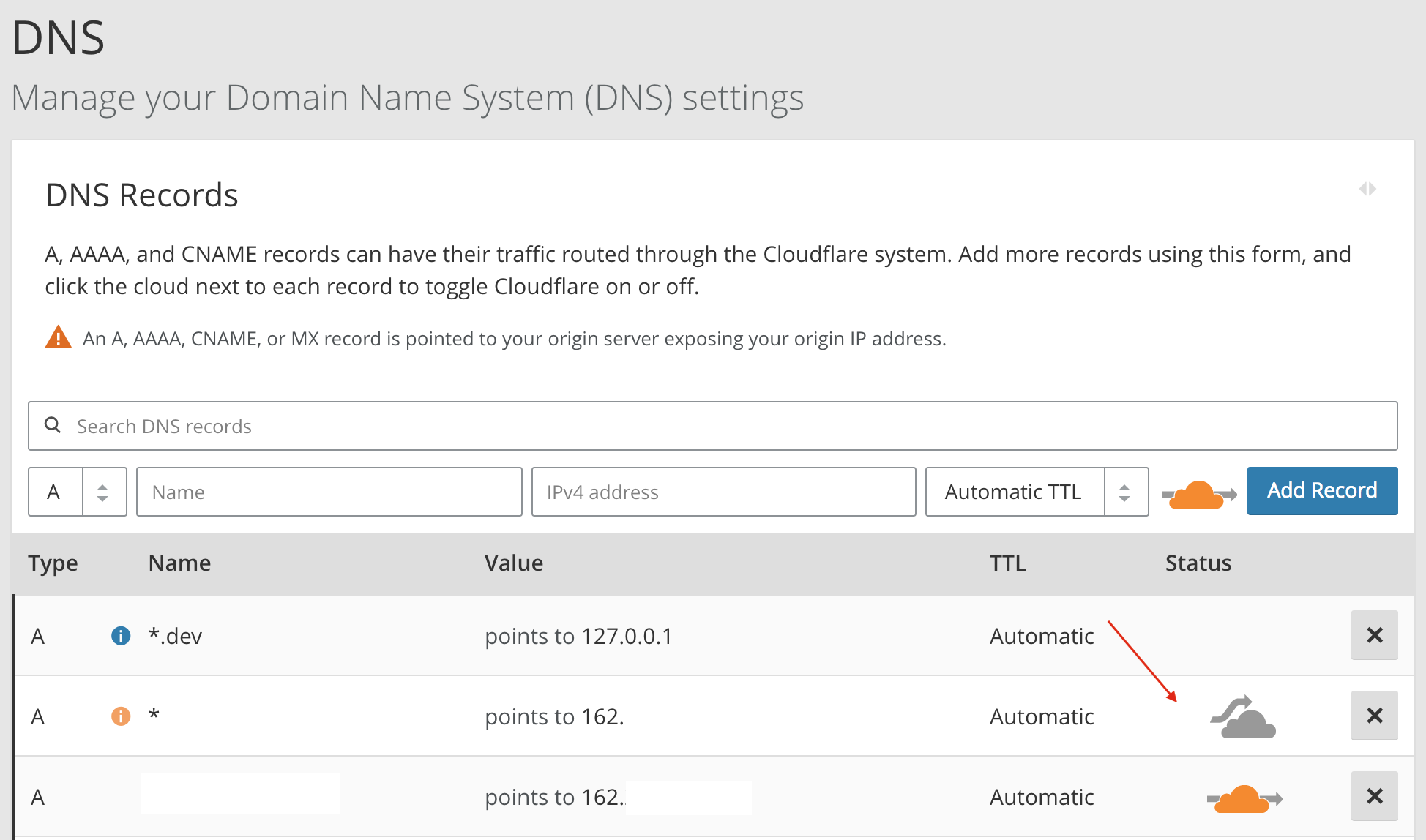
The quickest way to fix this is for them to grey cloud the dns entry for what they are cnaming to you
davidfischer
on 19 Jul 2018
Now I'm CNAMEing several projects to readthedocs.io and with proxying disabled (grey cloud) and everything including https works.
webknjaz
on 20 Jul 2018
(the only problem that it now doesn't automatically redirect http->https)
webknjaz
on 20 Jul 2018
(the only problem that it now doesn't automatically redirect http->https)
I'm working on this. There are a couple steps. The first one is that everywhere where we display a link to documentation to show the HTTPS link. This will uncover issues with certificates not successfully issuing and whatnot. The next step is to force HTTPS for all traffic to custom domains by redirecting. We're probably 1-2 weeks from the first and a bit more for the 2nd. Once those shake out, we'll look at HSTS because you can't back out of HSTS (by design).
davidfischer
on 20 Jul 2018
Thank you for the update!
webknjaz
on 20 Jul 2018
After talking with our fine contacts at Cloudflare, we have a solution. The problem here has to do with proxying a domain on Cloudflare to another domain that is also proxied on Cloudflare. This is a problem because it is unclear which domain rules to apply and where the SSL termination is going to happen.
The solution is that only one proxy can be applied. If you want to allow Read the Docs to handle the proxying -- which means we are issuing a certificate for the domain -- then continue following our documentation by CNAMEing to readthedocs.io and use the "grey cloud" in Cloudflare as noted above.
If instead you want to handle proxying on your side -- which means you are responsible for the SSL certificate -- then set your CNAME to cloudflare-to-cloudflare.readthedocs.io and you can continue to use the "orange cloud". Your page rules, web app firewall, and any other proxying you have in place will apply.
I will be updating our documentation in the next couple days. I'm also going to leave this ticket open for a few weeks for any issues to shake out.
davidfischer
on 20 Jul 2018
Sounds reasonable! Thanks :)
webknjaz
on 20 Jul 2018
@davidfischer
If instead you want to handle proxying on your side -- which means you are responsible for the SSL certificate -- then set your CNAME to cloudflare-to-cloudflare.readthedocs.io and you can continue to use the "orange cloud". Your page rules, web app firewall, and any other proxying you have in place will apply.
The cloudflare-to-cloudflare variant doesn't appear to work (SSL certificate is for *.readthedocs.io instead of my hostname), and there is no cloud icon when using this variant. Instead I get:
The cloudflare settings for this hostname are being managed by cloudflare-to-cloudflare.readthedocs.io. [...]
I get the same for setting it to readthedocs.io, but that one works
EDIT: it appears to work now, perhaps a temporary hickup
 untitaker
on 22 Jul 2018
untitaker
on 22 Jul 2018
it appears to work now, perhaps a temporary hickup
This was probably due to the slowness of issuing an SSL certificate once you set your DNS. When you create the domain in Read the Docs' dashboard, we instruct Cloudflare to issue a certificate for the domain. Normally this takes just a few minutes (<10). However, you were just switching your DNS at the time, that has to propagate to Cloudflare and they have to retry the certificate challenge. That probably takes a bit longer. It sounds from the edit history that we are still talking sub 1 hour.
davidfischer
on 23 Jul 2018
I'm going to close this issue for now. I think this is mostly resolved and our docs include instructions on how to resolve this issue if you hit it again.
 agjohnson
on 18 Sep 2018
agjohnson
on 18 Sep 2018
Related issues
 krzychb
·
4Comments
krzychb
·
4Comments
 JiaweiZhuang
·
3Comments
JiaweiZhuang
·
3Comments
 humitos
·
3Comments
humitos
·
4Comments
humitos
·
4Comments
humitos
·
3Comments
humitos
·
4Comments
humitos
·
4Comments
Most helpful comment
I'm working on this. There are a couple steps. The first one is that everywhere where we display a link to documentation to show the HTTPS link. This will uncover issues with certificates not successfully issuing and whatnot. The next step is to force HTTPS for all traffic to custom domains by redirecting. We're probably 1-2 weeks from the first and a bit more for the 2nd. Once those shake out, we'll look at HSTS because you can't back out of HSTS (by design).