Readthedocs.org: I can't import my Sphinx doc project from github.
The project I am trying to import is at https://github.com/artakhak/IoC.Configuration.Documentation. It shows in github projects (under "Import Repositories").
The steps I do in readthedocs.org are following.
-I click on plus button next to IoC.Configuration.Documentation in list "Import a Repository".
-On next page titled "Project Details" I check "Edit Advanced Options" and leave everything at defaults (I also tried the following in Repository URL: https://github.com/artakhak/IoC.Configuration.Documentation, and https://github.com/artakhak/IoC.Configuration.Documentation/docs)
-I click on checkbox "Edit advanced project options"
When I click next, I am taken to https://readthedocs.org/ . No error message.
I already spent a lot of time, and I am starting to regret that I considered readthedocs.org. The repository has the format that readthedocs suggests. Please help.
 artakhak
All 14 comments
First of all, there is nothing wrong with your project content. I just imported successfully on my local instance. I think maybe is something with your project name, I'm going to try creating a project like that on my account.
 stsewd
on 23 Apr 2018
stsewd
on 23 Apr 2018
Sorry, I'm not able to reproduce this issue with a project with the same name.
stsewd
on 23 Apr 2018
Did you try importing manually your project? https://readthedocs.org/dashboard/import/manual/
stsewd
on 23 Apr 2018
HI stsewd ,
Thanks for responding quickly.
Yes I was trying the manual import option (not sure what non-manual option is, since I could use only this option).
artakhak
on 23 Apr 2018
My previous comment was wrong. I wasn't importing manually before. Juts tried import manually too and it didn't work either (the same result).
artakhak
on 23 Apr 2018
Ok, I'm pinning @humitos here, maybe he can take a look at the logs on the server if any.
stsewd
on 23 Apr 2018
I finally was able to import the project by creating a new account and importing in that account.
I guess the issue can be considered closed
artakhak
on 24 Apr 2018
What was your previous account? Maybe related to https://github.com/rtfd/readthedocs.org/issues/2953?
stsewd
on 24 Apr 2018
It was artakhak. I still would like to use that account if it works.
artakhak
on 24 Apr 2018
Did you use the "Import Manually" button?
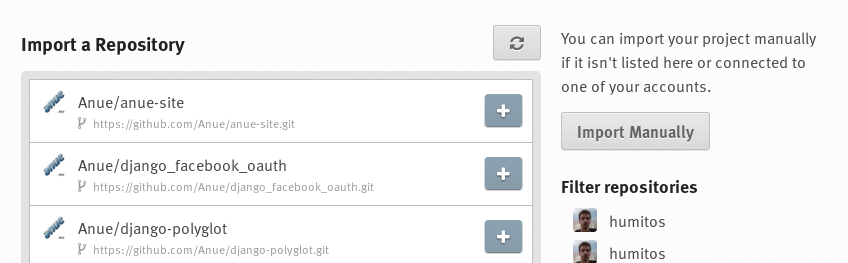
If the project is on Github, you could connect your github account to your read the docs username and import it using the _plus_ sign shown in the image.
 humitos
on 24 Apr 2018
humitos
on 24 Apr 2018
@humitos yes, he did that https://github.com/rtfd/readthedocs.org/issues/3997#issuecomment-383549508
stsewd
on 24 Apr 2018
@humitos and stsewd
I appreciate the time you spent looking into this. Don't worry if you can't figure out what the problem is since I can use my other account (unless you want to fix this bug in readthedocs system).
Probably at some point I will try to delete artakhak account and signup again with that account and see if ot fixes the issue. If not, I will just use the other one (artakhs74)
artakhak
on 25 Apr 2018
This issue has been automatically closed because there has been no response to our request for more information from the original author. With only the information that is currently in the issue, we don't have enough information to take action. Please reach out if you have or find the answers we need so that we can investigate further. Thanks!
![no-response[bot] picture](https://avatars2.githubusercontent.com/u/26350515?v=4&s=40) no-response[bot]
on 10 Jan 2019
no-response[bot]
on 10 Jan 2019
We actually only needed a replication here, but not sure that we are going to replicate this soon. If someone else has the same problem, we can reopen and investigate more.
stsewd
on 10 Jan 2019
Related issues
 adamjstewart
·
4Comments
adamjstewart
·
4Comments
 krzychb
·
4Comments
krzychb
·
4Comments
 pllim
·
3Comments
humitos
·
4Comments
pllim
·
3Comments
humitos
·
4Comments
 jaraco
·
4Comments
jaraco
·
4Comments
Most helpful comment
@humitos and stsewd
I appreciate the time you spent looking into this. Don't worry if you can't figure out what the problem is since I can use my other account (unless you want to fix this bug in readthedocs system).
Probably at some point I will try to delete artakhak account and signup again with that account and see if ot fixes the issue. If not, I will just use the other one (artakhs74)