Reactjs.org: Unicode-escaped national characters are shown instead of human readable text
The issue is migrated from the ru.reactjs.org: https://github.com/reactjs/ru.reactjs.org/issues/180
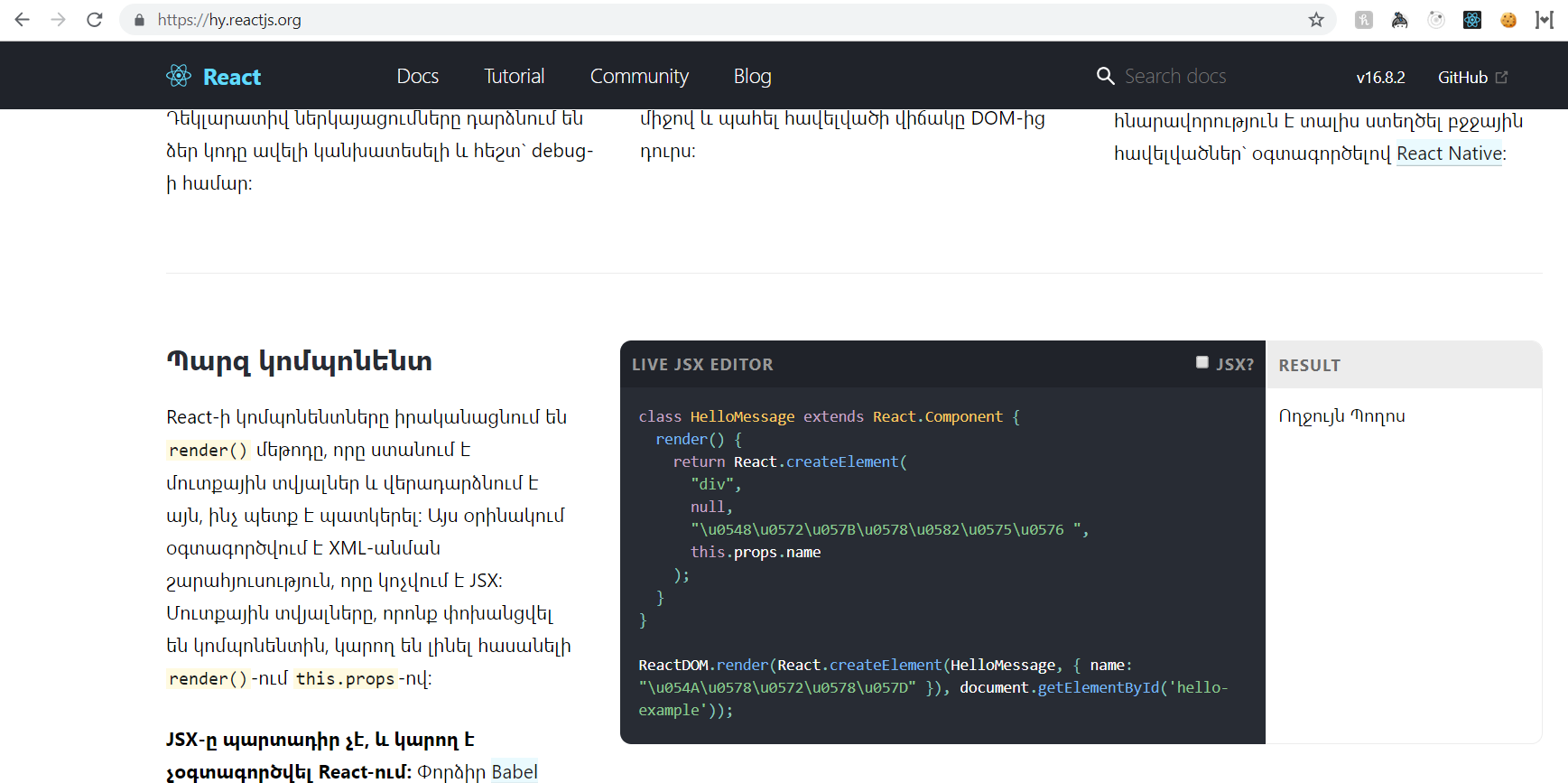
@gcor noticed a bug in the way national characters are displayed in Code Editor with JSX checkbox disabled (reset). Expected to see human-readable text in a particular natural language (when used in string literals and comments). Actually seeing unicode-escaped symbols. (See images below).
At least two languages are known to be affected: Russian and Armenian, but the issue must be not specific to just these two.
Russian translation


Armenian translation
 another-guy
All 11 comments
It seems to be an issue with Babel. When you uncheck the checkbox it runs Babel to compile it to es5. For some reason it also escapes unicode characters, and I can't figure out the setting to fix it.
@gaearon do you know who would know more about babel presets/plugins?
 tesseralis
on 22 Feb 2019
tesseralis
on 22 Feb 2019
Ooh: https://github.com/babel/babel/issues/4909
In particular, this might be useful: https://github.com/babel/babel/issues/4909#issuecomment-397715926
tesseralis
on 22 Feb 2019
If we try <h3>{'আউটপুট'}</h3> then it works
 nutboltu
on 26 Feb 2019
nutboltu
on 26 Feb 2019
@nutboltu having such code in documentation samples complicates things unnecessarily. The reader will get confused about why it's written that way, whether it's a pattern, or worse -- decide to use it across their project.
So, the issue should be fixed without forcing us to make code changes in examples ... Ideally.
another-guy
on 26 Feb 2019
As a stopgap solution we could just keep the text on the code examples in English (that's what some languages do anyways). @another-guy would you have the time to look into possible solutions?
tesseralis
on 27 Feb 2019
The jsonCompatibleStrings option here might help: https://babeljs.io/docs/en/babel-generator
Unfortunately I'm being kicked out of this cafe so I can't try it out right now.
tesseralis
on 27 Feb 2019
@tesseralis I'm sorry, at the moment I can only focus on translating and pull request reviews. (I have a limiting schedule: busy with young daughter and full time job [which does not reserve time for OSS contribution]). I hope, you can understand me.
P.S. Sorry to hear you were kicked out of a cafe. This is crazy _!_
another-guy
on 28 Feb 2019
@another-guy yeah, that's fair. I'll look into it when I have time but I'm moving on to other projects right now :)
(also I should have specified that I got kicked out because the cafe was closing!)
tesseralis
on 28 Feb 2019
@tesseralis and @another-guy
I tried this in CodeEditor.js
const compileES6 = code => Babel.transform(code, {
  presets: ['react'],
  generatorOpts: {
    jsescOption: {
      minimal: true,
    },
  },
}).code;
It didn't work.
I also upgraded babel standalone version from 6.26.0 to 7.0.0-beta.3.
In both versions, when I tried transform in the console, I couldn't find such generatorOpts options.
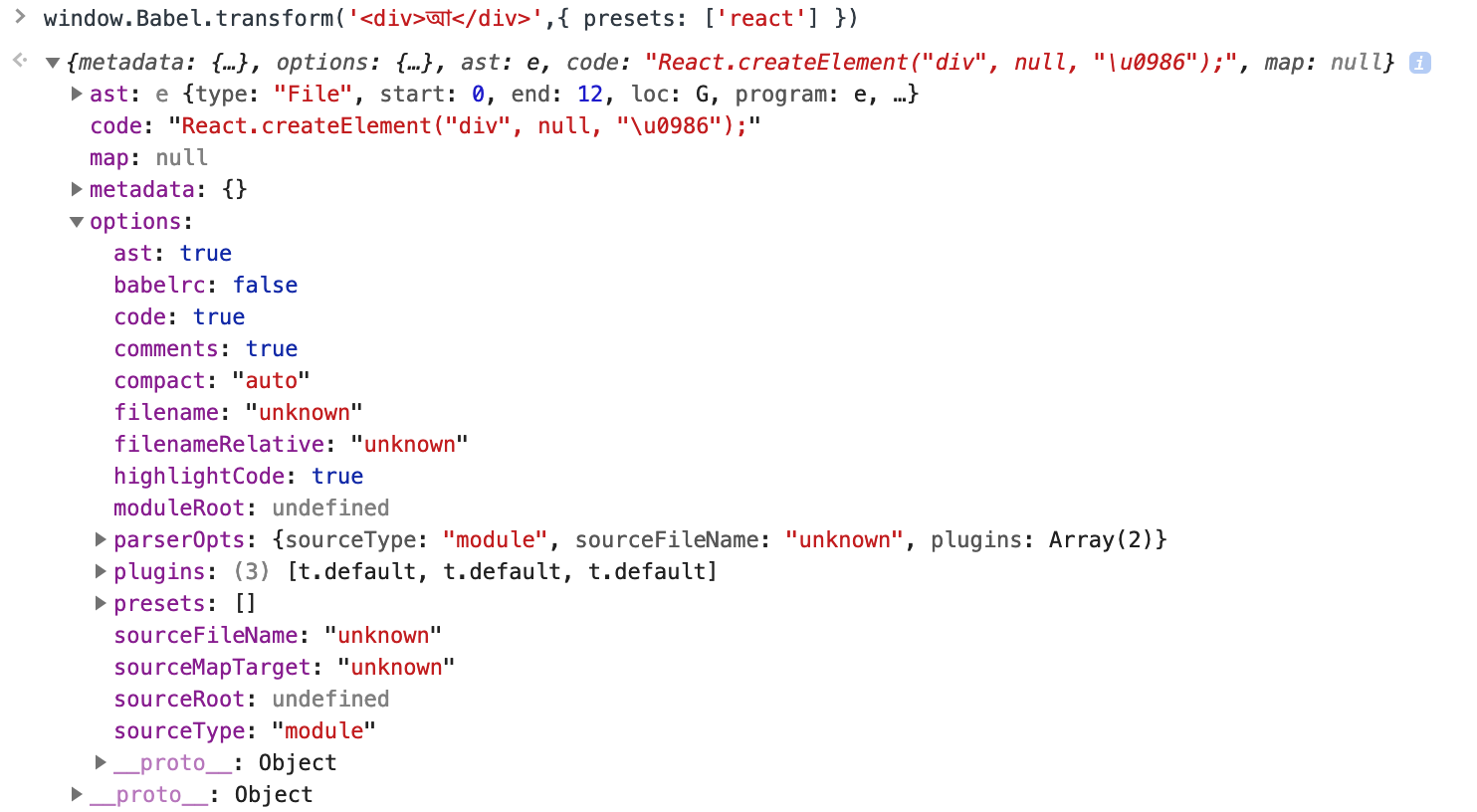
Any thoughts?
nutboltu
on 28 Feb 2019
@nutboltu another idea I had which is kind of hacky is using decodeURIComponent after we transform the text. That might be the easiest route but we have to be careful that it's still secure.
tesseralis
on 1 Mar 2019
@tesseralis I converted the unicode to text after es6 compilation. #1780 .
nutboltu
on 4 Mar 2019
Related issues
 gaearon
·
4Comments
gaearon
·
4Comments
 chochihim
·
3Comments
tesseralis
·
3Comments
chochihim
·
3Comments
tesseralis
·
3Comments
 OlegBrony
·
4Comments
gaearon
·
6Comments
OlegBrony
·
4Comments
gaearon
·
6Comments
Most helpful comment
@nutboltu having such code in documentation samples complicates things unnecessarily. The reader will get confused about why it's written that way, whether it's a pattern, or worse -- decide to use it across their project.
So, the issue should be fixed without forcing us to make code changes in examples ... Ideally.