React: Development flavor is way bigger than the production one
Using latest React release, the development flavor is way bigger than the production one:
- react (cjs): 72KB vs 6.5KB
- react-dom (cjs): 895KB vs 121KB
It makes bundling the development flavor way slower than bundling the production one, which is the exact opposite of what developer needs: developers need the lowest possible build time when developing, and they don't care if the production build is slower.
Replacing the development flavor with the production one leads to at least twice faster building time when developing the application. With no drawbacks at all since we still have access to the React DevTools.
I think that the production flavor should be the default one declared by package.json and that the development one should be left optional for people that needs the benefits it brings - which at that point are not clear to me.
 ericmorand
All 17 comments
What bundler are you using and what practical speed difference are you seeing?
There are very important differences — the development build includes many warnings that point out critical bugs but wouldn’t be displayed for a production build.
We could certainly do something like strip out the comments but it would impede the rare cases when people want to debug the source code.
 gaearon
on 6 Nov 2020
gaearon
on 6 Nov 2020
Using Browserify, with a very simple React application consisting of a single Button component, bundling takes an average of 2000ms with the development flavor versus an average of 500ms with the production flavor.
Granted, Browserify is not the most powerful bundler available but the difference remains. It makes sense to me: reading and parsing a 970KB set of source data (react + react-dom development flavor) and writing back into a bundle takes much more resources than doing the same thing from a 130KB one (react + react-dom production flavor).
Fortunately, it is very easy to force a bundler to use the production flavor instead of the development one.
Here is the code I use with Browserify:
const {broaderify} = require('broaderify');

browserify.transform(broaderify, {
    global: true,
    loaders: [{
        filter: /node_modules\/react\/index.js/,
        worker: function (module, content, done) {
            done('module.exports = require(\'./cjs/react.production.min.js\');');
        }
    }, {
        filter: /node_modules\/react-dom\/index.js/,
        worker: function (module, content, done) {
            done('module.exports = require(\'./cjs/react-dom.production.min.js\');');
        }
    }]
});
It should be extremely easy to do the same thing with Webpack.
ericmorand
on 6 Nov 2020
Replacing the development flavor with the production one leads to at least twice faster building time when developing the application. With no drawbacks at all since we still have access to the React DevTools.
This isn't really correct. The development build is significantly larger in part because it has not been mangled and minified (so it's easier to debug and step through an error stack) but also (and even more importantly) because we have a lot of DEV-only validations and warnings to help identify and fix problems before they make it to production.
 bvaughn
on 6 Nov 2020
bvaughn
on 6 Nov 2020
It is debatable that providing an easy way to debug react sources is legitimate. But would you want to provide such a thing then a source map would be the way to go. If consumers have to debug the react sources themselves when using the public API then something more profound is flawed and _that_ should be taken care of.
Anyway, I'm not saying that React should not come with a development flavor. I believe that the production build should be the default one - alongside a source map - and the development one should be triggered with an environment variable set to "DEV" or something.
ericmorand
on 6 Nov 2020
and the development one should be triggered with an environment variable set to "DEV" or something.
That's exactly what's already happening :smile: If NODE_ENV is anything other than "production" then the development build of React is loaded.
if (process.env.NODE_ENV === 'production') {
  module.exports = require('./cjs/react-dom.production.min.js');
} else {
  module.exports = require('./cjs/react-dom.development.js');
}
No it's not. The development one should be triggered with an environment variable set to "DEV". Not set to _nothing_.
What is happening now forces us to setup our development systems as Production to benefit from an optimized development experience.
ericmorand
on 6 Nov 2020
That's you're opinion, which is okay, but it's not the ecosystem-wide convention.
bvaughn
on 6 Nov 2020
I don't get what you mean: what is not the ecosystem-wide convention?
ericmorand
on 6 Nov 2020
And to clarify my point: finding a bug that forces to debug the React sources is not a common expectation of developers. There is no reason that the default flavor of React assumes that things will go wrong except if the framework itself admits that it's flawed.
On the other hand, having the lowest possible build time is a common expectation of developers.
My point is that the current strategy sacrifices the experience of the developers in exchange for something that they rarely (if ever) need. I believe that the production build should be the default and that developers that want to debug the React sources should explicitly install and use the debug-oriented flavor when needed and only when needed.
ericmorand
on 6 Nov 2020
I don't get what you mean: what is not the ecosystem-wide convention?
The convention I was referring to was specifying either "development" or "production" (or in some cases "test") as NODE_ENV. I think that convention has been around for 10 years or so, dating back to Express JS. At this point, it's pretty widely used by libraries and build tools.
I don't think it's likely that we're going to change this convention by having a conversation on GitHub :smile: I'm just trying to share insight into why it is currently the way it is.
And to clarify my point: finding a bug that forces to debug the React sources is not a common expectation of developers. There is no reason that the default flavor of React assumes that things will go wrong except if the framework itself admits that it's flawed.
I think that focusing on this point is misleading. It's not about debugging React. Although React, like all software, has flaws :smile:
When tracing through a call stack during development debugging, it's always a nicer experience to look at code that's as close to source as possible. Could source maps be used to achieve a similar result? Maybe. FWIW though, I don't think we hear many (any?) complaints about the size of React itself as being the cause of slowness during development builds. React itself is generally small compared to the size and amount of application code.
bvaughn
on 6 Nov 2020
What bundler are you using and what practical speed difference are you seeing?
I was curious about this too, so I setup a simple test project (single React component) and tested Browserify myself. (Note that I am not applying any additional transforms or minification etc to the production build below.)
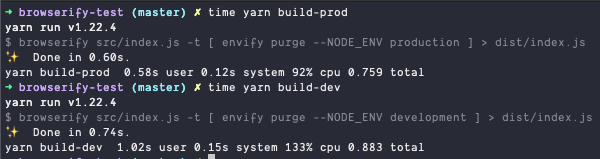
So for me at least, in the worst case scenario (where there's only one component and React is literally the majority of what Browserify is building), the development bundle adds an additional 24% to the build time (but this is only 0.14s). I imagine in a realistic app (where React is by far smaller than the application source code) that this would not even be noticeable.
Makes me wonder about the 2000ms vs 500ms difference mentioned above.
bvaughn
on 7 Nov 2020
Here are my results using this source file as entry point:
const {Component, createElement} = require('react');
const {render} = require('react-dom');

class App extends Component {
    render() {
        return createElement('div');
    }
}

render(new App(), document.getElementById('app'));
- First, by using the default
node_modules/react/index.jsandnode_modules/react-dom/index.js:
time npx browserify index.js -t > bundle.js

real    0m3,638s
user    0m4,171s
sys     0m0,489s
- Second, by using custom
node_modules/react/index.jsandnode_modules/react-dom/index.jsthat only export the production modules:
module.exports = require('./cjs/react.production.min.js');
module.exports = require('./cjs/react-dom.production.min.js');
time npx browserify index.js -t > bundle.js

real    0m2,090s
user    0m2,382s
sys     0m0,213s
In the first case, both production and development sources are included in the final bundle. In the second case, only the minified production one is included in the bundle.
For exhaustivity sake, here is the result when using custom node_modules/react/index.js and node_modules/react-dom/index.js that only export the development modules:
module.exports = require('./cjs/react.development.js');
module.exports = require('./cjs/react-dom.development.js');
We are back to the same magnitude than with both sources included:
time npx browserify index.js -t > bundle.js

real    0m3,554s
user    0m4,273s
sys     0m0,337s
Which means that most of the time spent at bundling comes from including the development source. It makes sense: it weights around 1MB versus 130KB for the production sources, so the impact of bundling the production sources is negligeable.
ericmorand
on 7 Nov 2020
In the first case, both production and development sources are included in the final bundle. In the second case, only the minified production one is included in the bundle.
I'm confused. Why are you including both production and development versions in your bundle?
Can you share an actual repro (that I can run myself) because I'm still not sure why you're seeing the differences you're reporting. It doesn't match what I saw when I tried it myself.
bvaughn
on 7 Nov 2020
I'm confused. Why are you including both production and development versions in your bundle?
I'm not. Not expicitly at least.
The entry point of react (for example) _is_ including both versions:
'use strict';

if (process.env.NODE_ENV === 'production') {
  module.exports = require('./cjs/react.production.min.js');
} else {
  module.exports = require('./cjs/react.development.js');
}
At run-time, one or the other will be used depending on the value of NODE_ENV variable - and it will probably won't be set so development flavor will be used. But both are included in the bundle. You have to use bundler plugins that detect dead code paths at bundling-time to get rid of them. Which you didn't do in your example: envify would only replace the environment variable with its value at bundle time, leading to the following code being bundled instead of the original:
'use strict';

if ('development' === 'production') {
  module.exports = require('./cjs/react.production.min.js');
} else {
  module.exports = require('./cjs/react.development.js');
}
Which leads to both of the versions being bundled, whatever the value of NODE_ENV.
ericmorand
on 8 Nov 2020
Gotcha. I misunderstood what you were saying to imply that both bundles were being used.
Anyway, again: can you share an actual repro that we can run ourselves?
bvaughn
on 8 Nov 2020
Here it is:
ericmorand
on 8 Nov 2020
I tried to run the builds from @ericmorand but only the first two scripts work. anyway, here are the results:
 ➜ time npx node reference.js
npx node reference.js  0.45s user 0.06s system 128% cpu 0.399 total

 ➜ time npx browserify src/index.js > bundle.js
npx browserify src/index.js > bundle.js  0.89s user 0.08s system 138% cpu 0.704 total
there is some added slowliness indeed, but it's a price worth paying for having the react sources to step trough while debugging 👍
 PupoSDC
on 10 Nov 2020
PupoSDC
on 10 Nov 2020
Related issues
 jmullo
·
3Comments
jmullo
·
3Comments
 jimfb
·
3Comments
jimfb
·
3Comments
 trusktr
·
3Comments
trusktr
·
3Comments
 bloodyowl
·
3Comments
bloodyowl
·
3Comments
 zpao
·
3Comments
zpao
·
3Comments
Most helpful comment
Here it is:
https://github.com/ericmorand/react-20177