React: DevTools: Add shortcut keys for standalone version
Suggested keys:
- ⌘1 - Switch to "Components" tab
- ⌘2 - Switch to "Profiler" tab
Note that these shortcut keys should only be implemented for the standalone DevTools since (1) the browser already uses these shortcut keys and (2) the "Component" and "Profiler" tabs are only part of DevTools in the standalone version anyway.
 bvaughn
All 10 comments
Hello @bvaughn, I want to get started with this issue, I am not sure which one is the "standalone DevTools".
I think https://github.com/facebook/react/tree/master/packages/react-devtools is what you mean, right?
 kerolloz
on 5 Mar 2020
kerolloz
on 5 Mar 2020
Yes, that's the one.
bvaughn
on 5 Mar 2020
This issue is all yours! 😄
I've added the "good first issue (taken)" label so that others will know not to start work on the issue. If you change your mind about the issue, no worries! Just let me know so that I can remove the label and free it up for someone else to claim.
Cheers!
bvaughn
on 5 Mar 2020
Thank you @bvaughn :smile:
for the past two hours, I have been trying to get started with building the package from source as mentioned.
I did yarn build-for-devtools but it throws the following error
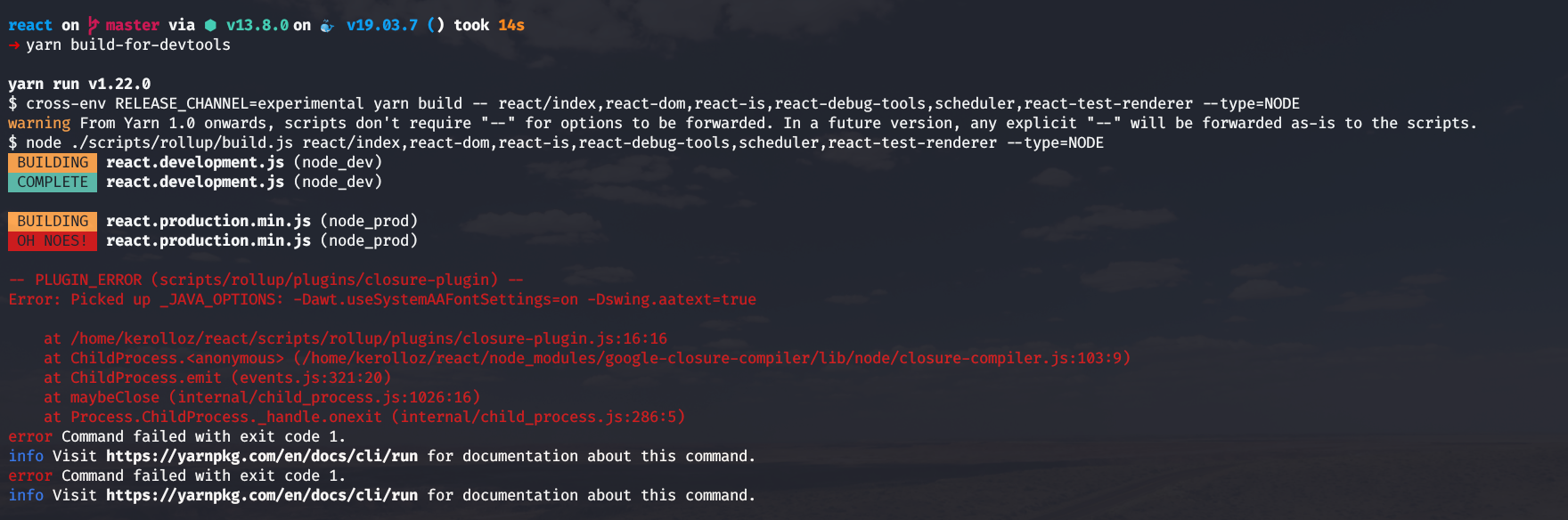
➜ yarn build-for-devtools

yarn run v1.22.0
$ cross-env RELEASE_CHANNEL=experimental yarn build -- react/index,react-dom,react-is,react-debug-tools,scheduler,react-test-renderer --type=NODE
warning From Yarn 1.0 onwards, scripts don't require "--" for options to be forwarded. In a future version, any explicit "--" will be forwarded as-is to the scripts.
$ node ./scripts/rollup/build.js react/index,react-dom,react-is,react-debug-tools,scheduler,react-test-renderer --type=NODE
 BUILDING  react.development.js (node_dev)
 COMPLETE  react.development.js (node_dev)

 BUILDING  react.production.min.js (node_prod)
 OH NOES!  react.production.min.js (node_prod)

-- PLUGIN_ERROR (scripts/rollup/plugins/closure-plugin) --
Error: Picked up _JAVA_OPTIONS: -Dawt.useSystemAAFontSettings=on -Dswing.aatext=true

    at /home/kerolloz/react/scripts/rollup/plugins/closure-plugin.js:16:16
    at ChildProcess.<anonymous> (/home/kerolloz/react/node_modules/google-closure-compiler/lib/node/closure-compiler.js:103:9)
    at ChildProcess.emit (events.js:321:20)
    at maybeClose (internal/child_process.js:1026:16)
    at Process.ChildProcess._handle.onexit (internal/child_process.js:286:5)
error Command failed with exit code 1.
info Visit https://yarnpkg.com/en/docs/cli/run for documentation about this command.
error Command failed with exit code 1.
info Visit https://yarnpkg.com/en/docs/cli/run for documentation about this command.
more info:
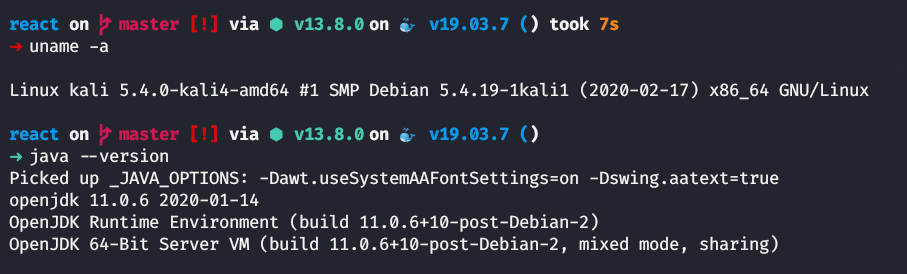
is this a problem with Java?
kerolloz
on 5 Mar 2020
You'll need Java to build React source, because of the Closure Compiler, but I suggest just using the download script instead.
./scripts/release/download-experimental-build.js
Should only take a few seconds.
bvaughn
on 5 Mar 2020
Thank you @bvaughn :smile:
I tried using the script but it depends on some packages that didn't exist despite running yarn in the main root directory.
back to the yarn build-for-devtools command
I followed the stack trace of the error and I managed to fix it.
https://github.com/facebook/react/blob/024a764310e64ef38963df16970364b9942a60cd/scripts/rollup/plugins/closure-plugin.js#L9-L20
I changed line 13 to be if (!exitCode) instead of if (!stdErr) and the issue was fixed and I managed to compile it.
kerolloz
on 5 Mar 2020
oh my bad
I should have run yarn first inside the _scripts/release_ dir. Sorry.
kerolloz
on 5 Mar 2020
for the sake of documenting the errors I face, when I try to run yarn start at _react/packages/react-devtools_ nothing happens. I tried running the electron executable at _node_modules_ dir and the following error was given
➜ ./node_modules/.bin/electron
[112941:0306/004904.433464:FATAL:setuid_sandbox_host.cc(157)] The SUID sandbox helper binary was found, but is not configured correctly. Rather than run without sandboxing I'm aborting now. You need to make sure that /home/kerolloz/react/node_modules/electron/dist/chrome-sandbox is owned by root and has mode 4755.
That is how I managed to solve it.
sudo sysctl kernel.unprivileged_userns_clone=1
Hi @bvaughn
I have been playing around the devtools packages codebase the whole night. I'm a little bit confused, I should implement the tab switching shortcut feature in the _rect-devtools_ dir. I don't really get to understand how the standalone devtools is connected to the frontend part. I see frontend bridge. what is the right approach to get started implementing the shortcuts feature only for the standalone version. According to Electron documentation, the keyboard shortcuts suggests 3 approaches, I see that the first approach might be a good choice (Local Shortcuts). but how can I manage the frontend part and switch tab from the electron part?
kerolloz
on 6 Mar 2020
@kerolloz In case the READMEs aren't clear, here's a high level overview of the DevTools packages:
packages/react-devtools-core: Lower level package used by the standalone shell, React Native, and some other dev tooling.packages/react-devtools-extensions: Browser-specific code for extensions.packages/react-devtools-inline: Embed friendly version of DevTools used by Code Sandbox.packages/react-devtools-shared: Code shared between all of the other packages.packages/react-devtools-shell: Test harness used for local development.packages/react-devtools: Small wrapper around core package that launches an Electron shell with the DevTools UI embedded into it.
Working on this feature will mean you'll want to test the following packages:
packages/react-devtools-core: This is the standalone UI with built-in tabs.packages/react-devtools-inline: This UI has built-in tabs too.packages/react-devtools-shell: This UI has tabs too and also allows you to test the change more quickly when you're initially working on it.
You will also likely end up needing to work with packages/react-devtools-shared since it's where most of the code lives. 🙂 Specifically, you may end up adding code to:
DevToolsto remember the last selected tab, set the right default, and wire up the shortcut keys. (Although please be sure to only do this ifshowTabBaris true.)TabBarsince this is where the Tabs live. (You may not need to do anything here though.)
I do not expected that you would end up needing to do anything in either packages/react-devtools or packages/react-devtools-extensions.
bvaughn
on 6 Mar 2020
Related issues
 framerate
·
3Comments
framerate
·
3Comments
 krave1986
·
3Comments
krave1986
·
3Comments
 h1orz
·
3Comments
h1orz
·
3Comments
 zpao
·
3Comments
zpao
·
3Comments
 UnbearableBear
·
3Comments
UnbearableBear
·
3Comments
Most helpful comment
@kerolloz In case the READMEs aren't clear, here's a high level overview of the DevTools packages:
packages/react-devtools-core: Lower level package used by the standalone shell, React Native, and some other dev tooling.packages/react-devtools-extensions: Browser-specific code for extensions.packages/react-devtools-inline: Embed friendly version of DevTools used by Code Sandbox.packages/react-devtools-shared: Code shared between all of the other packages.packages/react-devtools-shell: Test harness used for local development.packages/react-devtools: Small wrapper around core package that launches an Electron shell with the DevTools UI embedded into it.Working on this feature will mean you'll want to test the following packages:
packages/react-devtools-core: This is the standalone UI with built-in tabs.packages/react-devtools-inline: This UI has built-in tabs too.packages/react-devtools-shell: This UI has tabs too and also allows you to test the change more quickly when you're initially working on it.You will also likely end up needing to work with
packages/react-devtools-sharedsince it's where most of the code lives. 🙂 Specifically, you may end up adding code to:DevToolsto remember the last selected tab, set the right default, and wire up the shortcut keys. (Although please be sure to only do this ifshowTabBaris true.)TabBarsince this is where the Tabs live. (You may not need to do anything here though.)I do not expected that you would end up needing to do anything in either
packages/react-devtoolsorpackages/react-devtools-extensions.