React: Component does not re-render state variables on update unless placed in span
Do you want to request a feature or report a bug?
bug
What is the current behavior?
- There is an interval timer that updates seconds/minutes/currentCount.
- Case 1 only updates seconds and currentCount.
- Case 1 does not update minutes correctly.
- Case 2 does not update minutes and seconds value on the UI, currentCount is being updated (Browser/Chrome)
- React seems to only update the component if the output state value is wrapped in a
<span>tag.
Case 1
<div><span>{this.state.minutes}/<span>{this.state.seconds}</span></span>x<span>{this.state.currentCount}</span></div>
Case 2
<div><span>{this.state.minutes}/{this.state.seconds}</span>x<span>{this.state.currentCount}</span></div>
What is the expected behavior?
State updates should cause a re-render for the component.
Which versions of React, and which browser / OS are affected by this issue? Did this work in previous versions of React?
Chrome/
React: ^15.5.4
 bhagyas
All 15 comments
Please provide a reproducing case.
 gaearon
on 22 Nov 2018
gaearon
on 22 Nov 2018
@gaearon Please find the code for a simple timer below. Notice the <span> tags in the render function to make it work.
class Clock extends Component<{
validityEnds: number;
}, {
minutes: number;
seconds: number;
currentCount: number;
}> {
private intervalId?: number;
constructor(props){
super(props);
this.state = {
minutes: 0,
seconds: 0,
currentCount: 10
}
}
timer() {
// let remainingTime = moment.unix(this.props.validityEnds);
let remainingTime = moment.unix(this.props.validityEnds);
let minutes = remainingTime.diff(moment.now(), "minutes");
let seconds = remainingTime.diff(moment.now(), "seconds");
this.setState({
minutes: minutes,
seconds: seconds % 60,
currentCount: this.state.currentCount - 1
})
if(this.state.minutes < 1 && this.state.seconds < 1) {
clearInterval(this.intervalId);
//wait for a few seconds more.
setTimeout(() => {
location.reload();
}, 2000);
}
}
componentDidMount() {
this.intervalId = setInterval(this.timer.bind(this), 1000);
}
componentWillUnmount(){
clearInterval(this.intervalId);
}
render() {
let minutes = this.state.minutes;
let seconds = this.state.seconds;
if(minutes == 0 && seconds == 0){
return null;
}
return(
<span>{minutes} <span> minutes</span> <span>{seconds} <span> seconds</span></span></span>
);
}
}
Please ignore the momentJS related code, the validityEnds property is a number for a unix timestamp (the code is in Typescript)
bhagyas
on 22 Nov 2018
Can you please put this code on CodeSandbox or JSFiddle?
Most reports like this end up being user mistakes. I'm asking you to demonstrate that the problem is with React, and a runnable demo is the best way to do it.
gaearon
on 22 Nov 2018
Hi @gaearon,
Please find the JSFiddle here: http://jsfiddle.net/bhagyas/qp78yfut/1/
bhagyas
on 22 Nov 2018
I have set a error property in the component to toggle the settings, and as you can see when error is set to true, the div fails to update properly.
Sometimes, it loses the rest of the render, leaving only the _minutes_ counter visible.
Also note that the minutes counter is in synchronisation with the non error version.
Update: The error was not observed on iOS 12 Safari. Error confimed on Chrome (macOS) latest.
bhagyas
on 22 Nov 2018
@gaearon Issue was reproduced only on Chrome (macOS).
Tested on macOS Safari (works), macOS Opera (works), macOS Firefox (works)
bhagyas
on 23 Nov 2018
I couldn't reproduce this on chrome/macos. could you try in an incognito window (without extensions)?
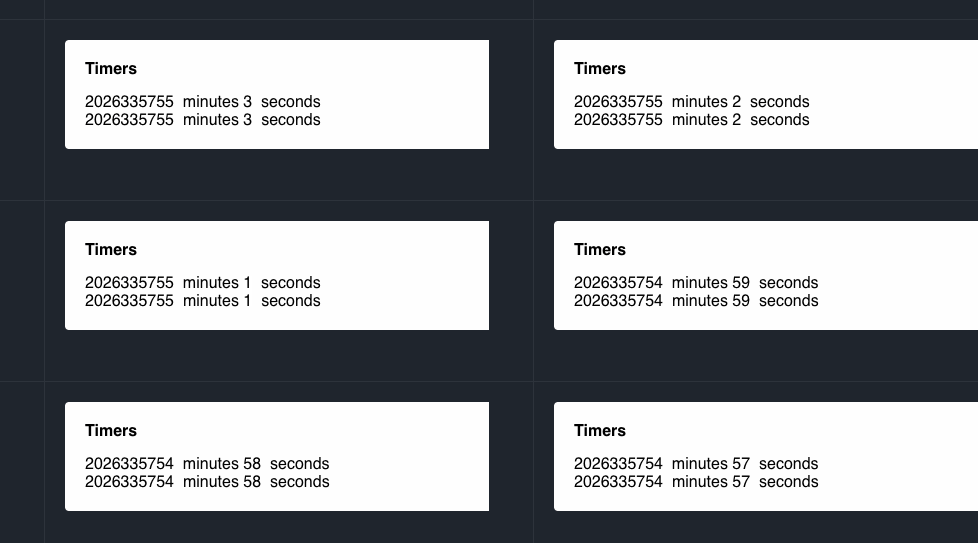
this gif is the expected behaviour, yes?
 threepointone
on 23 Nov 2018
threepointone
on 23 Nov 2018
I also couldn't reproduce. It's likely an extension indeed. Maybe one of them is messing with the page (e.g. I remember Skype extension breaking anything that looked like phone number). Try disabling them.
gaearon
on 23 Nov 2018
@threepointone and @gaearon Thank you, I was not able to reproduce the error on incognito mode on Chrome macOS. So it's probably an extension that made this happen.
Interesting error nonetheless and thank you very much for your time.
bhagyas
on 26 Nov 2018
@gaearon This issue was reproduced by having redux-devtools on Chrome running. I will be creating an issue over there.
bhagyas
on 3 Dec 2018
bhagyas
on 3 Dec 2018
Cannot reproduce with it. I don't see how Redux DevTools extension could affect your react component if there's no redux state enhanced with the extension. You can enable Redux DevTools in incognito and try if it affects there as well.
 zalmoxisus
on 3 Dec 2018
zalmoxisus
on 3 Dec 2018
@bhagyas are you sure you don’t have a Skype/some other caller extension installed?
threepointone
on 3 Dec 2018
Also, couldn't reproduce on Chrome/Windows, neither on Firefox/Windows.
 NaumanMoazzam
on 4 Dec 2018
NaumanMoazzam
on 4 Dec 2018
Related issues
 kocokolo
·
3Comments
kocokolo
·
3Comments
 tleunen
·
3Comments
tleunen
·
3Comments
 jvorcak
·
3Comments
jvorcak
·
3Comments
 varghesep
·
3Comments
varghesep
·
3Comments
 zpao
·
3Comments
zpao
·
3Comments
Most helpful comment
I also couldn't reproduce. It's likely an extension indeed. Maybe one of them is messing with the page (e.g. I remember Skype extension breaking anything that looked like phone number). Try disabling them.